
1. Introduzione
This manual provides detailed instructions for the installation, operation, and maintenance of your ESX Vision VMX900DAB Universal 1-DIN Multimedia Receiver. Please read this manual thoroughly before using the device to ensure proper functionality and to maximize your user experience.
The ESX Vision VMX900DAB is a versatile 1-DIN multimedia receiver featuring a 9-inch multi-angle touchscreen display. It integrates advanced connectivity options including wireless Apple CarPlay and Android Auto, DAB+ digital radio, Bluetooth hands-free calling and audio streaming, and a comprehensive media player. The unit is designed for universal compatibility and offers a removable monitor for enhanced security.
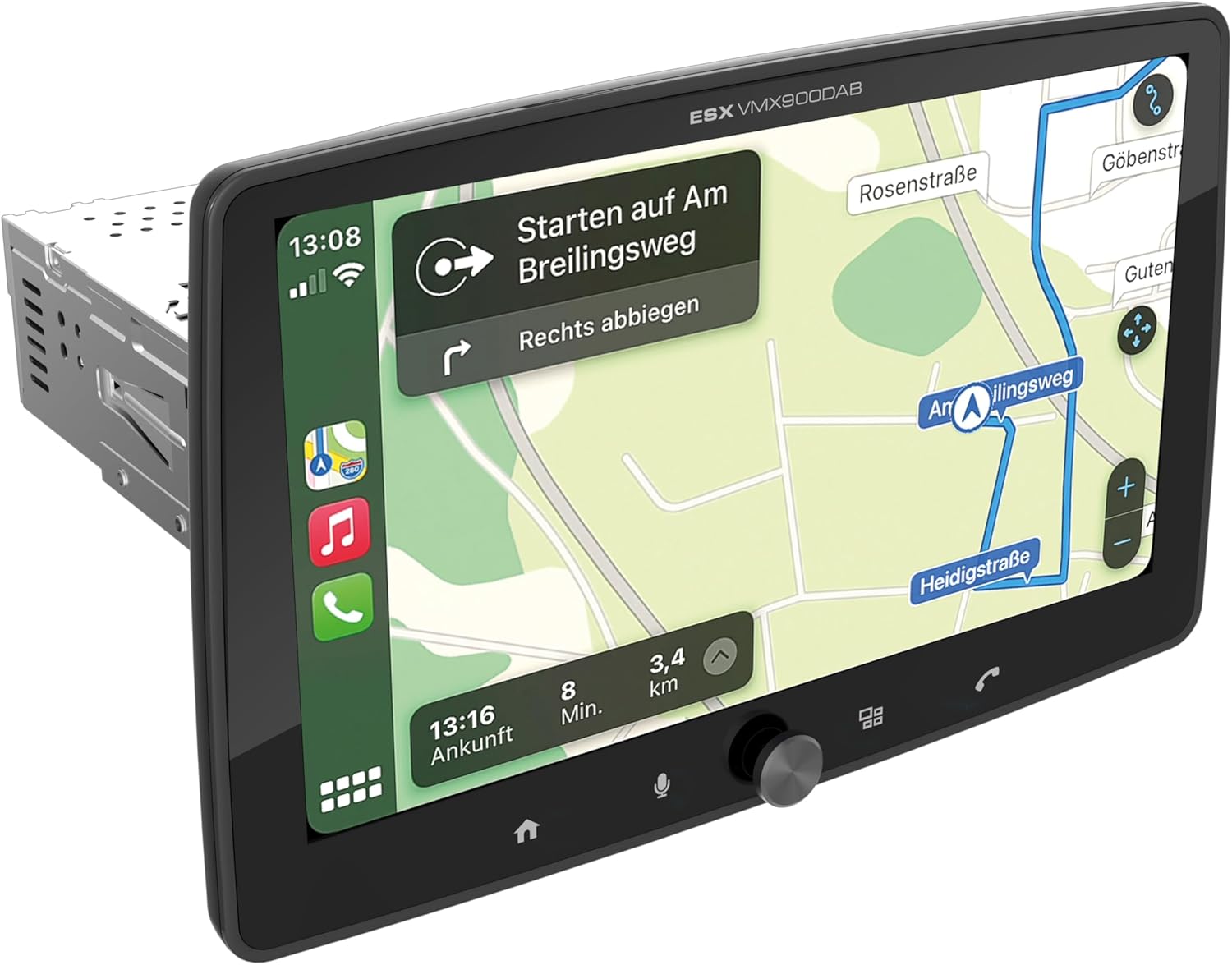
Figure 1.1: ESX Vision VMX900DAB with navigation interface.
2. Configurazione e installazione
2.1 Contenuto della confezione
Prima dell'installazione, verificare che tutti i componenti siano presenti:
- ESX Vision VMX900DAB Main Unit
- Detachable 9-inch Touchscreen Monitor
- Cablaggio di alimentazione/altoparlanti
- Microfono esterno
- Antenna GPS
- Antenna DAB+
- Cavi di prolunga USB
- Hardware di montaggio (staffe, viti)
- Manuale dell'utente (questo documento)

Figura 2.1: Accessori e componenti inclusi.
2.2 Montaggio dell'unità principale
- Prima di iniziare l'installazione, assicurarsi che la batteria del veicolo sia scollegata.
- Insert the 1-DIN main unit into the vehicle's dashboard opening.
- Secure the main unit using the provided mounting brackets and screws.
2.3 Collegamento del monitor
The 9-inch monitor is detachable and connects to the main unit via a click system.
- Align the monitor's connector with the slot on the main unit.
- Gently push the monitor until it clicks securely into place.
- To remove, press the release button (if applicable) and pull the monitor away.

Figure 2.2: Detachable monitor with click system.
2.4 Collegamenti di cablaggio
Per i collegamenti specifici, fare riferimento allo schema elettrico fornito con l'unità. I collegamenti principali includono:
- Potenza e altoparlanti: Connect the main wiring harness to the vehicle's power supply and speakers.
- Microfono esterno: Collega il microfono esterno all'ingresso dedicato per una qualità ottimale delle chiamate in vivavoce.
- Antenna GPS: Collegare l'antenna GPS e montarla in una posizione con una vista libera view del cielo per un posizionamento accurato.
- Antenna DAB+: Connect the DAB+ antenna for digital radio reception.
- Porte USB: Two USB-A ports are available. One for media playback and charging (1.5A), and another specifically for Apple CarPlay/Android Auto and charging (1.5A).
- Pre-RCAampUscite unificate: Six 4V RCA outputs (FL/FR/RL/RR/SUB1/SUB2) are available for connecting external amplificatori.
- AUX RCA Inputs: Stereo audio and video inputs (L/R/VIDEO) for external audio/video sources.
- Camera RCA Inputs: Dedicated inputs for front and rear cameras.
- Controllo del volante: Analog steering wheel remote control input (learnable) for integration with vehicle controls.
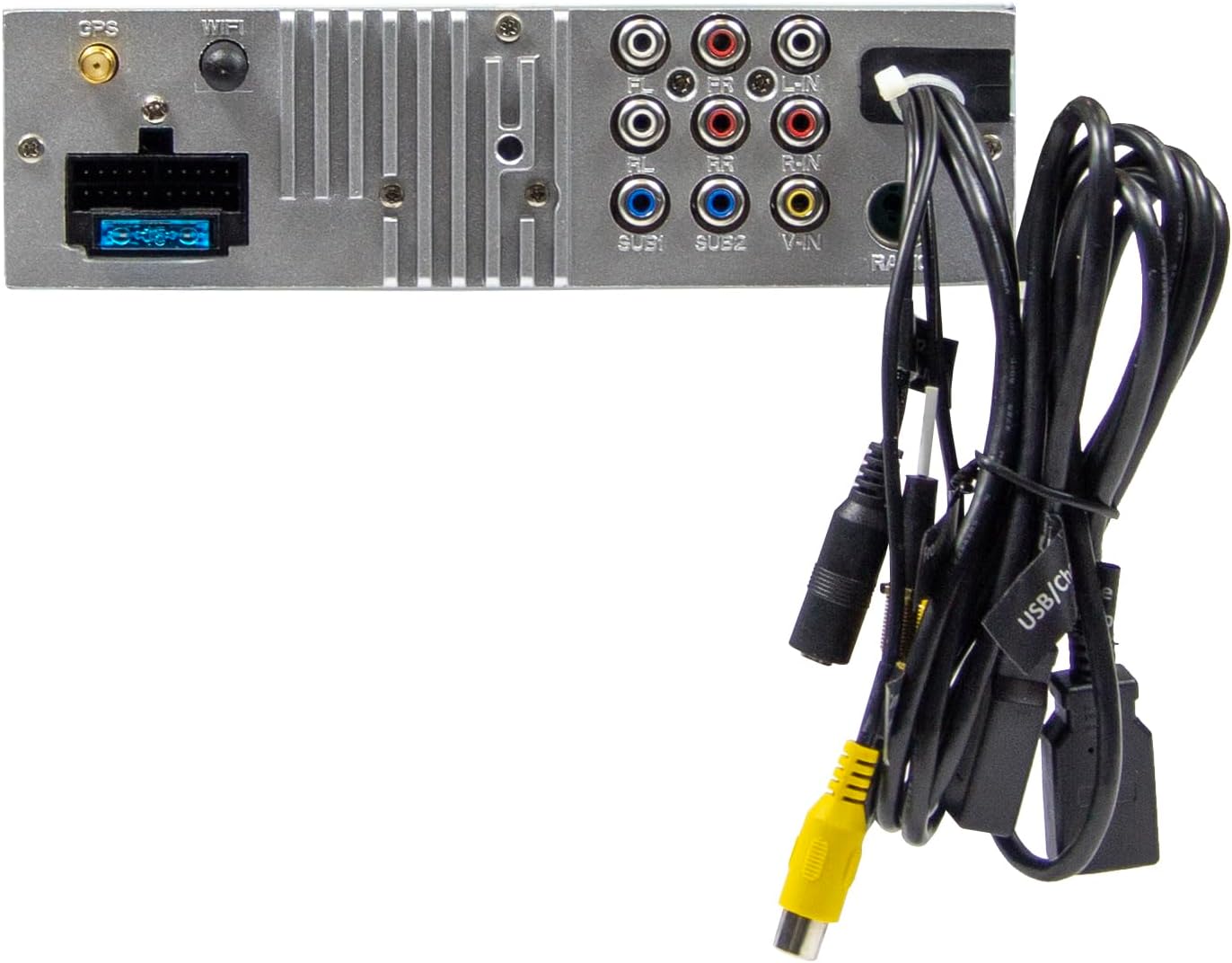
Figura 2.3: Collegamenti posteriori dell'unità principale.
3. Istruzioni per l'uso
3.1 Accensione/spegnimento e controlli di base
- Accensione: L'unità si accenderà automaticamente all'accensione del veicolo.
- Spegni: The unit will power off automatically with the vehicle's ignition.
- Controllo del volume: Use the large rotary knob on the front panel to adjust the volume.
- Tasti funzione: Four function keys on the front panel provide quick access to common features.
- Schermo tattile: All primary functions are controlled via the 9-inch touchscreen.
3.2 Schermata iniziale e navigazione
The home screen provides access to all main functions and applications.

Figure 3.1: Main menu/home screen.
3.3 Apple CarPlay e Android Auto
The VMX900DAB supports both wireless and wired (via USB) Apple CarPlay and Android Auto.
- Connessione wireless: Enable Bluetooth and Wi-Fi on your smartphone and follow the on-screen prompts to connect.
- Connessione cablata: Connect your smartphone to the dedicated USB-A port using a compatible USB cable.
- Once connected, your smartphone's compatible apps (navigation, music, calls, messages) will be mirrored on the receiver's display.

Figura 3.2: Interfaccia Apple CarPlay.
3.4 Radio Functions (DAB+/FM/AM)
- Radio DAB+: Select the DAB+ icon from the home screen. The unit will scan for available digital radio stations.
- Radio FM/AM: Select the Radio icon. Use the touchscreen to tune to stations, save presets, and access RDS functions.
3.5 Bluetooth Hands-Free and Audio Streaming
- Abbinamento: Enable Bluetooth on your smartphone and search for the VMX900DAB. Select the device and confirm pairing.
- Chiamate in vivavoce: Once paired, you can make and receive calls directly through the receiver. The external microphone ensures clear voice transmission. Your phonebook can be synchronized.
- Streaming audio: Stream music wirelessly from your smartphone to the receiver.
3.6 Riproduzione multimediale
The unit supports various audio, video, and photo formats via USB.
- Supportato File Formati: AVI, FLV, MOV, MKV, WMV, WMA, MP3, FLAC, JPEG, PNG, BMP.
- Insert a USB drive into the media USB-A port. Select the USB icon from the home screen to browse and play media files.
3.7 Monitor Adjustment
The monitor can be tilted and adjusted in height to achieve the optimal viewing angle and prevent obstruction of vehicle controls.

Figure 3.3: Adjustable monitor mechanism.
MAI personalizzazione
- Startup Logo: Customize the startup logo in the settings menu.
- RGB Key Illumination: Select from various RGB colors and animation effects for the key illumination.
- Menù Lingue: Supported languages include DEU, ENG, SWE, ITA.
4. Manutenzione
4.1 Pulizia dell'unità
- Use a soft, dry cloth to wipe the display and unit surfaces.
- For stubborn marks on the screen, use a screen cleaner specifically designed for electronic displays and a microfiber cloth.
- Do not use abrasive cleaners, solvents, or harsh chemicals, as these can damage the finish or screen.
4.2 Cura generale
- Evitare di esporre l'unità a temperature estreme, alla luce solare diretta per periodi prolungati o a elevata umidità.
- Garantire un'adeguata ventilazione intorno all'unità per evitare il surriscaldamento.
- When removing the monitor, handle it carefully to avoid damage to the connectors.
5. Risoluzione Dei Problemi
If you encounter issues with your VMX900DAB, refer to the following common problems and solutions:
| Problema | Possibile causa | Soluzione |
|---|---|---|
| Nessun potere | Cablaggio errato; Fusibile bruciato; Accensione del veicolo spenta | Controllare i collegamenti di alimentazione; sostituire il fusibile; accendere l'accensione del veicolo |
| Nessun suono | Volume troppo basso; Disattivazione audio attivata; Problema con il cablaggio degli altoparlanti | Aumentare il volume; Disattivare l'audio; Controllare i collegamenti degli altoparlanti |
| Il Bluetooth non si connette | Bluetooth disattivato sul telefono/unità; processo di associazione non corretto | Ensure Bluetooth is on; Re-attempt pairing process |
| Apple CarPlay/Android Auto not starting | Incorrect USB port; Faulty USB cable; Phone not compatible/configured | Use the dedicated USB port; Try a different USB cable; Check phone settings for CarPlay/Android Auto |
| Scarsa ricezione radio | Antenna not connected; Poor antenna placement; Weak signal area | Check antenna connection; Adjust antenna position; Try in a different location |
| Il monitor non visualizza | Monitor not securely attached; Connector issue | Ensure monitor is fully clicked into place; Check for debris in connector |
If the problem persists after attempting these solutions, please contact ESX customer support or your authorized dealer.
6. Specifiche
| Caratteristica | Specificazione |
|---|---|
| Numero di modello | VMX900DAB |
| Display | 9-inch Multi-angle Touchscreen |
| Fattore di forma | 1-DIN Universal |
| Connettività | USB, Bluetooth, ausiliario |
| Caratteristiche speciali | Wireless Apple CarPlay, Wireless Android Auto, Detachable Monitor with Click System |
| Sintonizzatore radio | DAB+ (Digital Radio), FM/AM with RDS |
| Bluetooth | Hands-free function, Audio Streaming |
| Porte USB | 2x USB-A (1.5A charging, one dedicated for CarPlay/Android Auto) |
| Max Music Power | 4 x 80 W |
| Pre-ampUscite unificate | 6x RCA (4V) (FL/FR/RL/RR/SUB1/SUB2) |
| Ingressi AUX | RCA (L/R/VIDEO) |
| Ingressi della telecamera | RCA (Front/Rear) |
| Supportato File Formati | AVI, FLV, MOV, MKV, WMV, WMA, MP3, FLAC, JPEG, PNG, BMP |
| Microfono esterno | Incluso |
| Controllo del volante | Analog (learnable) |
| Ricevitore GPS | Incluso |
| Lingue del menu | DEU, ENG, SWE, ITA |
| Potenza di uscita totale | 320 Watt |
| Configurazione del canale audio surround | 4.2 |
| Modalità di uscita audio | Stereo |
7. Garanzia e supporto
For warranty information, please refer to the documentation provided at the time of purchase or contact your authorized ESX dealer. Warranty terms and conditions may vary by region and retailer.
For technical support or further assistance, please contact ESX customer service or visit the official ESX websito per le risorse di supporto.