
KTC A27Q7
KTC 27-inch MegPad A27Q7 Portable Smart Touchscreen Monitor User Manual
Comprehensive guide for setup, operation, and maintenance of your KTC MegPad A27Q7.
1. Introduzione
The KTC 27-inch MegPad A27Q7 is a versatile portable touchscreen monitor designed for a wide range of uses, from entertainment to productivity. Featuring an EDLA-certified Android 14 operating system, a powerful Octa-core Qualcomm SM6115 chip, 8GB RAM, and 128GB internal storage, it offers a smooth and responsive user experience. Its full swivel rotation, long-lasting battery, and built-in camera make it an adaptable device for various environments.

Figure 1: The KTC MegPad A27Q7 in a home setting, showcasing its portability and sleek design.
2. Contenuto della confezione
Upon unboxing your KTC MegPad A27Q7, ensure all components are present and undamaged. The package typically includes:
- KTC 27-inch Smart Mobile Screen (MegPad A27Q7)
- Base with silent universal wheels
- Telescopic rod/stand assembly
- Telecomando
- 2 batterie AAA (per il telecomando)
- Adattatore di alimentazione e cavo
- Cacciavite con testa a croce
- Mounting screws (for base assembly)
- Guida per l'utente (questo manuale)

Figure 2: All included components of the KTC MegPad A27Q7, neatly arranged for inspection.
3. Installazione e assemblaggio
Follow these steps to assemble your KTC MegPad A27Q7. It is recommended to perform assembly on a soft, flat surface to prevent scratches.
- Preparare la base: Place the Styrofoam packaging flat on the floor. Position the circular base of the stand onto the designated slot in the Styrofoam.
- Attach the Telescopic Rod: Carefully align the bottom of the telescopic rod with the connection point on the base. Push down firmly until it clicks into place, ensuring a secure connection.
- Proteggere la base: Using the provided Phillips head screwdriver and screws, fasten the base to the telescopic rod from underneath. Ensure all screws are tightened securely.
- Montare lo schermo: Slide the screen onto the top of the telescopic rod. Pay attention to the arrows or guides on the screen's back plate and the rod to ensure correct orientation. The screen should slide down and lock into place.
- Collegare il cavo di alimentazione: Locate the USB-C port on the back of the screen. Connect the power cable to this port.
- Installare le batterie remote: Open the battery compartment on the back of the remote control and insert the two AAA batteries, observing polarity.
- Accensione iniziale: Plug the power adapter into a wall outlet. Press and hold the power button on the back of the screen for 3 seconds to power on the device.
- Coppia di telecomandi: Follow the on-screen instructions to pair your remote control with the MegPad. This usually involves pressing specific buttons on the remote simultaneously until an indicator light blinks.
Video 1: A detailed guide on unboxing and assembling the KTC MegPad A27Q7, demonstrating each step for a smooth setup process.

Figura 3: Posteriore view of the MegPad screen, highlighting the mounting interface and connectivity options.
4. Istruzioni per l'uso
4.1 Accensione/spegnimento
To power on, press and hold the power button on the back of the screen for 3 seconds. To power off, press and hold the power button again, then select "Power Off" from the on-screen menu.
4.2 Touchscreen and Remote Control
The MegPad features a responsive 10-point Incell touchscreen for direct interaction. Alternatively, use the included remote control for navigation, volume adjustment, and accessing various functions. The remote also includes a "flying mouse" feature for precise cursor control.
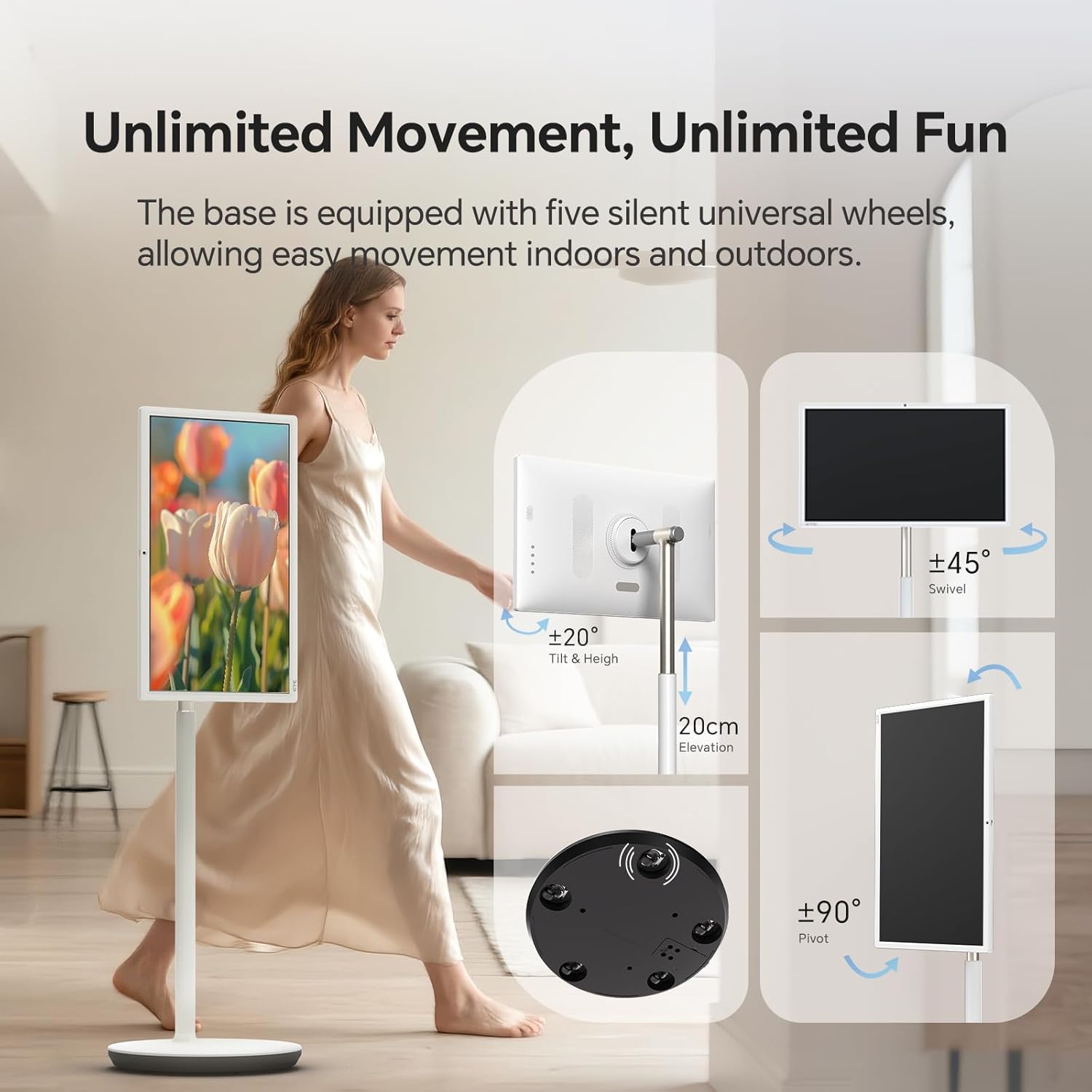
Figure 4: User interacting with the 10-point touchscreen for intuitive control.

Figure 5: The remote control provides convenient operation from a distance.
4.3 Sistema operativo Android e applicazioni
The MegPad runs on EDLA-certified Android 14 OS, powered by a Qualcomm SM6115 Octa-core CPU with 8GB RAM and 128GB storage. This allows you to download and install a wide array of applications directly from the Google Play Store, including streaming services, social media, and productivity tools.

Figure 6: The Android 14 OS interface with access to Google Play Store applications.
4.4 Regolazione dello schermo
The screen offers full adjustability, allowing you to rotate, tilt, and lift it to achieve the optimal viewing angle. The base is equipped with five silent universal wheels for easy movement across different locations.

Figure 7: Multi-angle adjustment features for customized viewing.
4.5 Connectivity and Screen Mirroring
The MegPad supports Wifi5 wireless connection for internet access and content sharing. It also features a Type-C interface for easy device pairing and full-function output. Screen mirroring is supported via Apple AirPlay, Miracast, and Android DLNA, allowing you to cast content from your mobile phone, tablet, or laptop.

Figure 8: Wireless screen casting in action, displaying content from a phone to the MegPad.
4.6 Built-in Camera and Audio
An integrated camera and 4x5W speakers enable clear video calls and business meetings. The monitor also incorporates low blue light technology to reduce eye fatigue during extended use.

Figure 9: The built-in camera facilitates video conferencing and online interactions.
4.7 Battery Life and Mobility
The 9500mAh built-in battery provides 4-6 hours of continuous use, offering flexibility to enjoy content without a constant power connection. The rolling design with silent universal wheels allows for easy movement between rooms or even outdoors.

Figure 10: Enjoy extended usage with the long-lasting battery, perfect for various settings.
5. Manutenzione
To ensure the longevity and optimal performance of your KTC MegPad A27Q7, follow these maintenance guidelines:
- Pulizia dello schermo: Utilizzare un panno morbido e privo di lanugine, specificamente progettato per l'elettronica. Per le macchie ostinate, strofinare leggermenteampPulisci il panno con acqua o una soluzione detergente adatta allo schermo. Evita prodotti chimici aggressivi o materiali abrasivi.
- Pulizia del supporto e della base: Wipe down the stand and base with a soft, damp cloth. Ensure no liquid enters any openings.
- Cura della batteria: To maximize battery life, avoid fully discharging the battery frequently. Charge the device when the battery level is low. If storing the device for an extended period, charge it to about 50-60% and store in a cool, dry place.
- Magazzinaggio: When not in use, store the MegPad in a clean, dry environment away from direct sunlight and extreme temperatures.
6. Risoluzione Dei Problemi
If you encounter issues with your KTC MegPad A27Q7, refer to the following common troubleshooting steps:
- Il dispositivo non si accende:
- Assicurarsi che l'adattatore di alimentazione sia collegato saldamente sia al dispositivo sia a una presa di corrente funzionante.
- Verificare che la presa di corrente funzioni collegandovi un altro dispositivo.
- Charge the device for at least 30 minutes before attempting to power it on again.
- If the device is stuck in a boot loop (repeatedly showing the logo and turning off), try performing a hard reset by pressing and holding the power and volume buttons simultaneously for several seconds until the device restarts.
- Touchscreen non reattivo:
- Riavviare il dispositivo.
- Assicurarsi che lo schermo sia pulito e privo di detriti o umidità.
- Il telecomando non funziona:
- Controllare e sostituire le batterie AAA nel telecomando.
- Assicurarsi che non vi siano ostacoli tra il telecomando e il dispositivo.
- Re-pair the remote control with the MegPad by following the on-screen instructions during initial setup or in the device settings.
- Nessuna connessione Wi-Fi:
- Assicurati che il router Wi-Fi sia acceso e funzioni correttamente.
- Controlla se altri dispositivi riescono a connettersi alla stessa rete Wi-Fi.
- Restart the MegPad and your Wi-Fi router.
- Go to "Settings" > "Network & Internet" and ensure Wi-Fi is enabled and you are connected to the correct network.
Video 2: Demonstration of a boot loop issue, where the device repeatedly shows the logo and turns off, along with a user's attempt at troubleshooting.
7. Specifiche
| Caratteristica | Dettaglio |
|---|---|
| Marca | KTC |
| Nome del modello | A27Q7 |
| Dimensioni dello schermo | 27 pollici |
| Risoluzione | 1920x1080 FHD 1080p |
| Tipo di visualizzazione | LCD |
| Frequenza di aggiornamento | 60 Hz |
| Rapporto di contrasto | 4000:1 |
| Sistema operativo | EDLA-Certified Android 14 |
| processore | Octa-core Qualcomm SM6115 |
| Memoria RAM | 8 GB |
| Memoria interna | 128 GB |
| Capacità della batteria | 9500mAh (4-6 hours use) |
| Connettività | Wifi5, Bluetooth, USB Type-C |
| Altoparlanti | 4x5W Built-in Speakers |
| Telecamera | Incorporato |
| Caratteristiche speciali | 10-point Touch, Low Blue Light, Full Swivel Rotation, Universal Wheels |
| Peso dell'articolo | 40.32 libbre |
| Dimensioni dell'articolo (P x L x A) | 38"P x 9"L x 20"A |
8. Garanzia e supporto
The KTC MegPad A27Q7 comes with a Garanzia del produttore di 1 anno. For any issues during installation or use, please contact KTC-Official through the Amazon platform for consultation. Our professional engineers are available to provide solutions as soon as possible.
For further assistance, please refer to the contact information provided in your purchase documentation or visit the official KTC websito.
Ask a question about this manual
Ask about setup, troubleshooting, compatibility, parts, safety, or missing instructions. Manuals+ will review the question and use this page’s manual context to help answer it.