
Veout V1Pro
Manuale di istruzioni del monitor da gioco portatile Veout V1 Pro da 16 pollici 2.5K 144Hz
Model: V1Pro | Brand: Veout
1. Introduzione
This manual provides detailed instructions for the setup, operation, and maintenance of your Veout V1 Pro 16-inch 2.5K 144Hz Portable Gaming Monitor. Please read this manual thoroughly before using the product to ensure optimal performance and longevity. Keep this manual for future reference.

Image: The Veout V1 Pro monitor, showcasing its high-resolution and refresh rate capabilities.
2. Caratteristiche principali
- Schermo Ultra HD 2.5K: 2560×1600 resolution with 188 PPI and a 16:10 aspect ratio for enhanced content efficiency. Features 8-bit color depth (16.7 million colors) and ΔE < 3 color accuracy.
- 144Hz High Refresh Rate + FreeSync: IPS panel with 100% sRGB gamut, 144Hz refresh rate, and AMD FreeSync technology for smooth visuals. 1ms fast response time, low-blue-light, and flicker-free technology for reduced eye fatigue. (Note: Max 120Hz via HDMI, 144Hz via USB-C).
- Ultra-Slim Aluminum Design: Weighs 1.58lbs and is 0.36 inches thick. Features a built-in aluminum stand adjustable from 0° to 75° and supports portrait mode.
- Compatibilità universale: Dual USB-C ports and Mini HDMI for plug-and-play connection to laptops, smartphones, PS4/5, Xbox, and Switch 1/2. Built-in speakers included.
- Global Certifications: Passed FCC, CE, RoHS, UKCA, KC, and PSE safety certifications. Holds original design patents and the MUSE Design Gold Award.
3. Cosa c'è nella scatola
Verificare che tutti gli articoli siano presenti nel pacco:
- 1 monitor portatile da 16''
- 1 cavo da USB-C a USB-A
- 1 cavo da USB-C a USB-C
- 1 x cavo da mini-HDMI a HDMI
- 1 adattatore di alimentazione da 15 W
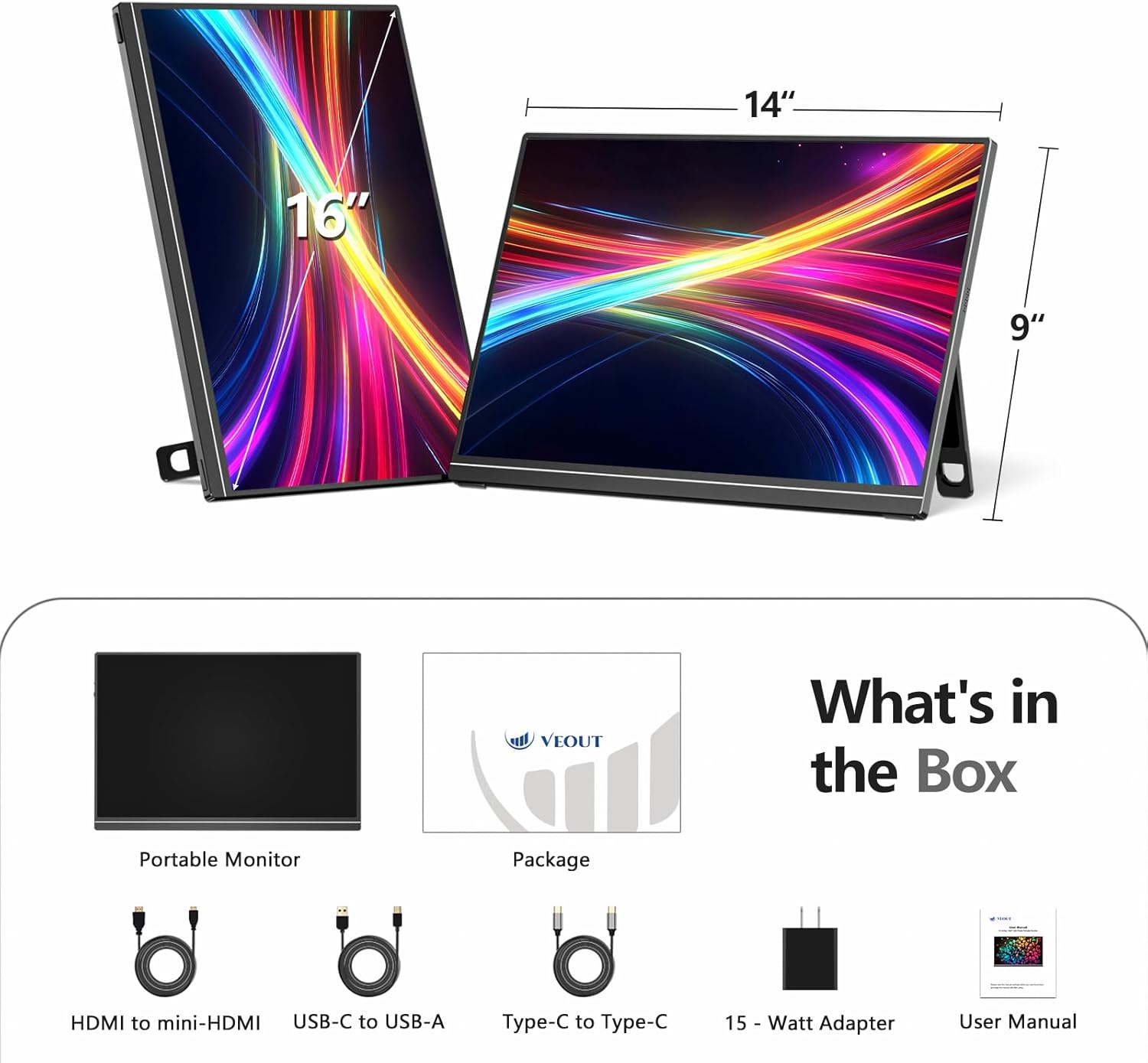
Image: All included accessories and the portable monitor.
4. Prodotto finitoview
4.1 Porte e controlli
The Veout V1 Pro monitor features multiple ports for versatile connectivity and intuitive controls for easy adjustment.
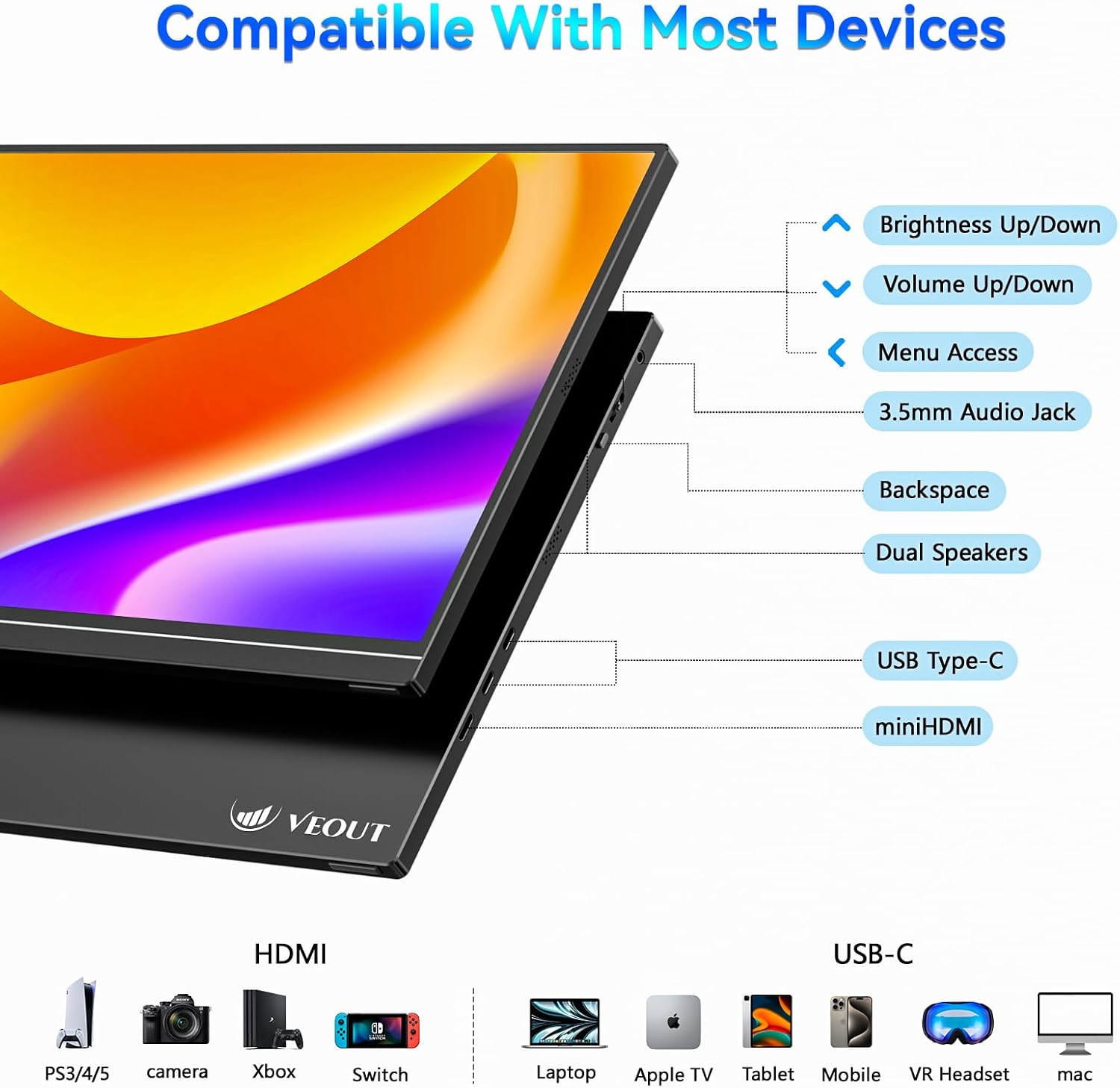
Immagine: dettagliata view delle porte e dei pulsanti di controllo del monitor.
- Luminosità su/giù: Regola la luminosità dello schermo.
- Volume su/giù: Controls the volume of the built-in speakers.
- Accesso al menu: Navigates the on-screen display (OSD) menu.
- Jack audio da 3.5 mm: Per collegare cuffie o altoparlanti esterni.
- Indietro: Used for navigation within the OSD menu.
- Doppi altoparlanti: Uscita audio integrata.
- USB di tipo C (x2): Supports video signal, power delivery, and data transfer.
- Mini HDMI: For video input only.
4.2 Caratteristiche fisiche
The monitor is designed for portability and flexibility, featuring a built-in stand and support for multiple orientations.

Image: The monitor's adjustable stand and ability to rotate for landscape or portrait viewing.
- Supporto regolabile: The integrated aluminum stand allows for angle adjustments from 0° to 75°.
- Modalità ritratto: The monitor can be rotated 90° to function in portrait orientation, ideal for coding or document viewing.
- Corpo in alluminio: Costruzione durevole e leggera.
5. Configurazione e connessione
The Veout V1 Pro monitor offers flexible connectivity options for various devices. Ensure your device supports the necessary video output standards.
5.1 Connecting to Laptops
For laptops with a full-featured USB-C port (supporting video signal and power delivery), a single USB-C to USB-C cable is sufficient for both power and display. For other laptops, use the Mini HDMI for video and a USB-C to USB-A cable with the power adapter for power.

Image: Connecting the monitor to a laptop using a single USB-C cable.
5.2 Connecting to Smartphones and Tablets
For smartphones and tablets with a full-featured USB-C port (supporting DP Alt Mode via USB-C 3.0+), a single USB-C to USB-C cable can provide display and power. Some phones may require an external power adapter. Avoid phones with USB-C 2.0-only ports.

Image: Phone compatibility and connection requirements for the portable monitor.
5.3 Connessione alle console di gioco
Connect gaming consoles like PS4/5, Xbox, and Nintendo Switch (docked mode) using the Mini HDMI to HDMI cable for video. Power may need to be supplied via a USB-C cable and the 15W power adapter.
5.4 Controllo di compatibilità
Before connecting, ensure your device has either a full-featured USB-C port (supporting video signal and power delivery) or a standard HDMI port for video transmission.

Image: Quick compatibility check for USB-C and HDMI ports.
6. Istruzioni per l'uso
6.1 Impostazioni di visualizzazione
Use the control buttons on the monitor to access the On-Screen Display (OSD) menu. Here you can adjust settings such as brightness, contrast, color temperature, and input source. Refer to the 'Product Overview' section for button locations.
6.2 Orientation Modes
The monitor supports both landscape and portrait orientations. To switch modes, physically rotate the monitor and adjust the display settings on your connected device (e.g., laptop or smartphone) accordingly.
6.3 Caratteristiche di gioco
Experience smooth gaming with the 144Hz refresh rate and AMD FreeSync technology, which helps eliminate screen tearing and stuttering. Ensure your connected device's graphics settings are configured to utilize these features.

Image: Visual comparison of 144Hz FreeSync versus 60Hz display during gaming.
6.4 Qualità dello schermo
The 2.5K Ultra HD IPS display offers sharp details, vibrant colors, and wide viewing angles. The matte screen reduces glare, enhancing readability in various lighting conditions.

Image: Comparison of 2.5K vs 1080p resolution, emphasizing pixel density and color accuracy.
Video: Oltreview of the Veout 2.5K/144Hz portable monitor, demonstrating its features and connectivity.
7. Manutenzione
- Pulizia: Utilizzare un panno morbido e privo di lanugine per pulire lo schermo. Per i segni ostinati, strofinare leggermenteampImmergere il panno in acqua o in una soluzione detergente per schermi. Evitare prodotti chimici aggressivi.
- Magazzinaggio: When not in use, fold the stand and store the monitor in a protective sleeve or bag to prevent scratches and damage.
- Gestione: Maneggiare il monitor con cura. Evitare di farlo cadere o di esercitare una pressione eccessiva sullo schermo.
8. Risoluzione Dei Problemi
- Nessun segnale:
- Assicurarsi che i cavi siano collegati saldamente sia al monitor sia al dispositivo sorgente.
- Verify the source device is powered on and configured to output video.
- Check the monitor's OSD menu to ensure the correct input source is selected (Auto, USB-C1, USB-C2, HDMI).
- Confirm your device's USB-C port supports video output (DP Alt Mode).
- Nessun potere:
- If using a single USB-C cable, ensure the source device can provide sufficient power.
- Connect the monitor to the 15W power adapter using the USB-C to USB-A cable.
- Display tremolante/instabile:
- Controllare i collegamenti dei cavi.
- Reduce the refresh rate on your source device if experiencing issues, especially with HDMI connections (max 120Hz for HDMI).
- Ensure FreeSync is enabled/disabled as needed in the OSD menu or source device settings.
- Nessun audio:
- Adjust the monitor's volume via the control buttons.
- Controlla le impostazioni di uscita audio sul dispositivo sorgente.
- Ensure external speakers/headphones are properly connected to the 3.5mm audio jack.
9. Specifiche
| Caratteristica | Specificazione |
|---|---|
| Dimensioni del prodotto | 9.37 x 0.3 x 13.9 pollici |
| Peso dell'articolo | 1.58 libbre |
| Numero modello articolo | V1Pro |
| Dimensioni di visualizzazione dello schermo in piedi | 16 pollici |
| Proporzioni | 16:10 |
| Risoluzione | 2560 x 1600 pixel (2.5K) |
| Luminosità dell'immagine | 300 candele (nits) |
| Porte USB totali | 2 (USB di tipo C) |
| Descrizione della superficie dello schermo | Opaco |
10. Garanzia e supporto
The Veout V1 Pro monitor comes with a lifetime quality warranty. Enjoy 24/7 customer service and a 30-day free return policy. For technical assistance or warranty claims, please contact Veout customer support through the official channels.

Image: Warranty and support information.
Ask a question about this manual
Ask about setup, troubleshooting, compatibility, parts, safety, or missing instructions. Manuals+ will review the question and use this page’s manual context to help answer it.