
1. Introduzione
Thank you for choosing the Kuulaa Magsafe Power Bank 5000mAh. This portable magnetic wireless charger is designed to provide convenient and efficient power for your compatible devices, featuring both wireless and wired charging capabilities, along with a versatile folding swivel stand. Please read this manual carefully before use to ensure optimal performance and safety.
2. Informazioni sulla sicurezza
- Non esporre il power bank a temperature estreme, alla luce solare diretta o al fuoco.
- Evitare di far cadere, smontare o tentare di riparare autonomamente il dispositivo.
- Tenere il power bank lontano dall'acqua e da altri liquidi.
- Utilizzare solo cavi di ricarica e adattatori certificati.
- Tenere fuori dalla portata dei bambini.
- Smaltire il prodotto in modo responsabile secondo le normative locali.
3. Contenuto della confezione
Si prega di controllare la confezione per verificare la presenza dei seguenti elementi:
- Kuulaa Magsafe Power Bank 5000mAh
- Cavo di ricarica USB-C
- Manuale d'uso
4. Caratteristiche e componenti del prodotto
The Kuulaa Magsafe Power Bank is designed for convenience and efficiency:
- Capacità 5000mAh: Provides reliable power for your devices.
- Ricarica wireless magnetica: Securely attaches to compatible iPhone models (12/13/14/15 series) for 7.5W wireless charging.
- PD 20W USB-C Port: Supports fast wired charging for input and output, charging an iPhone to 50% in approximately 30 minutes.
- Indicatore LED della batteria: Four small LED lights display the remaining power level.
- Folding Swivel Stand: Supporto integrato per mani libere viewin vari orientamenti.
- Design sottile e portatile: Ergonomic, lightweight, and travel-friendly.
- Funzionalità di sicurezza avanzate: Built-in protection against overcharging, overcurrent, short circuit, and high temperature.
Prodotto finitoview

Figura 1: lato view of the power bank, illustrating its slim and portable design (0.8cm thickness, 110g weight).

Figure 2: The power bank magnetically attached to a smartphone, showcasing the secure and efficient magnetic connection.

Figure 3: Illustration of both wireless (top) and wired (bottom) charging methods supported by the power bank.
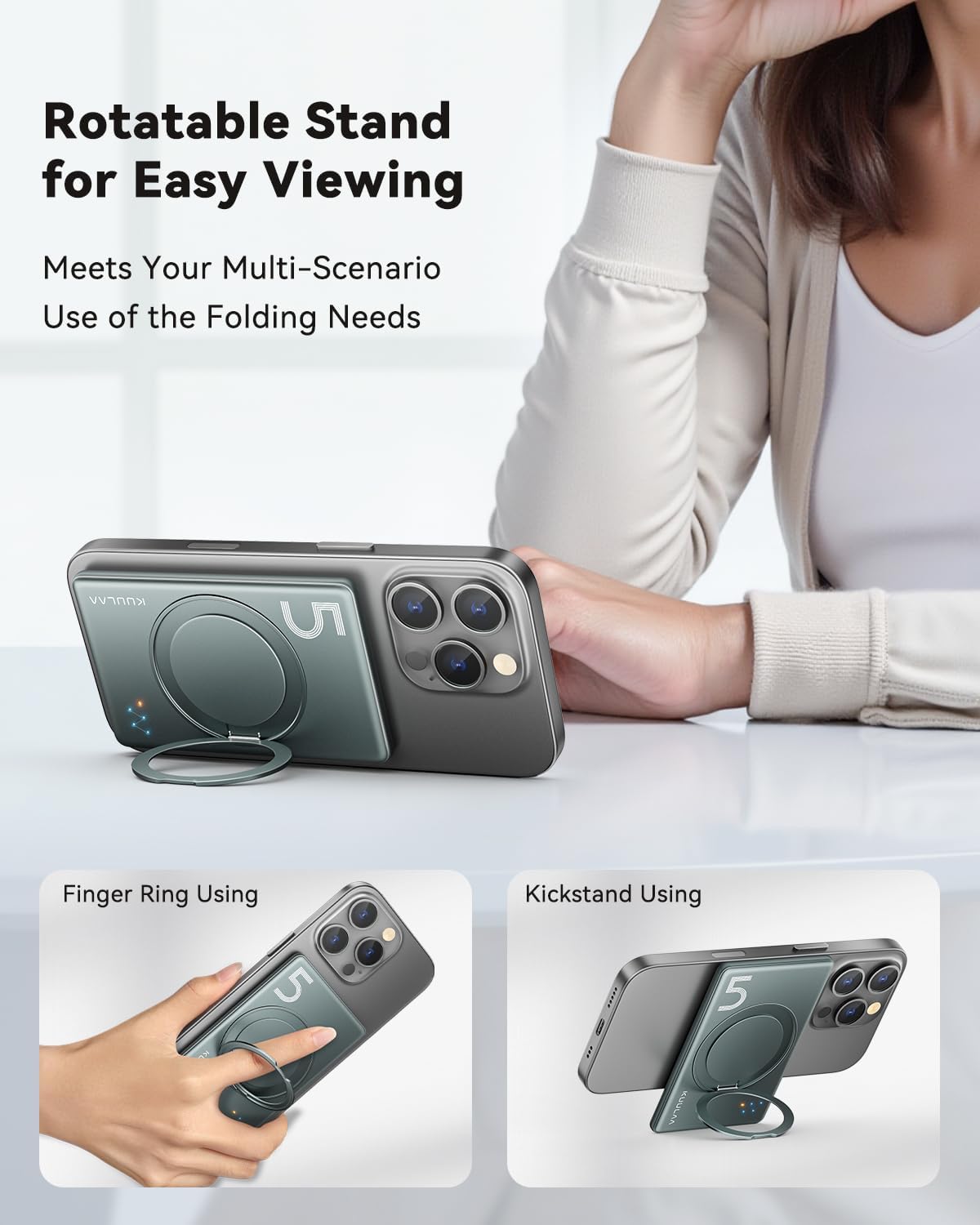
Figura 4: Esamples of the integrated folding swivel stand being used as a kickstand and a finger ring for enhanced usability.
5. Impostazione
Ricarica iniziale del Power Bank
- Collegare il cavo USB-C in dotazione alla porta USB-C del power bank.
- Collegare l'altra estremità del cavo USB-C a un adattatore di alimentazione USB compatibile (non incluso).
- Gli indicatori LED si accenderanno per mostrare lo stato di carica. Tutti e quattro i LED saranno accesi fissi quando la carica è completa.
- Per prestazioni ottimali, caricare completamente il power bank prima del primo utilizzo.
6. Istruzioni per l'uso
6.1. Ricarica wireless
- Ensure your device is compatible with MagSafe wireless charging (iPhone 12/13/14/15 series).
- Align the power bank with the back of your iPhone. The magnets will automatically snap it into place.
- Wireless charging will begin automatically. The LED indicators on the power bank will illuminate to confirm charging.
- For best results, ensure there are no foreign objects between the power bank and your device.
6.2. Ricarica cablata
- Connect one end of a USB-C cable (or your device's charging cable) to the USB-C port on the power bank.
- Connect the other end of the cable to your smartphone, smartwatch, or headphones.
- Il power bank inizierà automaticamente a caricare il tuo dispositivo.
6.3. Using the Folding Swivel Stand
- Estrarre delicatamente il supporto integrato dal retro del power bank.
- The stand can be rotated 360 degrees to achieve your desired viewangolo di ing.
- It can be used as a kickstand for hands-free viewing or as a finger ring for a more secure grip on your phone.
6.4. Controllo del livello della batteria
The four LED indicators on the power bank display the remaining battery capacity:
- 4 LED fissi: 75% - 100% caricato
- 3 LED fissi: 50% - 75% caricato
- 2 LED fissi: 25% - 50% caricato
- 1 LED fisso: 0% - 25% caricato (ricaricare presto)
7. Manutenzione
- Pulizia: Pulisci il power bank con un panno morbido e asciutto. Non utilizzare prodotti chimici aggressivi o materiali abrasivi.
- Magazzinaggio: Store the power bank in a cool, dry place away from direct sunlight and extreme temperatures. If storing for extended periods, charge it to about 50% every three months to prolong battery life.
- Evitare l'impatto: Proteggere il dispositivo da cadute e urti.
8. Risoluzione Dei Problemi
| Problema | Possibile soluzione |
|---|---|
| La power bank non si ricarica |
|
| Il dispositivo non si carica in modalità wireless |
|
| Device not charging via USB-C cable |
|
| Gli indicatori LED non funzionano |
|
9. Specifiche
| Caratteristica | Dettaglio |
|---|---|
| Numero di modello | KL-YD68 |
| Capacità della batteria | 5000 mAh |
| Uscita di ricarica wireless | 7.5W (for iPhone 12/13/14/15 series) |
| Ingresso/uscita USB-C | PD 20 W max |
| Dimensioni del prodotto | 10L x 6.6W x 0.8Th centimetri |
| Peso dell'articolo | 170 grammi |
| Numero di porte | 2 (1x USB-C, 1x Wireless) |
| Dispositivi compatibili | Smartphone, Smartwatch, Headphone |
| Produttore | Shenzhen Kula Technology Co., Ltd. |

Figura 5: Oltreview of the power bank's sophisticated security features and certifications.
10. Garanzia e supporto
The Kuulaa Magsafe Power Bank comes with a standard manufacturer's warranty. For detailed warranty information, please refer to the warranty card included in your package or visit the official KUULAA websito.
If you encounter any issues or have questions regarding your product, please contact KUULAA customer support through the retailer where you purchased the product or via the contact information provided on the official KUULAA websito.