
PELADN WO7
PELADN Mini PC Gaming WO7 User Manual
Model: WO7 | Brand: PELADN
1. Introduzione
Welcome to the user manual for your new PELADN Mini PC Gaming WO7. This compact yet powerful desktop computer is designed for a wide range of applications, from gaming and multimedia to office productivity and professional tasks. Equipped with an AMD Ryzen 7 7735U processor, 16GB DDR5 RAM, and a 512GB NVMe SSD, it delivers exceptional performance and responsiveness. Please read this manual thoroughly to ensure proper setup, operation, and maintenance of your device.
2. Prodotto finitoview
2.1 Caratteristiche principali
The PELADN Mini PC Gaming WO7 boasts a range of features designed for high performance and versatility:
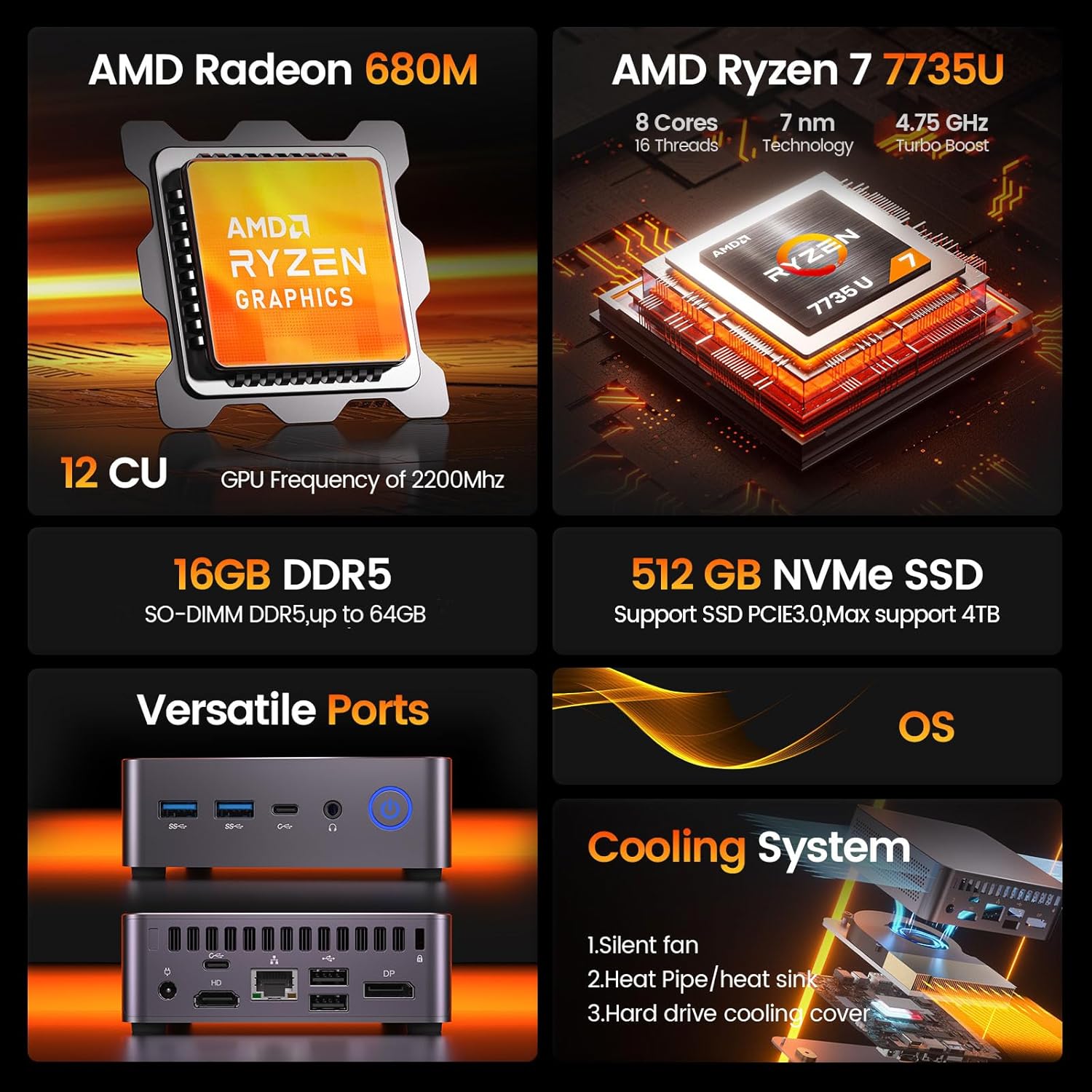
Figura 2.1.1: Un overview of the PELADN Mini PC WO7's core specifications, highlighting its AMD Ryzen 7 7735U processor, AMD Radeon 680M graphics, 16GB DDR5 RAM, 512GB NVMe SSD, versatile ports, and efficient cooling system.
- Processore: AMD Ryzen 7 7735U (8 Cores/16 Threads, up to 4.75Ghz)
- Grafica: Integrated AMD Radeon 680M GPU (12 CU, 2200 MHz)
- Memoria: 16 GB di RAM DDR5 (espandibile fino a 64 GB)
- Magazzinaggio: 512GB NVMe SSD (PCIe 3.0, expandable up to 4TB)
- Uscita di visualizzazione: Quadruple 4K/60Hz display support via DP, HD, and Dual Type-C ports
- Connettività wireless: Wi-Fi 6 e Bluetooth 5.2
- Sistema operativo: Pre-installed OS (supports Linux, Ubuntu)
- Sistema di raffreddamento: Efficient Peladn IceBlast 1.5 Cooling Technology with triple copper heat pipes and silent fan.
- Design compatto: Small form factor (0.46L volume) for space-saving and portability.

Figure 2.1.2: Detailed specifications of the AMD Ryzen 7 7735U processor, including its 4.75 GHz turbo boost, 30W TDP, 8 cores, 16 threads, and 16MB L3 cache, alongside its Cinebench R23 multi-core and single-core performance benchmarks.

Figure 2.1.3: Information on the AMD Radeon 680M integrated graphics, highlighting its 12 compute units and 2200 MHz GPU frequency, designed for smooth gaming, entertainment, and multitasking.

Figure 2.1.4: Diagram illustrating the Peladn IceBlast 1.5 Cooling Technology, featuring triple copper heat pipes, multiple fan blades, and a top heat conductor for efficient thermal management.

Figure 2.1.5: Visual representation of the PELADN Mini PC WO7's compact dimensions (113mm x 113mm x 36mm) and design elements such as durable housing, smooth rounded edges, and responsive physical buttons.
2.2 Componenti e porte
Familiarize yourself with the various components and ports of your PELADN Mini PC WO7.
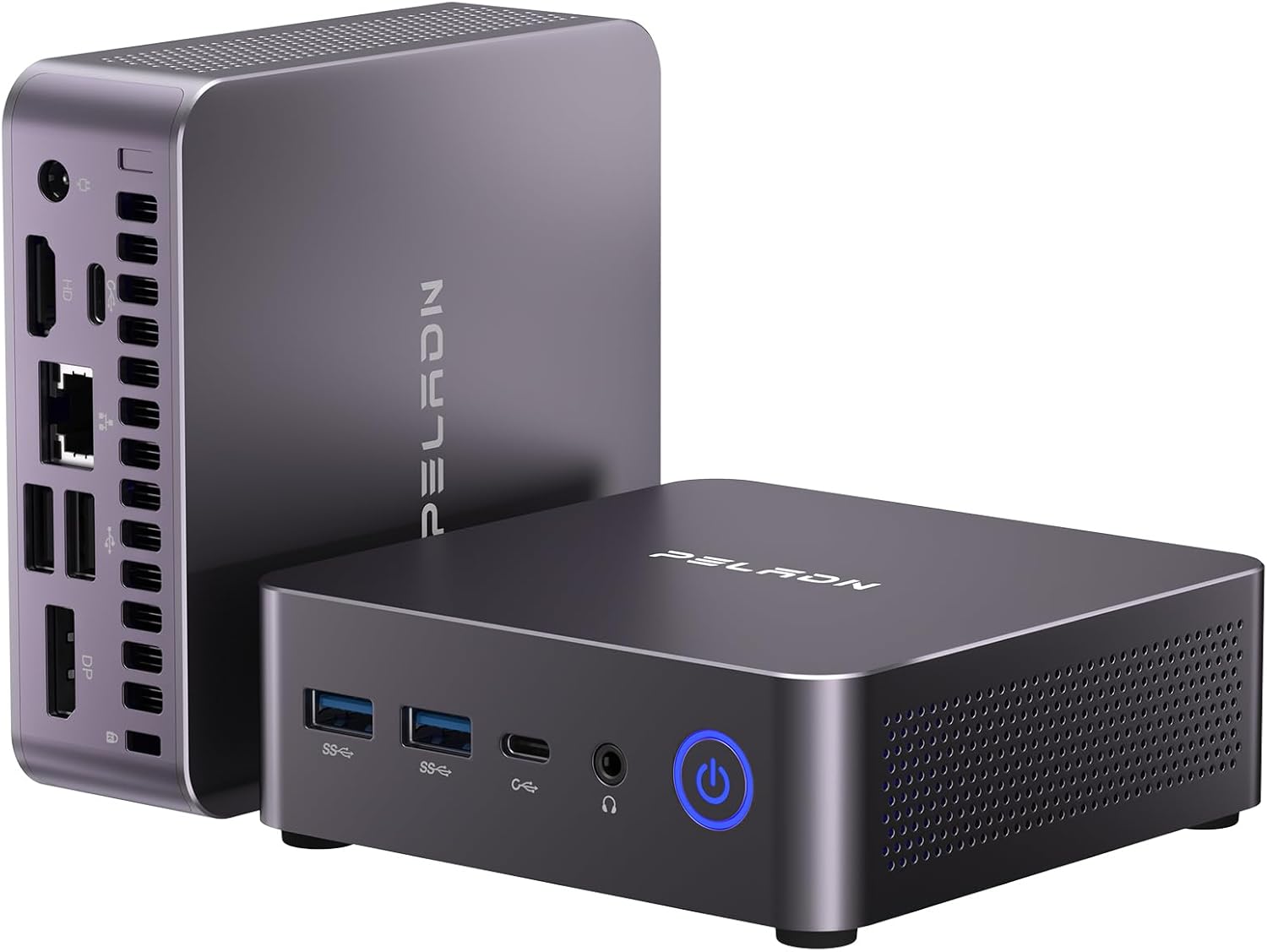
Figura 2.2.1: Frontale e laterale view of the PELADN Mini PC WO7, showcasing its compact design and various connectivity options.

Figura 2.2.2: dettagliata view of the front and rear ports of the PELADN Mini PC WO7. Front ports include 2x USB 3.2, 2x Type-C, 2-in-1 audio jack, and power button. Rear ports include DC power, HD, LAN (2.5G), 2x USB 2.0, DP, and anti-theft lock.
- Pannello frontale:
- 2 porte USB 3.2
- 2 x Type-C USB 3.2 Ports
- 1 x 2-in-1 Audio Jack (Headphone & Microphone)
- 1 x Pulsante di accensione
- Pannello posteriore:
- 1 x DC Jack (Power Input)
- 1 x HD 2.0 Port
- 1 x RJ45 LAN Port (2.5G)
- 2 porte USB 2.0
- 2 x DP 1.4 Ports
- 1 x Anti-theft Lock Slot
3. Guida all'installazione
3.1 Cosa c'è nella scatola
Prima di iniziare, verifica che tutti gli articoli siano presenti nel pacco:

Figure 3.1.1: Contents of the PELADN Mini PC WO7 package, including the PC unit, power adapter, HD cable, VESA mount with screws, and user manual.
- 1 x PELADN WO7 Mini PC
- 1 x adattatore di alimentazione
- 1 x Cavo HD
- 1 x supporto VESA con viti
- 1 x Manuale utente (questo documento)
3.2 Collegamento del mini PC
- Collegamento elettrico: Connect the power adapter to the DC Jack on the rear panel of the Mini PC, then plug the adapter into a power outlet.
- Connessione display: Connect your monitor(s) to the Mini PC using the HD, DP, or Type-C ports. The Mini PC supports up to four 4K displays simultaneously.
- Periferiche: Collega la tastiera, il mouse e gli altri dispositivi USB alle porte USB 3.2 o USB 2.0 disponibili.
- Connessione di rete: For a wired connection, connect an Ethernet cable to the RJ45 LAN port. For wireless, the Mini PC supports WiFi 6.
- Dispositivi audio: Connect headphones or speakers to the 2-in-1 audio jack on the front panel.

Figure 3.2.1: Illustration of the PELADN Mini PC WO7 supporting a quadruple 4K display setup, demonstrating its versatile video output capabilities for enhanced productivity or entertainment.
3.3 Accensione iniziale
Once all connections are secure, press the power button on the front panel to turn on the Mini PC. The system will boot into the pre-installed operating system. Follow the on-screen instructions for initial setup, including language, region, and network configuration.
4. Istruzioni per l'uso
4.1 Sistema Operativo
Your PELADN Mini PC comes with an operating system pre-installed. It also supports other operating systems like Linux and Ubuntu. For detailed instructions on using the operating system, please refer to the respective OS documentation.
4.2 Espansione di memoria e archiviazione
The Mini PC is equipped with 16GB DDR5 RAM and a 512GB NVMe SSD. For users requiring more memory or storage, the system supports expansion:
- Memoria RAM: Expandable up to 64GB DDR5 RAM.
- SSD: Supports M.2 NVMe SSD expansion up to 4TB.

Figura 4.2.1: Interno view highlighting the DDR5 RAM and NVMe SSD slots, illustrating the upgrade potential of the PELADN Mini PC WO7 for increased memory and storage capacity.

Figure 4.2.2: Comparison of speed increases for DDR5 RAM (up to 4800MHz) and NVMe SSD (up to 3500MB/s), demonstrating the performance benefits of these components in the PELADN Mini PC WO7.
Note: Upgrading internal components should be performed by users with technical expertise. Refer to the detailed upgrade guide (if available separately) or consult professional assistance to avoid damage.
4.3 Connettività wireless
The Mini PC features high-speed WiFi 6 and Bluetooth 5.2 for seamless wireless connections.
- Wi-Fi 6: Provides faster internet speeds for browsing, streaming, and gaming. Access network settings in your operating system to connect to available WiFi networks.
- Bluetooth 5.2: Enables stable and efficient connection to various wireless devices such as keyboards, mice, headphones, and speakers. Pair devices through your operating system's Bluetooth settings.

Figure 4.3.1: Visual representation of the PELADN Mini PC WO7's advanced wireless capabilities, including WiFi 6 and Bluetooth 5.2 for enhanced connectivity and a smoother user experience.
5. Manutenzione
5.1 Pulizia
- Keep the Mini PC clean and free from dust. Use a soft, dry cloth for external surfaces.
- Periodically clean the ventilation holes to ensure proper airflow and prevent overheating. A can of compressed air can be used for this purpose.
- Non utilizzare detergenti liquidi o spray aerosol direttamente sul dispositivo.
5.2 Posizionamento ottimale
- Place the Mini PC on a stable, flat surface.
- Ensure adequate ventilation around the device. Avoid placing it in enclosed spaces or near heat sources.
- The included VESA mount allows for discreet mounting behind a monitor or TV, optimizing desk space.

Figure 5.2.1: The PELADN Mini PC WO7 demonstrating its portability, easily fitting into a bag, and the option for VESA mounting to save space and create a clean workstation.
5.3 Aggiornamenti software
Regularly update your operating system and drivers to ensure optimal performance, security, and compatibility. Refer to your operating system's documentation for instructions on checking and installing updates.
6. Risoluzione Dei Problemi
This section provides solutions to common issues you might encounter with your PELADN Mini PC.
| Problema | Possibile causa | Soluzione |
|---|---|---|
| Nessuna alimentazione/Il sistema non si accende | Adattatore di alimentazione non collegato correttamente; problema con la presa di corrente; adattatore di alimentazione difettoso. | Ensure power adapter is securely connected to both the PC and the outlet. Try a different power outlet. Test with another compatible power adapter if available. |
| Nessuna visualizzazione sul monitor | Display cable loose or incorrect; Monitor input not selected; Monitor faulty. | Check display cable connections (HD, DP, Type-C). Ensure the monitor is set to the correct input source. Test with a different monitor or cable. |
| Prestazioni lente | Too many applications running; Insufficient RAM; Overheating. | Close unnecessary applications. Consider upgrading RAM if frequently experiencing slowdowns. Ensure proper ventilation and clean dust from vents. |
| Problemi di connettività Wi-Fi/Bluetooth | Driver issues; Interference; Incorrect settings. | Check Wi-Fi/Bluetooth drivers in Device Manager. Restart the Mini PC and your router/Bluetooth device. Ensure no strong interference sources are nearby. |
| Il sistema si blocca o si arresta in modo anomalo | Software conflict; Driver issues; Overheating; Hardware malfunction. | Update drivers and operating system. Check for malware. Monitor temperatures. If issues persist, consider a system restore or professional diagnosis. |
If the problem persists after trying these solutions, please contact PELADN customer support for further assistance.
7. Specifiche
Detailed technical specifications for the PELADN Mini PC Gaming WO7.
| Caratteristica | Specificazione |
|---|---|
| Modello | WO7 |
| Processore | AMD Ryzen 7 7735U (8C/16T, up to 4.75Ghz) |
| Grafica | Integrated AMD Radeon 680M (12 CU, 2200 MHz) |
| Memoria RAM | 16 GB DDR5 (espandibile fino a 64 GB) |
| Magazzinaggio | 512GB NVMe SSD (PCIe 3.0, Max 4TB) |
| Uscita di visualizzazione | HD 2.0, DP 1.4, 2x Type-C (Supports Quadruple 4K/60Hz Displays) |
| Connettività wireless | Wi-Fi 6, Bluetooth 5.2 |
| Rete locale | 2.5G RJ45 Ethernet |
| Porte USB | 2x USB 3.2, 2x USB 2.0, 2x Type-C USB 3.2 |
| Audio | 1x 2-in-1 Audio Jack (HP&MIC) |
| Sistema operativo | Pre-installed OS (Supports Linux, Ubuntu) |
| Dimensioni | Approx. 113mm x 113mm x 36mm (0.46L volume) |
| Peso | Circa 2.4 libbre |
8. Garanzia e supporto
8.1 Informazioni sulla garanzia
Your PELADN Mini PC Gaming WO7 comes with a standard manufacturer's warranty. Please refer to the warranty card included in your package or visit the official PELADN websito per termini e condizioni di garanzia dettagliati. Conservare la prova d'acquisto per eventuali reclami in garanzia.
8.2 Assistenza clienti
For technical support, troubleshooting assistance, or any inquiries regarding your PELADN Mini PC, please contact our customer support team:
- Supporto online: Visit the official PELADN store on Amazon (PELADN Store on Amazon) for FAQs, driver downloads, and contact information.
- Supporto via e-mail: Fare riferimento alla confezione del prodotto o al sito ufficiale websito per l'indirizzo email di supporto dedicato.
When contacting support, please have your product model (WO7) and purchase details ready.
Ask a question about this manual
Ask about setup, troubleshooting, compatibility, parts, safety, or missing instructions. Manuals+ will review the question and use this page’s manual context to help answer it.