
1. Introduzione
The Sandberg Survivor DAB Radio All-in-1 4500, Model 421-17, is a versatile and robust portable radio designed for various environments. It features DAB, FM, and AM radio reception, a built-in flashlight, and multiple power options including solar charging. This manual provides detailed instructions for setup, operation, maintenance, and troubleshooting to ensure optimal performance of your device.
2. Prodotto finitoview
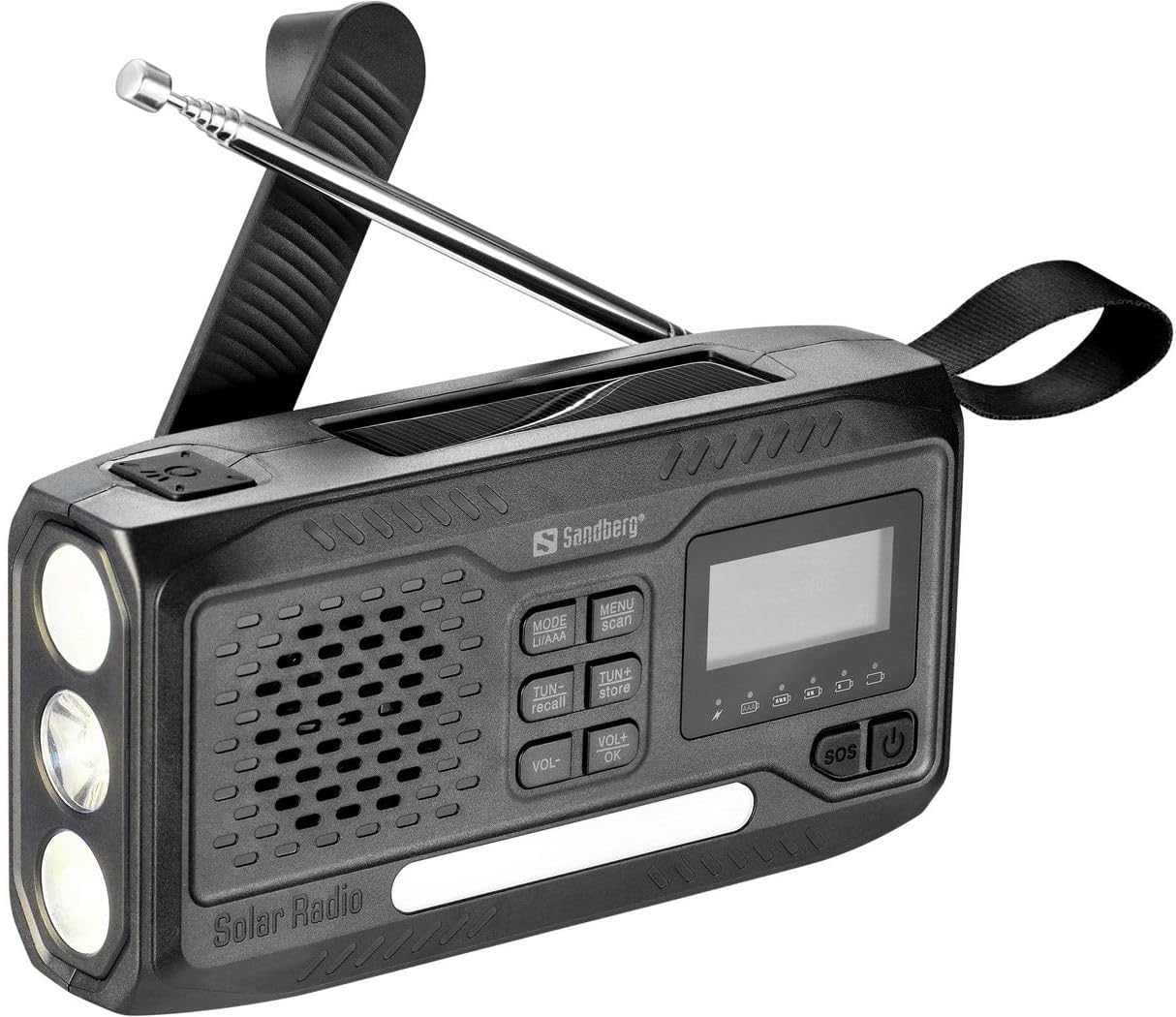
Figura 1: Fronte view of the Sandberg Survivor DAB Radio All-in-1 4500.
The Sandberg Survivor DAB Radio All-in-1 4500 is a multi-functional device. The front panel (as shown in Figure 1) features a speaker grille, a digital display, and an array of control buttons. On the left side, three LED bulbs serve as a flashlight. An extendable telescopic antenna is located at the top for enhanced radio reception. A durable carrying strap is attached to the right side for portability.
Componenti chiave:
- Display digitale: Shows radio frequency, mode, battery status, and other relevant information.
- Pulsanti di controllo:
- MODE (LI/AAA): Switches between radio bands (DAB, FM, AM) and potentially battery types.
- MENU (scan): Accesses menu options and initiates station scanning.
- TUN- (recall): Tunes down frequency or navigates menu; recalls stored stations.
- TUN+ (store): Tunes up frequency or navigates menu; stores stations.
- VOL- / VOL+: Regola i livelli del volume.
- OK: Conferma le selezioni nel menu.
- SOS: Activates emergency alarm/light function.
- Pulsante di accensione: Accende o spegne il dispositivo.
- Oratore: Per l'uscita audio.
- Torcia elettrica: Three LED lights for illumination.
- Antenna telescopica: Per una migliore ricezione del segnale radio.
- Pannello solare: (Located on top, not visible in this specific image but indicated by 'Solar Radio' text) For solar charging.
- Porta ausiliaria: For connecting external audio devices (e.g., headphones, smartphones, MP3 players).
3. Impostazione
3.1 Carica iniziale
Before first use, fully charge the internal rechargeable battery. Connect the radio to a USB power source using a compatible cable (not specified if included, assume standard USB). The charging indicator on the display will show progress. Alternatively, place the radio with its solar panel facing direct sunlight for solar charging.
3.2 Estensione dell'antenna
For optimal radio reception, fully extend the telescopic antenna when listening to FM or DAB radio. For AM reception, the internal antenna is typically sufficient, but adjusting the radio's orientation may improve signal.
4. Istruzioni per l'uso
4.1 Accensione/spegnimento
Premere e tenere premuto il tasto Energia button (⏻) located on the right side of the control panel to turn the radio on or off.
4.2 Radio Functions (DAB/FM/AM)
- Seleziona modalità: Premere il tasto MODALITÀ button repeatedly to cycle through DAB, FM, and AM radio bands. The selected mode will be displayed on the screen.
- Cerca stazioni: In modalità DAB o FM, premere il tasto MENU button, then select 'Scan' (if available) or press and hold the MENU/scan pulsante per eseguire la scansione e la memorizzazione automatica delle stazioni disponibili.
- Sintonizzazione manuale: Utilizzare il TONNO- E TUN+ pulsanti per sintonizzarsi manualmente su frequenze specifiche.
- Memorizza le preimpostazioni: Per memorizzare una stazione, sintonizzarsi sulla frequenza desiderata, quindi tenere premuto il tasto TUN+ (store) button. Follow the on-screen prompts to select a preset number and confirm with OK.
- Richiama i preset: Per richiamare una stazione memorizzata, premere il tasto TUN- (recall) pulsante e utilizzare TONNO- or TUN+ to navigate through your presets. Confirm with OK.
4.3 Controllo del volume
Regolare il livello di uscita audio utilizzando vol- E Volume+ pulsanti.
4.4 Funzione torcia
The radio is equipped with a flashlight. The activation method is typically a dedicated button or a long press of the power button when the radio is off. Refer to the quick start guide for the exact flashlight activation sequence.
4.5 Funzione SOS
In caso di emergenza, premere il tasto sos button. This will typically activate a loud siren and a flashing light to attract attention. Press the sos nuovamente il pulsante per disattivare.
4.6 Ingresso ausiliario
Connect headphones, a smartphone, or an MP3 player to the auxiliary port (usually a 3.5mm jack) to listen to audio privately or from an external source. When an auxiliary device is connected, the radio's internal speaker may be muted.
5. Manutenzione
- Pulizia: Utilizzare un panno morbido e asciutto per pulire l'esterno della radio. Evitare detergenti abrasivi o solventi.
- Cura della batteria: To prolong battery life, avoid fully discharging the battery frequently. If storing the radio for an extended period, charge it to approximately 50% and recharge every few months.
- Magazzinaggio: Conservare la radio in un luogo fresco e asciutto, lontano dalla luce solare diretta e da temperature estreme.
6. Risoluzione Dei Problemi
| Problema | Possibile causa | Soluzione |
|---|---|---|
| La radio non si accende. | La batteria è scarica. | Charge the radio using a USB power source or solar panel. |
| Ricezione radiofonica scadente. | Antenna non estesa, segnale debole, interferenza. | Estendere completamente l'antenna telescopica. Riposizionare la radio in una posizione con un segnale migliore. Evitare fonti di interferenze elettroniche. |
| Nessun suono dall'altoparlante. | Volume troppo basso, cuffie collegate. | Aumentare il volume utilizzando Volume+. Disconnect any headphones from the auxiliary port. |
| I pulsanti non rispondono. | Problema temporaneo del software. | Try turning the radio off and on again. If possible, perform a factory reset (refer to specific product documentation if available). |
7. Specifiche
- Marca: Sandberg
- Numero modello: 421-17
- Tecnologia di connettività: Ausiliario
- Tecnologia di messa a punto: TAMPONARE
- Bande radio supportate: AM/FM
- Dispositivi compatibili: Headphones, smartphone, MP3 player
- Batteria ricaricabile: SÌ
- Colore: Nero
8. Garanzia e supporto
For warranty information and technical support, please refer to the documentation provided with your purchase or visit the official Sandberg websito. Conservare la prova d'acquisto per eventuali reclami in garanzia.