
LIECTROUX N7S-U
LIECTROUX N7S-U Robot Vacuum Cleaner User Manual
Modello: N7S-U
1. Introduzione e descrizione del prodottoview
Thank you for choosing the LIECTROUX N7S-U Robot Vacuum Cleaner. This manual provides essential information for the safe operation, maintenance, and troubleshooting of your device. Please read it thoroughly before use.
The LIECTROUX N7S-U is designed for efficient dry and wet cleaning, featuring smart mapping, powerful suction, and smart home integration.
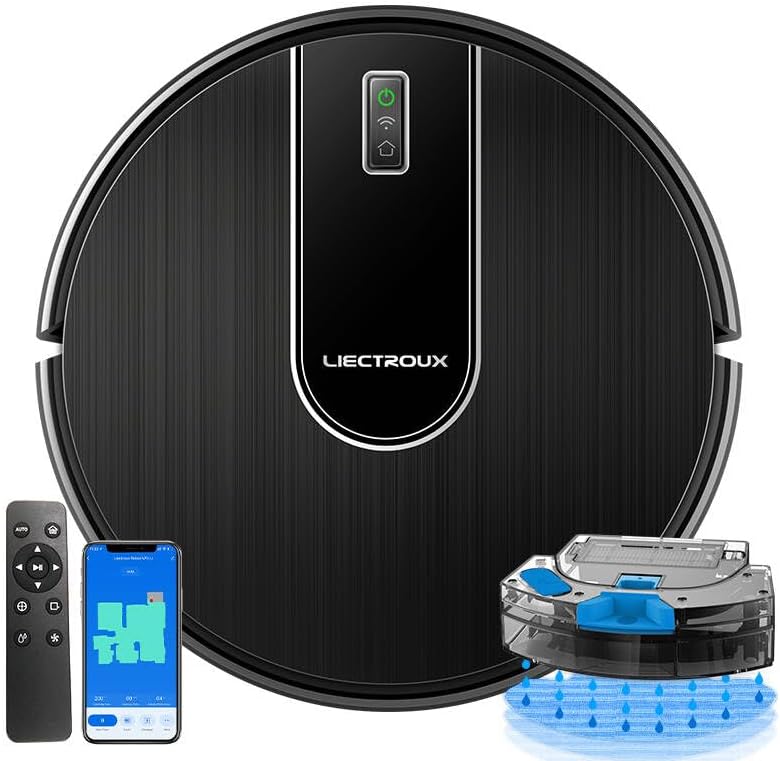
Image: The LIECTROUX N7S-U Robot Vacuum Cleaner, showcasing its sleek design, accompanying remote control, and a smartphone displaying the control app interface. A water tank accessory is also visible.
2. Impostazione
2.1 Disimballaggio e posizionamento iniziale
Carefully remove all components from the packaging. Place the charging station against a wall in an open area, ensuring there are no obstacles within 1 meter to the sides and 2 meters in front.
2.2 Ricarica del robot
Connect the power adapter to the charging station and plug it into a wall outlet. Place the robot onto the charging station, ensuring the charging contacts align. The indicator light on the robot will show charging status. Fully charge the robot before first use (approximately 4-5 hours).
2.3 Connessione all'app (app TUYA)
Download the TUYA Smart app from your smartphone's app store. Follow the in-app instructions to add your LIECTROUX N7S-U robot. This will enable smart control, cleaning process visualization, and voice control via Alexa or Google Home.

Image: An illustration demonstrating the WiFi App Control capabilities, including Distance Control, Multiple Cleaning Modes, Schedule Cleaning, and Adjustable Suction Power. The image also shows a smartphone displaying the robot's cleaning map within a house layout.
3. Istruzioni per l'uso
3.1 Accensione/spegnimento
Per accendere o spegnere il robot, tenere premuto il pulsante di accensione per alcuni secondi.
3.2 modalità di pulizia
The robot offers various cleaning modes to suit different needs. These can be selected via the remote control, the TUYA app, or voice commands.
- Pulizia automatica: Il robot naviga e pulisce in modo intelligente l'intera area.
- Pulizia a punto fisso (pulizia spot): Concentra la pulizia su una specifica area sporca.
- Pulizia dei bordi: Pulisce lungo le pareti e i bordi dei mobili.
- Spazzare: Dry cleaning mode.
- Lavaggio: Wet cleaning mode using the water tank.

Image: Visual representation of the various cleaning modes available, including Zigzag Cleaning, Border Cleaning, Fixed Point Cleaning, and the Constant Pressure Water Tank feature. The robot is shown cleaning a room with different floor types.
3.3 Navigazione e mappatura intelligenti
The N7S-U utilizes 2D map navigation to detect its environment and create a cleaning map. This allows it to clean systematically from room to room, ensuring high coverage and minimal repetition.

Image: An infographic illustrating key features such as WiFi App Control, 2D Map Navigation and Accurate Positioning, Multiple Cleaning Modes, Brushless Motor, and an Intelligent Chip. The robot is depicted navigating a mapped area.
3.4 Regolazione della potenza di aspirazione
The suction power can be adjusted, reaching up to 4000 Pa in max mode, to effectively remove dirt from various surfaces.

Image: A visual demonstrating the robot's strong suction power, showing dust particles being drawn into the device. Insets highlight the Filter Dust Box and the Strong Fan components.
3.5 Ricarica automatica
The robot will automatically return to its charging station when the battery is low or when a cleaning task is complete.
4. Manutenzione
Una manutenzione regolare garantisce prestazioni ottimali e prolunga la durata del tuo robot aspirapolvere.
4.1 Dust Box and Water Tank
The robot features an integrated 400ml large dust box and a 250ml large water tank. Empty the dust box after each use and refill the water tank as needed for mopping.

Image: An illustration highlighting the integrated dust box and water tank, emphasizing effortless cleaning. Icons represent the 400ml large dust box, 250ml large water tank, fine seepage, and intelligent electronic control. The bottom of the robot is shown with labels for Mopping, Vacuuming, and Sweeping functions.

Image: A close-up of the robot's 250ml large water tank, illustrating its three-level intelligent electric control for water adjustment (High, Medium, Low). Icons represent the large water tank, fine seepage, and intelligent electronic control.
4.2 Pennelli e filtri
- Spazzole laterali: Check and clean the side brushes regularly for tangled hair or debris. Replace them if they are worn.
- Spazzola principale: Remove and clean the main brush periodically. Use the cleaning tool provided to cut and remove tangled hair.
- Filtro: Tap out dust from the filter after each use. Wash the filter with water every 2-4 weeks (depending on usage) and allow it to air dry completely before reinserting.
4.3 Sensori e contatti di ricarica
Wipe the anti-drop sensors, anti-collision sensors, and charging contacts on both the robot and the charging station with a clean, dry cloth regularly to ensure proper function.
5. Risoluzione Dei Problemi
Se riscontri problemi con il tuo robot aspirapolvere, consulta le seguenti soluzioni comuni:
- Il robot non si carica: Ensure the charging contacts on both the robot and the charging station are clean and free of debris. Check if the power adapter is securely plugged in.
- Robot stuck or trapped: Clear obstacles from the robot's path. The robot is designed with anti-collision, anti-falling, and twining-proof features, and can climb thresholds up to 1.5cm.
- Scarsa prestazione di pulizia: Empty the dust box, clean the brushes, and check the filter for clogs. Ensure the water tank is filled for mopping.
- Problemi di connessione all'app: Assicurati che la tua rete Wi-Fi sia stabile e che il robot si trovi nel raggio d'azione. Riavvia il robot e il router, se necessario.
- Il robot non risponde: Try restarting the robot by holding the power button. If unresponsive, place it on the charging station.

Image: A four-panel image illustrating the robot's intelligent navigation features: Anti-collision (detecting barriers), Anti-falling (detecting stairs), Twining-proof (avoiding cables), and Easy Climbing (overcoming small thresholds up to 1.5cm).
Per problemi persistenti, contattare l'assistenza clienti.
6. Specifiche
| Caratteristica | Dettaglio |
|---|---|
| Marca | LIETTROUX |
| Numero di modello | N7S-U |
| Colore | Nero |
| Dimensioni del prodotto | 32L x 32W x 7.8H centimetri |
| Potenza di aspirazione | Fino a 4000 Pa (modalità Max) |
| Capacità della scatola di polvere | 400ml |
| Capacità del serbatoio dell'acqua | 250ml |
| Tipo di batteria | Agli ioni di litio |
| Capacità della batteria | 2500 mAh |
| Tempo di esecuzione | Fino a 120 minuti |
| Metodi di controllo | Remote Control, TUYA App, Voice Control (Alexa, Google Assistant) |
| Navigazione | 2D Map Navigation |

Image: A diagram illustrating the compact stature of the robot vacuum cleaner, showing its height of 7.5cm, which allows it to clean under most furniture.
7. Garanzia e supporto
For warranty information, please refer to the documentation included with your purchase or contact the retailer. For technical support, spare parts, or any inquiries not covered in this manual, please contact LIECTROUX customer service through their official websito o le informazioni di contatto fornite con il prodotto.
Ask a question about this manual
Ask about setup, troubleshooting, compatibility, parts, safety, or missing instructions. Manuals+ will review the question and use this page’s manual context to help answer it.