
1. Introduzione
This manual provides detailed instructions for the installation and operation of your ANKEWAY XBH-7703 Car Stereo Head Unit. This unit is designed to upgrade the in-car entertainment and navigation experience for specific Chevrolet, GMC, and Hummer H2 models.
Modelli di veicoli compatibili:
- Chevrolet: Silverado, Tahoe, Colorado, and Suburban (2003–2006)
- GM: Yukon, Sierra, and Canyon (2003–2006)
- Hummer: H2 (2003–2007)
For a complete list of compatible models, please refer to the product images or contact technical support.

Image: Compatibility chart for Chevrolet, GMC, and Hummer H2 models, showing the head unit installed in a compatible vehicle dashboard.
2. Cosa c'è nella scatola
Dopo aver aperto la confezione, verificare che siano presenti tutti i seguenti componenti:
- ANKEWAY XBH-7703 Car Stereo Head Unit
- Posterioreview Telecamera
- Microfono
- CANbus Protocol Decoder
- Panel Removal Tools (various orange plastic tools)
- Cavo di alimentazione
- Adattatore per antenna radio
- Cavo della fotocamera
- Antenna GPS
- RCA
- Cavi USB (x2)
- User Manuals (Android Product Operating Manual, ZLINKS User Manual)

Image: A flat lay of all components included in the ANKEWAY XBH-7703 car stereo package, including the head unit, cables, camera, and tools.
Video: An unboxing video demonstrating the contents of the ANKEWAY car stereo package, including the head unit, various cables, camera, and installation tools.
3. Caratteristiche principali
- CarPlay and Android Auto (Wireless & Wired): Integrazione perfetta con lo smartphone per navigazione, musica e chiamate.
- Sistema Android: Access to apps via Wi-Fi, split-screen mode, multi-language support.
- Radio FM RDS: Search and save favorite FM channels, adjust sound with DSP and equalizer.
- AHD posterioreview Telecamera: High-definition image input, night vision, automatic display on reverse.
- CANbus Adapter: Preserves steering wheel control functions.
- Aggiornamenti di sistema: Regular firmware updates for optimized performance.
- Installazione semplice: Pre-grouped cables and connectors for simplified setup.

Image: The ANKEWAY car stereo head unit showcasing the Apple CarPlay interface with various app icons.

Image: The ANKEWAY car stereo head unit displaying the Android Auto interface with various app icons.
4. Guida all'installazione
The ANKEWAY XBH-7703 car stereo is designed for straightforward installation. The included cables are pre-grouped with connectors to match your vehicle's original system.
4.1. Preparazione
- Prima di avviare il veicolo, assicurarsi che l'accensione sia spenta e che la batteria sia scollegata.
- Use the provided panel removal tools to carefully detach the original car stereo and surrounding trim.
- Refer to your vehicle's specific service manual for detailed instructions on removing the factory head unit.
4.2. Collegamento dei componenti
- Cablaggio di alimentazione principale: Connect the main power harness from the new head unit to the vehicle's wiring harness. The included CANbus decoder ensures compatibility and retains steering wheel controls.
- Decoder CANbus: Connect the CANbus decoder to the main wiring harness as indicated in the diagram.
- Posterioreview Telecamera: Installa la parte posterioreview camera at the rear of your vehicle. Connect its video output to the "CVBS-IN-1" RCA input on the head unit and the power wire to the reverse light circuit for automatic activation.
- Antenna GPS: Montare l'antenna GPS in una posizione con una vista libera view del cielo, in genere sul cruscotto o sotto il parabrezza.
- Microfono: Collega il microfono esterno per una migliore qualità delle chiamate. Posizionalo vicino al conducente per una ricezione vocale ottimale.
- Cavi USB: Connect the USB extension cables to the rear of the head unit and route them to a convenient location for connecting USB devices or for wired CarPlay/Android Auto.
- Cavi RCA: Utilize the RCA cables for connecting external amplifiers or other audio/video components if desired.
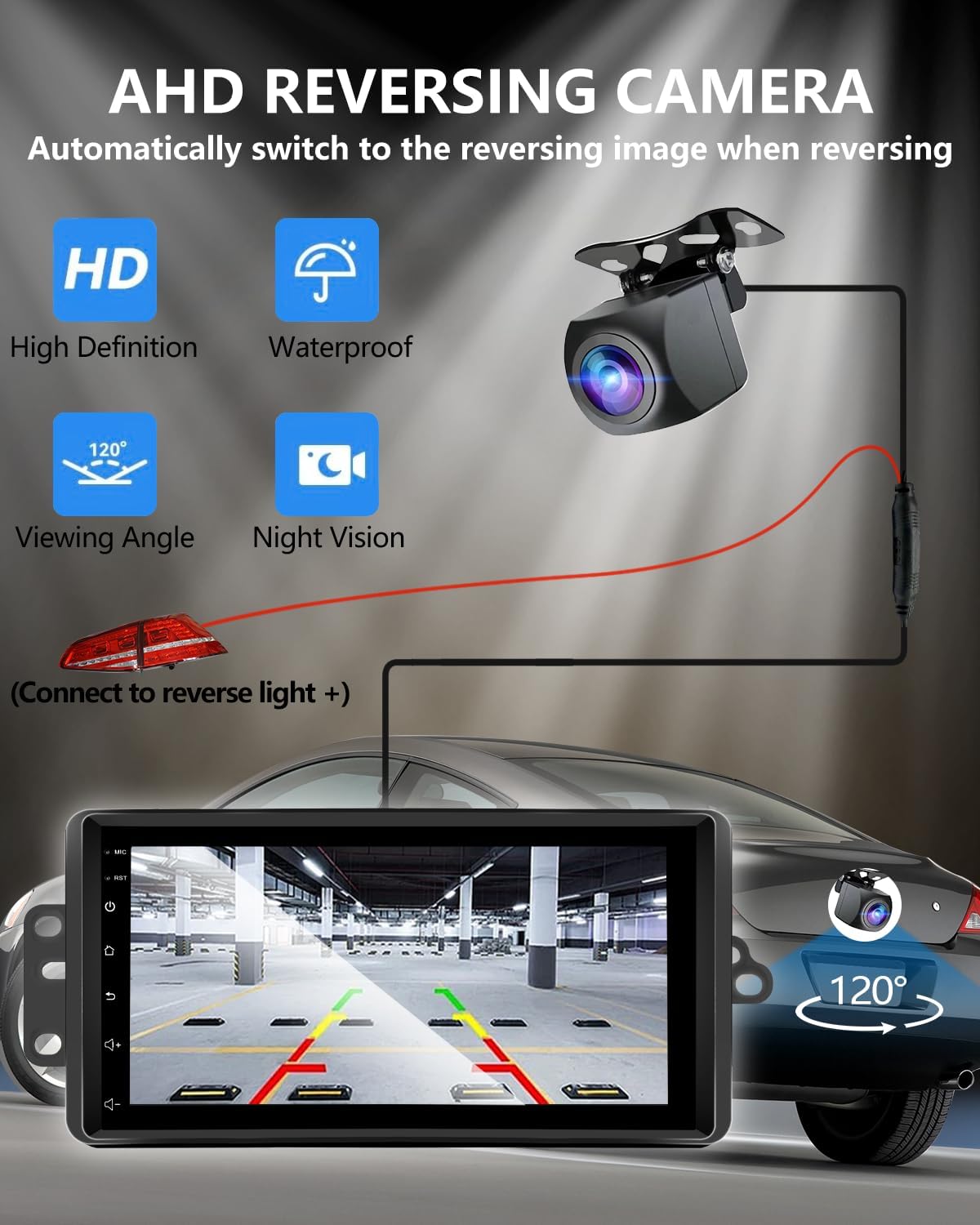
Image: A diagram illustrating the connection of the AHD rearview camera to the car stereo, showing the video input and power connection to the reverse light.
4.3. Passaggi finali
- Inserire con cautela la nuova unità principale nell'apertura del cruscotto, assicurandosi che tutti i cavi non vengano schiacciati.
- Secure the head unit with the original screws or mounting brackets.
- Riattaccare tutti i pezzi di rifinitura rimossi.
- Ricollegare la batteria del veicolo.
- Turn on the ignition and test all functions of the new car stereo.
5. Istruzioni per l'uso
5.1. Configurazione iniziale
Upon first power-on, the system may guide you through initial setup steps, including language selection and Wi-Fi connection.
5.2. CarPlay e Android Auto
Connect your iOS or Android smartphone via USB cable or wirelessly (via Bluetooth and Wi-Fi) to activate CarPlay or Android Auto. This allows access to compatible apps like navigation, music, and messaging directly on the head unit screen.

Image: A split image showing both the Apple CarPlay and Android Auto interfaces running on the car stereo screen.
5.3. Navigazione GPS
The unit supports GPS navigation. You can use pre-installed map applications or download others from the app store. Offline map support is available for navigation without an internet connection.

Image: The car stereo screen showing a GPS navigation map with icons for phone, messages, and music, alongside voice command prompts.
5.4. Controllo vocale
Utilize voice assistants (Siri for CarPlay, Google Assistant for Android Auto) for hands-free control of navigation, music playback, calls, and messages. This feature is active when CarPlay or Android Auto is running.

Image: The car stereo screen displaying various voice commands for Siri and Google Assistant, such as "Hey Siri, Call Tom" or "Hi Google, Play Music."
5.5. Radio FM RDS
Access the FM radio tuner to listen to local stations. The RDS (Radio Data System) feature displays station information where available. You can search for and save your favorite channels for quick access.
5.6. Controllo del volante
Thanks to the integrated CANbus adapter, your vehicle's original steering wheel controls will function with the new head unit, allowing you to manage audio, calls, and other features without taking your hands off the wheel.

Image: The car stereo screen showing the FM radio interface and a separate image illustrating the functionality of steering wheel controls with the unit.
5.7. Internet Connectivity (Wi-Fi)
Connect the head unit to the internet via your mobile hotspot or a Wi-Fi network. This enables access to online content, app downloads, and real-time traffic updates for navigation.

Image: The car stereo screen showing various online applications like YouTube, TikTok, and social media, indicating Wi-Fi connectivity.
6. Manutenzione
To ensure the longevity and optimal performance of your ANKEWAY XBH-7703 Car Stereo Head Unit, follow these general maintenance guidelines:
- Pulizia: Utilizzare un panno morbido e asciutto per pulire lo schermo e le superfici esterne. Evitare detergenti abrasivi o solventi che potrebbero danneggiare la finitura.
- Aggiornamenti software: Regularly check for and install system updates provided by ANKEWAY to ensure the latest features and security patches. Contact technical support for firmware update packages.
- Condizioni ambientali: Evitare di esporre l'unità a temperature estreme, alla luce solare diretta per periodi prolungati o a umidità eccessiva.
7. Risoluzione Dei Problemi
Se riscontri problemi con l'autoradio, fai riferimento ai seguenti passaggi comuni per la risoluzione dei problemi:
- Nessun potere: Controllare tutti i collegamenti elettrici e assicurarsi che la batteria del veicolo sia collegata correttamente. Verificare che i fusibili siano intatti.
- Nessun suono: Controllare i collegamenti degli altoparlanti. Assicurarsi che il volume non sia disattivato o impostato al minimo. Verificare le impostazioni di uscita audio.
- CarPlay/Android Auto non si connette: Ensure your phone's Bluetooth and Wi-Fi are enabled. Try connecting with a different USB cable. Restart both the head unit and your smartphone.
- Comandi al volante non funzionanti: Verify the CANbus decoder is correctly connected. Ensure the vehicle's original wiring is intact.
- Posterioreview La fotocamera non visualizza: Check the camera's video input connection and power supply. Ensure the reverse gear is engaged.
- Problemi con il segnale GPS: Assicurarsi che l'antenna GPS abbia una visuale libera view del cielo. Evita gli ostacoli.
If the problem persists after attempting these steps, please contact ANKEWAY technical support for further assistance.
8. Specifiche
| Caratteristica | Dettaglio |
|---|---|
| Numero di modello | XBH-7703 |
| Sistema operativo | Android |
| Memoria (RAM) | 2 GB |
| Memoria (ROM) | 64 GB |
| Connettività | Bluetooth, USB, Wi-Fi |
| Caratteristiche speciali | Android Auto, Built-In Bluetooth, Built-In Wi-Fi, DSP, GPS Navigation |
| Dispositivi compatibili | Amppiù vivace |
| Tipo di connettore | RCA |
| Modalità di uscita audio | Stereo |
| Suono Surround | 5.1 Configurazione dei canali |
| Codifica video | H.264, H.265/HEVC, MPEG-4 |
| Numero di canali | 2 |
| Peso dell'articolo | 3.09 libbre |
| Dimensioni del pacco | 11.42 x 7.28 x 3.94 pollici |
9. Garanzia e supporto
For any questions regarding product accessories, system updates, or technical assistance, please contact ANKEWAY technical support. Our development team regularly releases firmware updates to optimize the system experience.
Per i dettagli specifici sulla garanzia, fare riferimento alla documentazione di acquisto.