
1. Introduzione
Welcome to the OUKITEL C59 Pro user manual. This guide provides detailed instructions on how to set up, operate, maintain, and troubleshoot your new Android 15 smartphone. Please read this manual thoroughly to ensure optimal performance and longevity of your device.
2. Informazioni sulla sicurezza
To prevent injury to yourself or others, or damage to your device, read all safety information before using the device. Keep this manual for future reference.
- Non esporre il dispositivo a temperature estreme, alla luce solare diretta o a elevata umidità.
- Utilizzare solo caricabatterie, batterie e accessori approvati da OUKITEL.
- Evitare di far cadere o di sottoporre il dispositivo a urti violenti.
- Non smontare, modificare o riparare il dispositivo autonomamente.
- Maintain a safe distance from medical devices to avoid interference.
- Smaltire il dispositivo e i suoi componenti in modo responsabile, nel rispetto delle normative locali.
3. Contenuto della confezione
Verifica che tutti gli articoli siano presenti nella confezione del prodotto:
- Smartphone OUKITEL C59 Pro
- Custodia per telefono
- Cavo USB (tipo C)
- Strumento di espulsione della SIM
- Adattatore di alimentazione
4. Dispositivo suview
Familiarize yourself with the physical features and components of your OUKITEL C59 Pro smartphone.

Immagine: Generale view dello smartphone OUKITEL C59 Pro, mostratoasinil suo design elegante e il modulo della fotocamera posteriore.
4.1 Pulsanti e porte fisiche
- Pulsante di accensione: Located on the side, used to power on/off the device or wake/sleep the screen. Integrates fingerprint recognition.
- Pulsanti del volume: Situato sul lato, serve per regolare il volume dei contenuti multimediali e della suoneria.
- Porta USB di tipo C: Situato nella parte inferiore, serve per la ricarica e il trasferimento dei dati.
- Slot per scheda SIM/MicroSD: Located on the side, for inserting Nano SIM cards and a MicroSD card.
- 110lm LED Flashlight: An exclusive physical flashlight located at the top of the device, activated by a dedicated button.
4.2 Visualizzazione
The OUKITEL C59 Pro features a large 6.88-inch HD+ display with a 90Hz refresh rate and 450 nits brightness, providing a clear and smooth visual experience.

Image: The OUKITEL C59 Pro's 6.88-inch HD+ display, highlighting its size and visual clarity.
4.3 Telecamere
The device is equipped with a dual rear camera system, featuring a 13MP main camera, and a 5MP front camera for selfies and video calls.

Image: Close-up of the OUKITEL C59 Pro's rear camera module and example foto scattate con la fotocamera principale da 13 MP e quella frontale da 5 MP.
4.4 Torcia elettrica
The OUKITEL C59 Pro features a powerful 110 lumen LED flashlight at the top. This flashlight can be activated instantly by pressing a dedicated physical button on the side of the phone, even when the screen is locked.

Image: The OUKITEL C59 Pro's 110lm LED flashlight illuminating dark environments, demonstrating its brightness and utility in various scenarios.
5. Impostazione
5.1 Inserimento delle schede SIM e MicroSD
Your OUKITEL C59 Pro supports Dual Nano SIM cards and a MicroSD card for expandable storage up to 1TB.
- Individuare il vassoio della scheda SIM sul lato del dispositivo.
- Inserire lo strumento di espulsione della SIM nel piccolo foro accanto al vassoio per aprirlo.
- Place your Nano SIM cards and/or MicroSD card into the designated slots on the tray, ensuring correct orientation.
- Spingere delicatamente il vassoio nuovamente nel dispositivo finché non scatta in posizione.

Image: The SIM card tray of the OUKITEL C59 Pro, showing slots for two Nano SIM cards and one MicroSD card.
5.2 Ricarica del dispositivo
Before first use, fully charge your OUKITEL C59 Pro. The device supports 18W fast charging.
- Collegare il cavo USB Type-C alla porta di ricarica nella parte inferiore del telefono.
- Collega l'altra estremità del cavo USB all'alimentatore.
- Collegare l'adattatore di corrente a una presa a muro.
- Una carica completa richiede in genere circa quattro ore.
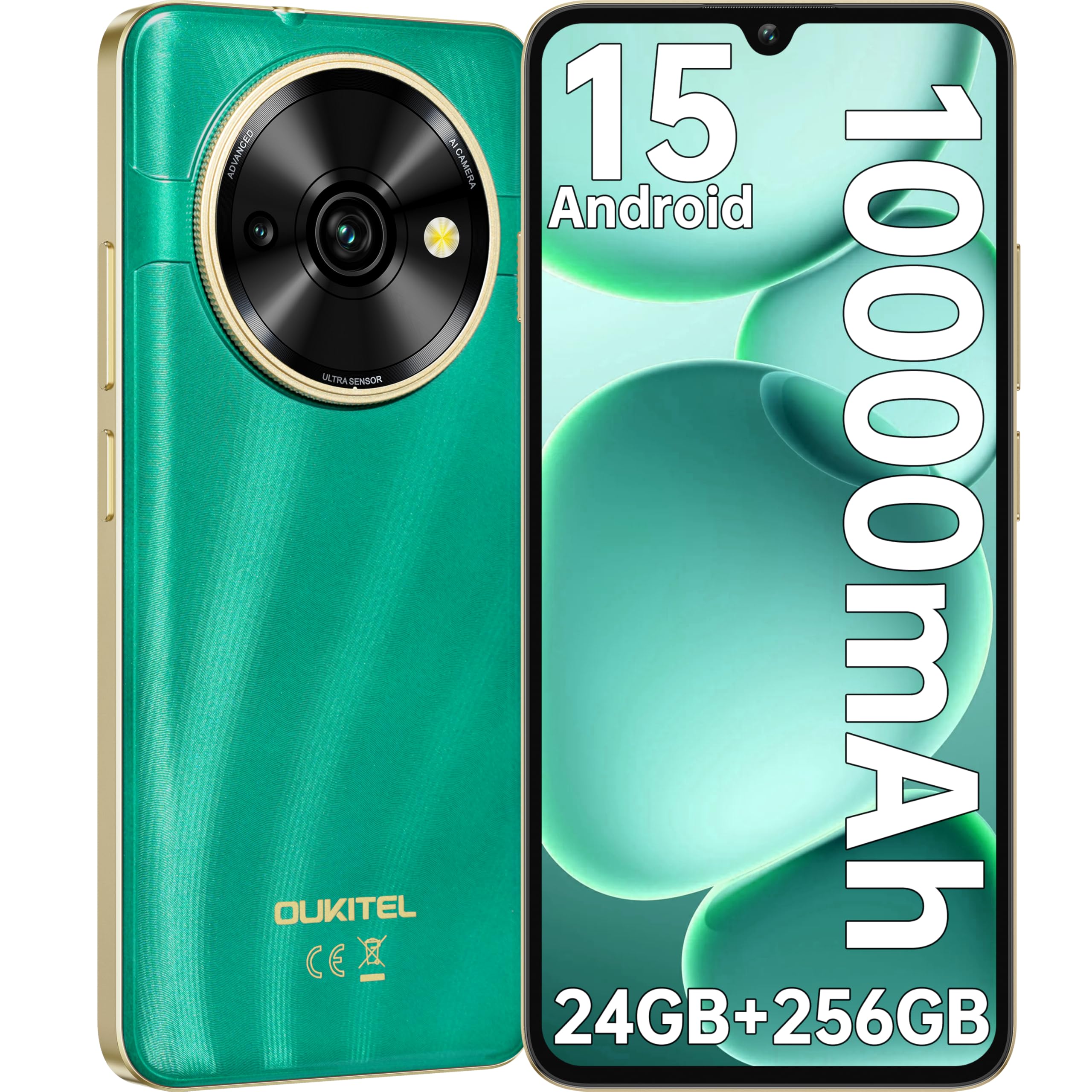
Image: Visual representation of the OUKITEL C59 Pro's 10000mAh battery capacity, indicating extended standby, talk, flashlight, and video playback times.
5.3 Accensione/Spegnimento
- Per accendere: Tenere premuto il pulsante di accensione finché non viene visualizzato il logo OUKITEL.
- Per spegnere: Tenere premuto il pulsante di accensione, quindi selezionare "Spegni" dalle opzioni sullo schermo.
- Ricominciare: Tieni premuto il pulsante di accensione, quindi seleziona "Riavvia" dalle opzioni.
6. Utilizzo dello smartphone
Sistema operativo Android 15 6.1
Your OUKITEL C59 Pro runs on the latest Android 15 operating system, offering enhanced energy efficiency, privacy protection, and multi-device integration capabilities optimized with artificial intelligence.

Immagine: una rappresentazione visiva dell'interfaccia del sistema operativo Android 15, mostrataasing its modern design and various application icons.
6.2 Biometric Security (Fingerprint & Face ID)
Unlock your device securely using the side-mounted fingerprint sensor or Face ID recognition.
- Riconoscimento delle impronte digitali: Register your fingerprints in the Security settings. To unlock, simply place your registered finger on the side power button.
- Identificazione facciale: Imposta Face ID nelle impostazioni di sicurezza. Per sbloccare, tieni il telefono davanti al viso.
6.3 Connectivity Features (NFC, GPS)
The OUKITEL C59 Pro supports NFC for contactless payments and data transfer, and GPS for navigation and location services.
- NFC: Enable NFC in Settings > Connected devices > Connection preferences > NFC. Tap your phone to compatible devices for quick pairing or payments.
- Posizione GPS: I servizi di localizzazione sono abilitati per impostazione predefinita. Puoi gestirli in Impostazioni > Posizione.
6.4 Memoria e archiviazione
The device comes with 24GB RAM (8GB physical + 16GB virtual) and 256GB internal storage, expandable up to 1TB via MicroSD card.

Image: A graphical representation of the OUKITEL C59 Pro's memory configuration, showing 24GB RAM (8GB + 16GB expansion) and 256GB ROM (expandable to 1TB).
6.5 Funzionalità OTG
The OUKITEL C59 Pro supports OTG (On-The-Go) reverse charging, allowing you to transfer data to other devices or use your phone as an emergency power bank.
7. Manutenzione
Proper maintenance ensures the longevity and optimal performance of your smartphone.
- Pulizia: Utilizzare un panno morbido e privo di lanugine per pulire lo schermo e il corpo del dispositivo. Evitare l'uso di prodotti chimici aggressivi o materiali abrasivi.
- Aggiornamenti software: Controlla e installa regolarmente gli aggiornamenti di sistema per assicurarti che il tuo dispositivo abbia le funzionalità e le patch di sicurezza più recenti. Vai su Impostazioni > Sistema > Aggiornamento di sistema.
- Cura della batteria: Evitare di scaricare completamente la batteria frequentemente. Per periodi di conservazione prolungati, caricare la batteria a circa il 50%.
- Gestione della memoria: Cancellare periodicamente ciò che non è necessario files and apps to free up storage space and improve performance.
8. Risoluzione Dei Problemi
Se riscontri problemi con il tuo dispositivo, prova le seguenti soluzioni:
- Il dispositivo non risponde: Per forzare il riavvio, tenere premuto il pulsante di accensione per circa 10-15 secondi.
- App che si bloccano: Clear the cache and data of the problematic app in Settings > Apps > [App Name] > Storage. If the issue persists, uninstall and reinstall the app.
- Scarsa durata della batteria: Check battery usage in Settings > Battery to identify power-hungry apps. Reduce screen brightness, disable unnecessary features like GPS or Wi-Fi when not in use.
- Problemi di rete: Ensure SIM cards are correctly inserted. Try restarting the device. Check network settings or contact your service provider.
- Surriscaldamento: Avoid using the device while charging or during prolonged heavy usage. Close background apps.
- Ripristino di fabbrica: As a last resort, if software issues persist, you can perform a factory reset. Attenzione: questa operazione cancellerà tutti i dati presenti sul dispositivo. Esegui il backup dei dati importanti prima di procedere. Vai su Impostazioni > Sistema > Opzioni di ripristino > Cancella tutti i dati (ripristino dati di fabbrica).
9. Specifiche
Detailed technical specifications for the OUKITEL C59 Pro smartphone.
| Caratteristica | Specificazione |
|---|---|
| Marca | OUKITEL |
| Nome del modello | OUKITEL C59 Pro |
| Sistema operativo | Androide 15 |
| Dimensione RAM installata | 24 GB (8 GB fisici + 16 GB virtuali) |
| Capacità di archiviazione | 256 GB |
| Max Supported Flash Memory Size | 1024 GB (1 TB) |
| Dimensioni dello schermo | 6.88 pollici |
| Risoluzione | 1640 x 720 pixel |
| Frequenza di aggiornamento | Frequenza 90 Hz |
| Tipo di visualizzazione | LCD |
| Tecnologia cellulare | 4G |
| Tecnologia di connettività | 4G |
| Colore | VERDE |
| Number of SIM Card Slots | Doppia SIM |
| Dimensione della carta SIM | Nano |
| Tipo di connettore | USB tipo C |
| Fattore di forma | Sbarra |
| Funzione di sicurezza biometrica | Riconoscimento delle impronte digitali, Face ID |
| Livello di resistenza all'acqua | Non impermeabile |
| Presa per cuffie | Nessuno |
| Risoluzione della telecamera posteriore | 13 MP |
| Number of Rear Cameras | 2 |
| Number of Front Cameras | 1 |
| Risoluzione di acquisizione video | Formato: 1080p |
| Frequenza dei fotogrammi | 30 fps, 60 fps, 120 fps |
| Capacità della batteria | 10000 mAh |
| Durata della batteria | 50 ore (tempo di conversazione) |
| GPS | SÌ |
| Componenti inclusi | Phone case, USB cable, SIM ejector tool, Power adapter |
| Usi specifici del prodotto | Gaming, Photography, Streaming, Video Conferencing |
10. Garanzia e supporto
10.1 Informazioni sulla garanzia
The OUKITEL C59 Pro smartphone comes with a Garanzia del produttore di 2 anni. This warranty covers defects in materials and workmanship under normal use. It does not cover damage caused by misuse, accidents, unauthorized repairs, or normal wear and tear. Please retain your proof of purchase for warranty claims.
10.2 Assistenza clienti
For technical assistance, warranty claims, or any other inquiries regarding your OUKITEL C59 Pro, please contact OUKITEL customer support through their official website or the contact information provided with your purchase. Ensure you have your device model and purchase details ready when contacting support.