
FREEWOLF T96
FREEWOLF T96 Wireless Gaming Keyboard and Mouse Combo User Manual
Modello: T96
Introduzione
This user manual provides detailed instructions for the FREEWOLF T96 Smart Display Wireless Gaming Keyboard and Mouse Combo. This combo is designed for a seamless and responsive experience across various devices and applications, from gaming to office work.
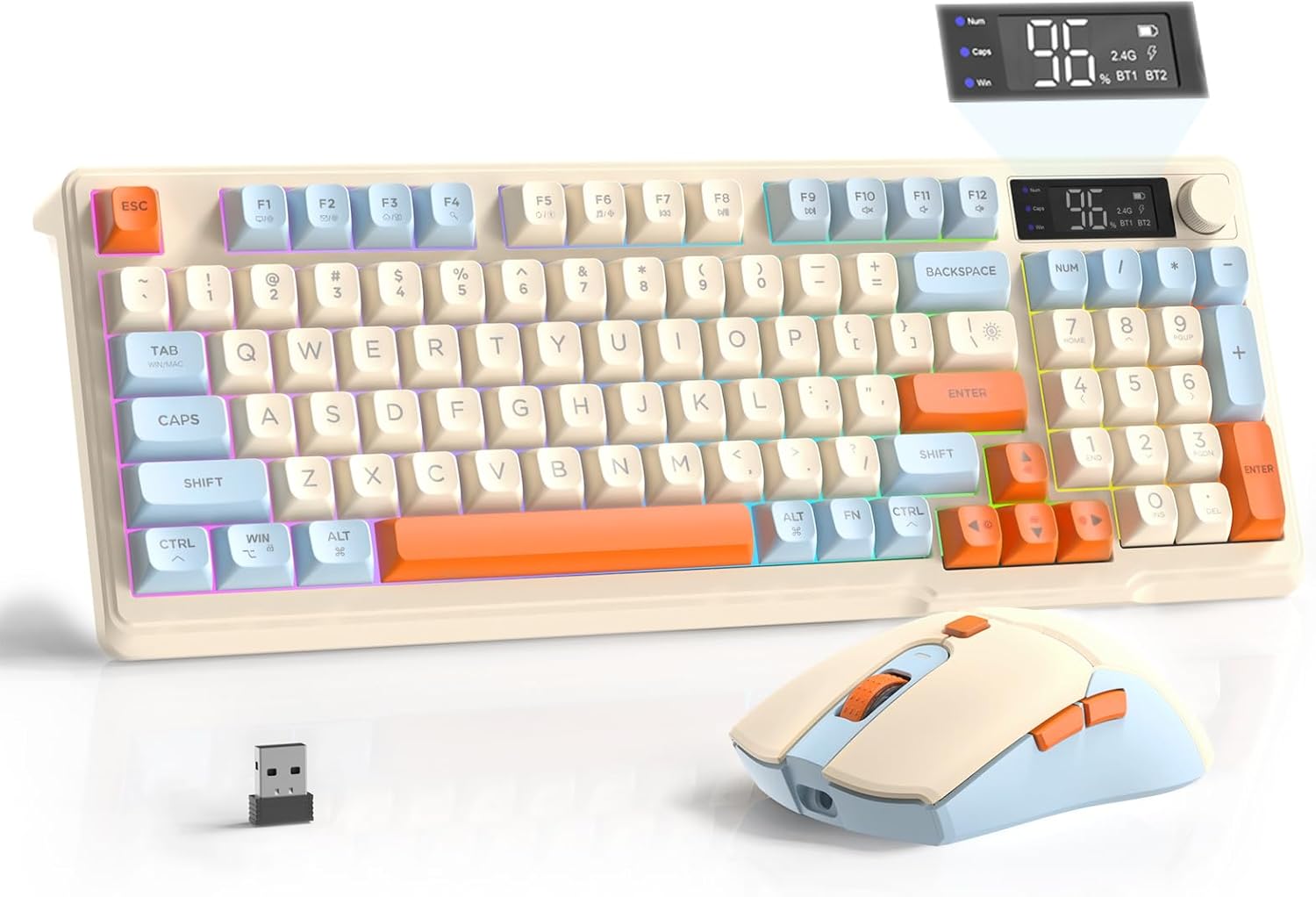
Image: The FREEWOLF T96 Wireless Gaming Keyboard and Mouse Combo, featuring the keyboard, mouse, and USB receiver.
Contenuto della confezione
Assicurarsi che tutti gli articoli siano presenti nel pacco:
- 1 x T96 Membrane Keyboard
- 1 x T96 Wireless Mouse
- 1 cavo USB-C
- 1 x USB Receiver (stored in mouse bottom slot)
- 1 x Manuale utente
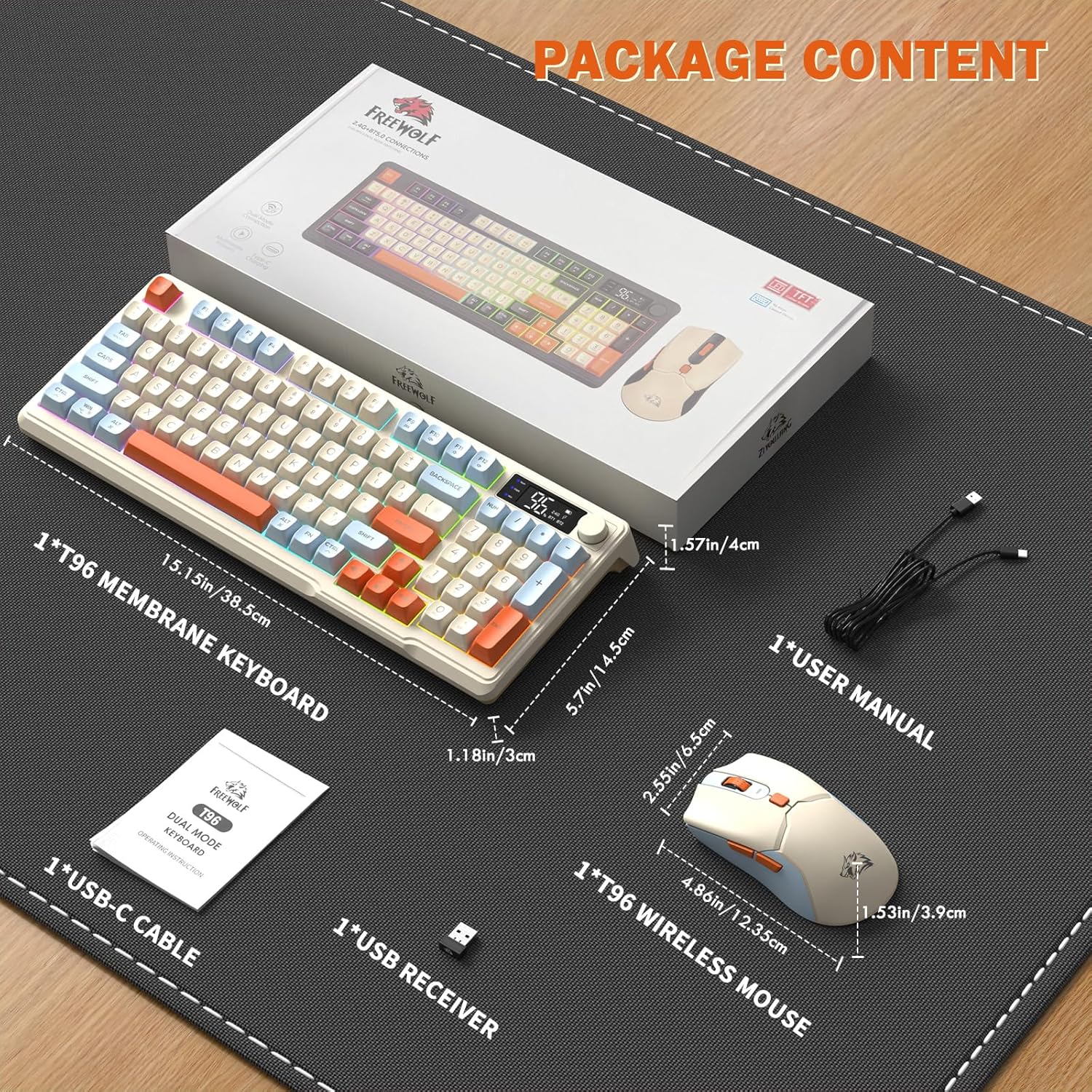
Image: A visual representation of the package contents, including the keyboard, mouse, USB-C cable, USB receiver, and user manual.
Impostare
Opzioni di connettività
The T96 combo supports dual-mode wireless connectivity:
- Connessione wireless 2.4G: Utilizes the included USB receiver for a stable, plug-and-play connection.
- Bluetooth Connections (BT1/BT2): Allows pairing with up to two Bluetooth-enabled devices, enabling seamless switching.
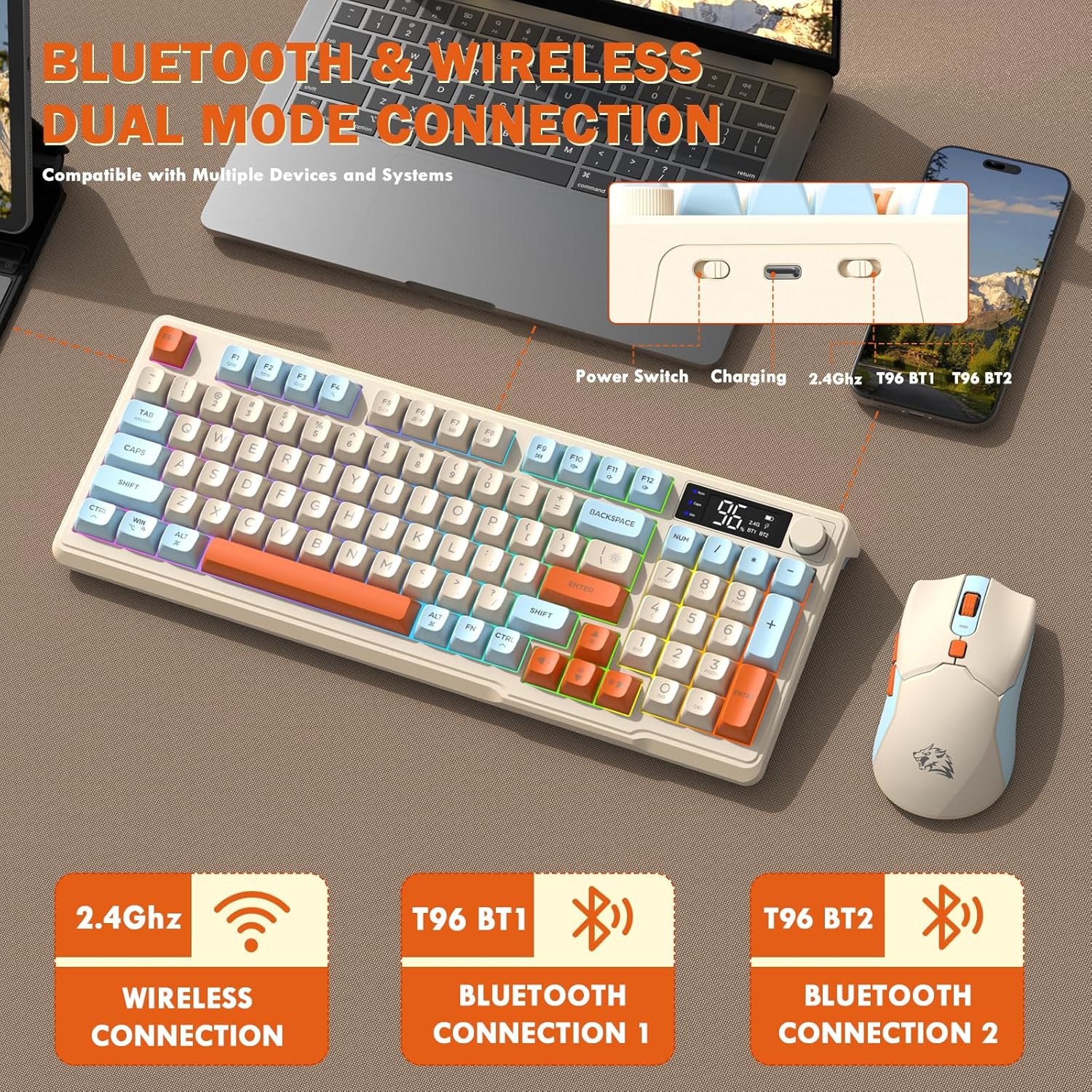
Image: Diagram illustrating the dual-mode connection options (2.4GHz, Bluetooth 1, Bluetooth 2) and the location of the power switch, charging port, and connection indicators on the keyboard.
Passaggi di configurazione iniziale
- Dispositivi di carica: Before first use, fully charge both the keyboard and mouse using the provided USB-C cable. The keyboard has a 2000mAh battery, and the mouse has a 500mAh battery. The smart display on the keyboard will show charging progress.
- Individuare il ricevitore USB: The USB receiver for 2.4G wireless connection is stored in a slot on the bottom of the mouse. Remove it for use.
- Accensione: Accendere la tastiera e il mouse utilizzando i rispettivi interruttori di alimentazione.
- Connect via 2.4G Wireless:
- Inserisci il ricevitore USB in una porta USB disponibile sul tuo computer.
- Ensure the keyboard and mouse are set to 2.4G mode (indicated on the keyboard's smart display). They should connect automatically.
- Connessione tramite Bluetooth:
- Switch the keyboard and mouse to BT1 or BT2 mode.
- On your device (PC, laptop, tablet, smartphone), open Bluetooth settings.
- Cercare "T96 Keyboard" and "T96 Mouse" in the list of available devices and pair them.
- The smart display will indicate the active Bluetooth connection (BT1 or BT2).
Istruzioni per l'uso
Operazione da tastiera
The T96 keyboard features a 94-key compact layout with various functions to enhance your experience.
Funzioni di visualizzazione intelligenti
Il display LED intelligente fornisce informazioni in tempo reale:
- Stato della batteria: Mostra la percentuale di batteria rimanentetage.
- Modalità di connessione: Indicates active connection (2.4G, BT1, BT2).
- Avanzamento della ricarica: Displays charging status when connected to power.
- Caps Lock/Num Lock/Win Lock Indicators: Shows status of these keys.
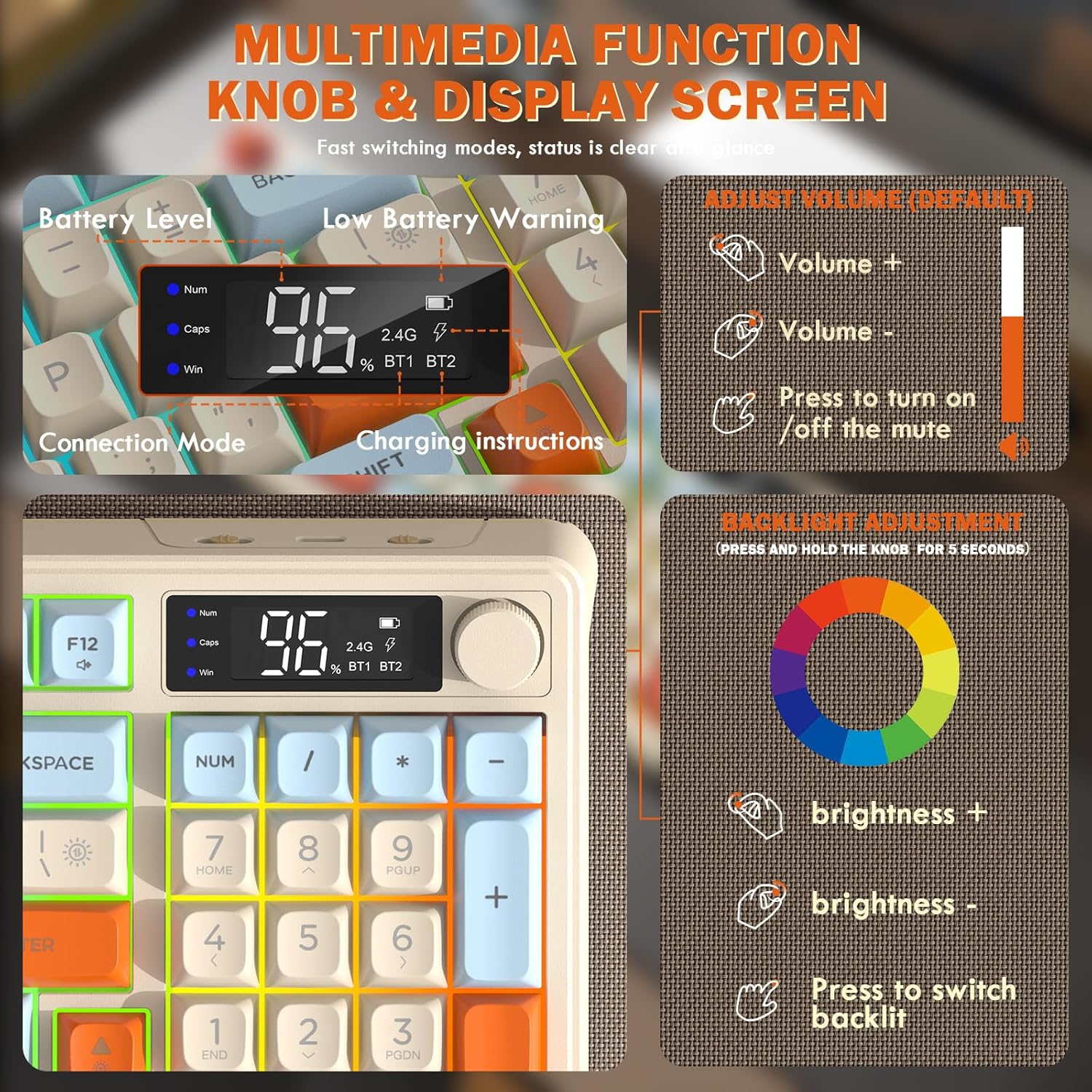
Image: Close-up of the keyboard's smart display showing battery level, connection mode, and charging instructions. Also details the multimedia knob's functions for volume and backlight control.
Multimedia Control Knob
Located on the top right of the keyboard, this knob offers quick control:
- Ruotare: Adjusts system volume (clockwise for volume up, counter-clockwise for volume down).
- Premere: Toggles mute on/off.
- Tenere premuto (5 secondi): Activates backlight adjustment mode. Rotate to change brightness, press to switch light effects.
Multimedia Hotkeys (FN Combinations)
The keyboard includes 12 dedicated multimedia hotkeys accessible via the FN chiave:
- FN + F1-F12: Access various multimedia and system functions (e.g., media playback, volume, browser, email). Refer to keycap legends for specific functions.
Controllo della retroilluminazione
The keyboard features vibrant rainbow LED backlighting. Control it using the following combinations:
- FN + Freccia su: Aumentare la luminosità della retroilluminazione.
- FN + Freccia giù: Ridurre la luminosità della retroilluminazione.
- FN + Freccia destra: Aumentare la velocità della retroilluminazione.
- FN + Freccia sinistra: Ridurre la velocità della retroilluminazione.
- Tasto funzione + \|: Switch between different lighting modes (e.g., always on, breathing, off).
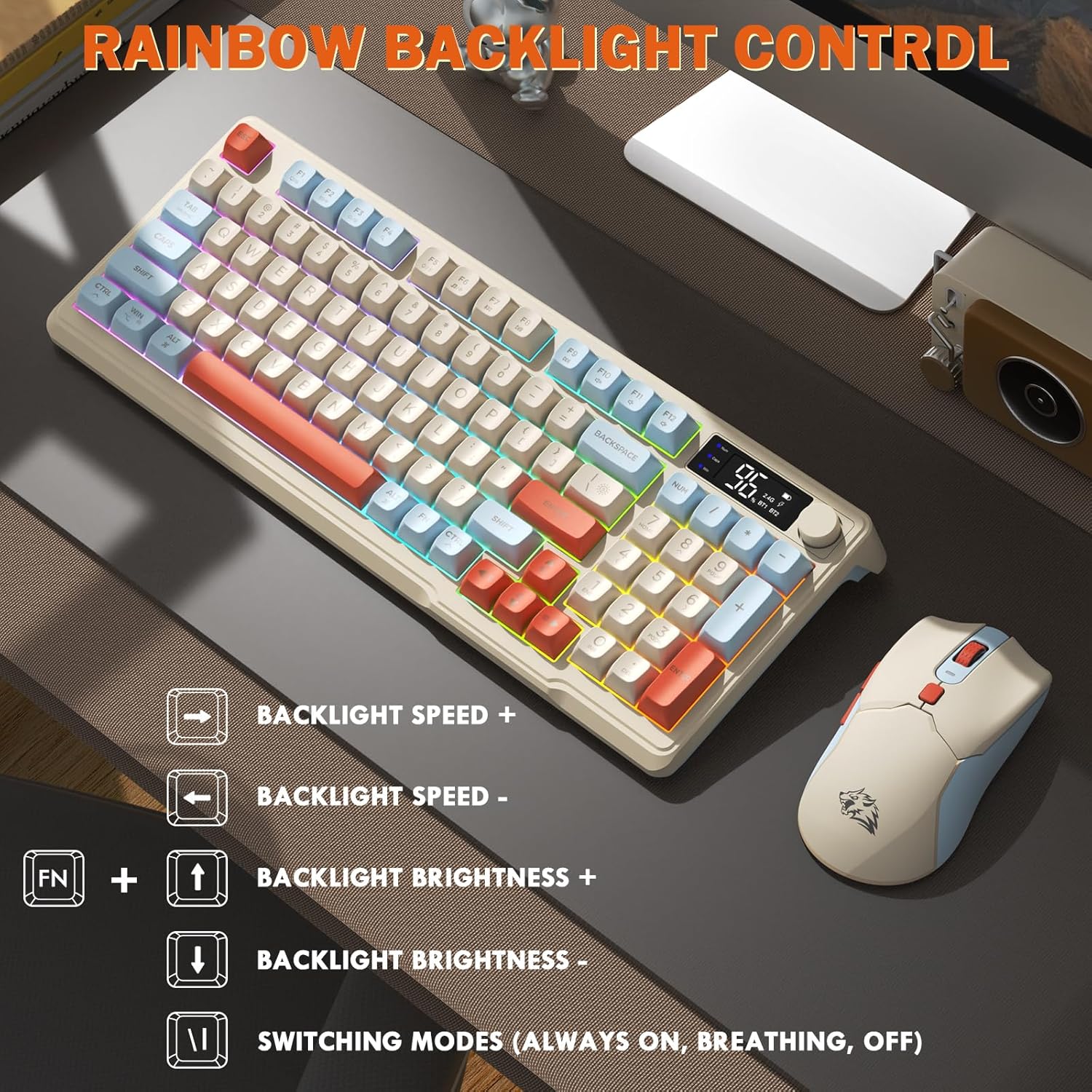
Image: Visual guide for controlling the rainbow LED backlight, showing key combinations for brightness, speed, and mode switching.
Anti-ghosting
The keyboard supports 26-key rollover anti-ghosting technology, ensuring accurate registration of multiple simultaneous key presses, crucial for gaming.
Operazione del mouse
The T96 gaming mouse is designed for precision and comfort.
Regolazione DPI
Adjust the mouse sensitivity (DPI) to suit your preference:
- Premere il tasto Pulsante DPI (located behind the scroll wheel) to cycle through available DPI settings: 800 / 1600 / 2400 / 4000 DPI.
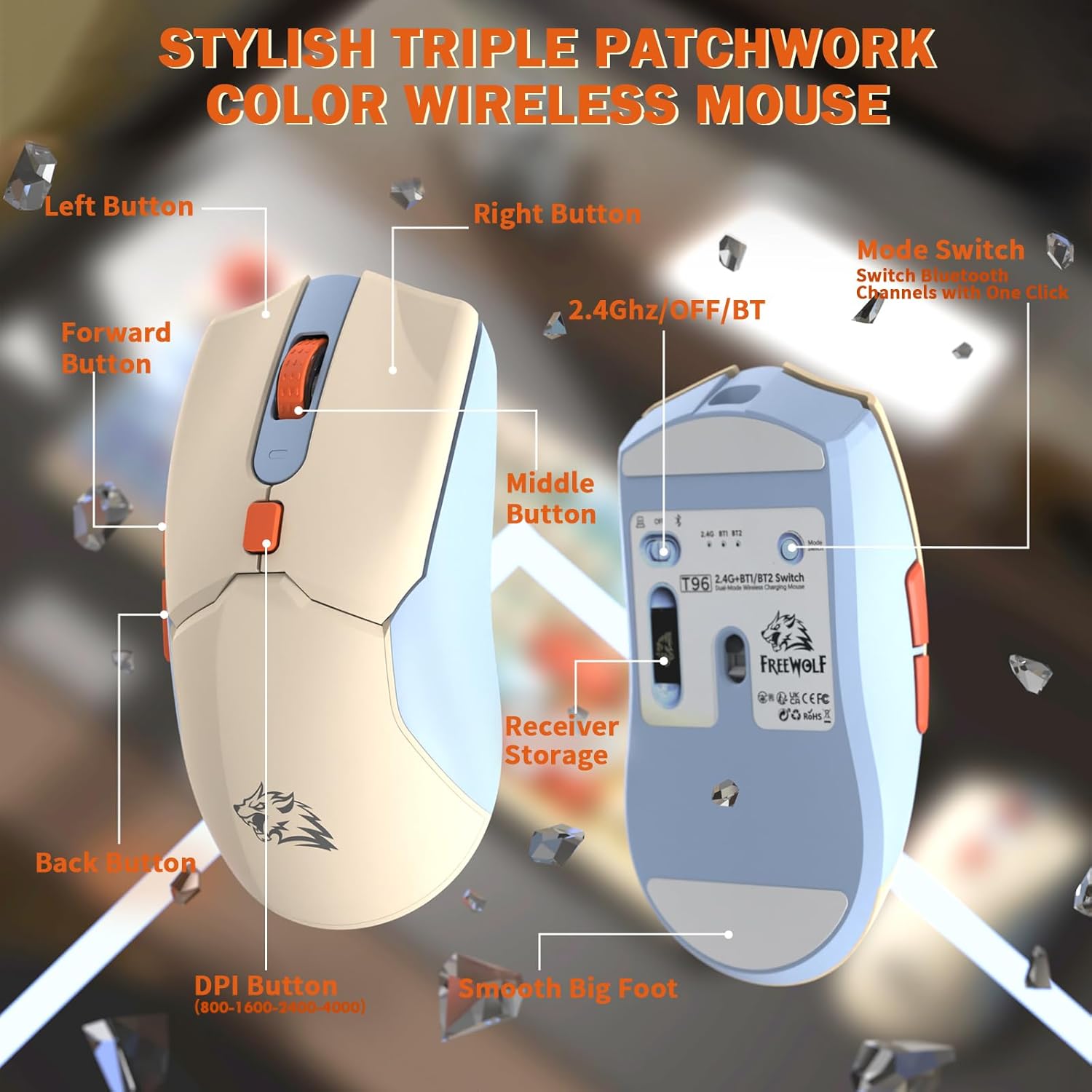
Immagine: dettagliata view of the T96 wireless mouse, highlighting its buttons (Left, Right, Middle, Forward, Back, DPI) and the receiver storage compartment on the bottom.
Pulsanti programmabili
The mouse features six programmable buttons. Refer to specific software (if applicable, not mentioned in data) or operating system settings for customization options.
Tariffe dei sondaggi
The mouse operates at different polling rates depending on the connection mode:
- Bluetooth (BT): 115 Hz
- Wireless 2.4G: 125 Hz
Manutenzione
Pulizia
- Utilizzare un panno morbido e asciutto per pulire le superfici della tastiera e del mouse.
- Per sporco ostinato, leggermente dampBagnare il panno con acqua o un detergente delicato e non abrasivo.
- Evitare l'uso di prodotti chimici aggressivi, solventi o materiali abrasivi, poiché potrebbero danneggiare la finitura.
- Non immergere i dispositivi in acqua o altri liquidi.
Cura della batteria
Per massimizzare la durata e le prestazioni della batteria:
- Recharge the devices when the low battery indicator appears on the keyboard's smart display.
- Evitare di scaricare completamente la batteria frequentemente.
- Conservare i dispositivi in un luogo fresco e asciutto quando non vengono utilizzati per periodi prolungati.
- The devices feature smart power-saving modes: the keyboard enters sleep mode after 3 minutes of inactivity, and the mouse after 2 minutes. They wake instantly upon touch.

Image: Illustration showing the 2000mAh battery capacity of the keyboard and 500mAh battery capacity of the mouse, emphasizing long-lasting power.
Risoluzione dei problemi
If you encounter issues with your T96 combo, refer to the following common solutions:
| Problema | Possibile causa | Soluzione |
|---|---|---|
| Tastiera/mouse non rispondono | Batteria scarica; Modalità di connessione errata; Ricevitore USB non connesso (2.4G); Bluetooth non associato. |
|
| Connessione lenta o intermittente | Interferenza; Distanza dal ricevitore/dispositivo; Batteria scarica. |
|
| La retroilluminazione non funziona o è fioca | Retroilluminazione disattivata; Luminosità impostata troppo bassa; Batteria scarica. |
|
| Il DPI del mouse non cambia | Il pulsante DPI non è stato premuto correttamente. |
|
Specifiche
| Caratteristica | Dettaglio |
|---|---|
| Marca | FREEWOLF |
| Modello | T96 |
| Tecnologia di connettività | 2.4Ghz Wireless, Bluetooth (BT1, BT2) |
| Tipo di tastiera | Membrane, 94-Key Compact Layout |
| keycaps | PBT Triple-Tone Spherical Keycaps |
| Retroilluminazione | Retroilluminazione LED arcobaleno |
| Anti-ghosting | Rollover a 26 tasti |
| Capacità della batteria della tastiera | 2000mAh |
| DPI del mouse | 800 / 1600 / 2400 / 4000 DPI (regolabile) |
| Mouse Polling Rate (BT) | 115 Hz |
| Mouse Polling Rate (2.4G) | 125 Hz |
| Capacità della batteria del mouse | 500mAh |
| Dispositivi compatibili | Laptop, console di gioco, PC, tablet, smartphone |
| Sistemi operativi | Windows, macOS, Linux, iOS, Android |
| Peso dell'articolo | 2.12 libbre (circa 0.96 kg) |
| Dimensioni del pacco | 16.26 x 8.78 x 1.85 pollici (circa 41.3 x 22.3 x 4.7 cm) |
Garanzia e supporto
Le informazioni relative alla garanzia del prodotto e all'assistenza clienti non sono state fornite nei dati disponibili. Fare riferimento alla confezione del prodotto o al manuale d'uso ufficiale del produttore. websito per i dettagli sulla copertura della garanzia e su come contattare l'assistenza clienti per ricevere assistenza.
Ask a question about this manual
Ask about setup, troubleshooting, compatibility, parts, safety, or missing instructions. Manuals+ will review the question and use this page’s manual context to help answer it.