
Introduzione
This manual provides essential information for the setup, operation, maintenance, and troubleshooting of your Protectli Vault Pro VP2430-4 Port Micro Appliance/Mini PC. Please read these instructions carefully before using the device to ensure proper functionality and longevity.
Impostare
Follow these steps to set up your Protectli Vault Pro VP2430-4.
1. Disimballaggio e controllo dei componenti
Disimballare con cura tutti i componenti dalla scatola. Verificare che siano presenti tutti gli articoli:
- Protectli Vault Pro VP2430-4 unit
- Adattatore di alimentazione e cavo
- Mounting bracket and screws (if included)
- USB Type-C console cable
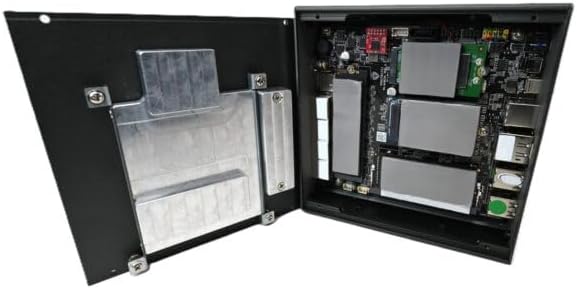
Image: Included accessories, including the power adapter, mounting bracket, screws, and USB console cable.
2. Connessioni fisiche
Connect the necessary cables to the device ports. Refer to the image below for port identification.

Image: Rear panel of the Protectli Vault Pro VP2430-4, displaying various ports including USB, HDMI, DisplayPort, and USB-C console port.
- Energia: Connect the power adapter to the DC 12V input port and then to a power outlet.
- Rete: Connect Ethernet cables to the 2.5G NIC ports (labeled 1-4) as required for your network configuration.
- Display: If a display is needed for initial setup or monitoring, connect a monitor to the HDMI or DisplayPort output.
- Dispositivi USB: Connect any necessary USB peripherals (keyboard, mouse) to the USB 2.0 or USB 3.2 Type C ports.
- Consolle: For serial console access, connect the provided USB Type-C console cable to the console port and your computer.
3. Primo avvio
After all connections are made, press the power button located on the front panel. The device will power on. Since no operating system is pre-installed, you will need to install your preferred firewall or operating system software.
Istruzioni per l'uso
The Protectli Vault Pro VP2430-4 is designed as a micro appliance for network security and mini PC applications. It does not come with a pre-installed operating system, allowing for maximum flexibility.
Compatibilità software
This hardware is tested for compatibility with various open-source firewall software solutions, including OPNsense, pfSense, and VyOS. It also supports other popular open-source software solutions. The device ships with AMI BIOS.
Scenari di utilizzo tipici
- Firewall/Router: Utilize the multiple 2.5G NICs to create a robust and secure network gateway.
- MiniPC: Install a lightweight operating system for various computing tasks.
- Virtualizzazione: Deploy hypervisors for running virtual machines.
Manutenzione
Una manutenzione regolare garantisce prestazioni ottimali e longevità del tuo dispositivo.
Pulizia
To clean the exterior of the device, use a soft, dry cloth. Avoid using liquid cleaners or solvents, as these can damage the finish or internal components. Ensure the device is powered off and unplugged before cleaning.
Aggiornamenti del firmware
Controllare periodicamente il Protectli website for BIOS/firmware updates. Updating the firmware can improve stability, performance, and security. Follow the instructions provided with the firmware update package carefully.
Hardware Upgrades (RAM/Storage)
The Protectli Vault Pro VP2430-4 supports upgrades for RAM and M.2 SATA SSD storage. To perform an upgrade:
- Spegnere il dispositivo e scollegare tutti i cavi.
- Carefully remove the screws securing the bottom cover.
- Gently lift the cover to expose the internal components.

Immagine: Interna view of the Protectli Vault Pro VP2430-4, showing the motherboard, RAM slots, and M.2 SSD slots.
Locate the SODIMM DDR5 RAM slots and M.2 SATA SSD slot. Install or replace components according to their respective instructions. Ensure components are seated correctly before reattaching the cover and screws.
Risoluzione dei problemi
Questa sezione affronta i problemi più comuni che potresti incontrare.
Nessun potere
- Assicurarsi che l'adattatore di alimentazione sia collegato saldamente al dispositivo e a una presa di corrente funzionante.
- Verificare che la presa di corrente funzioni collegandovi un altro dispositivo.
- Controllare che l'adattatore di alimentazione non presenti danni visibili.
Nessuna uscita di visualizzazione
- Confirm the monitor is powered on and correctly connected to the device's HDMI or DisplayPort.
- Provare un cavo di visualizzazione o un monitor diverso.
- Assicurati che sul tuo monitor sia selezionata la sorgente di input corretta.
Problemi di connettività di rete
- Check that Ethernet cables are securely connected to both the device and your network equipment.
- Verify the status indicator lights on the Ethernet ports.
- Ensure your installed operating system or firewall software is correctly configured for network interfaces.
Specifiche
| Modello | VP2430 |
| processore | Intel N150 Quad Core (up to 3.6GHz, 6MB Cache) |
| Memoria RAM | 32 GB di RAM SO-DIMM DDR5 |
| Magazzinaggio | 1000GB NVMe SSD, 32GB eMMC on-board |
| Interfacce di rete | 4x Intel I226-V 2.5G NICs |
| Porte USB | 2x USB 3.2 Type C with DisplayPort, 4x USB 2.0 Type A, 1x USB Type C Console |
| Uscita video | 1x HDMI, 1x DisplayPort (via USB-C) |
| Coprocessore grafico | Grafica Intel UHD 630 |
| Piattaforma hardware | PC |
| Dimensioni (LxWxH) | 5.67 x 5.63 x 2.17 pollici |
| Peso | 4.1 libbre |
| Fonte di alimentazione | DC |
| Batterie | È necessaria 1 batteria CR2 (inclusa) |
Garanzia e supporto
Informazioni sulla garanzia
Your Protectli Vault Pro VP2430-4 comes with a 30-day money-back guarantee. For specific warranty terms and conditions, please refer to the official Protectli websito o contattare l'assistenza clienti.
Assistenza clienti
Protectli offers US-based customer support to assist you with any questions or issues. Our dedicated team is available to provide technical assistance and guidance.
Per supporto, visita il sito Protectli Store or refer to the contact information provided with your product documentation.