
Element Element 2023
Manuale utente TV Element 43" frameless 4K UHD HDR XUMO
Model: Element 2023
1. Introduzione
This manual provides essential information for setting up, operating, and maintaining your Element 43-inch Frameless 4K UHD HDR XUMO TV. Please read it thoroughly before using your television to ensure proper functionality and safety.
The Element XUMO TV offers a breathtaking viewing experience with its 4K Ultra HD resolution, delivering clear and detailed images. Enhanced color and contrast are provided by Dolby Vision and HDR technology, ensuring an immersive experience even in dark scenes. Dolby Audio contributes to superior sound quality for movies and games. A 120Hz effective refresh rate ensures smooth motion during fast-paced content.

Immagine 1.1: anteriore view of the Element 43" XUMO TV.
2. Cosa c'è nella scatola
Si prega di controllare il contenuto del pacco per assicurarsi che siano presenti tutti gli articoli:
- 1 Element Xumo TV 43"
- 1 Xumo TV remote control (batteries included)
- 1 Guida rapida
- 1 TV stand + hardware
3. Impostazione
3.1 Disimballaggio
- Carefully remove the TV from its packaging. It is recommended to have two people for this step due to the size and weight of the television.
- Posizionare lo schermo del televisore su una superficie morbida e piana, con lo schermo rivolto verso il basso, per evitare graffi.
- Rimuovere tutte le pellicole protettive e i materiali di imballaggio.
3.2 Fissaggio del supporto
Per fissare il supporto TV:
- Identificare la gamba sinistra e quella destra del supporto.
- Allineare ciascuna gamba del supporto con i fori delle viti corrispondenti nella parte inferiore del televisore.
- Secure the stand legs using the provided hardware (screws). Do not overtighten.
- Sollevare con cautela il televisore in posizione verticale su una superficie stabile e piana.
3.3 Collegamento delle periferiche
Connect your external devices (e.g., cable box, gaming console, Blu-ray player) to the appropriate ports on the back of the TV. Refer to the Quick Start Guide for port locations.
3.4 Accensione iniziale
- Collegare il cavo di alimentazione al televisore e poi a una presa a muro.
- Premere il pulsante di accensione sul telecomando o sul televisore stesso.
- Follow the on-screen instructions to complete the initial setup, including network connection and channel scanning.
4. Istruzioni per l'uso
4.1 Funzioni del telecomando
The included XUMO TV remote control allows you to navigate the TV's features. It includes an advanced voice remote function for easy content search.
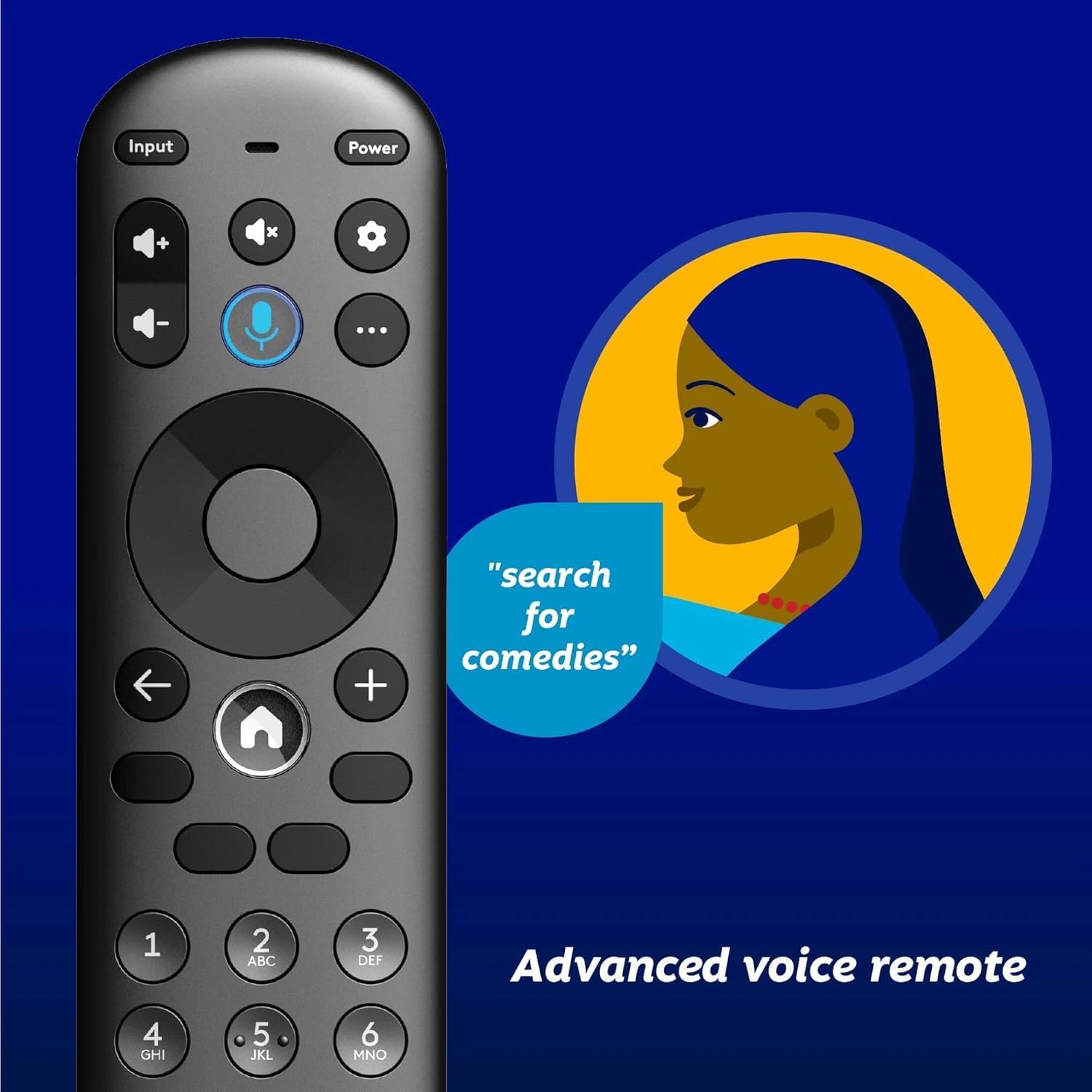
Image 4.1: Element XUMO TV advanced voice remote control.
- Energia: Accende o spegne la TV.
- Ingresso: Seleziona la sorgente di ingresso (HDMI, AV, ecc.).
- Pulsante vocale: Activates voice commands for searching content or controlling the TV.
- Pad di navigazione: Utilizzato per spostarsi nei menu e selezionare le opzioni.
- Pulsante Home: Returns to the XUMO TV home screen.
- Volume +/-: Regola il livello del volume.
- Canale +/-: Cambia canale TV.
4.2 Smart TV Features (XUMO)
Your Element TV features a built-in XUMO TV experience, providing access to over 250 pre-loaded apps and streaming services.

Image 4.2: XUMO TV smart interface with streaming applications.
- Applicazioni di streaming: Access thousands of movies, TV shows, and music from platforms like Netflix, YouTube, Disney+, Prime Video, Peacock, and more.
- Canali in diretta: Explore over 750 free live channels, including news, sports, and kids' programming, from Xumo Play, Tubi, Pluto TV, and others.
- Contenuto personalizzato: The XUMO interface is designed to help you stream easily, bringing together content in one simple view.
4.3 Connettività
- Wifi: Collegati alla rete wireless di casa per accedere a Internet e guardare contenuti in streaming.
- Bluetooth: Easily pair your TV with compatible Bluetooth devices such as speakers, headphones, or game controllers.
- Apple AirPlay & Home: Mirror your smartphone, iPad, or Mac screen to the TV, stream media, and control your TV directly from Apple devices.
5. Manutenzione
5.1 Pulizia dello schermo
- Spegnere il televisore e scollegarlo dalla presa di corrente.
- Pulire delicatamente lo schermo con un panno morbido, asciutto e privo di lanugine.
- Per segni ostinati, leggermente dampInumidire il panno con acqua o con un detergente specifico per schermi (non spruzzare direttamente sullo schermo).
- Evitare l'uso di prodotti chimici aggressivi, abrasivi o detergenti a base di alcol.
5.2 Cura generale
- Tenere il televisore lontano dalla luce solare diretta, da fonti di calore e da polvere eccessiva.
- Garantire un'adeguata ventilazione attorno al televisore per evitare il surriscaldamento.
- Non posizionare oggetti pesanti sopra il televisore.
6. Risoluzione Dei Problemi
Se riscontri problemi con il tuo televisore, fai riferimento ai seguenti problemi comuni e alle relative soluzioni:
- Nessun potere:
- Assicurarsi che il cavo di alimentazione sia collegato saldamente sia al televisore sia a una presa elettrica funzionante.
- Verificare che la presa funzioni collegandovi un altro dispositivo.
- Prova a premere il pulsante di accensione sul televisore stesso, non solo sul telecomando.
- Nessuna immagine, ma c'è l'audio:
- Verificare che sia selezionata la sorgente di input corretta (ad esempio, HDMI 1, AV).
- Controllare tutti i collegamenti dei cavi tra la TV e i dispositivi esterni.
- Riavviare la TV e tutti i dispositivi collegati.
- Nessun suono, ma c'è l'immagine:
- Controllare il livello del volume e assicurarsi che l'audio della TV non sia disattivato.
- Se si utilizzano altoparlanti esterni, assicurarsi che siano correttamente collegati e accesi.
- Controllare le impostazioni di uscita audio nel menu TV.
- Il telecomando non funziona:
- Sostituire le batterie del telecomando.
- Assicurarsi che non vi siano ostacoli tra il telecomando e il sensore IR del televisore.
- Re-pair the remote if it's a Bluetooth remote (refer to the Quick Start Guide for pairing instructions).
- Problemi di connessione di rete:
- Riavvia il router e il modem Wi-Fi.
- Check the Wi-Fi settings on the TV to ensure it's connected to the correct network.
- If possible, try connecting the TV to the internet via an Ethernet cable.
7. Specifiche
Key technical specifications for the Element 43" Frameless 4K UHD HDR XUMO TV:
| Caratteristica | Descrizione |
|---|---|
| Nome del marchio | Elemento |
| Nome del modello | Elemento 2023 |
| Dimensioni dello schermo | 43 pollici (110 cm) |
| Tecnologia di visualizzazione | GUIDATO |
| Risoluzione | 4K Ultra HD |
| Caratteristiche speciali | 4K High Definition, HDR (High Dynamic Range), Vibrant Colors, 60 Hz, Dolby Vision, HDR10+ |
| Frequenza di aggiornamento effettiva | 120 Hz |
| Tecnologia audio | Audio Dolby |
| Servizi Internet supportati | Netflix, Prime Video, Max, Disney Plus, YouTube TV, Paramount+, Apple TV+, Crunchyroll, Xumo Play, Tubi, Pluto TV |
| Tecnologia di connettività | Wired, Wireless (Wi-Fi, Bluetooth, Apple AirPlay) |
| Proporzioni | 16:9 |
| Peso dell'articolo | 22 libbre |
| Dimensioni del prodotto | 3.3 x 37 x 225 pollici |
7.1 Caratteristiche della qualità dell'immagine

Image 7.1: Dolby Vision technology enhances highlights and darks for superior contrast.

Image 7.2: 120Hz Effective Refresh Rate for smooth motion.

Image 7.3: 4K resolution delivers vivid colors and remarkable detail.
8. Garanzia e supporto
This product is an Amazon Renewed item. Amazon Renewed products are backed by the Amazon Renewed Guarantee. This means your purchase is eligible for a replacement or refund within 90 days of receipt if it does not work as expected.
For specific warranty details or support inquiries, please refer to the documentation provided with your Amazon Renewed purchase or visit the Amazon Renewed support page.
Ask a question about this manual
Ask about setup, troubleshooting, compatibility, parts, safety, or missing instructions. Manuals+ will review the question and use this page’s manual context to help answer it.