
1. Introduzione
This manual provides detailed instructions for the assembly, operation, and maintenance of your DEVAISE 55 Inch Electric Standing Desk. Designed for home and office use, this ergonomic desk features adjustable height, an LED touchscreen controller with memory presets, and a headphone hook for convenience. Please read this manual thoroughly before assembly and use to ensure proper function and safety.

Figure 1.1: The DEVAISE 55 Inch Electric Standing Desk, showcasincon il suo spazioso desktop bianco e la sua robusta struttura, dotato di due monitor, un computer portatile e vari accessori per ufficio.
2. Informazioni sulla sicurezza
Per evitare lesioni o danni alla scrivania, osservare le seguenti precauzioni di sicurezza:
- Prima di utilizzare la scrivania, assicurarsi che tutti i collegamenti siano saldi.
- Keep hands, feet, and objects clear of the moving parts (legs, crossbars) during height adjustments.
- Non sovraccaricare la scrivania. La capacità massima di carico è di 81.6 kg.
- Non permettere ai bambini di utilizzare la scrivania senza supervisione.
- Use the desk only on a flat, stable surface.
- Scollegare l'alimentazione prima di effettuare operazioni di pulizia o manutenzione.
- This product meets CA Prop 65 & federal safety requirements for toxin-free air quality.
3. Contenuto della confezione
Prima di iniziare il montaggio, verificare che tutti i componenti siano presenti:
- Desktop (55"W x 28"D)
- Gambe per scrivania (2)
- piedi (2)
- Scatola di controllo
- LED Touchscreen Controller
- Gancio per cuffie
- Tutto l'hardware necessario (viti, bulloni, utensili)
- Manuale di istruzioni
4. Istruzioni di montaggio
The DEVAISE Electric Standing Desk is designed for hassle-free installation with pre-drilled screw holes and labeled parts. Assembly typically takes less than 30 minutes. A Phillips head screwdriver (not included) is required.
- Disimballare i componenti: Estrarre con cautela tutti i componenti dall'imballaggio e disporli su una superficie pulita e morbida per evitare graffi.
- Montare la struttura della scrivania: Attach the desk legs to the crossbar and feet using the provided hardware. Ensure all connections are tightened securely.
- Allega Desktop: Place the desktop upside down on the soft surface. Align the pre-drilled holes on the desktop with the frame. Secure the desktop to the frame using the provided screws. Note: The desktop may consist of two pieces joined by wooden dowel rods. For added stability, consider applying wood glue to these joints during assembly.
- Install Control Box and Controller: Mount the control box and LED touchscreen controller to the underside of the desktop in the designated areas. Connect all cables according to the wiring diagram in the detailed instructions.
- Fissare il gancio per le cuffie: Secure the headphone hook to the desired location on the side of the desk.
- Gestione dei cavi: Use the included cable ties or clips to manage and secure all power and control cables, preventing tangles and ensuring safe operation.
- Scrivania ribaltabile verticale: Con l'aiuto di qualcuno, capovolgi con cautela la scrivania assemblata in verticale e posizionala nella posizione desiderata.

Figure 4.1: Simplified components for quick and easy assembly.
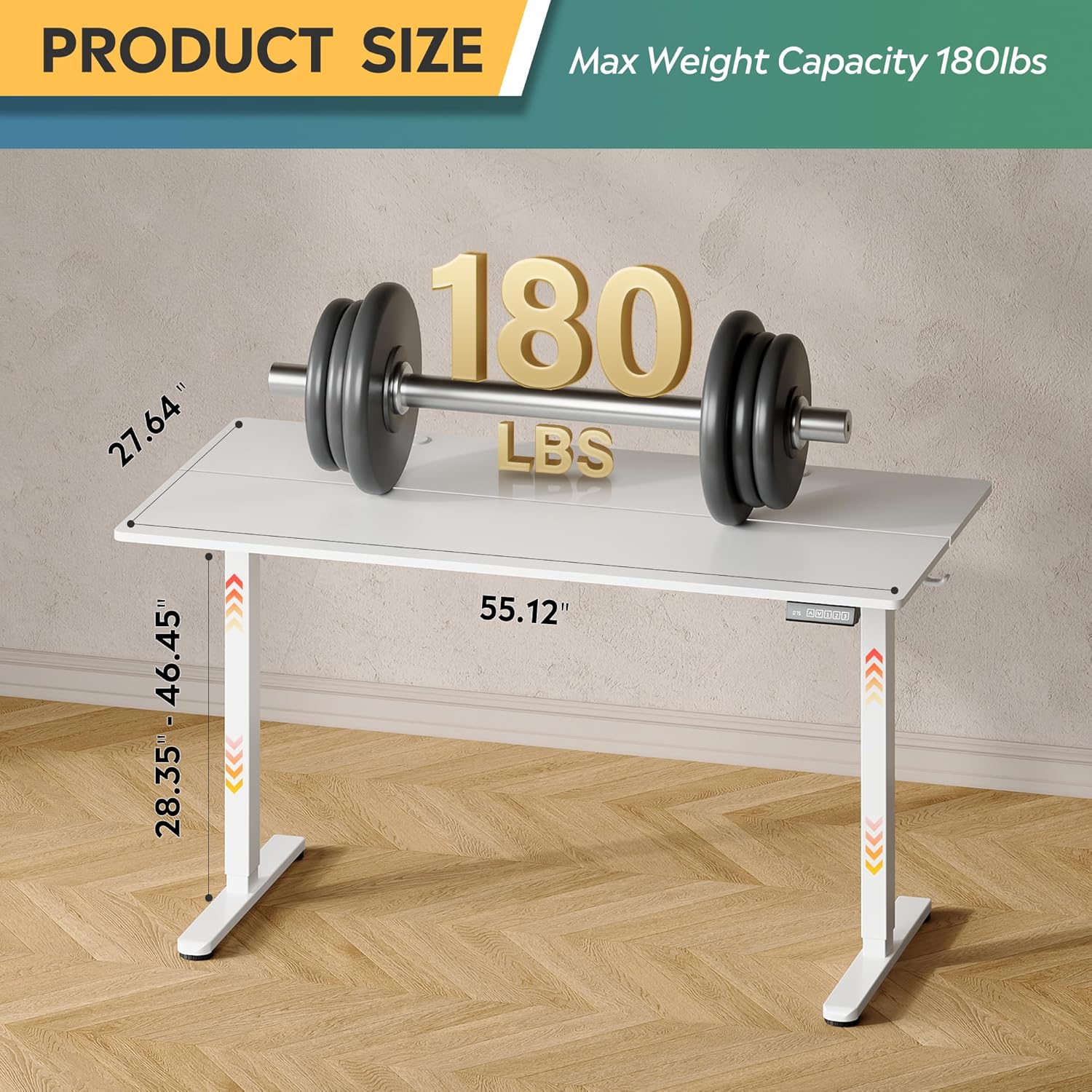
Figure 4.2: Desk dimensions and maximum weight capacity of 180 lbs.
5. Istruzioni per l'uso
Your DEVAISE Electric Standing Desk features a tri-motor system for quiet and smooth height adjustments and an intuitive LED touchscreen controller.
5.1. Regolazione dell'altezza
The desk's height can be adjusted from 28.35 inches (sitting height) to 46.45 inches (standing height).
- Alza la scrivania: Premere e tenere premuto il tasto UP arrow button on the controller. The desk will move upwards. Release the button at your desired height.
- Scrivania inferiore: Premere e tenere premuto il tasto GIÙ arrow button on the controller. The desk will move downwards. Release the button at your desired height.

Figure 5.1: Adjustable height range from 28.35" to 46.45".
5.2. Preimpostazioni di memoria
The LED touchscreen controller allows you to store and recall up to three personalized height settings.
- Imposta una preimpostazione di memoria:
- Regolare la scrivania all'altezza desiderata utilizzando i pulsanti SU/GIÙ.
- Premere il tasto S button (Set). The LED display will flash.
- Premere uno dei pulsanti di memoria (1, 2, O 3) within 5 seconds. The height is now saved to that button.
- Richiamare una preimpostazione di memoria: Basta premere il pulsante di memoria corrispondente (1, 2, O 3). La scrivania si sposterà automaticamente all'altezza salvata.

Figure 5.2: Multi-function LED touchscreen control panel.
5.3. Funzionamento silenzioso
The desk's tri-motor system operates at a whisper-quiet level of less than 50dB, ensuring minimal disruption in your workspace.

Figura 5.3: La scrivania funziona silenziosamente, al di sotto dei 50 dB.
6. Manutenzione
Regular maintenance will help prolong the life of your DEVAISE Electric Standing Desk:
- Pulizia: Pulisci il desktop e la cornice con un panno morbido eamp panno. Evitare prodotti chimici aggressivi o detergenti abrasivi.
- Controllare le connessioni: Controllare periodicamente tutte le viti e i collegamenti per assicurarsi che siano ben serrati. Serrare nuovamente se necessario.
- Gestione dei cavi: Ensure cables are neatly organized and not pinched or stressed.
7. Risoluzione Dei Problemi
Se riscontri problemi con la tua scrivania, fai riferimento ai seguenti problemi comuni e alle relative soluzioni:
| Problema | Possibile causa | Soluzione |
|---|---|---|
| La scrivania non si muove. | No power; loose connection; motor error. | Check power cord connection. Ensure all cables are securely plugged into the control box and motor. Unplug and replug the power cord to reset. |
| La scrivania si muove in modo irregolare o produce rumori insoliti. | Sovraccarico; ostruzione; componenti allentati. | Ridurre il peso sulla scrivania. Verificare la presenza di eventuali ostacoli sotto o intorno alla scrivania. Assicurarsi che tutte le viti di montaggio siano serrate. |
| Il display LED mostra un codice di errore. | Errore di sistema specifico. | Refer to the detailed error code list in the full product manual (if available) or contact customer support. Often, a power cycle (unplugging for 30 seconds and replugging) can resolve temporary errors. |
8. Specifiche
| Caratteristica | Dettaglio |
|---|---|
| Numero di modello | ASJZ023-new |
| Dimensioni del prodotto (P x L x A) | 23.62"P x 55"L x 28.34"A |
| Intervallo di altezza regolabile | Da 28.35" a 46.45" |
| Numero di posizioni in altezza | 3 (Preimpostazioni di memoria) |
| Capacità massima di peso | 180 libbre |
| Peso dell'articolo | 37 libbre |
| Materiale del desktop | Legno ingegnerizzato |
| Materiale di base | Iron / Steel |
| Colore | Bianco |
| Livello di rumore del motore | <50dB |
| Caratteristiche speciali | Adjustable Height, Electric, Ergonomic, LED Touchscreen, Headphone Hook |
9. Garanzia e supporto
Your DEVAISE Electric Standing Desk comes with a limited warranty. For specific warranty terms and conditions, please refer to the documentation included with your purchase or contact DEVAISE customer support.
9.1. Resi
This product is eligible for 30-day easy returns. Please refer to your retailer's return policy for details.
9.2. Piani di protezione
Optional 2-Year and 3-Year Protection Plans may be available for purchase separately to extend coverage beyond the standard limited warranty.
9.3. Assistenza clienti
If you have any questions regarding assembly, operation, troubleshooting, or product selection, please contact our U.S.-based product support team. Contact information can typically be found on the DEVAISE official websito o sulla ricevuta d'acquisto.