
Manuale utente della stazione di alimentazione portatile ALLPOWERS S300LUS
Modello: AP-SS-005
Thank you for choosing ALLPOWERS. Please read this manual carefully before use and retain it for future reference.
1. Istruzioni di sicurezza
To ensure safe operation and prolong the lifespan of your ALLPOWERS S300LUS Portable Power Station, please observe the following safety guidelines:
- Non smontare, riparare o modificare l'unità. Un rimontaggio non corretto potrebbe causare incendi o lesioni.
- Non esporre l'unità al fuoco o a temperature estreme (superiori a 60°C / 140°F).
- Non utilizzare o conservare l'unità in un bagno o in aree esposte all'acqua o a elevata umidità.
- Do not use or store the unit near heat sources such as stoves or heaters.
- Evitare cadute, urti violenti o forti vibrazioni.
- Tenere fuori dalla portata dei bambini e degli animali domestici.
- Utilizzare solo accessori originali o certificati.
- If the unit emits unusual odors, generates heat, or shows any other abnormality, discontinue use immediately and contact customer support.
- Smaltire il prodotto secondo le normative locali. Non smaltire con i rifiuti domestici.
2. Prodotto finitoview
The ALLPOWERS S300LUS is a compact and portable power station designed to provide reliable power for various devices. It features multiple output ports, wireless charging, and several recharging options.
Contenuto della confezione:
- 1 x ALLPOWERS Portable Power Station (S300LUS)
- 1 x AC Adapter and Charging Cable
- 1 x Manuale utente
Caratteristiche principali:
- Capacità: 288 Wh / 78000 mAh
- Uscita CA: 300 W (onda sinusoidale pura, picco 600 W)
- Uscite multiple: AC, USB-A, USB-C, 12V Car Charger, Wireless Charging
- Opzioni di ricarica: AC, Solar, Car Charger, AC + Solar, AC + Car Charger
- Design compatto: 8.1 x 6.5 x 4.3 inches, 8.8 pounds with built-in handle
- Luce di emergenza: Luce LED integrata
- Controllo intelligente: Bluetooth app compatibility (iOS 9.0+, Android 4.3+)
- Sicurezza: Built-in Battery Management System (BMS) for protection against overcurrent, overload, overheating, and short circuits.
Identificazione dei componenti:

Immagine: Frontale view of the ALLPOWERS S300LUS Portable Power Station, showing the display, AC outlet, USB ports, DC input, and handle.
- AC Output Port (US Standard)
- Tappetino di ricarica wireless
- Schermo LCD
- Pulsante di alimentazione CA
- Pulsante di accensione CC/USB
- Porte di uscita USB-A (2x)
- Porta di uscita USB-C (PD 100 W)
- 12V Car Charger Output
- Luce LED di emergenza
- Maniglia
3. Configurazione e utilizzo iniziale
Disimballaggio:
Carefully remove the power station and all accessories from the packaging. Inspect for any damage. If any components are missing or damaged, contact customer support immediately.
Carica iniziale:
Before first use, it is recommended to fully charge the ALLPOWERS S300LUS. This ensures optimal battery performance and calibration.
- Connect the provided AC adapter to the DC Input Port (9) on the power station.
- Collegare l'adattatore CA a una presa a muro standard.
- The LCD display (3) will show the charging status. The battery icon will animate, and the percentage aumenterà.
- Charging is complete when the battery icon is full and the display shows 100%.
Initial AC charging typically takes approximately 1.5 hours (Max. 200W).
4. Istruzioni per l'uso
Accensione/spegnimento:
- To turn on the unit, press and hold the AC Power Button (4) or DC/USB Power Button (5) for 3 seconds. The LCD display will illuminate.
- To turn off the unit, press and hold the respective power button (AC or DC/USB) for 3 seconds.
- If no output is detected, the unit will automatically shut down after a period of inactivity to conserve power.
Utilizzo dell'uscita CA:
- Press the AC Power Button (4) to activate the AC output. The AC icon will appear on the LCD display.
- Plug your AC device into the AC Output Port (1).
- Ensure your device's power consumption does not exceed 300W (or 600W peak). Overloading will trigger protection and shut down the AC output.
- When finished, press the AC Power Button (4) again to turn off the AC output.
Utilizzo delle uscite DC/USB:
- Press the DC/USB Power Button (5) to activate the DC and USB outputs. The DC and USB icons will appear on the LCD display.
- Connect your devices to the USB-A Ports (6), USB-C Port (7), or 12V Car Charger Output (8).
- The USB-C port supports Power Delivery (PD) up to 100W.
- When finished, press the DC/USB Power Button (5) again to turn off these outputs.
Ricarica wireless:
- Press the DC/USB Power Button (5) to activate the wireless charging function.
- Place your Qi-compatible device on the Wireless Charging Pad (2).
- Per una ricarica ottimale, assicurarsi che il dispositivo sia centrato sul pad.
- When finished, press the DC/USB Power Button (5) again to turn off wireless charging.

Image: Visual representation of the six output options available on the power station, including AC, USB-C, USB-A, wireless charging, and car charger, with examples of devices being powered.
Luce LED di emergenza:
- To turn on the LED light, short press the LED Light button (usually integrated with the DC/USB button or a separate button, refer to unit for exact location).
- Press again to cycle through brightness levels or SOS mode (if available).
- Tenere premuto per spegnere la luce LED.
Ricarica della stazione elettrica:
The S300LUS offers multiple ways to recharge:

Image: Infographic detailing the five different ways to recharge the power station: AC, Solar, Car Charger, AC+Solar, and AC+Car Charger, along with estimated charging times.
- AC Wall Outlet (Max. 200W): Connect the provided AC adapter to the DC Input Port (9) and a wall outlet. Approximately 1.5 hours.
- Solar Panel (Max. 100W MPPT): Connect a compatible solar panel (sold separately) to the DC Input Port (9). Ensure the solar panel is placed in direct sunlight. Approximately 3-4 hours (depending on sunlight intensity).
- Car Charger (Max. 100W): Connect a car charger adapter (not included, typically) to the DC Input Port (9) and your vehicle's 12V cigarette lighter socket. Approximately 3-4 hours.
- AC + Solar (Max. 300W): Combine AC wall charging and solar panel charging for faster recharge. Approximately 1 hour.
- AC + Car Charger (Max. 300W): Combine AC wall charging and car charger for faster recharge. Approximately 1 hour.
Note: Charging times are estimates and may vary based on environmental conditions and power source.
Controllo app Bluetooth:
The ALLPOWERS S300LUS can be controlled remotely via the ALLPOWERS app.
- Download the "ALLPOWERS" app from the App Store (iOS 9.0+) or Google Play Store (Android 4.3+).
- Assicurati che il Bluetooth sia abilitato sul tuo smartphone.
- Open the app and follow the on-screen instructions to pair with your S300LUS power station.
- Once connected, you can monitor battery status, control outputs, and adjust settings within a 10-meter range.
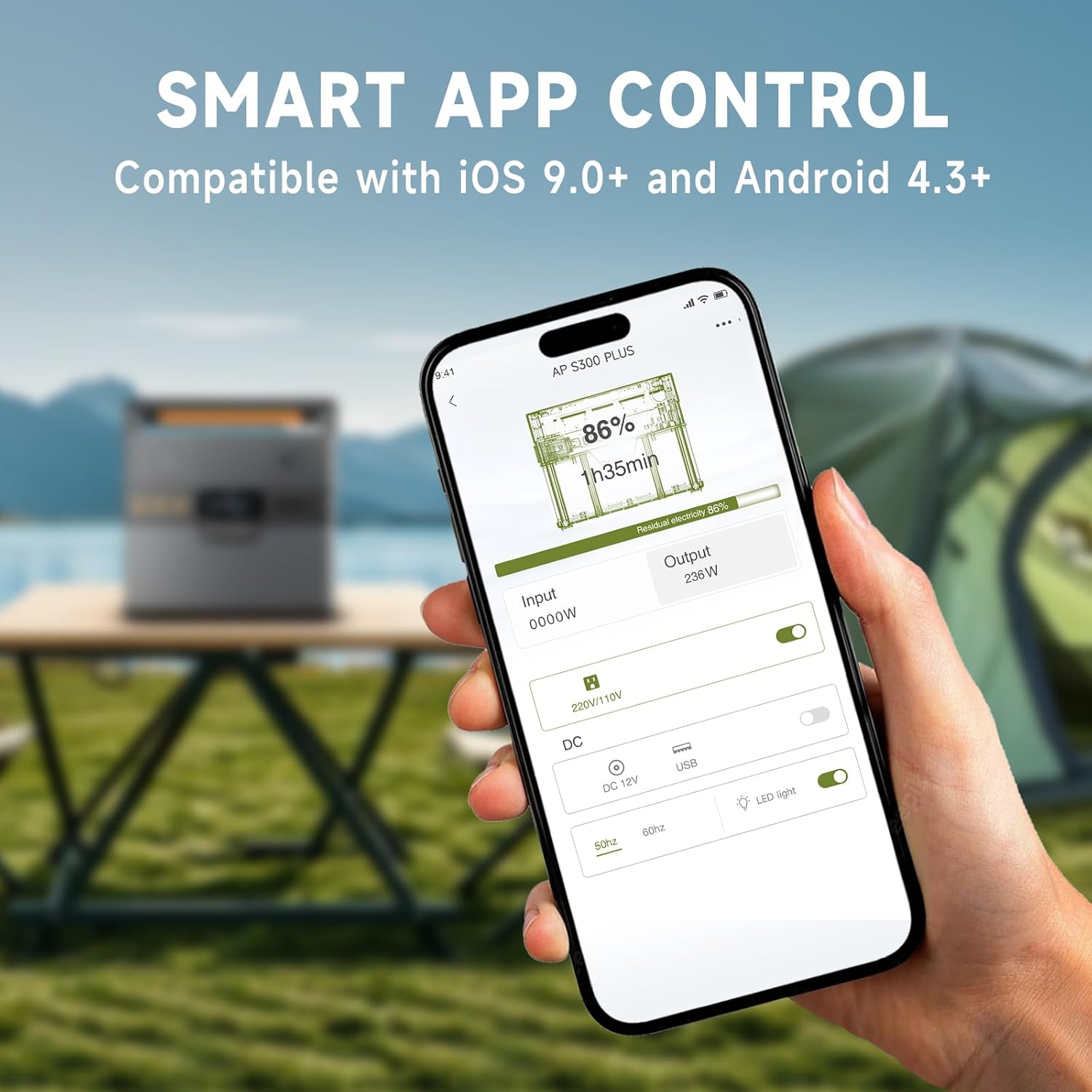
Image: A hand holding a smartphone showing the ALLPOWERS app interface, demonstrating remote control capabilities for the power station.
5. Manutenzione
Magazzinaggio:
- Conservare la centrale elettrica in un luogo fresco e asciutto, lontano dalla luce solare diretta e da materiali corrosivi.
- Per lo stoccaggio a lungo termine, caricare l'unità al 50-80% ogni 3-6 mesi per preservare la salute della batteria.
- Avoid storing in extreme temperatures (below -10°C / 14°F or above 45°C / 113°F).
Pulizia:
- Pulisci l'esterno con un panno morbido e asciutto.
- Non utilizzare detergenti abrasivi o solventi.
- Assicurarsi che tutte le porte siano prive di polvere e detriti.
6. Risoluzione Dei Problemi
| Problema | Possibile causa | Soluzione |
|---|---|---|
| L'unità non si accende. | La batteria è scarica. | Caricare la stazione di alimentazione tramite l'adattatore CA. |
| L'uscita CA non funziona. | Uscita CA non attivata; il dispositivo supera i 300 W. | Press the AC Power Button. Reduce load or use a lower-power device. |
| L'uscita USB/CC non funziona. | DC/USB output not activated. | Press the DC/USB Power Button. |
| La ricarica wireless non funziona. | Device not Qi-compatible; device not centered; DC/USB output not activated. | Ensure device is Qi-compatible and correctly placed. Activate DC/USB output. |
| Ricarica lenta tramite energia solare. | Insufficient sunlight; panel not correctly angled; panel not compatible. | Adjust panel angle for direct sunlight. Ensure panel is compatible and clean. |
| Problemi di connessione Bluetooth. | Bluetooth off on phone; app not updated; unit too far. | Ensure phone Bluetooth is on. Update app. Move phone closer to unit (within 10m). |
Se il problema persiste, contattare l'assistenza clienti ALLPOWERS.
7. Specifiche
| Caratteristica | Dettaglio |
|---|---|
| Nome del modello | AP-SS-005 |
| Capacità della batteria | 288 Wh / 78000 mAh |
| Uscita CA | 300 W (onda sinusoidale pura, picco 600 W) |
| Uscita USB-A | 2 x 18W |
| Uscita USB-C | 1 x 100W (QC3.0) |
| 12V Car Charger Output | 1 x 12 V/10 A |
| Ricarica wireless | 1 x 5 V/1 A |
| Ingresso di ricarica CA | Max. 200W |
| Ingresso di ricarica solare | Max. 100W (MPPT) |
| Dimensioni del prodotto | 8.1"L x 6.5"W x 4.3"H (20.5 cm x 16.5 cm x 10.9 cm) |
| Peso dell'articolo | 8.8 libbre (4 kg) |
| Tipo di batteria | Polimero di litio |
8. Garanzia e supporto
Informazioni sulla garanzia:
The ALLPOWERS S300LUS Portable Power Station comes with a 10-year ALLPOWERS warranty. This warranty covers manufacturing defects and workmanship under normal use. Please retain your proof of purchase for warranty claims.
La garanzia non copre i danni causati da uso improprio, incidenti, modifiche non autorizzate o calamità naturali.
Assistenza clienti:
For technical assistance, warranty claims, or any questions regarding your ALLPOWERS S300LUS, please contact ALLPOWERS customer support through their official websito o le informazioni di contatto fornite con l'acquisto.
Puoi anche visitare il Negozio ALLPOWERS su Amazon per maggiori informazioni sul prodotto e risorse di supporto.