Introduzione
The M-Amazup Portable AM/FM/SW Retro Radio (Model NS-8100BT) is a versatile audio device designed for clear radio reception and modern connectivity. Featuring a classic aesthetic, this radio supports AM, FM, and Shortwave bands, along with Bluetooth 5.3, TF card, and USB playback options. Its compact and lightweight design, coupled with a rechargeable battery, makes it suitable for both indoor and outdoor use.
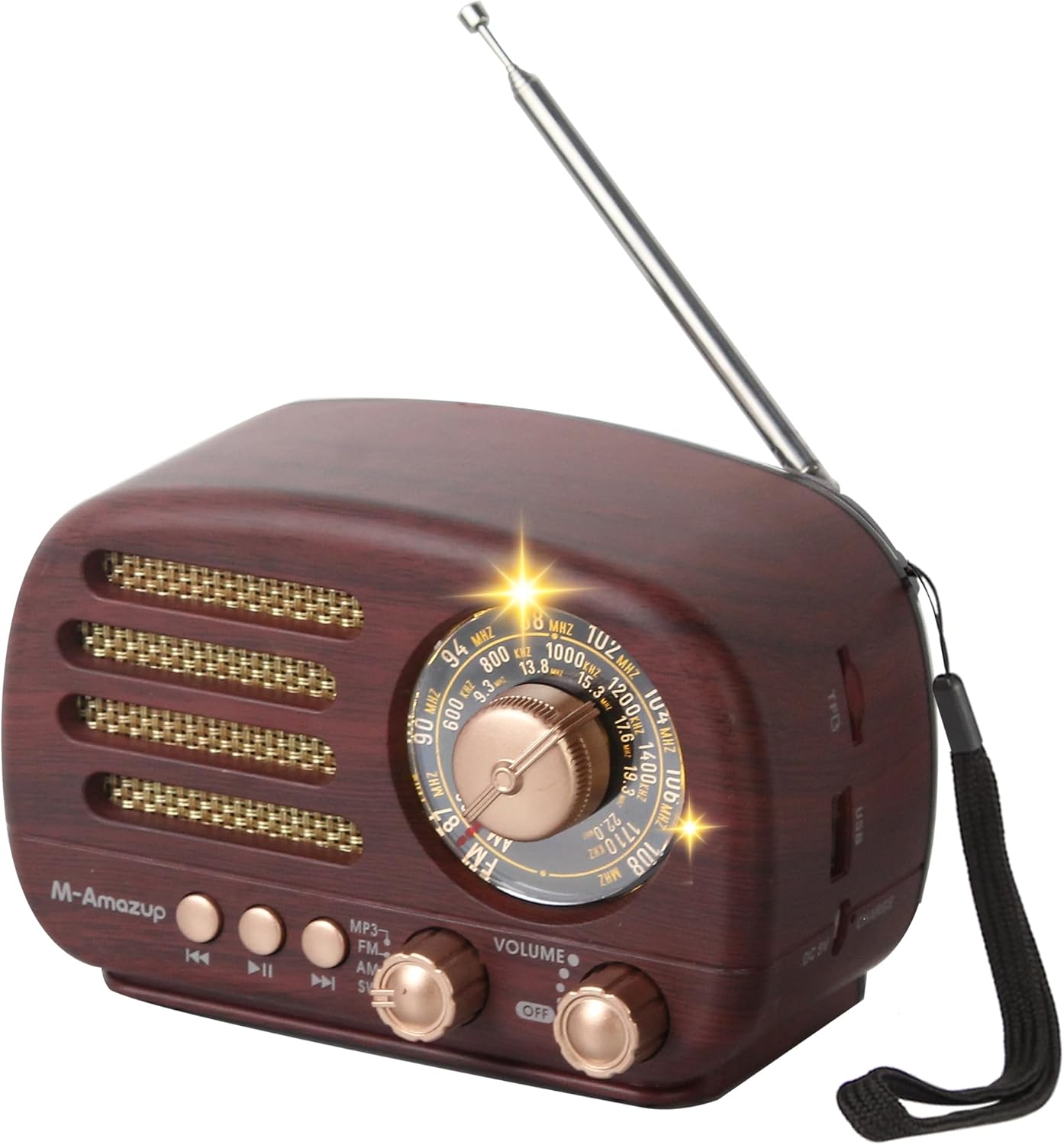
Figure 1: The M-Amazup Portable AM/FM/SW Retro Radio, showcasing its dark wood finish and classic design with an extended antenna.
Caratteristiche del prodotto
- Clear AM/FM/SW Reception: Equipped with a 16.5-inch retractable antenna for superior signal quality across FM (87-108 MHz), AM (522-1710 kHz), and SW (5.6-22.0 MHz) bands.
- Connettività Bluetooth 5.3: Wirelessly stream music from your phone or tablet.
- Compatibilità con schede USB/TF: Supports offline playback from USB drives and TF cards.
- Doppia modalità di ricarica: Powered by a 1500mAh rechargeable battery, with USB (5V) charging capability.
- Design ultra-portatile: Compact (6 x 3.2 x 3.6 inches) and lightweight (0.83 lb) with an included lanyard for easy transport.
- Immersive TWS Stereo Sound: Features a powerful speaker for crisp audio. Two units can be paired for TWS 2.0 stereo sound.
- User-Friendly Retro Style: Easy-to-use knobs and a clear dial, suitable for all ages.

Figure 2: Visual representation of the radio's key features, including its loud speaker, Bluetooth connectivity, USB and TF card support, and TWS functionality.
Impostare
- Installazione della batteria:
The radio is powered by a 1500mAh lithium battery. Before first use, ensure to tear off the insulation tape at the bottom of the battery if present. Insert the battery into the compartment located at the back of the radio, ensuring correct polarity.

Figure 3: Illustration of the battery compartment and the USB charging port on the M-Amazup radio. Note the instruction to remove insulation tape from the battery.
- Carica della batteria:
Connect the provided USB cable to the DC 5V charging port on the radio and plug the other end into a compatible USB power source (e.g., wall adapter, computer USB port). The charging indicator light will illuminate. A full charge typically takes a few hours.
- Configurazione dell'antenna:
For optimal radio reception, fully extend the 16.5-inch telescopic antenna. Adjust its position for the clearest signal.
Istruzioni per l'uso

Figura 4: dettagliata view of the radio's front panel, highlighting the tuning knob, band switch, playback control buttons, and volume/power knob.
- Accensione/spegnimento e controllo del volume:
Ruotare il Manopola volume/accensione clockwise to turn the radio on and increase the volume. Rotate counter-clockwise to decrease the volume and turn the radio off.
- Selezione della modalità:
Utilizzare il Interruttore di banda to select your desired mode: MP3 (for USB/TF card playback), FM, AM, or SW (Shortwave).
- Radio Tuning (AM/FM/SW):
Once a radio band is selected, slowly rotate the Manopola di sintonia to scan for stations. The illuminated dial will help you identify the frequency. Extend and adjust the antenna for best reception.
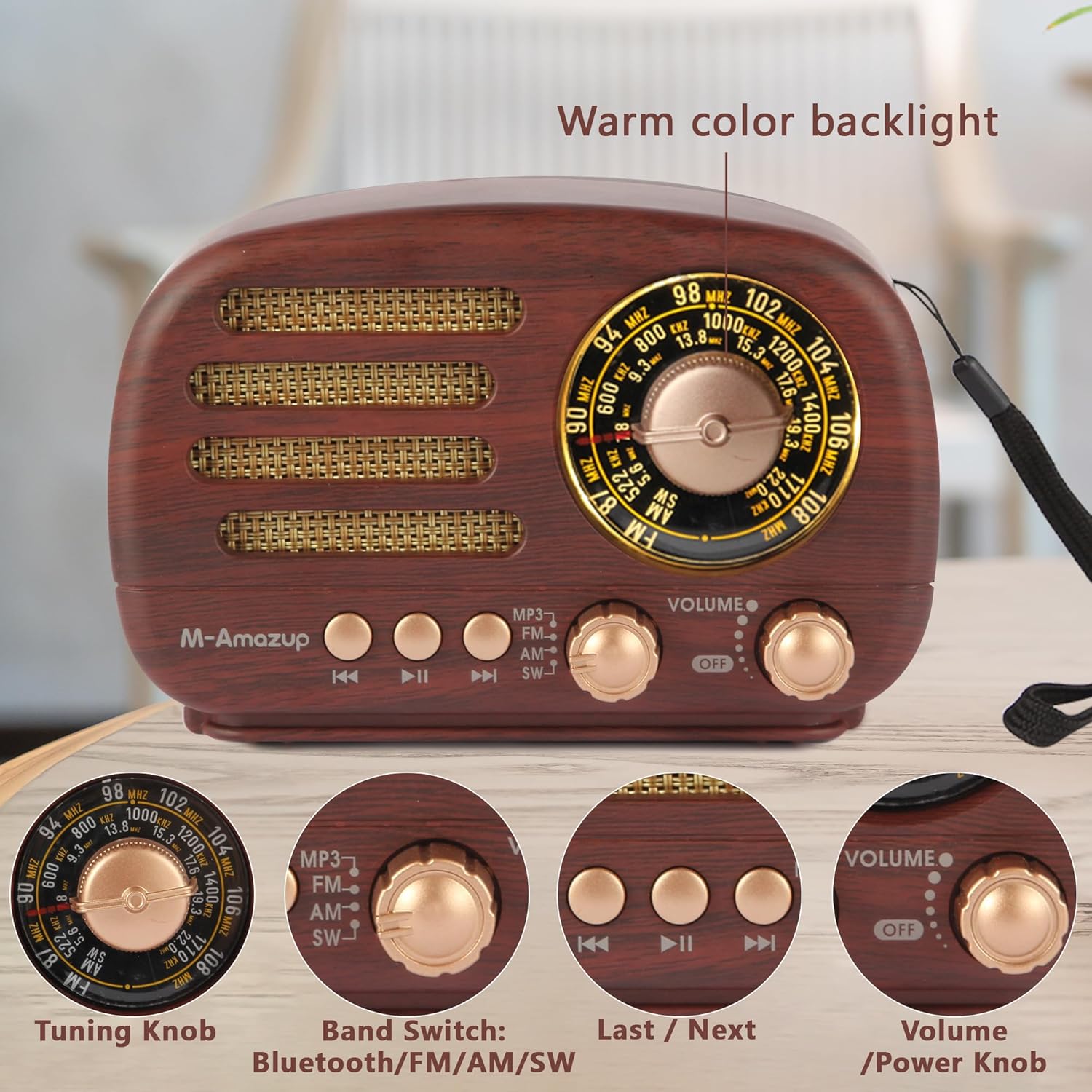
Figure 5: A close-up of the radio's tuning dial, showing the warm color backlight for easy visibility in low light conditions.
- Accoppiamento Bluetooth:
Cambia il Interruttore di banda to the Bluetooth mode. The radio will enter pairing mode. On your mobile device, search for "M-Amazup" in the Bluetooth settings and connect. A confirmation sound will indicate successful pairing.

Figure 6: The M-Amazup radio wirelessly connected to a smartphone via Bluetooth, ready for music streaming.
- Riproduzione USB/scheda TF:
Insert a USB drive or TF card (with MP3 files) into the respective port. Switch the Interruttore di banda to MP3 mode. The radio will automatically detect and begin playing audio fileS. Utilizzare il Precedente/Successivo pulsanti per navigare tra le tracce.
- TWS (True Wireless Stereo) Pairing (Requires two M-Amazup radios):
To achieve TWS 2.0 stereo sound, ensure both radios are in Bluetooth mode and not connected to any device. Double-press the "Play/Pause" button on one radio; it will automatically search for and pair with the second radio. Once paired, connect your device to the primary radio via Bluetooth.
Manutenzione
- Pulizia: Use a soft, dry cloth to wipe the radio's surface. Avoid using abrasive cleaners or solvents.
- Magazzinaggio: Quando non viene utilizzata per lunghi periodi, conservare la radio in un luogo fresco e asciutto, lontano dalla luce solare diretta e da temperature estreme.
- Cura della batteria: Per prolungare la durata della batteria, evitare di scaricarla completamente frequentemente. Caricare regolarmente la radio, anche se non la si utilizza costantemente.
Risoluzione dei problemi
| Problema | Possibile causa | Soluzione |
|---|---|---|
| Nessuna alimentazione/La radio non si accende. | La batteria è scarica o non è installata correttamente. | Charge the battery. Ensure the battery is inserted with correct polarity and insulation tape is removed. |
| Ricezione radiofonica scadente. | Antenna non estesa o area con segnale debole. | Fully extend the antenna and adjust its position. Try moving the radio to a different location. |
| Il Bluetooth non si connette. | La radio non è in modalità Bluetooth o il dispositivo è troppo lontano. | Ensure radio is in Bluetooth mode. Keep devices within 10 meters. Restart both devices. |
| La scheda USB/TF non funziona. | Modalità errata, non supportata file format, or corrupted card. | Switch to MP3 mode. Ensure files are in MP3 format. Try a different USB/TF card. |
| L'associazione TWS non è riuscita. | Radios not in Bluetooth mode or already connected. | Ensure both radios are in Bluetooth mode and disconnected from other devices before attempting TWS pairing. |
Specifiche
- Numero modello: NS-8100BT
- Dimensioni del prodotto: 6 x 3.23 x 3.62 pollici
- Peso dell'articolo: 13.2 once
- Bande radio supportate: AM (522-1710 kHz), FM (87-108 MHz), SW (5.6-22.0 MHz)
- Tecnologia di connettività: Bluetooth 5.3, USB
- Fonte di energia: 1500mAh Rechargeable Battery (included), USB Powered (DC 5V)
- Caratteristiche speciali: Bluetooth Speaker, Lightweight, Portable, Rechargeable, TWS
- Colore: Legno scuro
Garanzia e supporto
For warranty information and customer support, please refer to the owner's manual included in the product packaging. You may also visit the official M-Amazup websito o contattare il servizio clienti per ulteriore assistenza.
Nota: le specifiche sono soggette a modifiche senza preavviso.