
1. Introduzione
Thank you for choosing the iKF T1 Max Wireless Bluetooth Over Ear Headphones. These headphones are designed to provide a high-fidelity audio experience with advanced features such as Active Noise Cancellation (ANC), extended battery life, and dual-device connectivity. This manual will guide you through the setup, operation, and maintenance of your new headphones.

Immagine 1.1: Esploso view of the 40mm dynamic driver, illustrating the components responsible for HiFi sound quality.
2. Contenuto della confezione
Si prega di controllare la confezione per verificare la presenza dei seguenti elementi:
- iKF T1 Max Wireless Bluetooth Over Ear Headphones
- Manuale d'uso
- Cavo di ricarica (USB-C)
- Cavo audio da 3.5 mm
3. Prodotto finitoview
Familiarize yourself with the various parts of your iKF T1 Max headphones. A detailed diagram of button functions and port locations can typically be found in the printed manual included with your product.

Image 3.1: The iKF T1 Max headphones, showcasing their design and over-ear form factor.
Componenti chiave:
- Auricolari: Padded for comfort, housing the drivers and controls.
- Fascia: Regolabile per una vestibilità sicura.
- Pulsante di accensione: Used for powering on/off and pairing.
- Pulsanti del volume: Regola il volume audio.
- Pulsante multifunzione: Controls playback, calls, and ANC modes.
- Porta di ricarica USB-C: Per caricare le cuffie.
- Jack audio da 3.5 mm: Per connessione cablata.
- Indicatore LED: Visualizza lo stato di alimentazione, associazione e ricarica.
4. Impostazione
4.1 Ricarica delle cuffie
- Collegare il cavo di ricarica USB-C alla porta di ricarica delle cuffie.
- Collegare l'altra estremità del cavo a un adattatore di alimentazione USB (non incluso) o alla porta USB di un computer.
- The LED indicator will show charging status (e.g., red for charging, blue for fully charged). A full charge typically takes approximately 2 hours.
4.2 Accensione/spegnimento
- Per accendere: Tenere premuto il pulsante di accensione per circa 3 secondi finché l'indicatore LED non lampeggia.
- Per spegnere: Tenere premuto il pulsante di accensione per circa 5 secondi finché l'indicatore LED non si spegne.
4.3 Associazione Bluetooth
- Assicurati che le cuffie siano spente.
- Press and hold the Power button for approximately 5-7 seconds until the LED indicator flashes rapidly (usually blue and red alternately), indicating pairing mode.
- Sul tuo dispositivo (smartphone, tablet, laptop), attiva il Bluetooth e cerca i dispositivi disponibili.
- Select "iKF T1 Max" from the list of found devices.
- Una volta connesso, l'indicatore LED in genere emetterà una luce blu fissa o lampeggerà lentamente.
4.4 iKF App Connection
For advanced customization, including ANC level adjustments and personalized sound profiles, download the official iKF app from your device's app store. Follow the in-app instructions to connect your headphones.

Image 4.1: The iKF T1 Max headphones connected to the iKF mobile application, demonstrating app-based control and customization.
5. Istruzioni per l'uso
5.1 Cancellazione attiva del rumore (ANC)
The iKF T1 Max features Active Noise Cancellation to reduce ambient noise. You can activate and adjust ANC levels:
- Attiva/Disattiva: Press the dedicated ANC button (refer to your product diagram for exact location).
- Regola i livelli: Use the iKF app to fine-tune ANC intensity to your preference.
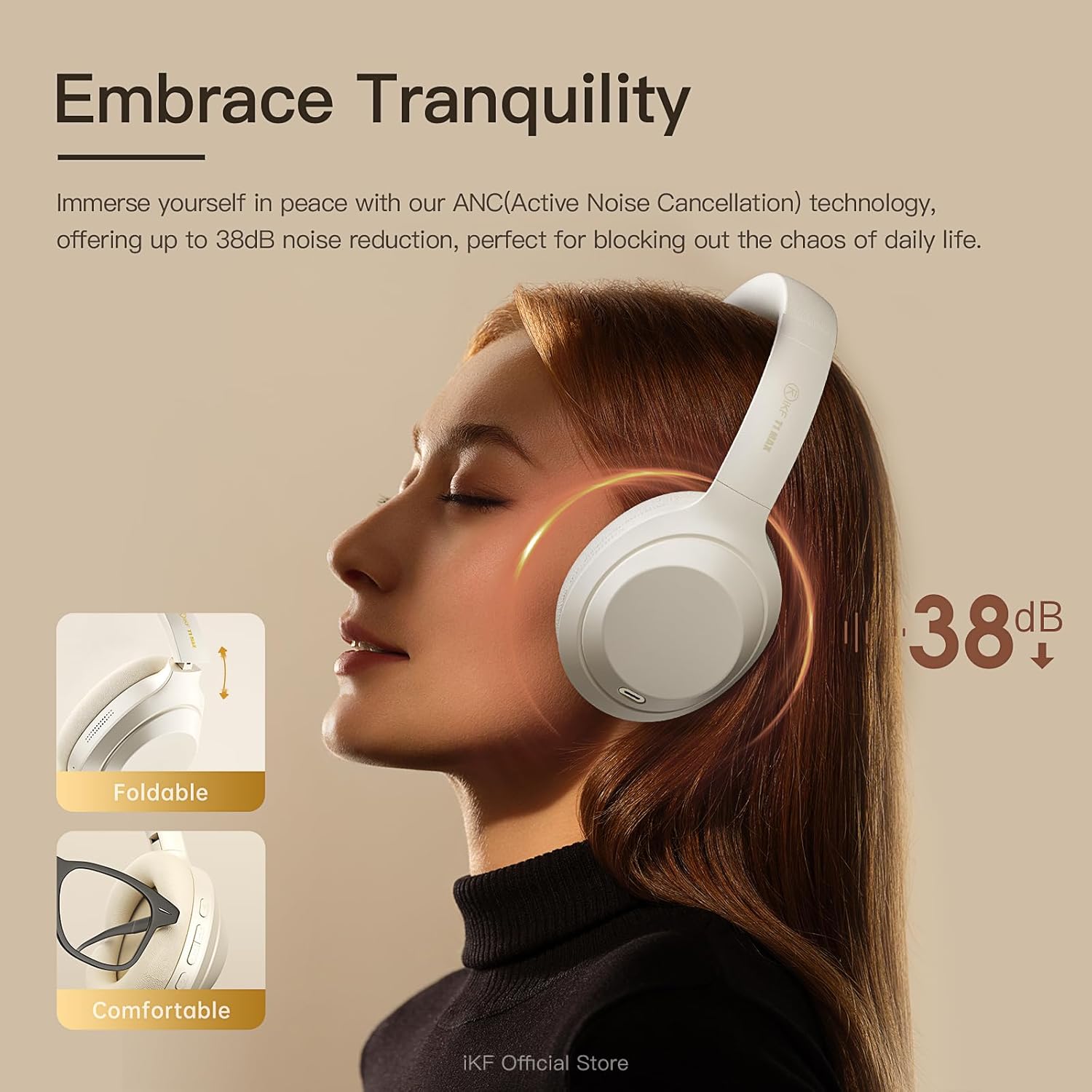
Image 5.1: A user experiencing the noise reduction capabilities of the iKF T1 Max headphones, highlighting up to 38dB noise cancellation.
5.2 Connessione a doppio dispositivo
The headphones can connect to two Bluetooth devices simultaneously, allowing for seamless switching between audio sources.
- Pair the headphones with your first device (e.g., smartphone) as described in Section 4.3.
- Disconnettere temporaneamente il Bluetooth sul primo dispositivo.
- Associa le cuffie al tuo secondo dispositivo (ad esempio, il laptop).
- Ricollega il Bluetooth sul primo dispositivo. Le cuffie dovrebbero ora essere connesse a entrambi i dispositivi.
- L'audio passerà automaticamente al dispositivo che riproduce contenuti o riceve una chiamata.

Image 5.2: The iKF T1 Max headphones demonstrating simultaneous connection to a smartphone and a laptop, enabling effortless switching between devices.
5.3 Modalità cablata
For continuous listening or when battery is low, use the included 3.5mm audio cable.
- Collegare un'estremità del cavo audio da 3.5 mm al jack audio delle cuffie.
- Collegare l'altra estremità alla porta da 3.5 mm della sorgente audio.
- Le cuffie passeranno automaticamente alla modalità cablata. Le funzioni Bluetooth saranno disattivate.

Image 5.3: A visual comparison illustrating the flexibility of the iKF T1 Max headphones, supporting both wireless Bluetooth and wired 3.5mm audio connections.
5.4 Controlli di base
- Riproduci/Pausa: Premere una volta il pulsante multifunzione.
- Volume su/giù: Premere i pulsanti Volume + / -.
- Traccia successiva: Premere due volte il pulsante multifunzione.
- Traccia precedente: Premere tre volte il pulsante multifunzione.
- Rispondi/Termina chiamata: Premere una volta il pulsante multifunzione durante una chiamata in arrivo o una chiamata attiva.
- Rifiuta chiamata: Tenere premuto il pulsante Multifunzione durante una chiamata in arrivo.

Image 5.4: The iKF T1 Max headphones adapting to various audio experiences, including music listening, movie watching, and gaming, demonstrating seamless transition.
6. Manutenzione
6.1 Pulizia
- Pulisci le cuffie con un panno morbido, asciutto e privo di lanugine.
- Non utilizzare detergenti abrasivi, alcol o solventi chimici.
- Evitare che l'umidità penetri nelle aperture.
6.2 Conservazione
- Conservare le cuffie in un luogo fresco e asciutto, lontano da temperature estreme e dalla luce solare diretta.
- When not in use for extended periods, fully charge the headphones at least once every three months to preserve battery life.
- Le cuffie sono pieghevoli per un ingombro ridotto.
7. Risoluzione Dei Problemi
If you encounter issues with your iKF T1 Max headphones, refer to the following common problems and solutions:
| Problema | Soluzione |
|---|---|
| Le cuffie non si accendono. | Assicurati che le cuffie siano cariche. Collegale a una fonte di alimentazione e riprova dopo qualche minuto. |
| Impossibile effettuare l'associazione con un dispositivo. | Ensure headphones are in pairing mode (LED flashing rapidly). Turn off and on Bluetooth on your device. Move headphones closer to the device. |
| Nessun suono o volume basso. | Check volume levels on both headphones and the connected device. Ensure headphones are properly paired. If in wired mode, check cable connection. |
| L'ANC non è efficace. | Ensure ANC is activated. Adjust ANC levels via the iKF app. Ensure earcups form a good seal around your ears. |
| La commutazione tra due dispositivi non funziona. | Ensure both devices are actively connected via Bluetooth. Play audio on one device to initiate the switch. |
8. Specifiche
Key technical specifications for the iKF T1 Max Wireless Bluetooth Over Ear Headphones:
- Marca: iKF
- Modello: T1 Massimo
- Posizionamento dell'orecchio: Sopra l'orecchio
- Controllo del rumore: Active Noise Cancellation, Environmental Noise Cancellation
- Tecnologia di connettività: Bluetooth 5.4, cablato (jack da 3.5 mm)
- Dimensioni del driver: 40mm
- Battery Life (ANC Off): Fino a 100 ore
- Battery Life (ANC On): Fino a 75 ore
- Tempo di ricarica: Circa 2 ore
- Dispositivi compatibili: Android Phone, Laptops, Smart Watch, Tablets, iPhone/iPad/Macbook
- Materiale: Plastica, poliuretano (PU)

Image 8.1: The iKF T1 Max headphones highlighting their extended battery performance: up to 100 hours with ANC off and 75 hours with ANC on.
9. Garanzia e supporto
9.1 Informazioni sulla garanzia
The iKF T1 Max Wireless Bluetooth Over Ear Headphones come with a 1-Year Store Warranty dalla data di acquisto. La presente garanzia copre difetti di fabbricazione e di lavorazione in condizioni di normale utilizzo. Non copre danni causati da uso improprio, incidenti, modifiche non autorizzate o normale usura. Si prega di conservare la prova d'acquisto per eventuali reclami in garanzia.
9.2 Assistenza clienti
For further assistance, technical support, or warranty inquiries, please contact iKF customer service through the retailer's platform or the official iKF websito. Quando contatti l'assistenza, tieni a portata di mano il modello del tuo prodotto e i dettagli di acquisto.