
1. Introduzione
The Innex DS200 is a professional USB book scanner designed for efficient digitization of various documents, including books, magazines, and loose papers. It features a 26MP camera, A3 scanning capability, and advanced software functions to enhance scanning quality and workflow. This manual provides detailed instructions for setting up, operating, and maintaining your DS200 scanner.

Figure 1.1: Innex DS200 Scanner in operation with an open book.
2. Contenuto della confezione
Verifica che tutti gli articoli elencati di seguito siano inclusi nel pacco. Se alcuni articoli risultano mancanti o danneggiati, contatta l'assistenza clienti.
- Innex DS200 Scanner Unit
- Pad di scansione
- Cavo USB
- Adattatore di alimentazione (tipo A)
- Power Plugs (Type C, Type G)
- Pulsante a mano
- Pedale
- Adapter (USB-C to USB-A)
- Guida rapida
- Carta dei servizi
- Dichiarazione GPSR
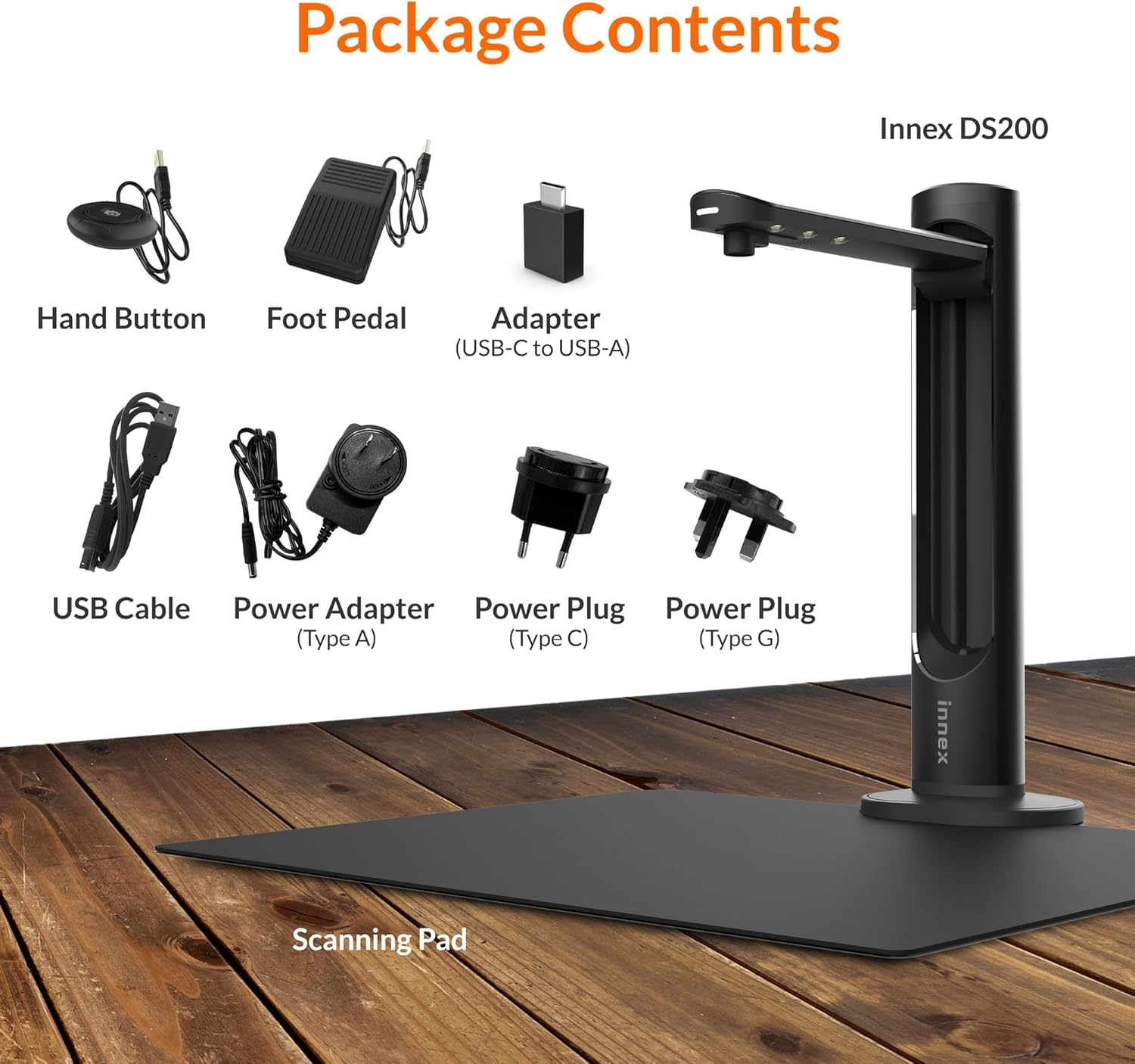
Figure 2.1: Contents of the Innex DS200 package.
3. Impostazione
- Disimballare i componenti: Estrarre con cautela tutti gli articoli dall'imballaggio.
- Posizionare lo scanner: Place the Innex DS200 scanner unit on a stable, flat surface.
- Place the Scanning Pad: Position the black scanning pad directly beneath the scanner head. Ensure it is centered and flat.
- Connetti alimentazione: Connect the power adapter to the scanner and plug it into an electrical outlet. Use the appropriate power plug for your region.
- Connessione al computer: Connect the scanner to your computer using the provided USB cable. If your computer only has USB-C ports, use the included USB-C to USB-A adapter.
- Installa il software: Download and install the Innex Scan software from the official Innex website. Follow the on-screen instructions for installation. The software is compatible with Windows and macOS.
- Collegare gli accessori: Plug in the hand button and foot pedal to the designated ports on the scanner unit.
4. Istruzioni per l'uso
4.1. Procedura di scansione di base
- Launch Innex Scan Software: Open the Innex Scan application on your computer.
- Inserisci documento: Place the document or book you wish to scan on the scanning pad. Ensure it is within the scanning area. The laser guide can assist with alignment.
- Regola impostazioni: In the software, select your desired scanning mode (e.g., Document, Book, Photo) and adjust settings such as color mode, resolution, and output format.
- Avvia scansione: Trigger the scan using one of the available methods: the software capture button, the hand button, or the foot pedal.
- Review e salva: Dopo la scansione, riview the image in the software. Apply any necessary corrections and save the file to your preferred location and format.

Figure 4.1: Using the laser guide for document alignment.

Figure 4.2: Multiple options for triggering a scan.
4.2. Funzionalità del software
The Innex Scan software includes several features to optimize your scanning experience:
- Curve Flattening: Automatically corrects the curvature of book pages for flat, readable scans.
- OCR (riconoscimento ottico dei caratteri): Converts scanned images into editable and searchable text in over 120 languages.
- Auto-Cropping: Automatically detects and crops the document edges.
- Page-Turn Detection: For book scanning, the software can detect when a page has been turned and automatically initiate the next scan.
- Rimozione delle dita: Intelligently removes images of fingers holding down pages during scanning.
- Modalità scansione multipla: Allows scanning multiple small items simultaneously, such as business cards or photos, and separates them into individual files.
- Visualizer Mode: Enables the scanner to function as a document camera for presentations or live demonstrations.
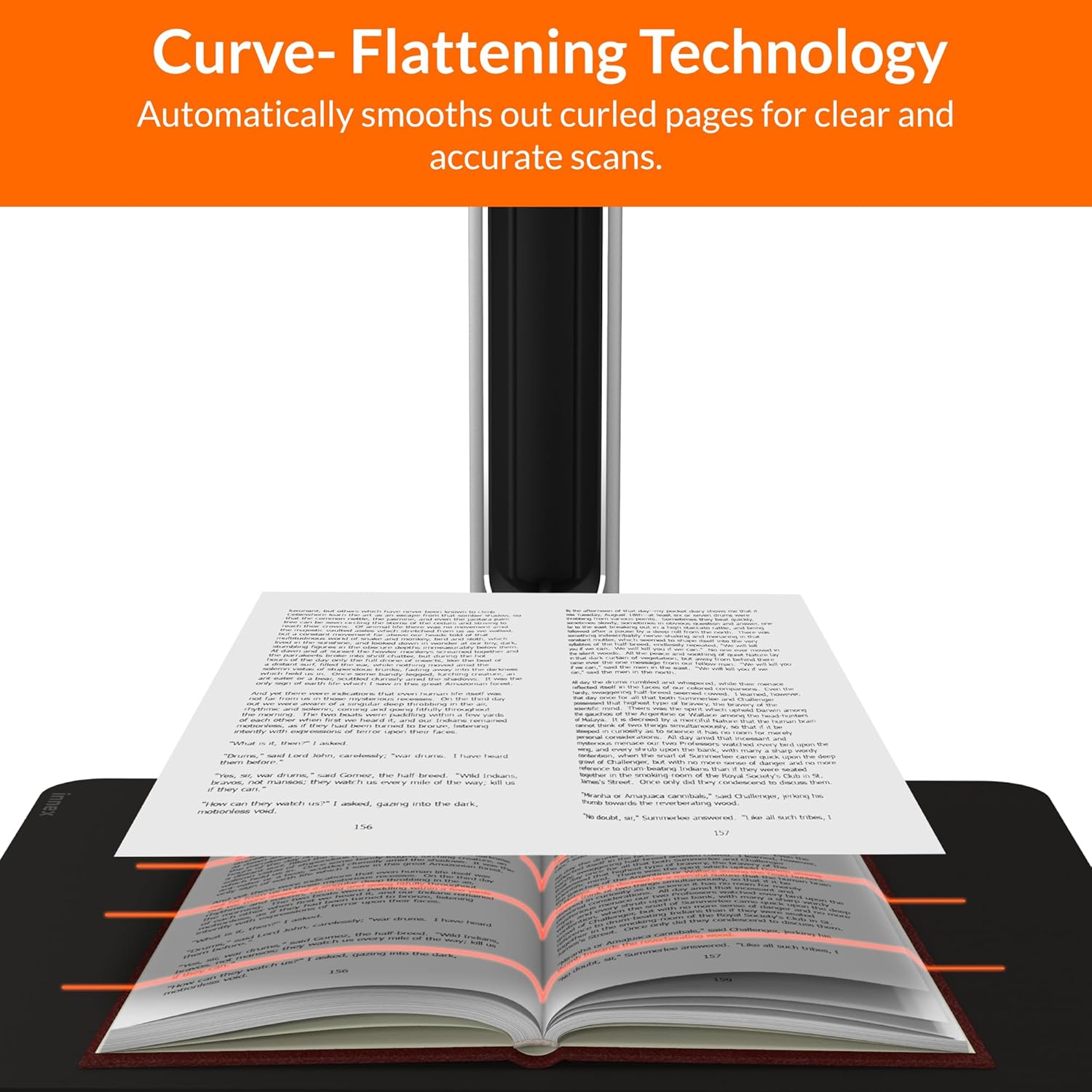
Figure 4.3: Curve Flattening Technology in use.

Figure 4.4: OCR Text Recognition and export options.

Figura 4.5: Oltreview of Innex Scan software features.
4.3. Export Options
The Innex DS200 supports various export formats for both image and text files:
- Immagine Files: JPEG, PNG, BMP, TIFF
- Documento Files: PDF (searchable), DOC, EXCEL, TEXT
- E-book Files: Formato EPUB
- Audio Files (Text-to-Speech): MP3, WAV
- Video Files (Visualizer Mode): MP4, AVI, FLV, WMV

Figure 4.6: Available export formats in Innex Scan software.
5. Manutenzione
- Pulizia: Regularly wipe the scanner lens and LED lamp with a soft, dry, lint-free cloth to ensure optimal scan quality. Clean the scanning pad with a damp panno se necessario.
- Aggiornamenti software: Periodically check the official Innex websito per gli aggiornamenti software per assicurarti di disporre delle funzionalità più recenti e dei miglioramenti delle prestazioni.
- Magazzinaggio: Quando non in uso, conservare lo scanner in un ambiente pulito e asciutto, lontano dalla luce solare diretta e da temperature estreme.
6. Risoluzione Dei Problemi
6.1. Problemi comuni e soluzioni
| Problema | Possibile causa | Soluzione |
|---|---|---|
| Scanner non rilevato | Loose USB connection, driver issue, power issue | Ensure USB cable is securely connected. Check power connection. Reinstall scanner drivers or software. Try a different USB port. |
| Scarsa qualità di scansione | Dirty lens, insufficient lighting, incorrect settings, document not flat | Clean the scanner lens. Ensure adequate ambient lighting or use the built-in LED lamp. Adjust resolution and color settings in software. Ensure documents are flat on the scanning pad. |
| Il software si blocca o si blocca | Outdated software, system incompatibility, insufficient system resources | Update Innex Scan software to the latest version. Ensure your computer meets minimum system requirements. Close other demanding applications. Restart the software and computer. |
| OCR not working correctly | Poor scan quality, incorrect language setting, complex font | Improve scan quality. Verify the correct OCR language is selected in the software. For highly stylized or handwritten text, OCR accuracy may vary. |
7. Specifiche
Detailed technical specifications for the Innex DS200 scanner:

Figure 7.1: Innex DS200 Technical Specifications.
- Modello: DS200
- Sensore di immagine: Sensore CMOS
- Risoluzione massima: 5800 x 4522 pixel (26MP)
- Output DPI: Approx. 300 dpi (A3)
- Massimo. Area di tiro: A3 (16.77" x 12.59" / 426 x 320mm)
- Profondità del colore: 24 bit
- Lens Focus: Fisso
- Velocità di scansione: 1.5 sec per A3 page
- Attivazione della scansione: Pulsante manuale, pedale, pulsante software, scansione automatica
- Formati di output: Picture (JPG, TIFF, BMP, PNG), Document (PDF, Image, PDF Searchable), Text (DOC, EXCEL, TEXT), E-book (EPUB), Audio (MP3, WAV), Video (AVI, MPEG, FLV, WMV)
- Laser Projection: Incorporato
- Sorgente luminosa: LED ad alta luminosità integrato
- Interfaccia: USB 2.0 Type B x 1 (for PC Connection), USB 2.0 Type-A x 1 (for USB Extension)
- Energia: 5V/2A
- Requisiti minimi di sistema: Windows 10, 11, macOS 11 or later; Intel i5 Processor or higher; 8GB RAM (Recommended 16GB or more); 20GB Available HDD Space; USB 2.0 Port
- Dimensioni del prodotto (piegato): 4.33"P x 5.91"L x 15.75"A (110 x 150 x 400 mm)
- Product Dimensions (In Use): 12.05"P x 5.91"L x 15.75"A (307 x 150 x 400 mm)
- Peso netto: Circa 2.64 libbre (1.2 kg)
8. Garanzia e supporto
For warranty information and technical support, please refer to the service card included in your package or visit the official Innex website. You can also contact FunTech Innovation, the manufacturer, for assistance.
Produttore: FunTech Innovation
Websito: Innex Official Store on Amazon