
1. Introduzione
Thank you for choosing the TNICER T4X Motorcycle Intercom. This device is designed to enhance your riding experience by providing clear communication, music playback, and navigation audio while on the road. Featuring advanced ENC (Environmental Noise Cancellation) technology, Bluetooth 5.2 connectivity, and IP67 waterproof rating, the T4X ensures reliable performance in various conditions. Please read this manual thoroughly before use to ensure proper operation and to maximize the product's potential.
2. Informazioni sulla sicurezza
- Dare sempre priorità alla sicurezza stradale. Non utilizzare il dispositivo in modo da distrarti dalla guida.
- Prima di guidare, assicurarsi che il dispositivo sia fissato saldamente al casco.
- Regola il volume a un livello che ti consenta di sentire i rumori del traffico circostante. Un volume eccessivo può danneggiare l'udito e compromettere la consapevolezza.
- Non tentare di smontare o modificare il dispositivo. Ciò potrebbe invalidare la garanzia e causare danni.
- Keep the device away from extreme temperatures, open flames, and corrosive substances.
- Smaltire le batterie secondo le normative locali.
3. Contenuto della confezione
Verifica che tutti gli articoli siano presenti nel tuo pacco:
- T4X Main Unit
- Hard Microphone & Speaker Set
- Soft Microphone
- Manuale utente (giapponese)
- Cavo di ricarica USB-C
- 3M Adhesive Pads (for main unit and speakers)
- Rigid Mic Fixed Velcro
- Base della staffa di montaggio
- Round Velcro (for speakers)
- Speaker Foam Pads
- metal clip
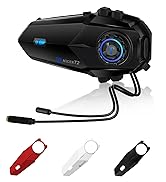
Image: All components included in the TNICER T4X package, laid out for identification.
4. Prodotto finitoview
The TNICER T4X features a sleek design with intuitive controls. Familiarize yourself with the main unit's buttons and ports:
- Pulsante di accensione/interfono: Utilizzato per accendere/spegnere e avviare/terminare chiamate interfoniche.
- Pulsante di aumento del volume: Aumenta il volume, naviga nei menu.
- Pulsante di riduzione del volume: Diminuisce il volume e consente di navigare nei menu.
- Pulsante multifunzione: Controls music playback, phone calls, and voice assistant.
- Porta di ricarica: Porta USB-C per la ricarica.
- Porta per cuffie: Connects speakers and microphone.

Immagine: Frontale view of the TNICER T4X main unit, highlighting its buttons and indicator light.
5. Impostazione
5.1. Carica del dispositivo
Before first use, fully charge the T4X unit.
- Connect the provided USB-C charging cable to the T4X charging port.
- Collegare l'altra estremità del cavo a un adattatore di alimentazione USB (non incluso) o a una porta USB del computer.
- L'indicatore LED mostrerà lo stato di carica (ad esempio, rosso per la carica, blu per la carica completa).
- Una carica completa richiede circa 1.5 ore.

Image: The TNICER T4X unit connected to a USB-C charging cable, illustrating its 1000mAh battery capacity and usage times (40 hours talk/music, 1.5 hours charge, 600 hours standby).
5.2. Installazione del casco
Choose between the metal clip or adhesive mount for securing the T4X to your helmet.
- Montaggio dell'unità interfonica:
- Clip in metallo: Slide the metal clip between the helmet shell and inner padding. Secure the T4X main unit to the clip.
- Supporto adesivo: Clean the desired area on the helmet surface. Attach the 3M adhesive pad to the mounting bracket base, then firmly press the base onto the helmet. Secure the T4X main unit to the bracket.
- Installazione dell'altoparlante:
- Attach the round Velcro pads to the inside of your helmet, aligning them with your ears.
- Attach the speakers to the Velcro pads. Ensure speakers are positioned directly over your ears for optimal sound.
- Installazione del microfono:
- Microfono rigido: Suitable for open-face or modular helmets. Attach the hard mic to the helmet's chin bar using the rigid mic fixed Velcro. Position it close to your mouth.
- Microfono morbido: Suitable for full-face helmets. Route the soft mic inside the helmet, positioning it near your mouth.
- Connetti l'auricolare: Plug the speaker and microphone cable into the headset port on the T4X main unit. Ensure it is firmly inserted.
6. Istruzioni per l'uso
6.1. Accensione/spegnimento
- Accensione: Press and hold the Power/Intercom Button for approximately 3 seconds until the LED indicator lights up and you hear a voice prompt.
- Spegni: Press and hold the Power/Intercom Button for approximately 3 seconds until the LED indicator turns off and you hear a voice prompt.
6.2. Controllo del volume
- Aumenta volume: Premere il pulsante di aumento del volume.
- Diminuisci volume: Premere il pulsante Volume giù.
6.3. Bluetooth Pairing (Smartphone)
- Ensure the T4X is powered off.
- Press and hold the Power/Intercom Button for approximately 5-7 seconds until the LED indicator flashes red and blue alternately, indicating pairing mode.
- Sul tuo smartphone, attiva il Bluetooth e cerca nuovi dispositivi.
- Select "TNICER T4X" from the list of available devices.
- Una volta effettuato l'accoppiamento, l'indicatore LED lampeggerà lentamente in blu e verrà emesso un messaggio vocale di conferma.
6.4. Intercom Pairing (Multi-Unit)
The T4X supports one-touch automatic pairing for up to 8 riders within a 1000m range.

Image: A visual representation of multiple T4X units automatically pairing for group communication over a bridge, illustrating the one-touch pairing feature for up to 8 devices.
- Ensure all T4X units are powered off.
- On the first unit (Unit A), press and hold the Power/Intercom Button for 5-7 seconds to enter pairing mode (red and blue flashing).
- On the second unit (Unit B), press and hold the Power/Intercom Button for 5-7 seconds to enter pairing mode.
- Briefly press the Power/Intercom Button on Unit A. It will search for Unit B. Once connected, both units will flash blue slowly.
- To add more units (Unit C, D, etc.), repeat steps 2-4, pairing each new unit to an already connected unit.
- Riconnessione automatica: If communication is interrupted due to distance or obstacles, the T4X will automatically reconnect when units are back within range.
6.5. Comunicazione interfonica
- Avvia Intercom: Briefly press the Power/Intercom Button on any paired unit.
- Fine citofono: Briefly press the Power/Intercom Button again.
6.6. Funzioni del telefono
- Rispondi alla chiamata: Premere brevemente il pulsante multifunzione.
- Termina chiamata: Briefly press the Multi-function Button during a call.
- Rifiuta chiamata: Quando arriva una chiamata, tenere premuto il pulsante multifunzione per 2 secondi.
- Ricomponi l'ultimo numero: Premere due volte il pulsante multifunzione.
6.7. Riproduzione di musica
- Riproduci/Pausa: Premere brevemente il pulsante multifunzione.
- Traccia successiva: Press the Volume Up Button for 2 seconds.
- Traccia precedente: Press the Volume Down Button for 2 seconds.
- Condivisione di musica: While playing music, briefly press the Multi-function Button and Volume Up Button simultaneously to share music with a connected intercom unit.
6.8. Radio FM

Image: A rider on a motorcycle, with graphics indicating FM radio functionality (76.0MHz to 108.0MHz) and voice command support (Siri, Google Assistant).
- Attiva/disattiva FM: Press and hold the Volume Down Button for 2 seconds.
- Scansione canali: Briefly press the Multi-function Button while FM is on.
- Cambia canale: Press the Volume Up or Volume Down Button briefly.
6.9. Assistente vocale
- Attiva l'assistente vocale: Double-press the Volume Up Button. This will activate your smartphone's voice assistant (e.g., Siri, Google Assistant).
6.10. Sound Adjustment (Equalizer)
The T4X offers three sound profiles:

Image: A motorcycle rider with a helmet, overlaid with a graphic showing three distinct sound profiles: Bass Boost, Mid-range Boost, and Treble Boost, indicating customizable audio experience.
- Switch Sound Modes: Triple-press the Multi-function Button to cycle through Bass Boost, Mid-range Boost, and Treble Boost.
6.11. Ambient Sound Reception
This feature allows you to hear your surroundings without removing your helmet.
- Activate/Deactivate Ambient Sound: Press and hold the Volume Up Button for 2 seconds.
7. Manutenzione
- Pulizia: Pulire il dispositivo con un panno morbido, damp stoffa. Non utilizzare prodotti chimici aggressivi o detergenti abrasivi.
- Magazzinaggio: Conservare il dispositivo in un luogo fresco e asciutto quando non in uso. Evitare la luce solare diretta e le temperature estreme.
- Cura della batteria: For optimal battery life, charge the device at least once every three months if not used regularly.
8. Risoluzione Dei Problemi
8.1. No Sound from Earphones or Microphone
If you experience issues with audio output or input:
- Soluzione 1: Ensure the cable connector is fully inserted into the main unit's jack. The earphone jack may be tight, requiring firm insertion.
- Soluzione 2: Try unplugging and re-plugging the earphone cable several times to ensure a secure connection.
- Soluzione 3: Check if the volume is turned up on both the intercom and your connected smartphone.
- Soluzione 4: Test with another headset if available to rule out a faulty headset.
8.2. Intercom Not Connecting
- Ensure both units are in pairing mode (red and blue flashing) before initiating pairing.
- Make sure units are within the 1000m communication range.
- Try resetting both units to factory settings (refer to the full manual for specific steps) and re-pairing.
8.3. Il dispositivo non si accende
- Assicurarsi che la batteria sia carica. Collegare a un caricabatterie e controllare l'indicatore LED.
- If the device is completely unresponsive, try a hard reset by holding the Power/Intercom button for an extended period (e.g., 10-15 seconds).
9. Specifiche
| Caratteristica | Dettaglio |
|---|---|
| Numero di modello | T4X |
| Versione Bluetooth | 5.2 |
| Cancellazione del rumore | ENC (cancellazione del rumore ambientale) |
| Numero massimo di utenti dell'interfono | 8 cavalieri |
| Portata massima dell'interfono | 1000 metri |
| Capacità della batteria | Polimero di litio da 1000 mAh |
| Tempo di riproduzione della musica | Fino a 40 ore |
| Tempo di conversazione | Fino a 40 ore |
| Tempo di standby | Fino a 700 ore |
| Tempo di ricarica | Circa 1.5 ore |
| Grado di impermeabilità | Grado di protezione IP67 |
| Peso | 44 grammi |
| Dimensioni (confezione) | Dimensioni: 20.5 x 10.9 x 8.9 cm |
| Presa per cuffie | Mini-USB |
| Colore | Bianco/Nero |
10. Garanzia e supporto
10.1. Informazioni sulla garanzia
The TNICER T4X comes with a standard manufacturer's warranty. Please retain your proof of purchase for warranty claims. The warranty covers defects in materials and workmanship under normal use. It does not cover damage caused by misuse, accidents, unauthorized modifications, or natural disasters.
10.2. Assistenza clienti
For any questions, issues, or support needs regarding your TNICER T4X intercom, please contact our customer service team. You can typically find contact information on the product packaging or the official TNICER websito.
If purchased through Amazon, you can also contact the seller directly:
- Go to "Your Account" > "Your Orders".
- Find your order for the TNICER T4X.
- Click "Contact Seller" to send a message.
Alternatively, you may contact us via email at: tnicerservice@tognicer.com (Please include your order number in the email).