
1. Introduzione
This manual provides essential instructions for the safe and efficient use of your Aiffro P10 Plus Magnetic Portable Solid State Drive. Please read this manual thoroughly before using the device and retain it for future reference.
2. Prodotto finitoview
The Aiffro P10 Plus is a high-speed, portable solid state drive designed for efficient data transfer and storage expansion across various devices. Its magnetic design offers convenient attachment, particularly for MagSafe-compatible iPhones.
- Trasferimenti ad alta velocità: Achieves speeds up to 2000MB/s, supporting USB 3.2 Gen 2x2 (20Gbps) for rapid data movement.
- Compatibilità MagSafe: Features magnetic attachment for iPhones, supporting both Type-C (iPhone 15/16 and later) and Lightning (iPhone 14/13/12 and earlier) connections.
- Compatibilità versatile: Works with Windows, macOS, Linux, Android, and iOS devices, including laptops, smartphones, and gaming consoles like PS5.
- Design portatile: Ultra-thin at 6.5mm and lightweight at approximately 41g, crafted from aluminum alloy for durability and ease of transport.
- Prestazioni efficienti: Utilizes a single-chip SM2320 design for enhanced performance and reduced power consumption.
3. Contenuto della confezione
Verifica che tutti gli articoli siano presenti nel tuo pacco:
- Aiffro P10 Plus Magnetic Portable Solid State Drive
- 2 x USB Cables (Type-C to Type-C, Type-C to Lightning)

4. Istruzioni per l'installazione
- Collegare l'SSD:
- For iPhone 15/16 and later models: Use the Type-C to Type-C cable.
- For iPhone 14/13/12 and earlier models: Use the Type-C to Lightning cable.
- For other devices (laptops, Android phones, PS5): Use the appropriate USB cable (Type-C to Type-C or Type-C to USB-A if an adapter is used).
- Magnetic Attachment (for iPhones): Align the Aiffro P10 Plus with the back of your iPhone. The magnetic mechanism will securely attach the SSD. For non-MagSafe compatible iPhones or cases, a magnetic ring may be required for optimal adhesion.

Image 2: The Aiffro P10 Plus SSD magnetically connected to an iPhone. 
Image 3: Illustration of the stable magnetic adhesion feature for iPhones. - Riconoscimento del dispositivo: Once connected, your device should automatically recognize the Aiffro P10 Plus as an external storage drive. You may need to access it through your device's file management application (e.g., Files app on iOS, File Explorer su Windows, Finder su macOS).
5. Istruzioni per l'uso
- Trasferimento Files:
- Apri il tuo dispositivo file manager.
- Individuare il files desideri trasferire.
- Copia o sposta il files to the Aiffro P10 Plus drive.
- Per il trasferimento files from the SSD to your device, reverse the process.
- Using with iPhone ProRes 4K 60fps: For iPhone 15/16 and later models, the P10 Plus supports direct recording of ProRes 4K 60fps video. Ensure the SSD is connected and recognized before starting video recording in the Camera app.
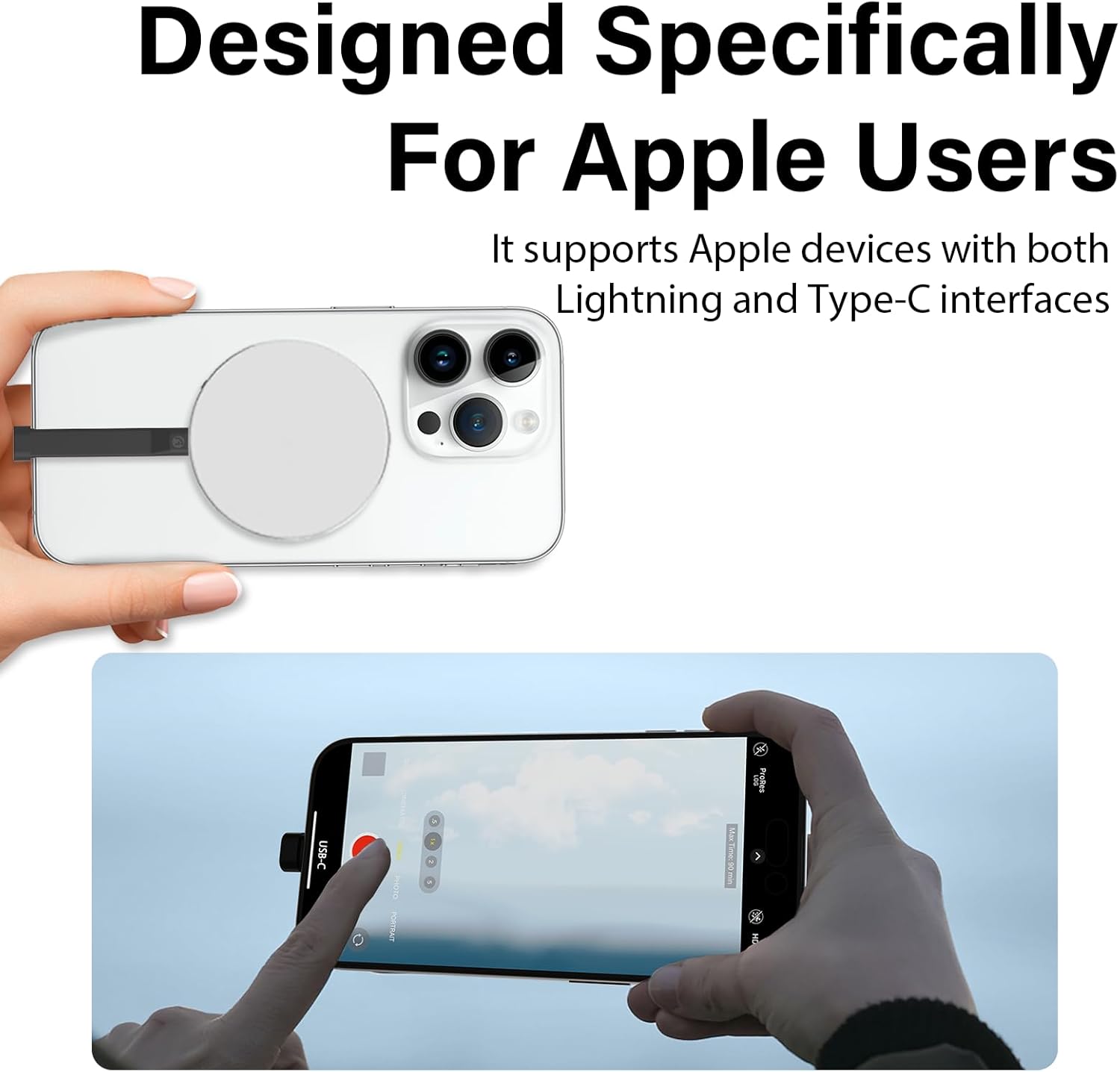
Image 4: An iPhone recording ProRes video directly to the Aiffro P10 Plus SSD. - Espulsione sicura: Always safely eject the Aiffro P10 Plus from your computer or device before disconnecting it to prevent data corruption.
- Windows: Right-click the drive icon in "This PC" or the taskbar, then select "Eject".
- macOS: Drag the drive icon to the Trash or click the Eject button next to the drive in Finder.
- iOS/Android: Disconnect after confirming no active transfers are occurring.
6. Compatibilità
The Aiffro P10 Plus is designed for broad compatibility:
- Sistemi operativi: Windows, macOS, Linux, Android, iOS (version 13 and later).
- Dispositivi:
- iPhones: X, 11, 12, 13, 14 (Lightning connection); 15, 16 and later (Type-C connection).
- iPads: iPad mini, iPad Air, iPad Pro, and other Lightning or Type-C enabled iPads.
- Android Smartphones and Tablets.
- Laptops and Desktop Computers.
- Gaming Consoles: PS5.


7. Manutenzione
To ensure the longevity and optimal performance of your Aiffro P10 Plus SSD, follow these maintenance guidelines:
- Cura fisica: Avoid dropping the device or subjecting it to strong impacts. While durable, extreme physical shock can damage internal components.
- Condizioni ambientali: Keep the SSD away from extreme temperatures, direct sunlight, and high humidity. Store it in a cool, dry place.
- Pulizia: Utilizzare un panno morbido e asciutto per pulire l'esterno dell'SSD. Non utilizzare detergenti liquidi o solventi.
- Aggiornamenti software: Keep your device's operating system updated to ensure proper compatibility and performance with external storage devices.
- Espulsione sicura: Always follow the safe ejection procedures mentioned in Section 5 before disconnecting the drive.
8. Risoluzione Dei Problemi
If you encounter issues with your Aiffro P10 Plus, refer to the following common problems and solutions:
| Problema | Possibile causa | Soluzione |
|---|---|---|
| SSD not recognized by device. |
|
|
| Bassa velocità di trasferimento dati. |
|
|
| L'attacco magnetico è debole. |
|
|
9. Specifiche
| Caratteristica | Dettaglio |
|---|---|
| Modello | P10 più |
| Tipo di archiviazione | Unità a stato solido (SSD) |
| Capacità di archiviazione digitale | 512 GB |
| Max Read/Write Speed | Up to 2000MB/s (Read/Write) |
| Interfaccia | USB 3.2 Gen 2x2 (20Gbps) |
| Connettività | USB (tipo C) |
| Dimensioni (spessore) | 6.5 millimetri |
| Peso | Circa 41 g |
| Materiale | Lega di alluminio |
| Sistema operativo compatibile | Windows, macOS, Linux, Android, iOS (13+) |


10. Garanzia e supporto
Aiffro products are designed for reliability and performance. For warranty information, technical support, or service inquiries, please refer to the official Aiffro webo contattare direttamente il servizio clienti. Conservare la ricevuta d'acquisto come prova d'acquisto per eventuali reclami in garanzia.
Per ulteriore assistenza, visitare: Aiffro Official Store on Amazon