
Temtop M100-New
Manuale utente del monitor della qualità dell'aria Tempop M100
Model: M100-New | Brand: Temtop
Introduzione
This manual provides comprehensive instructions for the setup, operation, and maintenance of your Temtop M100 Air Quality Monitor. The Temtop M100 is an 8-in-1 smart air quality weather station designed to provide real-time monitoring of indoor air quality, including PM2.5, PM10, CO2, temperature, and humidity, along with weather forecasts and time display.
Prodotto finitoview
Caratteristiche principali
- Large and clear display with colorful indicators for immediate air quality assessment.
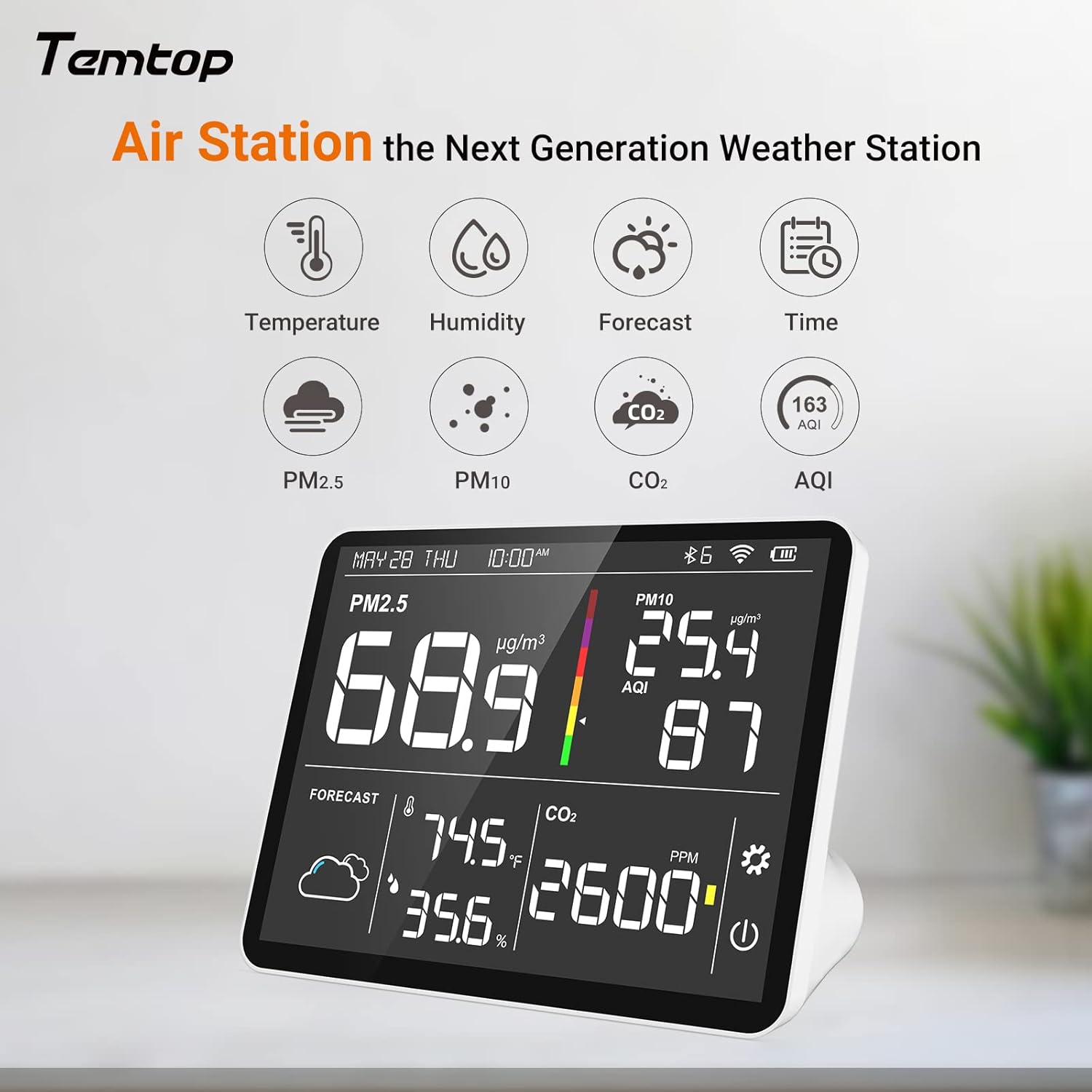
- 8-in-1 monitoring: Measures CO2, PM2.5, PM10, AQI, temperature, humidity, weather forecast, and date/time.
- Supports monitoring and managing up to 8 interconnected sensors via the Temtop dashboard.
- Calibration available for sensors to ensure accuracy.
- Push notifications via app for air quality alerts.
- Capacità di view graphs and export historical data for analysis.
Cosa c'è nella scatola
- Monitoraggio della qualità dell'aria Temptop M100
- Manuale di istruzioni
- Cavo di ricarica USB (tipo C)
Immagini del prodotto



Video ufficiali dei prodotti
Questo video fornisce un overview of the Temtop Air Quality Monitor M100, showcasing its features, design, and how it can be used to monitor air quality in various environments. It highlights the device's ability to display multiple air quality parameters simultaneously and its sleek design that fits into any style.
Impostare
Accensione iniziale e ricarica
Before first use, ensure the device is fully charged using the included Type-C USB cable. Connect the cable to the device's charging port and a compatible USB power source. A full charge is recommended for optimal battery performance. Note that some fast chargers may not be supported.
App Installation and Connectivity
The Temtop M100 connects via Wi-Fi to a companion mobile application. Download the official Temtop app from your device's app store (App Store for iOS, Google Play for Android). Follow the in-app instructions to create an account and connect your M100 monitor to your Wi-Fi network. This enables remote control, data tracking, and push notifications.
Calibrazione del sensore
The sensors support easy calibration to maintain accuracy. For the first use or after long storage, place the device in a well-ventilated environment (indoors or outdoors) for at least 6 hours. This allows the sensors to stabilize and calibrate to the ambient air conditions.
Istruzioni per l'uso
Comprensione del display
The large color screen displays all measured data simultaneously, including PM2.5, PM10, CO2, AQI, temperature, humidity, weather forecast, and current time/date. The colorful indicator provides a quick visual assessment of air quality. There are typically two on-screen touch buttons: one for power and another for screen brightness/measurement units.
Utilizzando l'applicazione mobile
The companion app allows for remote monitoring and management. You can:
- Change configuration settings.
- Provide a location for accurate weather forecasts.
- View and graph historical data for air quality, temperature, and humidity measurements over time.
- Receive push notifications when air quality levels are not optimal.
- Export data for further analysis.
Monitoraggio di più sensori
The Temtop M100 can monitor and manage up to 8 interconnected sensors from a single touch screen. Use the Temtop dashboard within the app to track connectivity, trends, and analyze historical data from all connected devices.
Manutenzione
Pulizia
To clean the device, gently wipe the exterior with a soft, dry cloth. Do not use abrasive cleaners or immerse the device in water. Ensure the sensor vents are clear of dust and debris for accurate readings.
Cura della batteria
The device is powered by an internal Lithium Ion battery. For continuous operation, it can be left plugged in. To prolong battery life, avoid extreme temperatures and store the device with a partial charge if not used for extended periods.
Risoluzione dei problemi
| Problema | Possibile causa/soluzione |
|---|---|
| Letture di temperatura imprecise | Ensure the device has been calibrated in a well-ventilated environment for at least 6 hours. Avoid placing the device near heat sources or direct sunlight. |
| App Glitches or Connectivity Issues | Ensure your Wi-Fi network is stable. Restart the device and the app. Check for app updates. Verify correct Wi-Fi credentials during setup. |
| Scarsa durata della batteria | The device's battery life may vary depending on usage. For continuous monitoring, it is recommended to keep the device plugged in. Ensure you are using the provided Type-C cable. |
| Display Viewing Angle Issues | The screen may have a narrow viewing angle. Adjust the device's position to view the display directly for optimal clarity. |
| Dispositivo non si spegne | Refer to the power button functionality in the operating instructions. If the device remains on, a long press of the power button or a soft reset might be required. Consult the manufacturer's support if the issue persists. |
Specifiche
| Attributo | Valore |
|---|---|
| Numero di modello | M100-New |
| Dimensioni del pacco | 9 x 6.63 x 3.5 pollici; 1.75 libbre |
| Batterie | 1 batterie agli ioni di litio richieste. (incluse) |
| Data prima disponibilità | 24 febbraio 2025 |
| Produttore | Tecnologia d'élite |
| Marca | Temptop |
| Usi consigliati per il prodotto | Casa |
| Usi specifici per il prodotto | Umidità |
| Fonte di alimentazione | Elettrico con cavo |
| Caratteristica speciale | Termometro |
| Tecnologia di connettività | Wifi |
| Colore | bianco |
| Componenti inclusi | Manuale di istruzioni |
Garanzia e supporto
Per informazioni sulla garanzia e supporto tecnico, fare riferimento al sito ufficiale Tempop website or contact their customer service. Details regarding product registration and specific warranty terms can typically be found on the manufacturer's official channels.
Puoi visitare il Negozio Temptop su Amazon per ulteriori informazioni e risorse di supporto.
Ask a question about this manual
Ask about setup, troubleshooting, compatibility, parts, safety, or missing instructions. Manuals+ will review the question and use this page’s manual context to help answer it.