
1. Informazioni sulla sicurezza
Please read all instructions carefully before using the BOSGAME P2 Plus Mini PC. Keep this manual for future reference.
- Non esporre il dispositivo a pioggia, umidità o temperature estreme.
- Evitare di posizionare il dispositivo vicino a fonti di calore o alla luce diretta del sole.
- Utilizzare esclusivamente l'adattatore di alimentazione fornito.
- Non aprire il casing of the Mini PC. Refer all servicing to qualified personnel.
- Garantire un'adeguata ventilazione attorno al dispositivo per evitare il surriscaldamento.
2. Contenuto della confezione
Verifica che tutti gli articoli siano presenti nel tuo pacco:
- 1 × BOSGAME P2 Mini PC
- 1 × Cavo HDMI
- 1 × Adattatore di alimentazione
- 1 × VESA Mount & Screws
- 1 × Manuale utente (questo documento)
3. Prodotto finitoview
The BOSGAME P2 Plus Mini PC is a compact and powerful computer designed for various applications, from business to entertainment. Familiarize yourself with its components and ports.

Figura 3.1: Fronte view of the BOSGAME P2 Plus Mini PC.
3.1 Pannello frontale
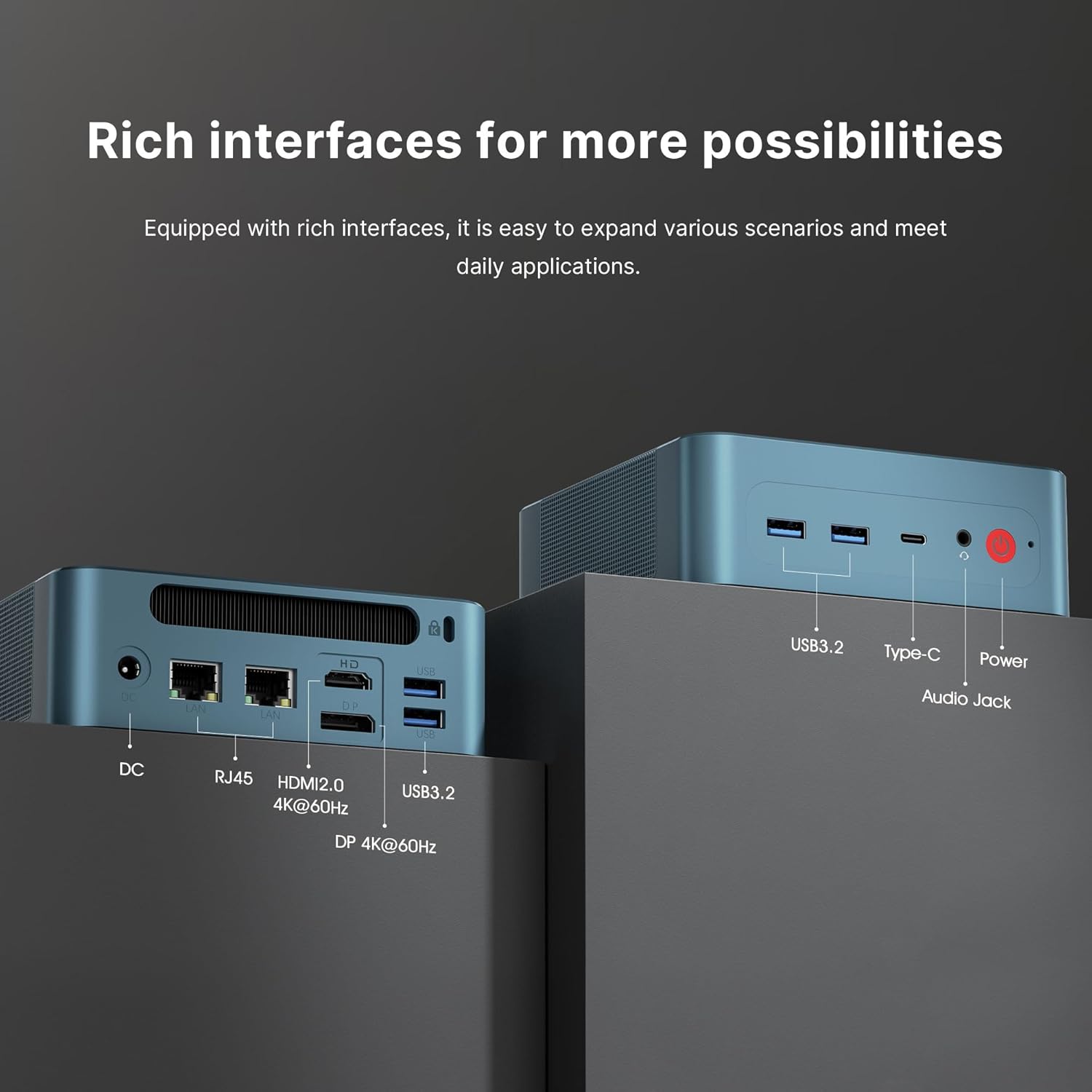
Figure 3.2: Front panel ports including USB 3.2, USB-C, Audio Jack, and Power button.
- Porte USB 3.2 Gen 2: Per collegare dispositivi USB come tastiere, mouse o dispositivi di archiviazione esterni.
- USB-C Port (Thunderbolt 4): Supports data transfer, video output (up to 8K), and Power Delivery (PD 3.0).
- Jack per cuffie da 3.5 mm: Per l'uscita audio su cuffie o altoparlanti.
- Pulsante di accensione: Per accendere o spegnere il dispositivo.
3.2 Pannello posteriore

Figure 3.3: Rear panel ports including DC-in, RJ45 LAN, HDMI 2.0, DisplayPort, and additional USB 3.2 ports.
- Jack DC: Collegare qui l'adattatore di alimentazione fornito.
- Dual 2.5Gb RJ45 LAN Ports: Per connessioni di rete cablate.
- Porta HDMI 2.0: For connecting to a display (up to 4K@60Hz).
- Porta Display (DP): For connecting to a display (up to 4K@60Hz).
- Porte USB 3.2 Gen 2: Additional ports for connecting USB devices.
3.3 Caratteristiche del prodottoview Video
Video 3.1: Un overview of the BOSGAME P2 Plus Mini PC's features, including its compact design, powerful processor, and various connectivity options. This video demonstrates the device's capabilities and its suitability for different usage scenarios.
4. Guida all'installazione
Per la configurazione iniziale del tuo Mini PC, segui questi passaggi:
- Connetti Display: Connect your monitor(s) to the Mini PC using the HDMI, DisplayPort, or USB-C (Thunderbolt 4) ports.
- Connetti le periferiche: Collega la tastiera, il mouse e qualsiasi altro dispositivo USB alle porte USB disponibili.
- Connetti rete: For a wired connection, connect an Ethernet cable to one of the RJ45 LAN ports. For Wi-Fi, you will configure it after the initial boot.
- Connetti alimentazione: Plug the power adapter into the DC jack on the rear panel, then plug the adapter into a power outlet.
- Accensione: Press the power button on the front panel. The device will boot up, and you will see the operating system (Windows 11 Pro) setup screen. Follow the on-screen instructions to complete the Windows setup.
5. Istruzioni per l'uso
5.1 Funzionamento di base
Once the initial setup is complete, your BOSGAME P2 Plus Mini PC is ready for use. You can navigate the Windows 11 Pro operating system, install applications, and connect to the internet.
5.2 Configurazione a triplo display
The Mini PC supports connecting up to three displays simultaneously for an extended workspace or immersive experience.

Figura 5.1: Esampdi una configurazione a triplo display con il Mini PC.
Per impostare più display:
- Connect your monitors to the HDMI, DisplayPort, and USB-C (Thunderbolt 4) ports.
- Once connected, Windows should automatically detect the displays.
- Right-click on the desktop, select "Display settings," and configure the display arrangement (extend, duplicate, etc.) as needed.
5.3 Thunderbolt 4 Functionality
The USB-C port on the front panel is a full-featured Thunderbolt 4 port, offering versatile connectivity:
- Erogazione di potenza (PD 3.0): Can provide power to compatible devices or receive power from a compatible power source (e.g., a portable power station).
- 40Gbps Data Transmission: High-speed data transfer for external SSDs or other Thunderbolt devices.
- Uscita video 8K: Supports connecting to an 8K display for ultra-high-resolution visuals.

Figure 5.2: The Thunderbolt 4 port enables power delivery, high-speed data, and video output, ideal for portable setups.
6. Espansione di memoria e archiviazione
The BOSGAME P2 Plus Mini PC comes equipped with 32GB DDR5 4800MHz SODIMM RAM and a 512GB PCIe Gen 4 x 4 SSD. Both can be upgraded.

Figure 6.1: Internal components showing the dual-channel DDR5 SODIMM memory and M.2 NVMe SSD.
- Memoria RAM: The dual-channel DDR5 4800MHz SODIMM memory can be expanded up to 64GB.
- SSD: The device features dual M.2 SSD slots, allowing for expansion up to 4TB PCIe Gen 4 x 4 SSD.
Note: Upgrading internal components should be performed by experienced users. Refer to the detailed upgrade guide on the BOSGAME support website or consult professional assistance to avoid damage.
7. Connettività
Il Mini PC offre solide opzioni di connettività:
- Wi-Fi 6: Provides faster and more stable wireless internet access compared to previous Wi-Fi standards.
- Bluetooth 5.2: Per collegare periferiche wireless come cuffie, tastiere e mouse.
- Dual 2.5Gb LAN: Two RJ45 ports for high-speed wired network connections.
8. Dissipazione del calore
The BOSGAME P2 Plus Mini PC incorporates an efficient heat dissipation system to maintain optimal performance and ensure quiet operation.

Figure 8.1: Illustration of the highly efficient heat dissipation system within the Mini PC.
To ensure effective cooling:
- Posizionare il Mini PC in un'area ben ventilata.
- Avoid blocking the ventilation grilles on the device.
- Regularly clean dust from the device's exterior to prevent accumulation in the vents.
9. Risoluzione Dei Problemi
This section addresses common issues you might encounter with your BOSGAME P2 Plus Mini PC.
| Problema | Possibile causa | Soluzione |
|---|---|---|
| Nessuna alimentazione/Il dispositivo non si accende | Adattatore di alimentazione non collegato, presa difettosa, problema con il pulsante di accensione. | Ensure power adapter is securely connected to both the device and a working power outlet. Try a different outlet. |
| Nessun output di visualizzazione | Loose display cable, incorrect input source on monitor, faulty cable. | Check display cable connections. Ensure monitor is set to the correct input source (HDMI, DP, USB-C). Try a different cable or monitor. |
| Wi-Fi/Bluetooth non funzionanti | Drivers not installed, disabled in OS, hardware issue. | Check device manager for driver status. Ensure Wi-Fi/Bluetooth is enabled in Windows settings. Restart the device. |
| Surriscaldamento del dispositivo | Poor ventilation, heavy workload. | Ensure adequate airflow around the device. Reduce demanding tasks. Clean dust from vents. |
If you encounter issues not listed here or if the suggested solutions do not resolve the problem, please contact BOSGAME customer support.
10. Specifiche
Key technical specifications for the BOSGAME P2 Plus Mini PC:
| Caratteristica | Specificazione |
|---|---|
| Processore | Intel Core i7-12700H (14 core, 20 thread, fino a 4.7 GHz) |
| Grafica | Grafica Intel Iris Xe (integrata) |
| Memoria RAM | 32GB DDR5 4800MHz SODIMM (Max 64GB) |
| Magazzinaggio | 512GB PCIe Gen 4 x 4 NVMe M.2 SSD (Expandable to 4TB) |
| Sistema operativo | Windows 11 Pro (preinstallato) |
| Wifi | Wi-Fi 6 |
| Bluetooth | Bluetooth 5.2 |
| Etereo | Dual 2.5Gb RJ45 LAN Ports |
| Porte USB | 4 x USB 3.2 Gen 2, 1 x USB-C (Thunderbolt 4) |
| Uscita video | 1 x HDMI 2.0 (4K@60Hz), 1 x DisplayPort (4K@60Hz), 1 x USB-C (Thunderbolt 4, up to 8K) |
| Audio | Jack 1 x 3.5mm per cuffie |
| Dimensioni | 129 x 123 x 44 mm (circa 5.08 x 4.84 x 1.73 pollici) |
| Peso | Circa 2 libbre (0.91 kg) |
11. Garanzia e supporto
BOSGAME provides comprehensive support for your P2 Plus Mini PC.
11.1 Informazioni sulla garanzia
Your BOSGAME P2 Plus Mini PC comes with a Three-Year limited warranty from the date of purchase. This warranty covers manufacturing defects and hardware malfunctions under normal use. Please retain your proof of purchase for warranty claims.
11.2 Assistenza clienti
For any pre-sale or after-sale inquiries, technical assistance, or warranty claims, please use the following methods:
- Contattaci su Amazon: Log into your Amazon buyer's account, find your order, and click 'Get help' for assistance with this product.
- Supporto via e-mail: Send an email to the After-sales Support Team at support@bosgame.comRiceverai una risposta il prima possibile.
BOSGAME is committed to providing professional customer service and support throughout the lifetime of your product.