
1. Introduzione
Welcome to the user manual for your new ASUS ROG Strix SCAR 16 G635LX-RW158WS gaming laptop. This document provides essential information for setting up, operating, maintaining, and troubleshooting your device. The ROG Strix SCAR 16 is engineered for high-performance gaming, featuring an Intel Core Ultra 9 processor, NVIDIA GeForce RTX 5090 graphics, and a high-refresh-rate display.

Figure 1.1: The ASUS ROG Strix SCAR 16 Gaming Laptop.
2. Cosa c'è nella scatola
Upon unboxing your ASUS ROG Strix SCAR 16, please verify that all the following items are included:
- ASUS ROG Strix SCAR 16 Gaming Laptop
- Adattatore di alimentazione
- Guida per l'utente (questo documento)
- Documenti di garanzia
3. Prodotto finitoview
The ASUS ROG Strix SCAR 16 is designed for peak gaming performance and productivity. Key features include:
- Processore: Intel Core Ultra 9 275HX with Intel AI Boost NPU
- Grafica: NVIDIA GeForce RTX 5090 Laptop GPU with 24GB GDDR7 RAM
- Display: 16-inch, 2.5K (2560 x 1600) WQXGA, 240Hz Refresh Rate, 1200nits Brightness ROG Nebula HDR Display
- Memoria: 32 GB di RAM DDR5
- Magazzinaggio: 2TB PCIe 4.0 NVMe M.2 Performance SSD
- Raffreddamento: ROG Intelligent Cooling with Vapor Chamber, Sandwiched Heatsink, Tri-Fan Technology, and Conductonaut Extreme Liquid Metal
- Tastiera: Backlit Chiclet Keyboard Per-Key RGB with Copilot key and Touchpad-based NumberPad
- Connettività: Wi-Fi 7, 2.5G LAN, Thunderbolt 5, HDMI 2.1, USB 3.2 Gen2 Type-A
- Audio: Accorto Amp Technology, 5.1.2 Channel Virtual Surround Sound, Two-Way AI Noise Cancelation
3.1 Componenti principali

Figura 3.1: Oltreview of the laptop's core specifications.
3.2 Sistema di raffreddamento
The ROG Intelligent Cooling system ensures optimal thermal performance, even during intense gaming sessions. It features an end-to-end Vapor Chamber, a sandwiched heatsink design, Tri-Fan Technology, and Conductonaut Extreme Liquid Metal for efficient heat dissipation.

Figure 3.2: ROG Intelligent Cooling system components.
Tecnologia di visualizzazione 3.3
Experience stunning visuals with the ROG Nebula HDR display. This 16-inch Mini LED panel offers over 2000 dimming zones, 1200 nits peak brightness, a 240Hz refresh rate with 3ms response time, and 100% DCI-P3 color gamut coverage. It supports Dolby Vision, NVIDIA G-SYNC, and is VESA Certified DisplayHDR 1000.

Figure 3.3: ROG Nebula HDR Display specifications.
3.4 Connettività e porte
The laptop offers comprehensive connectivity options for all your peripherals and networking needs, including Wi-Fi 7, 2.5G Ethernet, Thunderbolt 5, HDMI 2.1, and multiple USB ports.

Figure 3.4: Port layout and connectivity options.
3.5 Sistema audio
Enjoy immersive audio with Smart Amp Technology, 5.1.2 Channel Virtual Surround Sound, and Two-Way AI Noise Cancelation for clear communication.

Figure 3.5: Studio-quality sound features.
3.6 Tastiera e touchpad
The full-size Chiclet keyboard features Per-Key RGB backlighting, dedicated gaming hotkeys, and a touchpad with an integrated NumberPad for enhanced functionality.

Figure 3.6: Keyboard and touchpad with NumberPad.
3.7 Aggiornabilità
The laptop features a tool-less access design, allowing for easy upgrades. It supports up to 64GB 5600MHz DDR5 memory and up to 4TB PCIe 4.0 storage in RAID 0 configuration.
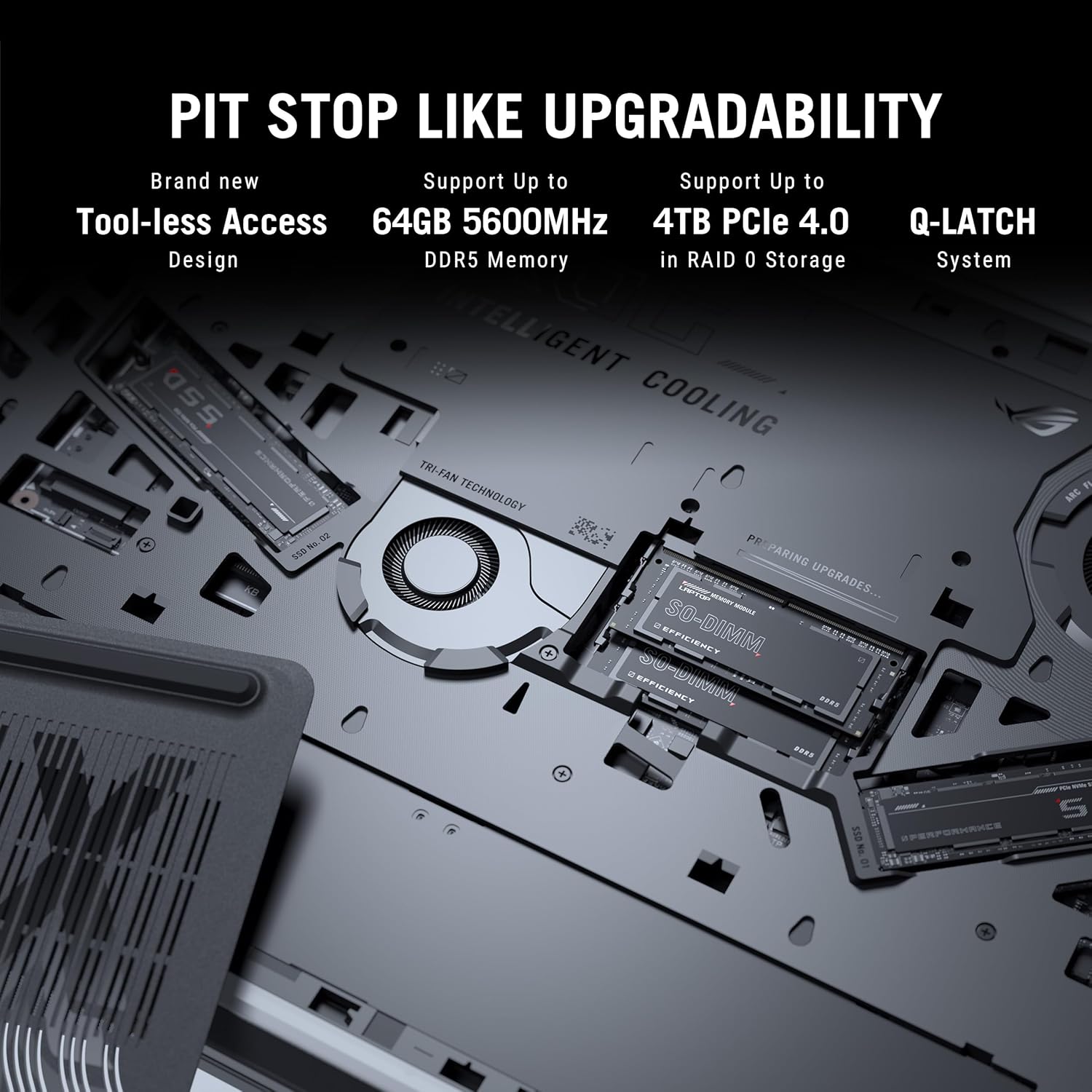
Figure 3.7: Internal components for upgradability.
4. Impostazione
4.1 Accensione iniziale
- Connetti alimentazione: Plug the power adaptor into the laptop's power port and then into a wall outlet. Ensure the power indicator light illuminates.
- Apri schermo: Aprire con cautela il display del laptop in una posizione comoda viewangolo di ing.
- Accensione: Premere il pulsante di accensione, solitamente situato in alto a destra sulla tastiera.
- Configurazione iniziale: Seguire le istruzioni visualizzate sullo schermo per completare la configurazione di Windows 11 Home, inclusa la selezione della lingua, la connessione di rete e la creazione dell'account utente.
4.2 Collegamento delle periferiche
Connect external devices such as a mouse, keyboard, external display, or storage devices to the available USB, HDMI, or Thunderbolt ports as needed.
5. Istruzioni per l'uso
5.1 Gestione dell'alimentazione
- Modalità risparmio: Chiudere il coperchio o premere brevemente il pulsante di accensione per entrare in modalità sospensione.
- Fermare: Fare clic sul pulsante Start, quindi su Arresta > Arresta il sistema.
- Ricomincia: Fare clic sul pulsante Start, quindi su Arresta > Riavvia.
5.2 Funzioni della tastiera
Utilizzare i tasti funzione (F1-F12) in combinazione con Fn key for quick access to system controls such as volume, brightness, and wireless settings. The dedicated gaming hotkeys provide quick access to performance modes and other ROG-specific features.
5.3 Impostazioni di visualizzazione
Adjust display settings through Windows Settings or the NVIDIA Control Panel for optimal gaming and visual experience. You can configure refresh rate, resolution, and color profiles.
6. Manutenzione
6.1 Pulizia
- Schermo: Utilizzare leggermente un panno morbido e privo di lanugine dampcon acqua o un detergente per schermi. Evitare prodotti chimici aggressivi.
- Tastiera e chassis: Utilizzare una spazzola morbida o aria compressa per rimuovere la polvere. Pulire le superfici con un panno leggermenteamp stoffa.
- Vents: Regularly clean the cooling vents with compressed air to prevent dust buildup and maintain airflow.
6.2 Cura della batteria
- Evitare di scaricare completamente la batteria frequentemente.
- Se non si utilizza il computer portatile per lunghi periodi, conservarlo in un luogo fresco e asciutto.
- For optimal battery longevity, consider using battery health management features available in ASUS software.
6.3 Aggiornamenti software
Regularly update your operating system, drivers (especially graphics drivers), and ASUS utilities to ensure optimal performance, security, and compatibility.
7. Risoluzione Dei Problemi
Questa sezione affronta i problemi più comuni che potresti riscontrare. Per problemi più complessi, fai riferimento al supporto ASUS. websito o contattare il servizio clienti.
7.1 Problemi di alimentazione
- Il portatile non si accende: Ensure the power adaptor is securely connected to both the laptop and a working power outlet. Check if the power adaptor's LED is lit. Try a different outlet.
- La batteria non si carica: Verify the power adaptor connection. Check for any physical damage to the adaptor or charging port.
7.2 Problemi di visualizzazione
- Nessuna visualizzazione sullo schermo: Connect an external monitor to check if the issue is with the laptop's internal display. Ensure the display cable (if external) is properly connected. Try pressing Tasto F8 (or the corresponding display toggle key) to switch display output.
- Visualizzazione tremolante o distorta: Aggiorna i driver della scheda grafica. Controlla i collegamenti dei cavi dello schermo se utilizzi un monitor esterno.
7.3 Problemi di prestazioni
- Prestazioni lente: Close unnecessary applications. Check for background processes consuming high CPU/RAM. Ensure adequate ventilation and clean cooling vents. Update drivers.
- Surriscaldamento: Ensure the laptop is on a hard, flat surface to allow proper airflow. Clean the cooling vents. Consider using a laptop cooling pad.
8. Specifiche
Detailed technical specifications for the ASUS ROG Strix SCAR 16 G635LX-RW158WS.
| Caratteristica | Specificazione |
|---|---|
| Marca | Asus |
| Nome del modello | ROG Strix SCAR 16 |
| Numero di modello | G635LX-RW158WS |
| Processore | Intel Core Ultra 9 275HX (2.7 GHz, up to 5.4 GHz, 24 cores, 24 Threads) |
| Grafica | NVIDIA GeForce RTX 5090 Laptop GPU, 24GB GDDR7 RAM |
| Display | 16-inch, 2.5K (2560 x 1600) WQXGA, 16:10, 240Hz, 1200nits, ROG Nebula HDR |
| Memoria | 32GB DDR5 RAM (Max 64GB) |
| Magazzinaggio | 2TB PCIe 4.0 NVMe M.2 Performance SSD |
| Sistema operativo | Windows 11 Casa |
| Tastiera | Backlit Chiclet Keyboard Per-Key RGB, Copilot key |
| Webcamma | Telecamera IR FHD 1080P per Windows Hello |
| Connettività wireless | Wi-Fi 7 (802.11.be), Bluetooth |
| Porti | Thunderbolt 5 (USB Type-C), HDMI 2.1, USB 3.2 Gen2 Type-A, 2.5G Ethernet, Audio Jack |
| Batteria | 90 Watt Hours Lithium Ion |
| Dimensioni (L x P x Spessore) | 35.4L x 26.8W x 2.3Th Centimeters |
| Peso dell'articolo | 2.8 chilogrammi |
9. Garanzia e supporto
9.1 Informazioni sulla garanzia
This genuine ASUS laptop comes with a 1-year Global Warranty and Onsite Domestic Warranty from ASUS, covering manufacturing defects. Physical damage is not covered. To activate your warranty, please register on the ASUS brand websito.
9.2 Assistenza clienti
For product-related queries or immediate assistance, you can contact ASUS customer support:
- Numero verde: 18002090365 (Monday - Saturday, 09:00 AM - 06:00 PM)
- E-mail: rc_india@asus.com
- Supporto online: Visita il supporto ufficiale ASUS website for service centers and further assistance: www.asus.com/in/support

Figure 9.1: ASUS 4A Guarantee and support contact details.
10. Note importanti
Nei dati forniti non erano disponibili video ufficiali del prodotto da incorporare in questo manuale.