
SHARPDO ZWS1025
SHARPDO ZWS1025 Smart Door Lock User Manual
Modello: ZWS1025
1. Introduzione
This manual provides detailed instructions for the installation, operation, and maintenance of your SHARPDO ZWS1025 Smart Door Lock. Please read this manual thoroughly before installation and use to ensure proper function and safety. This smart lock offers multiple unlocking methods including fingerprint, passcode, NFC, mobile app, and traditional key access.
2. Informazioni sulla sicurezza
- Non tentare di smontare o riparare la serratura da soli. Contattare l'assistenza clienti per assistenza.
- Use only specified 1.5V AA alkaline batteries. Do not mix old and new batteries or different types of batteries.
- Keep mechanical keys in a safe location outside the property.
- Avoid exposing the lock to direct sunlight or extreme temperatures for prolonged periods.
- Assicurarsi che tutti i componenti siano fissati saldamente durante l'installazione per evitare malfunzionamenti.
3. Contenuto della confezione
Verificare che tutti i componenti siano presenti prima di iniziare l'installazione.

Immagine 3.1: Sopraview of SHARPDO ZWS1025 Smart Door Lock components. This image displays the complete set of items included with the smart lock: the exterior keypad and handle assembly, the interior handle and battery cover, two traditional mechanical keys, two NFC cards, and the mortise lock mechanism. A smartphone displaying the "Powered by Tuya" app is also shown, indicating app compatibility.
- Front Panel Assembly (Keypad and Handle)
- Rear Panel Assembly (Interior Handle and Battery Compartment)
- Corpo serratura da infilare
- Piastra di battuta e scatola di battuta
- Viti e mandrini di montaggio
- Tasti meccanici (2)
- NFC Cards (2)
- Modello di installazione
- Manuale dell'utente (questo documento)
4. Prodotto finitoview
Familiarize yourself with the different parts of your smart door lock.

Immagine 4.1: Labeled diagram of the SHARPDO ZWS1025 Smart Door Lock. The image highlights key components on both the exterior and interior panels. On the exterior, it shows the password keypad, fingerprint collector, horn, hidden keyhole, and Type-C emergency power supply port. On the interior, it indicates the 4-battery compartment, door handle, and anti-lock knob.
- Exterior Panel: Keypad, Fingerprint Sensor, Handle, Emergency Keyhole (hidden), Type-C Emergency Power Port.
- Interior Panel: Battery Compartment (4x AA), Handle, Anti-lock Knob.
- Serratura a mortaio: Multi-bolt mechanism for secure locking.
5. Installazione
Follow these steps carefully to install your smart door lock. It is recommended to watch the official installation video for visual guidance.
5.1 Compatibilità delle porte
The SHARPDO ZWS1025 is suitable for various door types, including anti-theft doors, wooden doors, and painted doors. Ensure your door meets the following dimensions:

Immagine 5.1: Door compatibility and dimensions. This image illustrates the required dimensions for the door and the mortise lock body. The lock assembly measures 365mm in height and 72mm in width, with a thickness of 22mm. The mortise lock body has specific measurements for its length, width, and bolt positions, ensuring proper fit within the door.
- Lock Assembly Dimensions: Dimensioni: 36.5 x 7.2 x 2.2 cm.
- Mortise Lock Body Dimensions: Refer to Image 5.1 for detailed measurements.
5.2 Regolazione della direzione della maniglia
The door handle is reversible to accommodate both left and right-handed doors. Adjust the handle direction before installation if necessary by disassembling and changing the direction of the screws as per the instructions provided in the installation video.
5.3 Fasi di installazione (generali)view)
- Prepare the door according to the provided installation template.
- Installare il corpo della serratura a mortaio nel bordo della porta.
- Connect the cables from the exterior panel to the interior panel.
- Mount the exterior and interior panels, securing them with screws.
- Installare la piastra di battuta e la scatola di battuta sul telaio della porta.
- Insert 4 AA alkaline batteries into the interior panel's battery compartment.
- Test all unlocking methods to ensure proper function.
6. Istruzioni per l'uso
Your SHARPDO ZWS1025 Smart Door Lock offers multiple convenient ways to unlock.

Immagine 6.1: Sopraview of unlocking methods. This graphic displays five primary ways to unlock the SHARPDO ZWS1025 Smart Door Lock: IC/NFC unlocking, mobile phone Bluetooth unlocking, fingerprint unlocking, password unlocking, and traditional key unlocking.
6.1 Metodi di sblocco
- Accesso tramite impronta digitale: Place your registered finger on the semiconductor fingerprint sensor. The lock will unlock if the fingerprint is recognized.
- Inserimento codice di accesso: Inserisci il codice di accesso registrato sulla tastiera, seguito dal tasto '#'.
- NFC/IC Card: Present a registered NFC or IC card to the designated sensing area on the lock.
- Mobile App (TT App): Use the TT App on your smartphone to unlock the door via Bluetooth.
- Chiave meccanica: In caso di emergenza o di batteria scarica, utilizzare la chiave meccanica in dotazione per sbloccare la porta attraverso la serratura nascosta.
6.2 App Configuration (TT App)
Download the TT App from your smartphone's app store. Follow the in-app instructions to pair your smart lock and manage users, passcodes, fingerprints, and NFC cards. The app allows for remote control and monitoring.
6.3 Gestione delle password

Immagine 6.2: Password management features. This image illustrates three types of password functionalities: One-time password for temporary access (e.g., delivery personnel), Recurring password for regular access (e.g., home service staff), and Anti-peeping virtual bit code, which allows users to enter random numbers before or after the actual password to prevent others from guessing the code.
- Password monouso: Generate temporary passcodes for single use, ideal for visitors or service personnel.
- Recurring Passwords: Set passcodes that are valid for specific periods or recurring schedules.
- Anti-Peeping Virtual Code: Per aumentare la sicurezza, puoi inserire cifre casuali prima o dopo il codice di accesso effettivo. Il lucchetto riconoscerà comunque la sequenza corretta all'interno della stringa di numeri più lunga.
6.4 Emergency Mechanical Handle

Immagine 6.3: Emergency mechanical quick-opening handle. The image shows the interior side of the smart lock, highlighting the handle. The text indicates that the rear panel retains an independent mechanical quick-opening handle, which allows for quick door opening in case of an emergency, even if the electronic systems fail.
The interior panel features an independent mechanical quick-opening handle, allowing you to exit quickly in emergencies, regardless of the lock's electronic status.
7. Manutenzione
7.1 Sostituzione della batteria
The lock is powered by 4 AA alkaline batteries. When the battery level is low, the lock will provide a low-battery warning. Replace all four batteries promptly to ensure continuous operation.
- Open the battery compartment cover on the interior panel.
- Rimuovere le vecchie batterie e smaltirle in modo responsabile.
- Inserire quattro nuove batterie alcaline AA da 1.5 V, assicurandosi della corretta polarità.
- Chiudere il coperchio del vano batterie.
7.2 Alimentazione di emergenza
If the batteries are completely depleted, you can use a Type-C USB power bank to provide emergency power to the lock. Connect the Type-C cable to the port located on the bottom of the exterior panel to temporarily power the lock and gain access.
7.3 Pulizia
Wipe the lock's surface with a soft, dry cloth. Do not use abrasive cleaners or solvents, as these can damage the finish and electronic components.
8. Risoluzione Dei Problemi
Questa sezione affronta i problemi più comuni che potresti riscontrare con la tua serratura intelligente.

Immagine 8.1: Multiple alarms and indicators. This image highlights the lock's security features, specifically the anti-pry alarm, which activates with a loud noise if the door lock is tampered with, and the low battery reminder, indicating when batteries need replacement.
| Problema | Possibile causa | Soluzione |
|---|---|---|
| Il blocco non risponde. | Batterie scariche. | Replace batteries or use emergency Type-C power. |
| Impronta digitale non riconosciuta. | Finger is dirty, wet, or not properly placed; unregistered fingerprint. | Ensure finger is clean and dry, place it correctly on the sensor. Re-register fingerprint if necessary. |
| Il codice di accesso non funziona. | Incorrect passcode entered; passcode expired. | Verify the passcode. Check app for passcode validity or generate a new one. |
| Anti-pry alarm sounds. | Lock detected tamptentativo fallito. | Inspect the lock for damage. If false alarm, check installation. |
9. Specifiche
| Caratteristica | Dettaglio |
|---|---|
| Numero di modello | ZWS1025 |
| Metodi di sblocco | Fingerprint, Passcode, NFC, Mobile App (TT App), Mechanical Key |
| Alimentazione elettrica | 4 batterie alcaline AA da 1.5 V |
| Durata della batteria | Circa 12 mesi |
| Alimentazione di emergenza | Tipo-C USB |
| Sensore di impronte digitali | Semiconductor Live Fingerprint Collector |
| Capacità dell'impronta digitale | 100 |
| Capacità della scheda IC | 200 |
| Capacità del codice di accesso | Unlimited dynamic passwords, 150 groups for custom/permanent passwords |
| Standard Bluetooth | Bluetooth BLE |
| Sistema supportato | Android 4.3 / iOS 7.0 o versioni successive |
| Sblocca il tempo | ~1.5 secondi |
| Temperatura di lavoro | -25 ℃ a +65 ℃ |
| Materiale | Aluminum Alloy Integration Molding |
| Valutazione resistente alle intemperie | IP65 (pannello frontale) |
| Dimensioni del prodotto | Dimensioni: 36.5 x 7.2 x 2.2 cm |
| Peso dell'articolo | 2.79 chilogrammi |
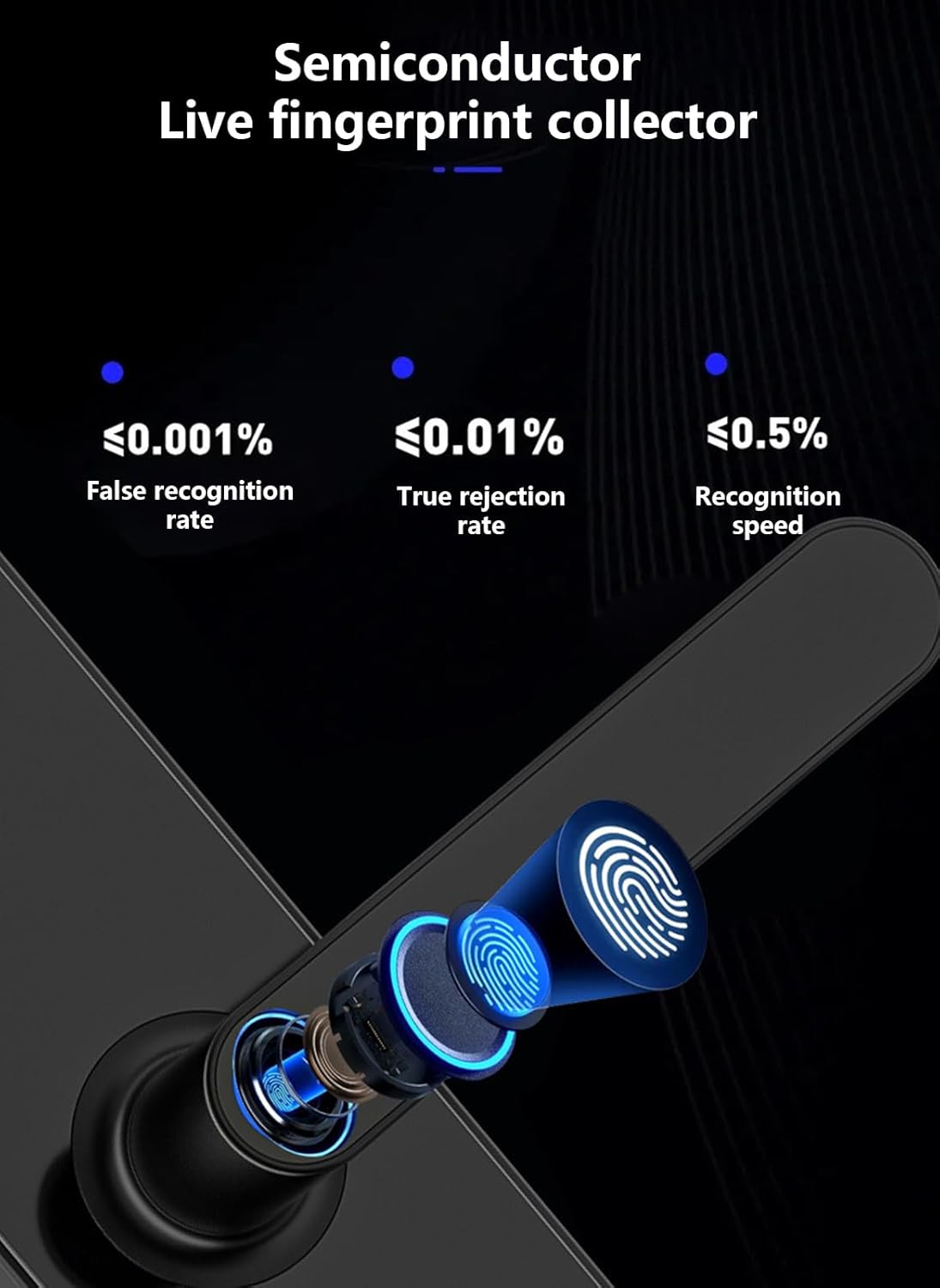
Immagine 9.1: Semiconductor live fingerprint collector performance. This image highlights the efficiency and accuracy of the fingerprint sensor, showing a false recognition rate of ≤0.001%, a true rejection rate of ≤0.01%, and a recognition speed of ≤0.5 seconds.
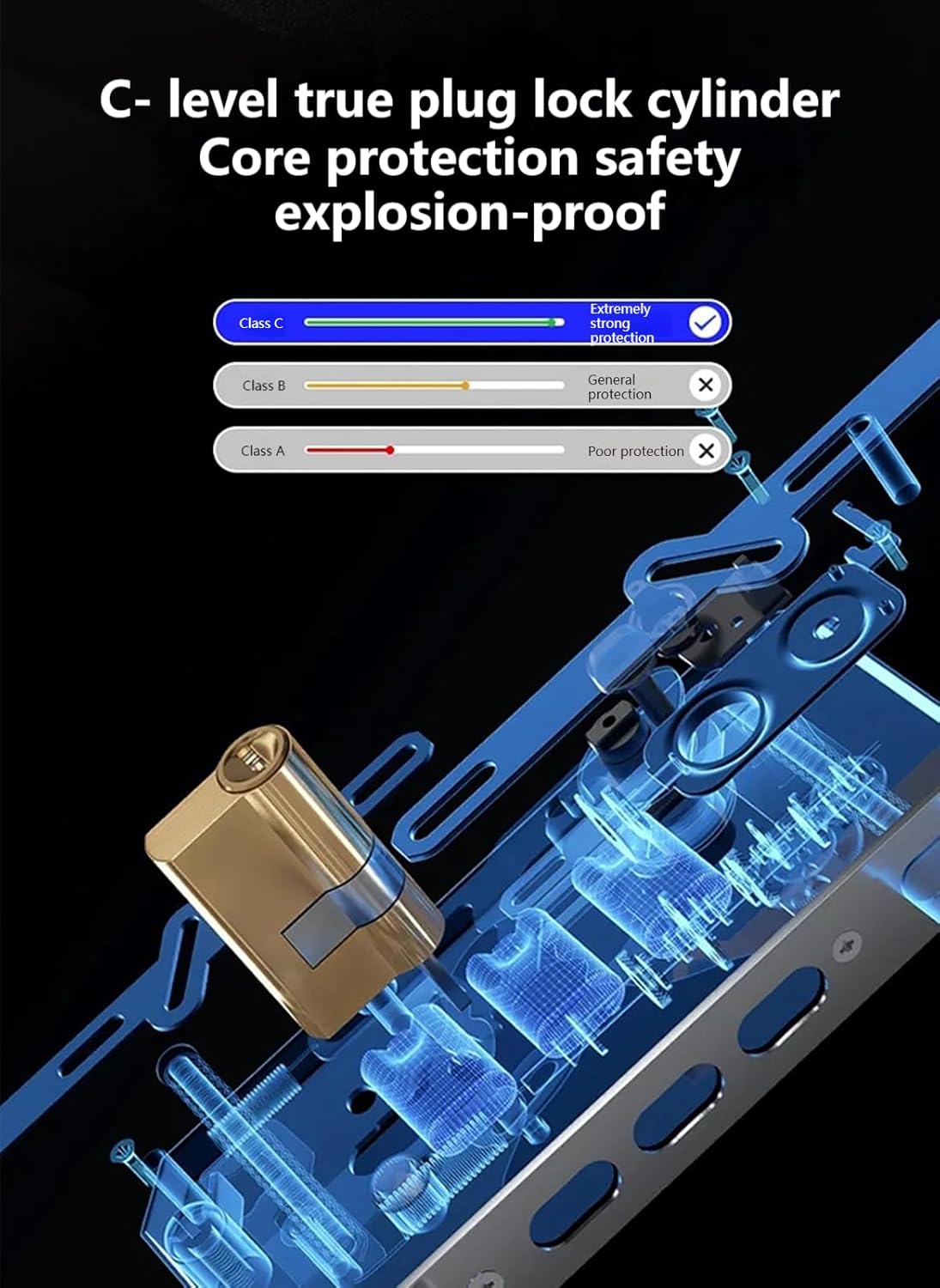
Immagine 9.2: C-level true plug lock cylinder. This image visually represents the high-security C-level lock cylinder, indicating "Extremely Strong Protection" against tampering and forced entry, compared to lower-grade lock cylinders.
10. Garanzia e supporto
Your SHARPDO ZWS1025 Smart Door Lock comes with a Garanzia del prodotto di 1 anni. Additionally, you receive a free lifetime app subscription for managing your lock.
Should you encounter any issues or require assistance, please contact SHARPDO customer support. Refer to the product packaging or the official SHARPDO websito per i contatti.