
Introduzione
This manual provides comprehensive instructions for the OMAIC EN2Q36H replacement remote control, designed for Hisense Smart TVs. It covers essential information regarding setup, operation, and maintenance to ensure optimal performance and user experience. This remote offers a direct replacement solution without the need for complex programming.
Impostare
The OMAIC EN2Q36H remote control is designed for immediate use with compatible Hisense Smart TVs. No programming or pairing is required.
Installazione della batteria
- Individuare il vano batterie sul retro del telecomando.
- Per aprire il coperchio della batteria, farlo scorrere verso il basso o nella direzione indicata dalla freccia.
- Inserire due batterie alcaline AAA (non incluse), assicurandosi che i terminali positivo (+) e negativo (-) siano allineati correttamente con le marcature all'interno del vano.
- Riposizionare il coperchio della batteria facendolo scorrere nella posizione corretta finché non scatta in posizione.
Once batteries are installed, the remote is ready to operate your Hisense Smart TV.

Istruzioni per l'uso
This remote control utilizes infrared (IR) technology for communication with your Hisense Smart TV. Ensure a clear line of sight between the remote and the TV's IR receiver for optimal performance.
Caratteristiche principali
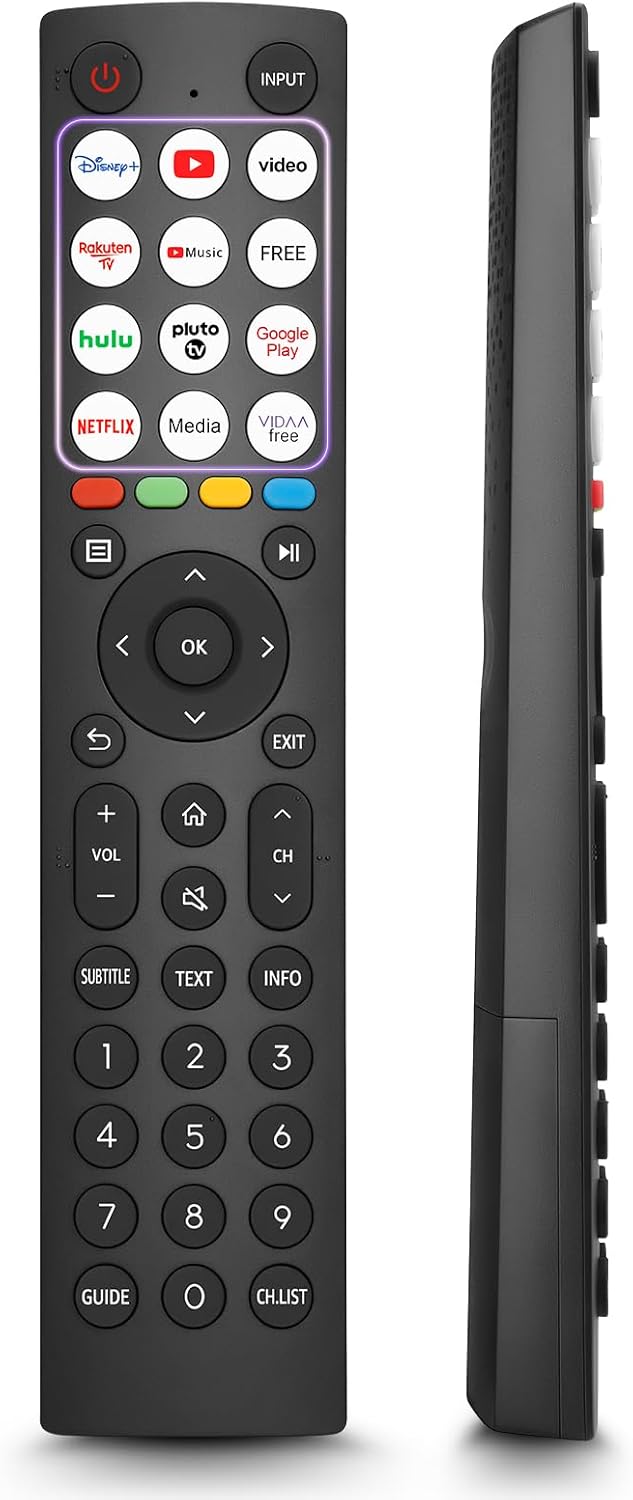
- 12 Shortcut Buttons: Quickly access popular streaming services and applications with dedicated buttons.
- Strong IR Signal: Provides a longer transmission distance and quick response without noticeable delay.
- Costruzione durevole: Made from high-quality ABS and silicone materials for extended lifespan.

Funzioni dei pulsanti
Familiarize yourself with the functions of each button on your OMAIC EN2Q36H remote control:
| Pulsante | Funzione |
|---|---|
| ENERGIA | Switches the TV on or into standby mode. |
| INGRESSO | Seleziona le sorgenti di ingresso (HDMI, AV, ecc.). |
| APP Buttons | Quick access buttons for specific applications (e.g., Disney+, Netflix, YouTube). |
| MENU | Displays the Quick Setup menu. |
| Controllo MEDIA | Buttons for Play, Pause, Stop, Fast Forward, Rewind. |
| Navigazione (su/giù/sinistra/destra) | Navigates on-screen menus and adjusts system settings. |
| OK | Confirms selection in on-screen menus. |
| INDIETRO | Torna al menù precedente. |
| EXIT | Esce dal menu corrente. |
| volume +/- | Regola il livello del volume. |
| CASA | Enters the Home screen. |
| MUTE | Disattiva o ripristina l'audio del televisore. |
| CH ^/v | Switches channels. |
| SOTTOTITOLI | Activates or deactivates subtitle mode. |
| TESTO | Turns teletext function on and off. |
| INFORMAZIONI | Visualizza le informazioni sul programma corrente. |
| NUMBER Buttons (0-9) | Direct channel selection or number input. |
| GUIDA | Displays the Electronic Programme Guide (DTV input). |
| ELENCO CANALI | Displays the Channel List on the screen. |

Modelli di TV Hisense compatibili
The OMAIC EN2Q36H replacement remote control is compatible with the following Hisense VIDAA 4K HDTV Smart TV series:
- 32A4K, 40A4K, 43A4K
- 32A5KQ, 40A5KQ
- 43A6K, 50A6K, 55A6K, 58A6K, 65A6K, 70A6K, 75A6K, 85A6K
- 55U6KQ, 65U6KQ
- 43A7KQ, 50A7KQ, 55A7KQ, 65A7KQ, 75A7KQ
- 43E7KQ, 50E7KQ, 55E7KQ, 65E7KQ, 75E7KQ
Manutenzione
Per garantire la longevità e il corretto funzionamento del telecomando, seguire queste linee guida per la manutenzione:
- Pulizia: Use a soft, dry cloth to clean the remote. Avoid using liquid cleaners or abrasive materials, as they may damage the surface or internal components.
- Sostituzione della batteria: Sostituisci le batterie quando la risposta del telecomando diventa lenta o smette di funzionare. Sostituisci sempre entrambe le batterie contemporaneamente con batterie nuove dello stesso tipo (alcaline AAA).
- Magazzinaggio: Conservare il telecomando in un luogo fresco e asciutto, lontano dalla luce solare diretta, da temperature estreme e da elevata umidità.
- Evitare gocce: Proteggere il telecomando dagli urti fisici, poiché le cadute possono danneggiare i circuiti interni.
Risoluzione dei problemi
Se riscontri problemi con il telecomando, fai riferimento ai seguenti passaggi per la risoluzione dei problemi:
| Problema | Possibile causa | Soluzione |
|---|---|---|
| Il telecomando non risponde | Batterie scariche o inserite in modo errato. | Sostituire le batterie con nuove batterie alcaline AAA, assicurandosi della corretta polarità. |
| Il telecomando non risponde | Ostruzione tra telecomando e TV. | Ensure a clear line of sight to the TV's IR receiver. Remove any objects blocking the path. |
| Il telecomando non risponde | Il telecomando è troppo lontano dalla TV. | Move closer to the TV. The remote has an extended range, but extreme distances may affect performance. |
| I pulsanti sono bloccati o non rispondono | Sporcizia o detriti sotto i pulsanti. | Pulire delicatamente la zona attorno ai pulsanti con un panno morbido e asciutto. Evitare i liquidi. |
| Funzioni specifiche non funzionanti | TV model incompatibility (rare). | Verify your Hisense TV model is listed in the 'Compatible Hisense TV Models' section. |
Specifiche
| Caratteristica | Dettaglio |
|---|---|
| Nome del modello | EN2Q36H |
| Marca | OMAICO |
| Dispositivi compatibili | Hisense Smart TVs |
| Tecnologia di connettività | Infrarossi (IR) |
| Numero di pulsanti | 48 |
| Tipo di controllo | Controllo dei pulsanti |
| Caratteristiche speciali | Universal, Comfortable |
| Colore | Nero |
| Descrizione della batteria | AAA (Alkaline) |
| Supported Devices (Max) | 1 |
| Dimensioni del prodotto (circa) | Dimensioni: 34.7 x 24.7 x 2.2 cm |
| Peso del prodotto (circa) | 80 grammi |

Garanzia e supporto
OMAIC is committed to the quality and compatibility of its replacement remote controls. We provide professional after-sales support to ensure customer satisfaction.
If you have any questions or concerns regarding your OMAIC EN2Q36H remote control or your order, please contact us directly. Our support team aims to respond to inquiries within 12 working hours.