
Introduzione
Grazie per l'acquistoasing the UPXNBOR Wireless LED Table Lamp. This manual provides important information for the safe and efficient use of your new lamp. Please read it thoroughly before first use and keep it for future reference.
Questo versatile lamp features a durable all-metal casing, touch control, three warm light levels, and IP54 waterproofing, making it suitable for various indoor and outdoor settings.
Istruzioni di sicurezza
- Leggi tutte le istruzioni: Prima di utilizzare lamp, read and understand all safety and operating instructions.
- Ricarica: Use only the provided USB-C cable for charging. Do not use fast chargers, as this may reduce battery lifespan. Ensure the lamp is fully charged before its first use.
- Resistenza all'acqua: Il lamp is IP54 waterproof, meaning it is protected against dust ingress and splashing water from any direction. It is not designed for submersion in water.
- Temperatura: Evitare di esporre la lamp to extreme temperatures. For optimal battery performance, use and charge the lamp within recommended temperature ranges.
- Pulizia: Scollegare lamp from the power source before cleaning. Use a soft, dry cloth. Do not use abrasive cleaners or solvents.
- Smontaggio: Non tentare di smontare o modificare lampCiò invaliderà la garanzia e potrebbe causare danni o lesioni.
- Bambini: Mantieni la lamp fuori dalla portata dei bambini.
Contenuto della confezione
Si prega di controllare la confezione per verificare la presenza dei seguenti elementi:
- UPXNBOR Wireless LED Table Lamp (Model UP-WSA)
- USB-C Power Cable (80cm)
- Manuale d'uso
Prodotto finitoview
The UPXNBOR Wireless LED Table Lamp is designed for convenience and durability. It features a robust all-metal construction and a sleek, minimalist design.
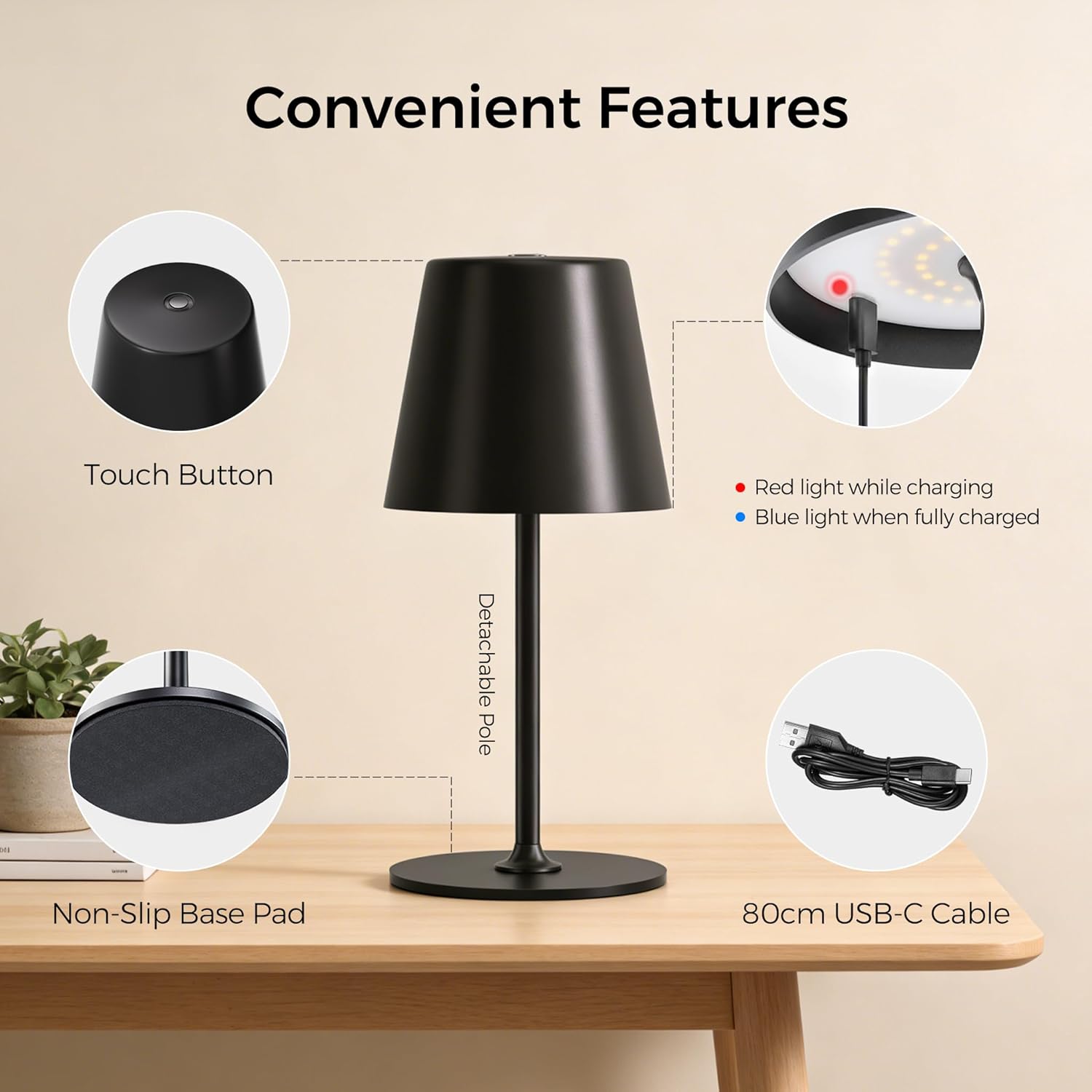
Image: Convenient Features. This image highlights the key components of the lamp, including the touch button on top, the charging indicator light (red for charging, blue for fully charged), the detachable pole for easy assembly, the non-slip base pad for stability, and the included 80cm USB-C charging cable.
Caratteristiche principali:
- All-Metal Casing: High-quality metal construction for durability and stability.
- 48 LED: Provides uniform illumination with 20 internal and 28 external LEDs.
- 3 livelli di luminosità: Easily adjust light intensity to suit different environments and needs.
- Dual Battery Design: Durata prolungata della batteria per un utilizzo prolungato.
- Controllo touch: Simple and intuitive operation via a touch-sensitive button on the top.
- IP54 impermeabile: Suitable for both indoor and outdoor use, resistant to splashing water.
- Base antiscivolo: Garantisce stabilità su diverse superfici.
- Detachable Pole: Allows for compact storage and easy assembly.

Image: All-New Upgrade. This graphic illustrates the product's enhancements, including an upgrade from single-ring to dual-ring LEDs for improved brightness, a transition from a single-battery to a dual-battery design for extended runtime (6-16 hours), and an upgrade from a plastic top to an all-metal top for enhanced material quality.
Impostare
Your UPXNBOR lamp is designed for easy assembly.
- Disimballare: Rimuovere con attenzione tutti i componenti dalla confezione.
- Montare il palo: Il lamp pole may come in two parts. Gently screw the upper part of the pole into the lower part, then screw the assembled pole into the lamp base. Ensure it is securely fastened.
- Carica iniziale: Prima del primo utilizzo, caricare completamente lamp using the provided USB-C cable. Refer to the 'Charging' section for details.
Istruzioni per l'uso
Il lamp features simple touch control for power and brightness adjustment.
- Accensione/spegnimento: Lightly touch the center of the top surface of the lamp to turn it on. Touch it again to turn it off.
- Regola luminosità: Mentre il lamp is on, tap the touch button repeatedly to cycle through the three brightness levels (Low, Medium, High).

Image: 3 Brightness Levels and Battery Life. This image illustrates the three available brightness settings and their approximate battery runtimes: Level 1 provides 14-16 hours, Level 2 provides 8-9 hours, and Level 3 provides 6-7 hours. Note that in cold conditions (0-5°C), battery capacity may drop to around 70-80%.
Ricarica
To charge your UPXNBOR Wireless LED Table Lamp:
- Locate the USB-C charging port, typically on the side or base of the lamp.
- Collegare il cavo USB-C in dotazione al lampporta di ricarica.
- Collegare l'altra estremità del cavo USB-C a un adattatore di alimentazione USB standard (non incluso) o a una porta USB alimentata.
- The charging indicator light (refer to Product Overview image) will illuminate rosso durante la ricarica.
- Una volta completamente carica, la spia luminosa si accenderà blu.
- Una volta completata la ricarica, scollegare il cavo di ricarica.
Importante: Si prega di caricare completamente la lamp before its first use. Do not use a fast charger to ensure the long-term health and lifespan of the battery.
Manutenzione
Proper maintenance ensures the longevity of your lamp.
- Pulizia: Pulisci la lamp with a soft, dry cloth. For stubborn marks, a slightly damp cloth can be used, but ensure the lamp is completely dry before use or charging. Do not use harsh chemicals or abrasive materials.
- Magazzinaggio: Se si conserva il lamp for an extended period, ensure it is fully charged and store it in a cool, dry place. Recharge it every 3-6 months to maintain battery health.
- Cura della batteria: To maximize battery life, avoid completely draining the battery frequently. Charge the lamp quando la luminosità diventa notevolmente fioca.
Risoluzione dei problemi
Se riscontri problemi con il tuo lamp, fare riferimento ai seguenti problemi comuni e alle relative soluzioni:
| Problema | Possibile causa | Soluzione |
|---|---|---|
| Lamp non si accende. | La batteria è scarica. | Carica il lamp completamente. |
| Lamp non fa pagare. | Il cavo di ricarica o l'adattatore sono difettosi. La porta di ricarica è sporca. | Prova un cavo USB-C e un adattatore di alimentazione diversi. Pulisci delicatamente la porta di ricarica con una spazzola morbida e asciutta. |
| L'emissione luminosa è scarsa. | La batteria è scarica. Incorrect brightness level selected. | Carica il lamp. Tap the touch button to cycle to a brighter setting. |
| Il controllo touch non risponde. | Surface is wet or dirty. Problema temporaneo del software. | Ensure the touch surface is clean and dry. Prova a girare la lamp off and on again (if possible) or let the battery drain and recharge. |
Specifiche
| Numero di modello | UP-WSA |
| Marca | UPXNBOR |
| Dimensioni (L x P x A) | Dimensioni: 10.5 x 37.8 x 10.5 cm |
| Peso dell'articolo | 650 grammi |
| Materiale | Metallo |
| Materiale dell'ombra | Metallo |
| Colore | Nero |
| Tipo di sorgente luminosa | GUIDATO |
| Numero di LED | 48 |
| Cosatage | 10 Watt |
| Fonte di alimentazione | Battery Powered (2 Non-standard batteries included) |
| Tipo di interruttore | Tocco |
| Caratteristiche | Dimmerabile, senza fili |
| Grado di impermeabilità | Grado di protezione IP54 |
| Ambiente di utilizzo | Interno, Esterno |
| Paese di origine | Cina |

Image: Two Height Options. This image displays the lamp in two different configurations, illustrating its adjustable height. One configuration shows a height of 23.5 cm (9.3 inches), and the other shows a height of 37.8 cm (14.9 inches).
Informazioni sullo smaltimento
This product contains a built-in rechargeable battery. Do not dispose of this product with general household waste. Please follow local regulations for the disposal of electronic products and batteries. Proper disposal helps prevent potential negative consequences for the environment and human health.
Garanzia e supporto
Per informazioni sulla garanzia o assistenza tecnica, consultare la documentazione fornita al momento dell'acquisto o contattare il rivenditore. Conservare la prova d'acquisto per eventuali reclami in garanzia.