
GMKtec G3 PLUS
Manuale utente del mini PC GMKtec Nucbox G3 Plus
Model: G3 PLUS | Brand: GMKtec
1. Introduzione
This user manual provides comprehensive instructions for the setup, operation, and maintenance of your GMKtec Nucbox G3 Plus Mini PC. Please read this manual carefully before using the device to ensure optimal performance and longevity.
2. Cosa c'è nella scatola
Verificare che tutti gli articoli siano presenti nel pacco:
- 1 x GMKtec Nucbox G3 Plus Mini PC
- 1 x adattatore di alimentazione
- 1 x Manuale utente
- 1 x supporto VESA con viti
- 1 cavo HDMI

Image: Retail Boxed Packaging showing the mini PC, power adapter, user manual, HDMI cable, and VESA mount with screws.
3. Prodotto finitoview
3.1. External Features and Ports
The GMKtec Nucbox G3 Plus is designed with a compact form factor and a variety of ports for versatile connectivity.
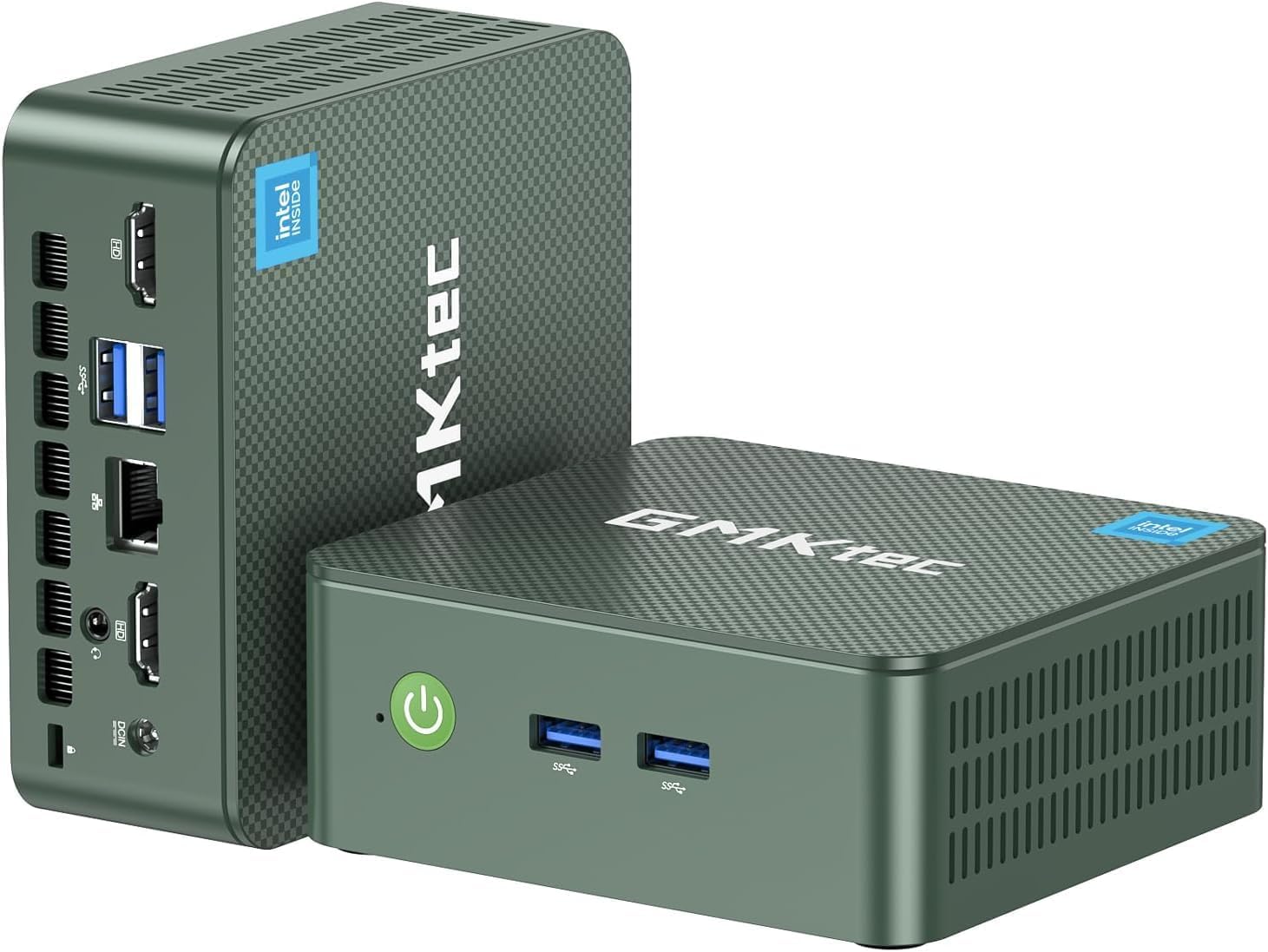
Immagine: anteriore e posteriore views of the GMKtec Nucbox G3 Plus Mini PC, highlighting its compact size and various ports.

Image: Detailed diagram showing the front and rear ports of the Nucbox G3 Plus, including Power Button, USB 3.2 ports, HDMI (4K@60Hz) ports, Giga LAN (RJ45 2.5G), 3.5mm Audio Jack, and Security Lock.
3.2. Componenti interni
The internal design focuses on performance and efficient cooling.

Immagine: Esploso view illustrating the internal components of the Nucbox G3 Plus, including DDR4 RAM, M.2 2280 NVMe SSD, M.2 2242 SATA slot (not included), cooling fan, and cooling vents.
Video: Un'animazioneview of the GMKtec Mini PC with Intel N150, showcasing its internal components, ports, and features like Wi-Fi 6, Bluetooth 5.2, and 2.5G LAN. The video highlights the Intel Twin Lake N150 Processor, Intel Graphics, DDR4 SO-DIMM, M.2 2280 NVMe SSD, M.2 2242 SATA, quiet cooling fan, and dual screen display capabilities.
4. Specifiche
Key technical specifications of the GMKtec Nucbox G3 Plus Mini PC:
| Caratteristica | Specificazione |
|---|---|
| Processore | Intel Twin Lake N150 (4 Core 4 Threads, up to 3.6GHz) |
| Grafica | Grafica Intel UHD (max 1000 MHz) |
| Memoria RAM | 16 GB DDR4 SO-DIMM (3200 MHz) |
| Magazzinaggio | 256GB PCIe 3.0 M.2 2280 NVMe SSD (Max 2TB), M.2 2242 SATA slot (Max 2TB) |
| Uscita video | 2 HDMI 2.0 (4K a 60 Hz) |
| Porte USB | 4 x USB 3.2 (fino a 5 Gbps/S) |
| Rete | Intel i226-V 2.5Gbps RJ45 Ethernet, WiFi 6 (802.11ax) |
| Bluetooth | Bluetooth 5.2 |
| Audio | 3.5mm Jack audio |
| Sistema operativo | Windows 11 Pro (preinstallato) |
| Dimensioni | 4.17 x 1.67 x 4.49 pollici |
| Peso | 1.8 libbre |
5. Guida all'installazione
Segui questi passaggi per configurare il tuo mini PC GMKtec Nucbox G3 Plus:
Connettiti all'alimentazione: Plug the power adapter into the DC 12V 3A port on the back of the mini PC, then connect it to a power outlet.
Connetti al display: Use the provided HDMI cable to connect one of the HDMI ports on the mini PC to your monitor or TV. The device supports dual 4K@60Hz displays.

Image: The mini PC connected to two monitors, demonstrating its dual 4K display capability.
Connetti le periferiche: Connect your USB keyboard, mouse, and other peripherals to the available USB 3.2 ports.
Connessione di rete: For wired internet, connect an Ethernet cable to the 2.5Gbps RJ45 LAN port. For wireless internet, the device supports WiFi 6.

Image: The mini PC with an Ethernet cable connected to its 2.5G LAN port, illustrating high-speed wired connectivity.
Accensione: Premere il pulsante di accensione situato sulla parte anteriore del mini PC. La spia di alimentazione si illuminerà.
Avvio iniziale: The system will boot into Windows 11 Pro. Follow the on-screen instructions for initial Windows setup, including language, region, and network settings.
Installazione con montaggio VESA (opzionale): If desired, use the included VESA mount and screws to attach the mini PC to the back of a compatible monitor.

Image: The mini PC shown mounted on the back of a monitor using the VESA mount, demonstrating space-saving installation.
6. Istruzioni per l'uso
6.1. Gestione energetica
- Accensione: Premere il pulsante di accensione sul pannello frontale.
- Fermare: Fare clic sul pulsante Start in Windows, quindi selezionare Arresta il sistema > Arresta il sistema.
- Ricomincia: Fare clic sul pulsante Start in Windows, quindi selezionare Arresta > Riavvia.
- Modalità risparmio: Fare clic sul pulsante Start in Windows, quindi selezionare Alimentazione > Sospensione.
- Wake On LAN (WoL): This feature allows you to power on the mini PC remotely over a network. Ensure WoL is enabled in the BIOS settings and your network adapter supports it.
- Avvio PXE: Supports network boot for system deployment.
- Riattivazione RTC: Allows the PC to power on at a scheduled time. Configure this in the BIOS.
- Accensione automatica: The PC can automatically power on after a power outage. This setting is typically found in the BIOS.
6.2. Connessione alle reti
- Connessione cablata: Connect an Ethernet cable to the RJ45 port. The 2.5Gbps LAN provides high-speed internet.
- Connessione wireless (WiFi 6):
- Fare clic sull'icona Wi-Fi nella barra delle applicazioni.
- Seleziona la rete desiderata dall'elenco.
- Se richiesto, immettere la chiave di sicurezza di rete.

Image: Diagram illustrating the high-speed WiFi 6 and Bluetooth 5.2 connectivity of the mini PC, showing faster speeds, lower latency, and wider coverage compared to older standards.
- Bluetooth 5.2:
- Vai su Impostazioni di Windows > Dispositivi > Bluetooth e altri dispositivi.
- Assicurati che il Bluetooth sia attivo.
- Click "Add Bluetooth or other device" and follow the instructions to pair your Bluetooth devices.
6.3. Espansione della memoria
The Nucbox G3 Plus supports storage expansion:
- M.2 2280 NVMe SSD: The device comes with a 256GB PCIe 3.0 M.2 2280 NVMe SSD. This can be upgraded to a maximum of 2TB.
- M.2 2242 SATA: An additional M.2 2242 SATA slot is available for further storage expansion, supporting up to 2TB.
Nota: Upgrading internal components should be performed by users with technical expertise. Refer to online guides or professional assistance if unsure.
7. Manutenzione
Una manutenzione regolare contribuisce a garantire la longevità e le prestazioni ottimali del tuo mini PC:
- Mantienilo pulito: Pulire regolarmente l'esterno del mini PC con un panno morbido e asciutto. Evitare di utilizzare detergenti liquidi direttamente sul dispositivo.
- Ventilazione: Ensure the cooling vents are not obstructed to allow for proper airflow. The upgraded cooling fan and copper turbine pipes are designed for efficient heat dissipation.
- Aggiornamenti software: Mantieni aggiornati il sistema operativo e i driver alle versioni più recenti per migliorare la sicurezza e le prestazioni.
- Rimozione della polvere: Periodically, and with caution, use compressed air to clear dust from the cooling vents. Do not open the casing unless you are familiar with computer hardware.
- Temperatura: Operate the mini PC in a well-ventilated area, away from direct sunlight or heat sources, to prevent overheating.

Immagine: Un interno view of the mini PC highlighting the quiet cooling fan and the airflow paths for heat dissipation, emphasizing the improved thermal design.
8. Risoluzione Dei Problemi
This section addresses common issues you might encounter with your GMKtec Nucbox G3 Plus Mini PC.
| Problema | Possibile causa/soluzione |
|---|---|
| Nessuna alimentazione / Non si accende |
|
| Nessuna visualizzazione sul monitor |
|
| Nessuna connessione Internet (cablata) |
|
| Nessuna connessione Internet (wireless) |
|
| Prestazioni lente |
|
9. Garanzia e supporto
GMKtec offers comprehensive support for your Nucbox G3 Plus Mini PC:
- Garanzia: GMKtec provides a 1-year limited warranty for each mini PC, effective from the date of purchase. This warranty covers defects due to design and workmanship.
- Supporto tecnico: For any technical issues or inquiries, you can contact the GMKtec after-sales team.
- Informazioni sui contatti:
- Assistenza Amazon: Log in to your Amazon account, navigate to "Your Orders," and select "Ask Product Question" for assistance.
- Supporto via e-mail: Invia un'e-mail a support@gmktec.com per un supporto clienti 24 ore su 24, 7 giorni su 7.
- Supporto tecnico a vita: GMKtec is committed to providing lifetime technical support for its products.

Image: Graphic detailing GMKtec's warranty and support options, including Amazon support and direct email support.
Ask a question about this manual
Ask about setup, troubleshooting, compatibility, parts, safety, or missing instructions. Manuals+ will review the question and use this page’s manual context to help answer it.