
1. Prodotto finitoview
The Philips 40" Class 6000 Series Full HD 1080p Smart LED TV (Model 40PFL6533/F7) offers a high-definition viewing experience with integrated smart features. This television operates on the Roku OS, providing access to a wide array of streaming content. It is compatible with voice assistants such as Alexa, Google Assistant, and Apple HomeKit, allowing for convenient control.
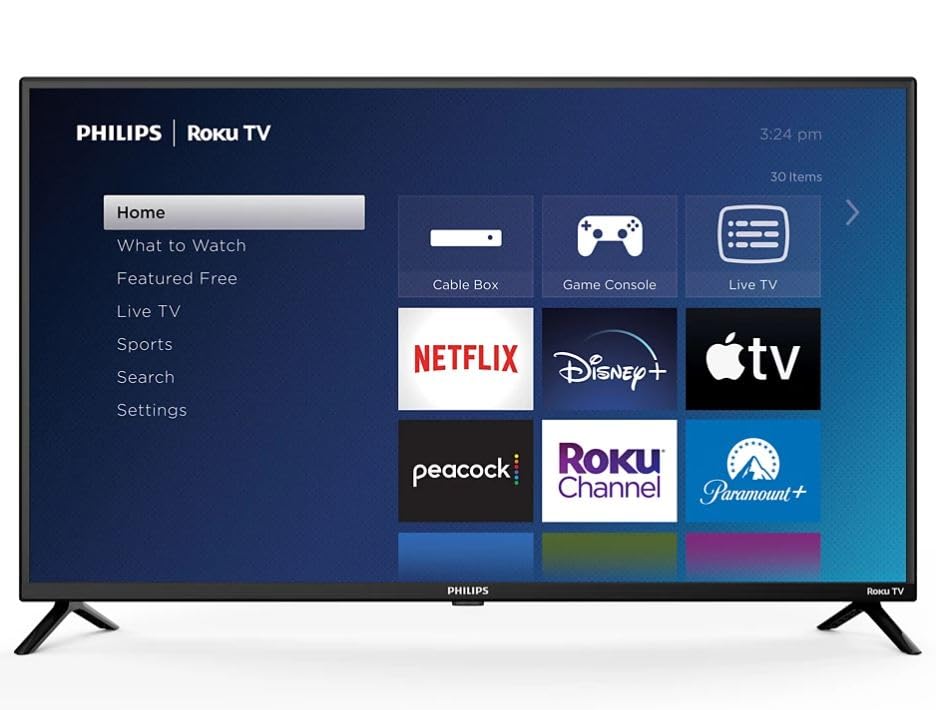
Image: Philips 40-inch Smart LED TV showcasing its Roku operating system interface with popular streaming applications.
2. Guida all'installazione
2.1 Disimballaggio e ispezione iniziale
Carefully remove the TV and its components from the packaging. Ensure all items listed in the 'What's in the Box' section are present and undamaged.
2.2 Fissaggio del supporto
Place the TV screen-down on a soft, clean surface to prevent scratches. Align the included stand feet with the designated slots on the bottom of the TV. Secure the feet using the provided screws. Refer to the diagram below for proper attachment.

Image: Detail of the Philips and Roku TV branding on the lower frame of the television, indicating the front-facing design.
2.3 Collegamento di alimentazione e dispositivi esterni
Connect the power cord to the TV and then to a wall outlet. The TV features multiple connectivity options:
- Porte HDMI: 3 ports for connecting devices like gaming consoles, Blu-ray players, or cable boxes.
- Ingresso USB: 1 port for media playback from USB drives.
- Uscita audio ottica: Per il collegamento a sistemi audio esterni.
- Wifi: Built-in for internet connectivity.
- Collegamento Ethernet: Per una connessione Internet cablata.
Connect your desired devices to the appropriate ports. For optimal performance, use high-quality HDMI cables.

Immagine: Pro lateralefile of the television highlighting the accessible input/output ports for external device connections.
2.4 Configurazione iniziale e associazione remota
Upon first power-on, the TV will guide you through the initial setup process. This includes selecting your language, connecting to your Wi-Fi network, and activating the Roku OS. Follow the on-screen instructions. The remote control typically pairs automatically during this process. If not, refer to the remote control's specific pairing instructions, usually involving holding down certain buttons for a few seconds.
3. Istruzioni per l'uso
3.1 Funzioni di base
- Energia: Premere il pulsante di accensione sul telecomando per accendere o spegnere la TV.
- Volume: Use the 'Vol +' and 'Vol -' buttons to adjust the volume.
- Ingressi: Use the 'Input' button to switch between connected devices (HDMI 1, HDMI 2, USB, etc.).
- Navigazione: Use the directional pad (up, down, left, right) and 'OK' button to navigate menus and select options.
3.2 Smart TV Features (Roku OS)
The Roku OS provides a user-friendly interface for accessing streaming content. The home screen displays various streaming channels (apps) and input options. You can customize the order of channels and add new ones from the Roku Channel Store.

Image: The Roku TV home screen, illustrating the intuitive layout for app selection and navigation.
- Applicazioni di streaming: Access pre-installed apps like Netflix, Prime Video, Max, Disney Plus, YouTube TV, Paramount+, Apple TV+, Crunchyroll, and more.
- Controllo vocale: The TV is compatible with Alexa, Google Assistant, and Apple HomeKit. Use your voice assistant device to control TV functions such as power, volume, and channel selection.
- Ricerca: Use the search function to find movies, TV shows, actors, or channels across multiple streaming services.
3.3 Impostazioni immagine e audio
Access the 'Settings' menu to adjust picture and audio preferences. You can select various picture modes (e.g., Standard, Movie, Sport) and fine-tune brightness, contrast, and color. The TV supports Dolby Audio for an enhanced sound experience.
4. Manutenzione
4.1 Pulizia del televisore
- Schermo: Pulire delicatamente lo schermo con un panno morbido e privo di lanugine. Per i segni ostinati, strofinare leggermenteampPulire il panno con acqua o con un detergente specifico per schermi. Non spruzzare il liquido direttamente sullo schermo.
- Telaio e supporto: Use a soft, dry cloth to wipe dust and dirt from the TV frame and stand.
4.2 Cura generale
- Evitare di posizionare il televisore alla luce diretta del sole o vicino a fonti di calore.
- Assicurare un'adeguata ventilazione attorno al televisore per evitare il surriscaldamento.
- Non ostruire le aperture di ventilazione.
5. Risoluzione Dei Problemi
5.1 Nessun potere
- Controllare che il cavo di alimentazione sia collegato saldamente sia al televisore sia alla presa a muro.
- Verificare che la presa a muro funzioni collegandovi un altro dispositivo.
- Prova una presa di corrente diversa.
5.2 Nessuna immagine/suono dal dispositivo esterno
- Assicurarsi che sul televisore sia selezionata la sorgente di ingresso corretta.
- Check the cable connections between the device and the TV. Try re-seating the cables.
- Se possibile, prova con un cavo HDMI diverso.
- Verificare che il dispositivo esterno sia acceso e funzioni correttamente.
5.3 Il telecomando non risponde
- Sostituire le batterie del telecomando.
- Assicurarsi che non vi siano ostacoli tra il telecomando e il sensore IR del televisore.
- Re-pair the remote control if necessary (refer to section 2.4).
5.4 Problemi di connettività di rete
- Riavvia il router e il modem Wi-Fi.
- Check the TV's network settings to ensure it's connected to the correct Wi-Fi network.
- Se si utilizza un cavo Ethernet, assicurarsi che sia collegato saldamente.
6. Specifiche
| Caratteristica | Specificazione |
|---|---|
| Dimensioni dello schermo | 40 pollici |
| Tecnologia di visualizzazione | LED 1080p |
| Risoluzione | 1920 x 1080 (Full HD) |
| Frequenza di aggiornamento | Frequenza 60 Hz |
| Sistema operativo | Sistema operativo Roku |
| Tecnologia di connettività | Wi-Fi, HDMI, USB |
| Numero totale di porte HDMI | 3 |
| Porte USB totali | 1 |
| Ingresso audio | Cavo HDMI |
| Descrizione dell'altoparlante | Audio Dolby |
| Compatibilità con l'assistente vocale | Alexa, Assistente Google, Apple HomeKit |
| Tipo di montaggio | Table Mount (VESA 200 x 200 mm compatible) |
| Dimensioni del prodotto (P x L x A) | 3"P x 35"L x 20"A |
| Peso dell'articolo | 12 libbre |
| Anno del modello | 2024 |
7. Garanzia e supporto
7.1 Informazioni sulla garanzia
This Philips TV comes with a Limited 3 Months Warranty. Please retain your proof of purchase for warranty claims.
7.2 Assistenza clienti
For further assistance, technical support, or warranty inquiries, please refer to the official Philips support website or contact their customer service. Contact information can typically be found in the quick start guide included with your product or on the manufacturer's websito.