
Introduzione
Thank you for choosing the Kiwi KAP 6730 Air Purifier. This manual provides essential information for the safe and efficient use of your device. Please read it thoroughly before operation and retain it for future reference.
The Kiwi KAP 6730 is designed to improve indoor air quality using advanced filtration technology, including a medical-grade H13 HEPA filter, to capture various airborne particles and odors.
Importanti istruzioni di sicurezza
Quando si utilizzano apparecchi elettrici, seguire sempre le precauzioni di sicurezza di base per ridurre il rischio di incendi, scosse elettriche e lesioni.
- Leggere tutte le istruzioni prima di utilizzare l'apparecchio.
- Assicurarsi che l'alimentazione corrisponda al voltage specificato sull'etichetta dell'apparecchio.
- Non utilizzare l'apparecchio con un cavo o una spina danneggiati.
- Tenere il cavo di alimentazione lontano da superfici calde.
- Non immergere l'apparecchio, il cavo o la spina in acqua o altri liquidi.
- Scollegare il purificatore d'aria prima di pulirlo o di eseguire qualsiasi intervento di manutenzione.
- Non ostruire le prese d'aria o le uscite.
- Questo apparecchio è destinato esclusivamente all'uso in ambienti interni.
- Tenere fuori dalla portata dei bambini.
Prodotto finitoview
The Kiwi KAP 6730 Air Purifier features a compact design with an intuitive control panel and multi-stage sistema di filtrazione.

Immagine: Superiore view of the Kiwi KAP 6730 Air Purifier, highlighting the circular control panel with various function icons including power, fan speed, timer, and Wi-Fi connectivity. The top grille for air output is also visible.

Immagine: An exploded diagram of the Kiwi KAP 6730 Air Purifier, illustrating its internal components. The image shows the outer casing, the fan assembly, and the cylindrical multi-layer filter system, with arrows indicating airflow and the capture of dust and pet hair by different filter stages.
Caratteristiche principali:
- Medical-grade H13 HEPA filter for effective air purification.
- Multi-stage sistema di filtrazione.
- Intuitive control panel.
- Design compatto e leggero.
- Smart connectivity (Wi-Fi enabled).
Impostare
Disimballaggio
- Estrarre con cautela il purificatore d'aria dalla confezione.
- Remove all packaging materials, including any protective films or bags.
- Verificare eventuali danni durante il trasporto. In caso di danni, non utilizzare il prodotto e contattare l'assistenza clienti.
Filter Installation (if not pre-installed)
The air purifier comes with a multi-layer filter. Ensure it is properly installed before first use.
- Capovolgere il purificatore d'aria.
- Ruotare il coperchio della base in senso antiorario per sbloccarlo e rimuoverlo.
- Rimuovere l'imballaggio di plastica dal filtro.
- Insert the filter into the air purifier, ensuring it sits securely.
- Replace the base cover and twist clockwise to lock it into place.
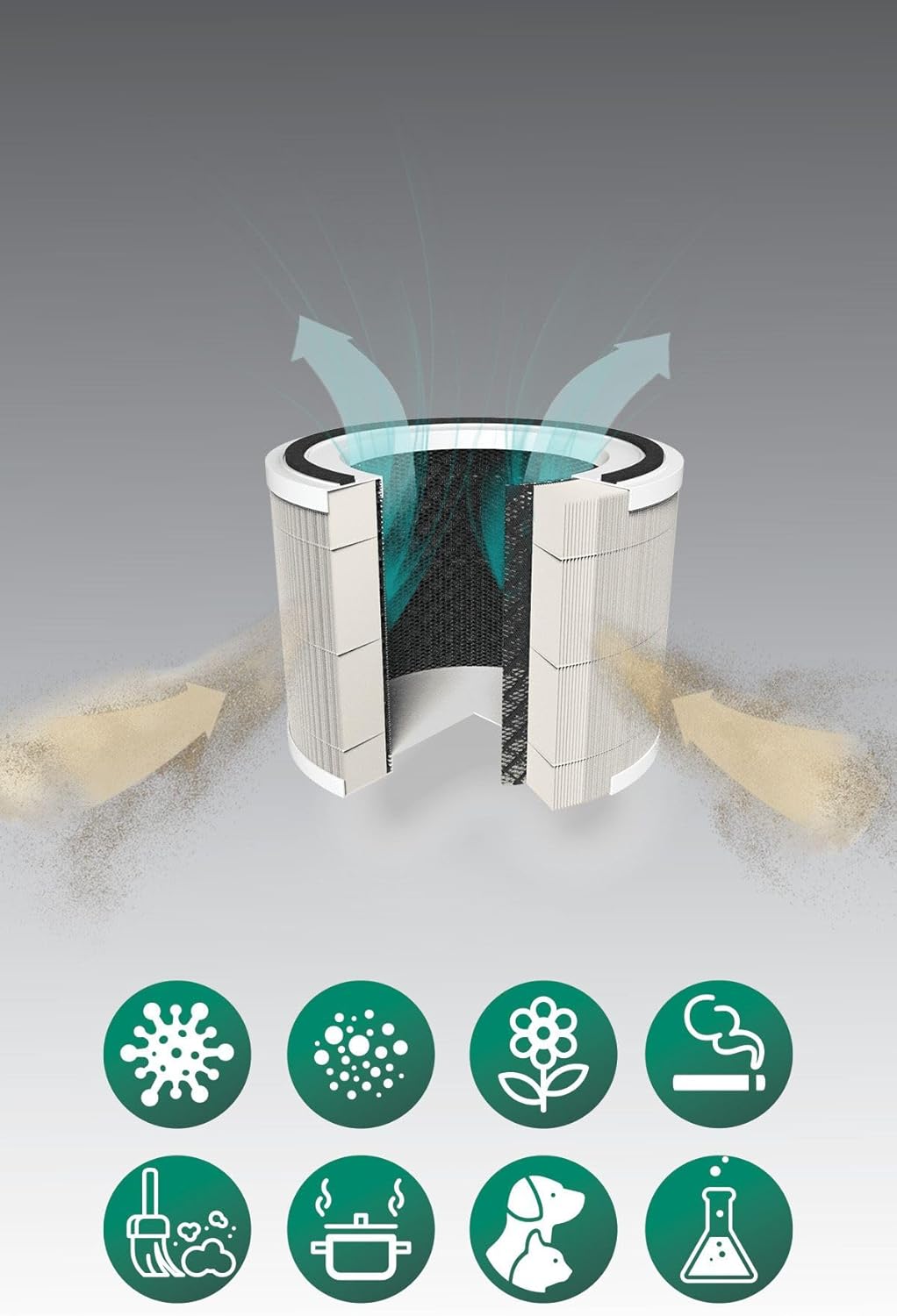
Immagine: A cutaway diagram illustrating the multi-layer filter system of the Kiwi KAP 6730 Air Purifier. Arrows show air entering and exiting the filter. Below the filter, icons represent various airborne pollutants that the system is designed to filter, including bacteria, dust, pollen, smoke, pet dander, cooking odors, and chemical fumes.
Posizionamento
- Posizionare il purificatore d'aria su una superficie solida e piana.
- Ensure there is at least 15-30 cm (6-12 inches) of space around all sides for optimal airflow.
- Avoid placing near heat sources, direct sunlight, or in damp ambienti.
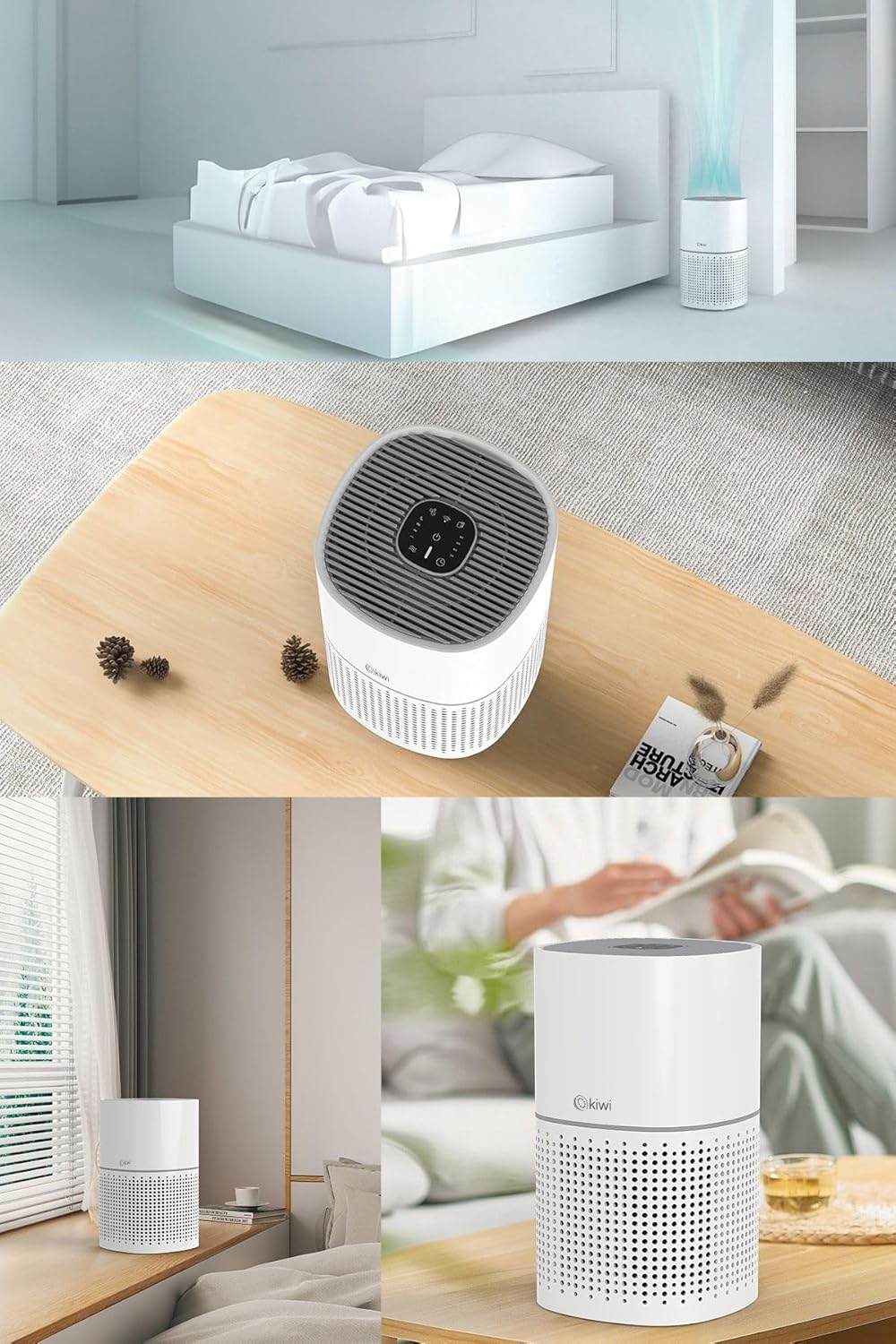
Immagine: A collage of images showing the Kiwi KAP 6730 Air Purifier in different home environments. It is depicted on a bedside table in a bedroom, on a wooden table in a living area, and on a windowsill, demonstrating its compact size and versatility for placement.
Collegamento di potenza
Collegare il cavo di alimentazione a una presa elettrica idonea.
Operazione
Funzioni del pannello di controllo
Il pannello di controllo si trova sulla parte superiore del purificatore d'aria.
Immagine: Un dettagliato view of the circular control panel on the top of the Kiwi KAP 6730 Air Purifier. Icons for power, fan speed, timer settings (1H, 2H, 4H, 8H), sleep mode, and Wi-Fi connectivity are clearly visible, along with an indicator light.
- Pulsante di accensione (⏻): Premere per accendere o spegnere il purificatore d'aria.
- Pulsante velocità ventola (💨): Press to cycle through different fan speeds (e.g., Low, Medium, High, Auto).
- Pulsante Timer (⏱): Set the operating time (e.g., 1 hour, 2 hours, 4 hours, 8 hours). The unit will automatically turn off after the set time.
- Pulsante Modalità Sospensione (🌙): Activates sleep mode, reducing fan speed and dimming indicator lights for quiet operation.
- Wi-Fi Button (📶): Press and hold to activate Wi-Fi pairing mode for smart control via a mobile application.
- Indicatore di ripristino del filtro: Illuminates when the filter needs replacement. Press and hold after filter replacement to reset.
Smart Control (App)
The Kiwi KAP 6730 can be controlled via a dedicated mobile application. Follow the app's instructions for pairing and remote control.

Immagine: The Kiwi KAP 6730 Air Purifier positioned in a room, with a hand holding a smartphone in the foreground. The smartphone screen displays a mobile application interface, indicating that the air purifier can be controlled remotely via a smart app, showing air quality readings and control options.
Manutenzione
Una manutenzione regolare garantisce prestazioni ottimali e prolunga la durata del purificatore d'aria.
Pulizia dell'esterno
- Scollegare sempre il purificatore d'aria prima di pulirlo.
- Pulire le superfici esterne con un panno morbido, damp stoffa.
- Non utilizzare detergenti abrasivi, cere o solventi.
- Assicurarsi che non penetri acqua all'interno dell'apparecchio.
Sostituzione del filtro
The filter life depends on air quality and usage. The filter replacement indicator will illuminate when a new filter is needed (typically every 6-12 months).
- Scollegare il purificatore d'aria.
- Capovolgere il purificatore d'aria.
- Ruotare il coperchio della base in senso antiorario per sbloccarlo e rimuoverlo.
- Rimuovere il vecchio filtro e smaltirlo correttamente.
- Unpack the new filter and insert it into the air purifier.
- Replace the base cover and twist clockwise to lock it into place.
- Plug in the air purifier. Press and hold the Filter Reset button (often the Wi-Fi or a dedicated filter icon) for 3-5 seconds until the indicator light turns off.
Nota: Only use genuine Kiwi replacement filters to ensure proper performance and maintain warranty validity.
Risoluzione dei problemi
| Problema | Possibile causa | Soluzione |
|---|---|---|
| Il purificatore d'aria non si accende. | Non collegato; malfunzionamento della presa di corrente; pulsante di accensione non premuto. | Ensure the power cord is securely plugged in. Try a different outlet. Press the power button firmly. |
| Flusso d'aria o efficienza di purificazione ridotti. | Blocked air inlets/outlets; Dirty filter; Filter packaging not removed. | Check for obstructions and clear them. Replace the filter if the indicator is on or if it appears dirty. Ensure all filter packaging is removed. |
| Rumore insolito. | Filtro non installato correttamente; Oggetto estraneo all'interno; Unità non posizionata su una superficie piana. | Check filter installation. Unplug and inspect for foreign objects. Place on a stable, level surface. |
| L'indicatore di sostituzione del filtro rimane acceso dopo aver sostituito il filtro. | Il ripristino del filtro non è stato eseguito. | Press and hold the Filter Reset button for 3-5 seconds until the light turns off. |
| Impossibile connettersi al Wi-Fi/all'app. | Incorrect Wi-Fi password; Router too far; App not updated; Wi-Fi pairing mode not activated. | Ensure correct password. Move unit closer to router. Update app. Press and hold Wi-Fi button to activate pairing mode. Consult app instructions. |
Specifiche
| Caratteristica | Dettaglio |
|---|---|
| Modello | CAP-6730 |
| Marca | KIWI |
| Colore | Bianco |
| Tipo di filtrazione | H13 HEPA Filter (Medical Grade) |
| Fonte di alimentazione | Elettrico cablato |
| Peso del prodotto | 2 chilogrammo |
| Connettività | Wi-Fi (Smart App Control) |
| Dimensioni (circa) | Design compatto |
Garanzia e supporto
For warranty information and customer support, please refer to the warranty card included with your product or visit the official KIWI websito.
You can also contact customer service for assistance with troubleshooting or replacement parts.
KIWI Official Websito: www.kiwi.com.tr (Nota: questo è un segnaposto URL, please refer to your product documentation for the correct support websito.)