
1. Introduzione
This manual provides detailed instructions for the setup, operation, maintenance, and troubleshooting of your NEOSMAY KC12-F Fanless Industrial Mini PC. Please read this manual thoroughly before using the device to ensure proper functionality and longevity.
2. Prodotto finitoview
The NEOSMAY KC12-F is a high-performance fanless industrial mini PC designed for various applications requiring robust and silent operation. It features an Intel 12th Gen Core i5-1240P processor, ample memory and storage, and extensive connectivity options.
Caratteristiche principali:
- Processore: Intel 12th Gen Core i5-1240P (12 Cores, 16 Threads, up to 4.4 GHz)
- Grafica: Grafica Intel Iris Xe
- Memoria: 16 GB di RAM DDR4 (Dual Channel, espandibile fino a 64 GB)
- Magazzinaggio: 512GB M.2 2280 NVME SSD (expandable, supports M.2 SATA SSD)
- Rete: Dual 2.5 Gigabit Ethernet, WiFi 6, Bluetooth 5.2
- Uscita di visualizzazione: Supports 4K 60Hz Quad Display via 2x HDMI 2.0, 1x DP 1.4, 1x Full Function Type-C
- Porte: USB 3.2 x 4, USB 2.0 x 4, Full Function Type-C (20Gbps), RS485 COM, RS232 COM, Audio/MIC Jack
- Progetto: Fanless aluminum shell with S-shaped copper sheet for efficient heat dissipation.
Disposizione delle porte:

Immagine 2.1: Anteriore e posteriore View of the NEOSMAY KC12-F Mini PC. The front panel includes power button, USB 3.2, USB 2.0, Type-C, and audio jacks. The rear panel features DC input, dual 2.5Gbe Ethernet, HDMI, DisplayPort, additional USB ports, and COM ports.
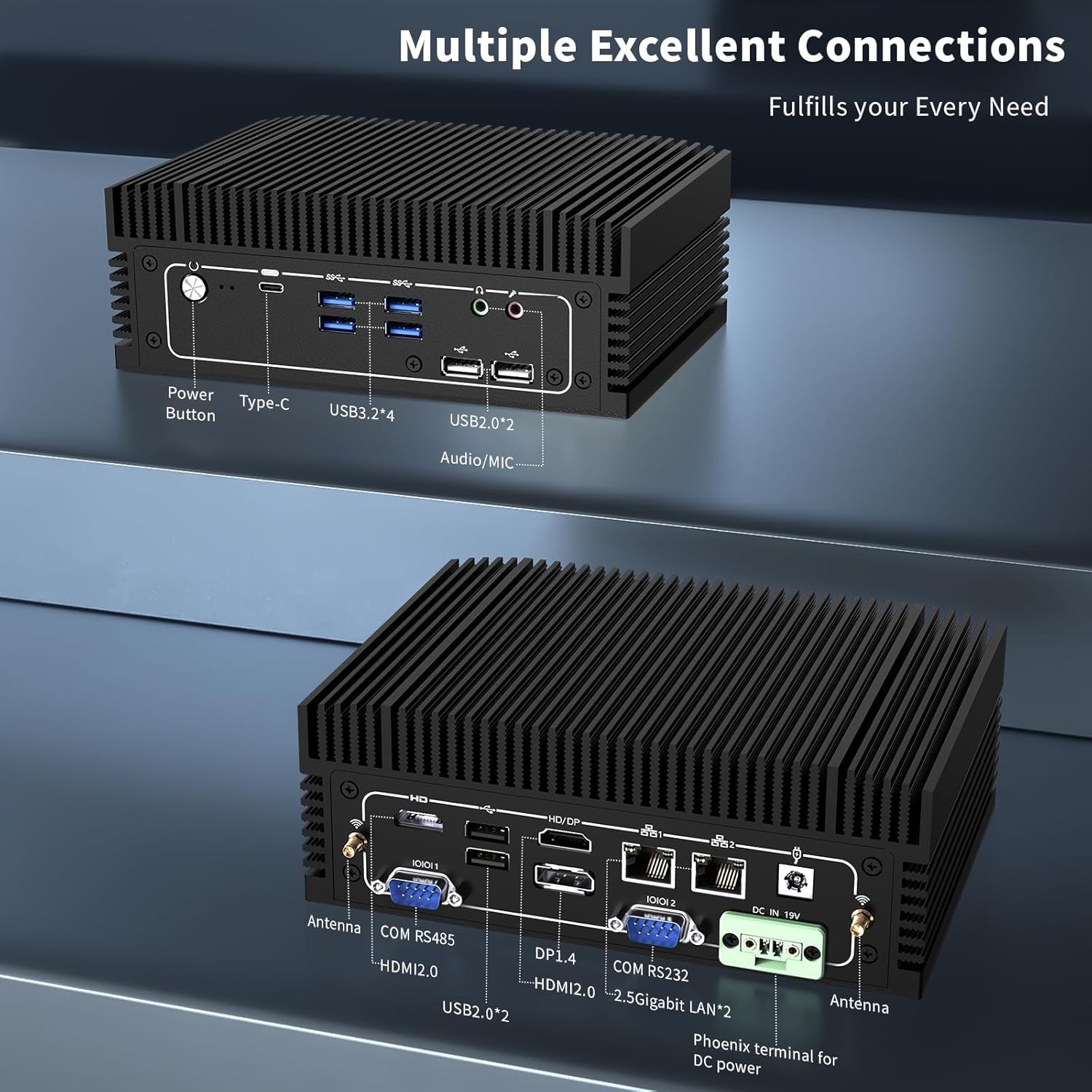
Immagine 2.2: Dettagliato view of the front and rear ports. The front includes a power button, Type-C port, 4x USB 3.2 ports, 2x USB 2.0 ports, and an Audio/MIC Jack. The rear includes 2x HDMI 2.0, 1x DP 1.4, 2x 2.5 Gigabit LAN, 2x USB 2.0, COM RS485, COM RS232, DC IN 19V, and antenna connectors.
3. Istruzioni per l'installazione
3.1 Contenuto della confezione
Prima di procedere, assicurati che tutti gli articoli siano presenti nella confezione:

Immagine 3.1: Contents of the NEOSMAY KC12-F Mini PC package. Includes the Mini PC unit, power adapter, power cord, Wi-Fi antennas, VESA mount bracket, and screws.
- NEOSMAY KC12-F Mini PC Unit
- Adattatore di alimentazione (19 V CC)
- Cavo di alimentazione
- Antenne Wi-Fi
- Staffa di montaggio VESA e viti
3.2 Connessione iniziale
- Connetti Display: Connect your monitor(s) to the Mini PC using HDMI, DisplayPort, or Type-C cables. The device supports up to four displays simultaneously.
- Connetti le periferiche: Collega la tastiera, il mouse e qualsiasi altro dispositivo USB alle porte USB disponibili.
- Connetti rete: For a wired connection, connect an Ethernet cable to one of the 2.5 Gigabit LAN ports. For wireless, screw in the provided Wi-Fi antennas to the antenna connectors on the rear panel.
- Connetti alimentazione: Connect the power adapter to the DC IN 19V port on the Mini PC, then plug the power cord into an electrical outlet.
4. Istruzioni per l'uso
4.1 Accensione/spegnimento
- Accensione: Premere il pulsante di accensione situato sul pannello frontale del Mini PC. La spia di alimentazione si illuminerà.
- Spegni: To shut down the system, use the operating system's shutdown function. Alternatively, press and hold the power button for 5-7 seconds to force a shutdown (not recommended for regular use).
4.2 Configurazione del display
The Mini PC supports up to four independent 4K@60Hz displays. After connecting multiple monitors, you may need to configure the display settings within your operating system (e.g., Windows Display Settings) to extend or duplicate your desktop.

Immagine 4.1: Illustration of the Mini PC supporting a quad 4K display setup, demonstrating its capability for multi-monitor environments.
5. Manutenzione
5.1 Pulizia
- Prima di pulirlo, assicurarsi che il Mini PC sia spento e scollegato.
- Use a soft, dry cloth to wipe the exterior. For stubborn marks, a slightly damp si può usare un panno, seguito da un panno asciutto.
- Evitare l'uso di prodotti chimici aggressivi, solventi o detergenti abrasivi.
- As this is a fanless design, there are no internal fans to clean. However, ensure the heat sink fins are free from dust accumulation to maintain optimal thermal performance. Use compressed air if necessary.
5.2 Conservazione e ambiente
- Conservare il Mini PC in un luogo fresco e asciutto, lontano dalla luce solare diretta e da temperature estreme.
- Avoid placing the device in areas with high humidity or excessive dust.
- Ensure adequate airflow around the device, especially around the heat sink fins, even though it is fanless.

Immagine 5.1: Diagram illustrating the fanless aluminum case design and S-shaped copper sheet for efficient heat dissipation, ensuring stable operation.
6. Risoluzione Dei Problemi
Questa sezione affronta i problemi più comuni che potresti riscontrare con il tuo Mini PC.
6.1 Nessun potere
- Controllare la connessione di alimentazione: Ensure the power adapter is securely connected to both the Mini PC and the electrical outlet. Verify the outlet is functional.
- Adattatore di alimentazione: Confirm the power adapter is the correct one supplied with the Mini PC.
6.2 Nessuna uscita di visualizzazione
- Monitorare la connessione: Ensure the display cable (HDMI, DP, Type-C) is securely connected to both the Mini PC and the monitor.
- Ingresso monitor: Verify your monitor is set to the correct input source (e.g., HDMI 1, DisplayPort).
- Prova un'altra porta/cavo: Test with a different display port on the Mini PC or a different cable if available.
- Funzionalità di monitoraggio: Test your monitor with another device to ensure it is working correctly.
6.3 Problemi di connettività di rete
- Connessione cablata: Check the Ethernet cable connection. Ensure the router/modem is working.
- Connessione wireless: Ensure Wi-Fi antennas are securely attached. Verify Wi-Fi is enabled in the operating system and you are connected to the correct network with the correct password.
- Problemi con i driver: Ensure network drivers are properly installed and updated.
6.4 Problemi di prestazioni del sistema
- Surriscaldamento: Although fanless, ensure the Mini PC is in a well-ventilated area and its heat sink fins are not obstructed.
- Software: Close unnecessary applications. Check for malware or viruses.
- Magazzinaggio: Ensure the SSD is not critically full.
7. Specifiche
| Caratteristica | Specificazione |
|---|---|
| Marca | NEOSMAY |
| Numero di modello | KC12-F |
| Processore | Intel 12th Gen Core i5-1240P (12 Cores, 16 Threads, up to 4.4 GHz) |
| Coprocessore grafico | Grafica Intel Iris Xe (integrata) |
| Memoria RAM | 16GB DDR4 (2x 8GB SODIMM, 3200MHz), expandable up to 64GB |
| Disco rigido | 512GB M.2 2280 NVME SSD (PCIE x 4), expandable |
| Risoluzione massima dello schermo | Risoluzione: 3840 x 2160 (4K) |
| Uscite di visualizzazione | 2x HDMI 2.0, 1x DP 1.4, 1x Full Function Type-C (supports 4K@60Hz quad display) |
| Porte USB | 4x USB 3.2, 4x USB 2.0 |
| Rete | 2x 2.5 Gigabit Ethernet (Intel I226-V chip), WiFi 6, Bluetooth 5.2 |
| Altre porte | RS485 COM, RS232 COM, Audio/MIC Jack |
| Sistema operativo | OS (Pre-installed Windows 11 Pro may vary by configuration) |
| Potenza in ingresso | 19V CC |
| Peso dell'articolo | 5.28 libbre |
| Dimensioni del pacco | 7.28 x 5.02 x 2.64 pollici |
8. Garanzia e supporto
NEOSMAY provides comprehensive support for its products. For technical assistance, warranty claims, or general inquiries, please use the contact information below.

Immagine 8.1: NEOSMAY Sales and Support contact details, including email and telephone number.
- E-mail: info@newsmaytech.com
- Telephone (CN): +86-0755-89456786 (Mon-Sat 9:00-18:00 GMT)
- Chat online: Log into your Amazon account, navigate to 'Your Orders', and select 'Ask Product Question'.
- Disponibilità del servizio: 7 days a week, 24 hours a day support is available.
Si prega di conservare la prova d'acquisto ai fini della garanzia.