
1. Introduzione
The SUPERONE Bluetooth 5.3 Audio Adapter is a versatile 2-in-1 device functioning as both a transmitter (TX) and a receiver (RX). It enables wireless audio connectivity for a wide range of devices, from non-Bluetooth TVs and airplane entertainment systems to older speakers and car stereos. Featuring Bluetooth 5.3 technology, it ensures stable, low-latency audio transmission and reception, supporting universal compatibility with various Bluetooth versions.
This adapter includes an intuitive HD display for real-time battery and connection status, simplifying user interaction. It also supports dual pairing, allowing two Bluetooth headphones or AirPods to connect simultaneously for shared listening experiences.
2. Prodotto finitoview
2.1 Caratteristiche principali
- Funzionalità 2 in 1: Operates as both a Bluetooth Transmitter (TX) and Receiver (RX).
- Tecnologia Bluetooth 5.3: Provides stable, low-latency, and high-quality audio. Backward compatible with Bluetooth 5.2/5.0/4.2 and earlier.
- Display HD: Shows real-time battery charge and connection status.
- Doppio accoppiamento: Connects to two Bluetooth headphones or AirPods simultaneously in TX mode.
- Batteria a lunga durata: Up to 20 hours in Transmitter mode, over 17 hours in Receiver mode.
- Ricarica rapida: Ricarica completa in circa 2 ore tramite USB-C.
- Compatibilità universale: 3.5mm Aux audio jack for wide device support.
2.2 Contenuto della confezione
Si prega di verificare che tutti gli elementi siano presenti:
- SUPERONE Bluetooth 5.3 Audio Adapter
- Cavo di ricarica USB-C
- Manuale dell'utente (questo documento)

Image: The SUPERONE Bluetooth 5.3 Audio Adapter, shown with its integrated 3.5mm audio jack and USB-C charging port.
3. Informazioni sulla sicurezza
- Gestione della batteria: Keep the battery out of reach of children. Do not expose the device to excessive heat or humidity. Dispose of the battery and device in accordance with local regulations.
- Avviso di interferenza: Questo dispositivo potrebbe interferire con altri dispositivi wireless. Seguire le istruzioni per ridurre al minimo le potenziali interferenze.
- Cura generale: Maneggiare il dispositivo con cura. Evitare di farlo cadere o di sottoporlo a forti urti.
4. Impostazione
4.1 Impostazione della modalità trasmettitore (TX)
Use TX mode to send audio from non-Bluetooth devices (e.g., airplane entertainment, TV, computer) to Bluetooth headphones or speakers.
- Slide the TX/RX switch on the adapter to the TX posizione.
- Press and hold the central button (play/pause/pairing) on the adapter for a few seconds until the display turns on and the headphone icons blink, indicating pairing mode.
- Put your Bluetooth headphones or AirPods into their pairing mode. The adapter will automatically search for and connect to nearby Bluetooth devices. The headphone icon will stop blinking when connected.
- Insert the adapter's 3.5mm audio jack into the audio output port of your source device (e.g., airplane seat audio jack, TV headphone jack).

Image: Visual guide for setting up the adapter in Transmitter (TX) mode, demonstrating connection to an airplane audio jack and AirPods.
4.2 Impostazione della modalità ricevitore (RX)
Use RX mode to receive audio from Bluetooth-enabled devices (e.g., smartphone, tablet) and play it through non-Bluetooth audio systems (e.g., car stereo, home speakers).
- Slide the TX/RX switch on the adapter to the RX posizione.
- Press and hold the central button on the adapter for a few seconds until the display turns on and the headphone icons blink, indicating pairing mode.
- On your Bluetooth-enabled device (e.g., smartphone), go to Bluetooth settings and select the SUPERONE adapter from the list of available devices to pair. The headphone icon will stop blinking when connected.
- Insert the adapter's 3.5mm audio jack into the AUX-IN port of your audio system (e.g., car stereo, home speaker).

Image: Visual guide for setting up the adapter in Receiver (RX) mode, demonstrating connection to a smartphone and a car's AUX-IN port.
5. Istruzioni per l'uso
5.1 Accensione/spegnimento
- Per accendere: Press and hold the central button (play/pause/pairing) for approximately 2 seconds until the display illuminates.
- Per spegnere: Press and hold the central button for approximately 3-5 seconds until the display turns off.
5.2 Pairing Additional Devices (Dual Pairing in TX Mode)
In TX mode, the adapter can connect to two Bluetooth headphones simultaneously.
- Assicurati che il primo paio di cuffie sia già collegato.
- Press the central button briefly. A second headphone icon on the display will begin blinking.
- Put the second pair of Bluetooth headphones into their pairing mode. The adapter will connect to them. The second headphone icon will stop blinking once connected.

Image: Illustration of dual pairing, showing two individuals listening to audio from a laptop via the adapter and two separate Bluetooth headphones.
5.3 Cambio di modalità
To switch between Transmitter (TX) and Receiver (RX) modes, use the physical TX/RX switch located on the side of the adapter.
Il mio profilo
The HD display provides the following information:
- Percentuale batteriatage: Indicates the current charge level.
- Stato della connessione: Headphone icons (1 and 2) indicate connected devices. Blinking icons signify pairing mode.
- Stato di carica: A charging icon appears when the device is connected to power.
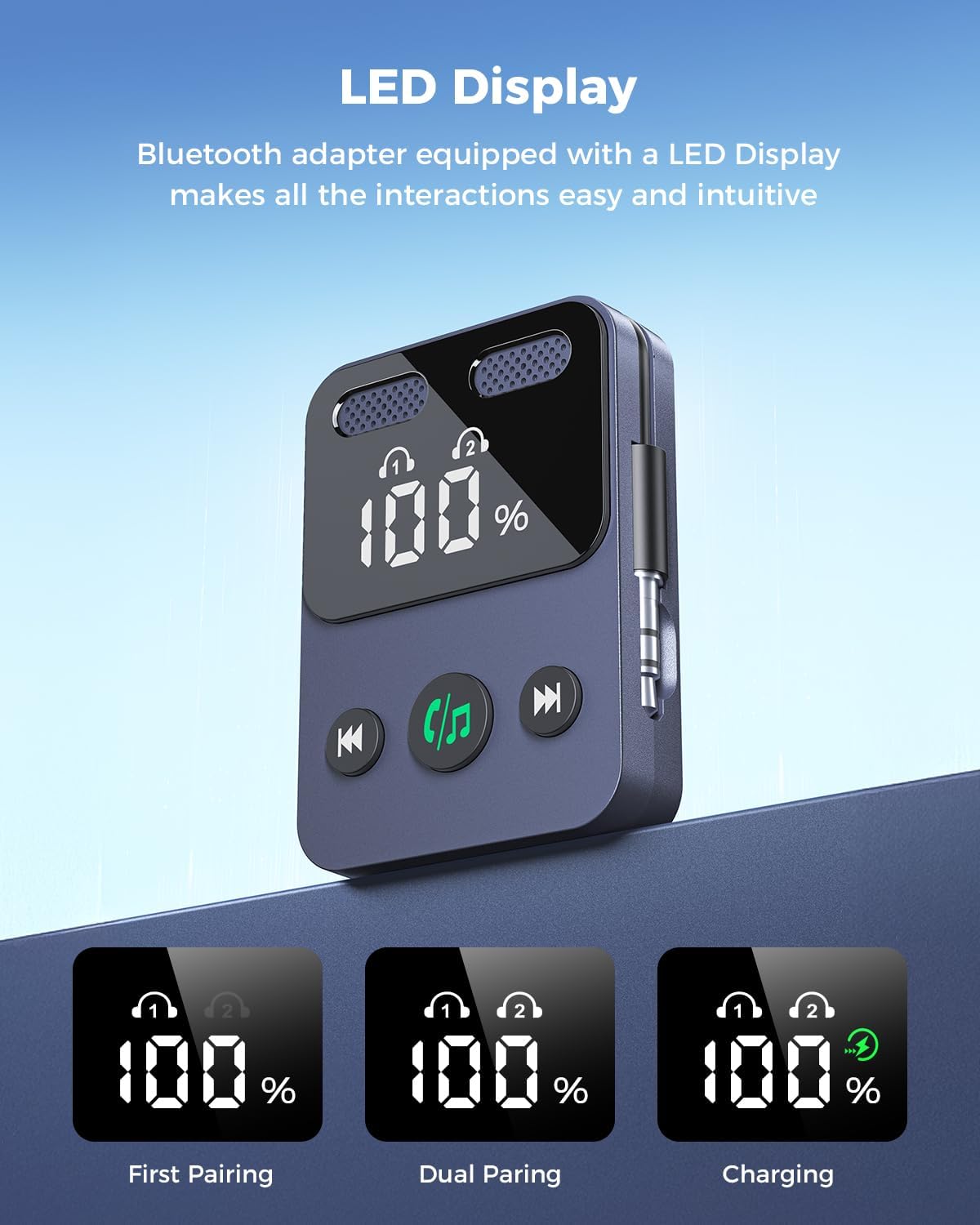
Image: The adapter's LED display, illustrating battery percentage and connection indicators for single and dual pairing, as well as charging status.
5.5 Batteria e ricarica
The adapter features a built-in rechargeable battery.
- Durata della batteria: Up to 20 hours in TX mode, over 17 hours in RX mode.
- Ricarica: Connect the included USB-C cable to the adapter and a compatible USB power source (e.g., phone charger, computer USB port). A full charge takes approximately 2 hours.
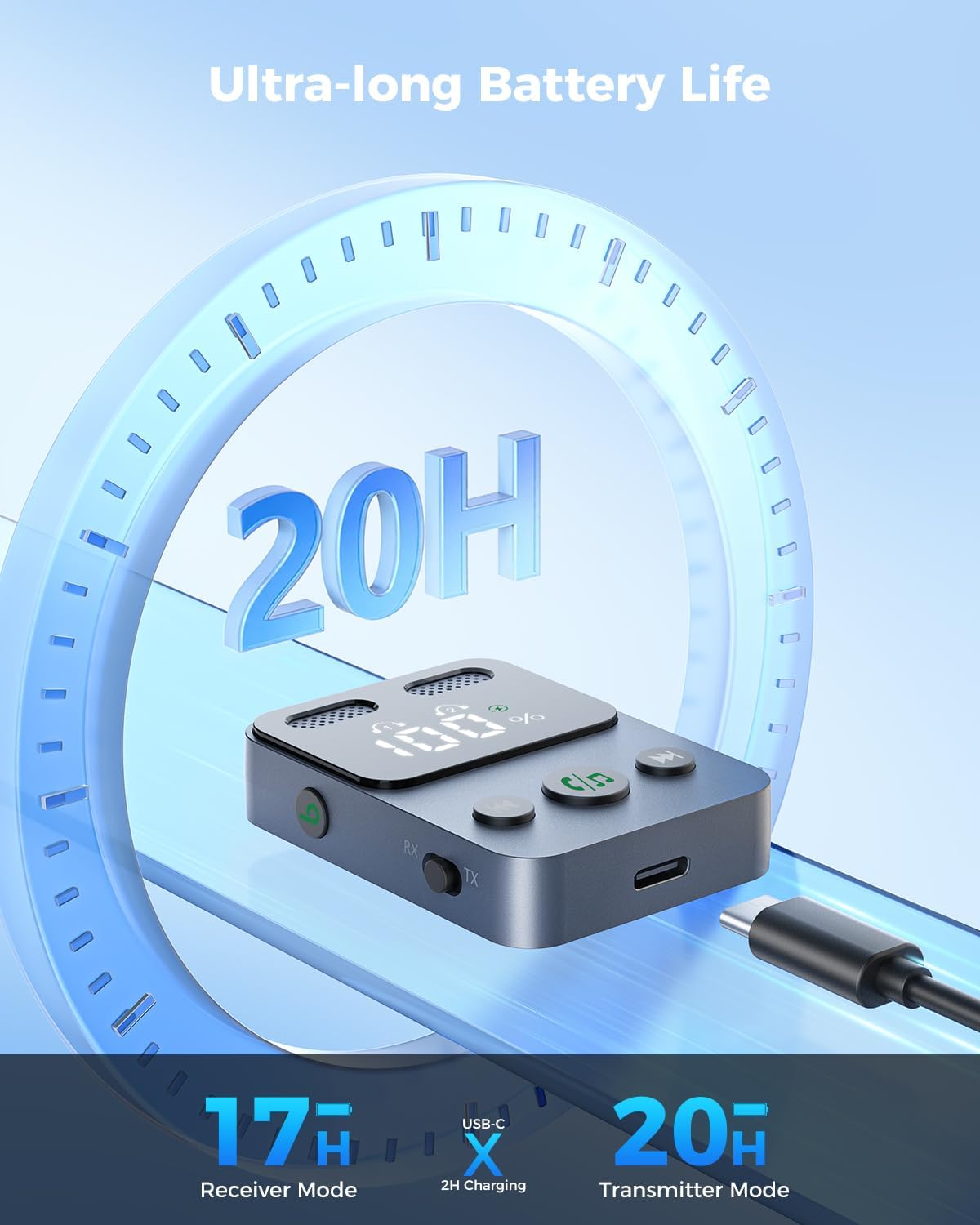
Image: The adapter connected to a USB-C charging cable, highlighting its long battery life and quick charging capability.
6. Manutenzione
- Pulizia: Utilizzare un panno morbido e asciutto per pulire il dispositivo. Evitare l'uso di prodotti chimici aggressivi o materiali abrasivi.
- Magazzinaggio: Conservare l'adattatore in un luogo fresco e asciutto, lontano dalla luce solare diretta e da temperature estreme.
- Gestione: The device is lightweight; handle it with care to prevent damage from drops or impacts.
7. Risoluzione Dei Problemi
| Problema | Possibile causa | Soluzione |
|---|---|---|
| Il dispositivo non si accende. | Batteria scarica. | Carica il dispositivo utilizzando il cavo USB-C in dotazione. |
| Impossibile effettuare l'associazione con cuffie/altoparlanti. | Incorrect mode (TX/RX), device not in pairing mode, or out of range. | Ensure the adapter is in the correct TX or RX mode. Press the central button to enter pairing mode (blinking headphone icons). Move devices closer together. Try restarting both the adapter and the Bluetooth device. |
| Nessun audio o scarsa qualità audio. | Incorrect cable connection, low volume, or interference. | Ensure the 3.5mm audio jack is fully inserted into the correct port. Check volume levels on both the adapter and connected devices. Reduce distance between devices and avoid obstacles. |
| La durata della batteria è inferiore al previsto. | Usage patterns, environmental factors. | Battery life can vary based on volume levels and usage. Ensure the device is fully charged before use. |
8. Specifiche
- Modello: B0F6TYHCSD
- Marca: SUPERONE
- Versione Bluetooth: 5.3
- Connettività: 3.5mm AUX/2RCA (via adapter, if applicable)
- Modalità operative: Trasmettitore (TX) e Ricevitore (RX)
- Caratteristiche speciali: HD Display, Low Latency, Simple Setup, Quick Pairing, Volume Control, Built-in Rechargeable Battery, Dual Pairing
- TX Mode Playtime: Fino a 20 ore
- RX Mode Playtime: Oltre 17 ore
- Tempo di ricarica: Approximately 2 hours (via USB-C)
- Fonte di energia: Elettrico con cavo (per la ricarica)
- Peso dell'articolo: 1.76 once
- Dimensioni della confezione: 3.82 x 2.72 x 0.67 pollici
9. Garanzia e supporto
SUPERONE provides a hassle-free Garanzia di 18 mesi for the Bluetooth 5.3 Audio Adapter. Additionally, lifetime technical support is available.
For any questions, concerns, or technical assistance, please contact the SUPERONE customer service team. They provide 24/7 support to address any issues you may encounter.
Informazioni sui contatti: Please refer to the product packaging or the official SUPERONE websito per i dettagli di contatto più aggiornati.