
PHYSEN Gas- und CO-Melder
PHYSEN WiFi Gas and Carbon Monoxide Detector User Manual
Model: Gas- und CO-Melder
1. Introduzione
Thank you for choosing the PHYSEN WiFi Gas and Carbon Monoxide Detector. This device is designed to provide reliable detection of flammable gases (such as methane) and carbon monoxide (CO) in your home or commercial environment, ensuring your safety through real-time monitoring and alerts. Please read this manual carefully before installation and use to ensure proper operation and maximize the lifespan of your detector.

Figure 1: PHYSEN WiFi Gas and Carbon Monoxide Detector with LED display, showing 2-in-1 protection for CO and gas.
2. Informazioni sulla sicurezza
Your safety is paramount. This device is certified according to European standards EN 50291-1:2018 and EN 50194-1:2009, ensuring reliable performance. For certificate verification, please contact us.
- Nota importante: Questo dispositivo cannot detect carbon dioxide (CO₂).
- In case of an alarm, immediately ventilate the area and address the source of the gas leak.
- Do not block the detector's air inlets.
- Non dipingere il rilevatore.

Figure 2: The PHYSEN detector is certified according to strict European standards EN 50291 and EN 50194.
3. Caratteristiche del prodotto
- Multifunctional Detection: Detects both flammable gas (methane) and carbon monoxide (CO).
- Alta sensibilità: Alarms when flammable gas concentration reaches ≥8.0% LEL or CO reaches ≥50 ppm.
- Allarme forte: Emits a continuous 85 dB alarm.
- Display LED digitale: Shows real-time gas and CO levels, and fault indicators.
- Connettività Wi-Fi: Connects to Tuya or Smart Life app for real-time monitoring and notifications (2.4 GHz Wi-Fi only).
- Efficienza energetica: Powered by 100–240 V AC, eliminating battery concerns.
- Durable Sensor: Equipped with a dual sensor designed for long-term reliability.
4. Contenuto della confezione
Dopo aver aperto la confezione, assicurarsi che tutti gli articoli siano presenti e in buone condizioni:
- 1x PHYSEN WiFi Gas and Carbon Monoxide Detector
- 1x Manuale utente
- Viti di montaggio e tasselli
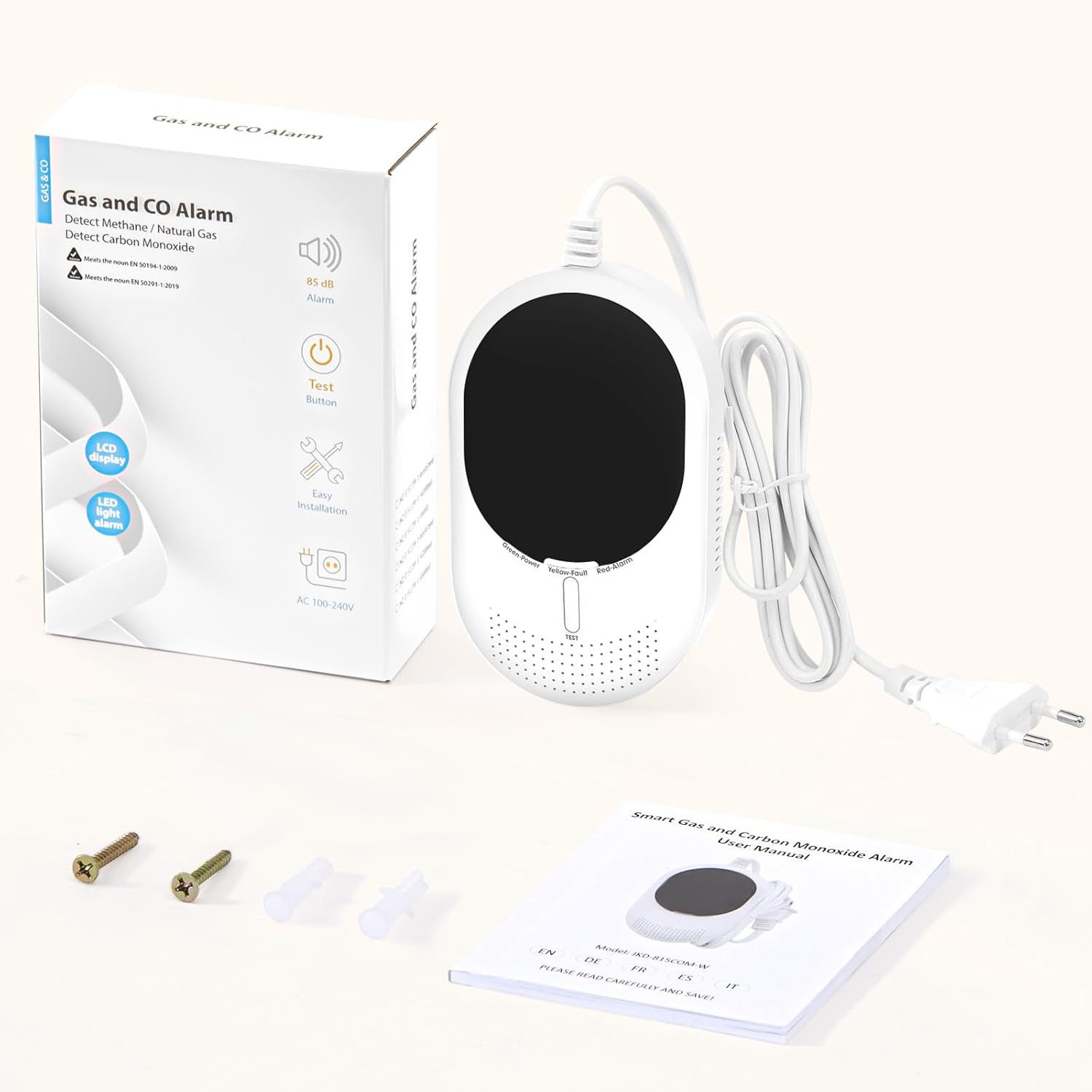
Figure 3: The package includes the detector, user manual, and mounting accessories.
5. Installazione
Proper installation is crucial for the detector's effectiveness. Consider the type of gas you are primarily detecting:
- For heavier-than-air gases (e.g., LPG): Install the detector 0.3 to 1.0 meters (1 to 3.3 feet) above the floor.
- For lighter-than-air gases (e.g., methane, carbon monoxide): Install the detector 0.3 to 1.0 meters (1 to 3.3 feet) below the ceiling.
- Posizionamento generale: Ideally, install the device 1 to 3 meters (3.3 to 9.8 feet) away from the combustion source (e.g., stove, boiler) and in a horizontal position.
- Avoid installing near windows, doors, or ventilation openings where air currents might dilute gas concentrations.
- Evitare aree con elevata umidità o temperature estreme.

Figura 4: Esample installation of the detector in a living room, positioned appropriately for CO detection.
6. Setup (App and Wi-Fi Connection)
The PHYSEN detector connects to the Tuya or Smart Life app for smart features. Ensure your Wi-Fi network is 2.4 GHz.
- Accensione: Plug the detector into a standard 100–240 V AC European socket. The device will begin a warm-up period of approximately 3 minutes. During this time, no gas tests can be performed.
- Enter Wi-Fi Configuration Mode: Press and hold the "TEST" button for more than 15 seconds. The green light will flash rapidly, and "E2" will appear on the screen, indicating the device is in Wi-Fi pairing mode.
- Apri l'app: Apri l'app Tuya Smart o Smart Life sul tuo smartphone.
- Aggiungi dispositivo: Click "Add Device" or the "+" icon in the app. Ensure your phone's Bluetooth is active. The app should automatically detect the device. If not, select "Gas sensor" from the list of devices.
- Connettiti al Wi-Fi: Enter your 2.4 GHz Wi-Fi network name and password in the app, then click "Next".
- Completamento: Wait for the device to connect successfully. Once added, click "Done".

Figure 5: Visual guide for connecting your detector to the Smart Life/Tuya app.
Video 1: This video demonstrates the WiFi connection process and shows the alarm activation when gas is detected, including app notifications.
7. Istruzioni per l'uso
7.1. Indicatori del display a LED
- Green Light (Normal/Standby): Indicates the detector is functioning correctly.
- Displaying Values: If flammable gas exceeds 4.0% LEL or CO exceeds 20 ppm, the display will show the detected values.
- Red Light Flashing & Alarm Sounding: Indicates that the alarm threshold has been reached.
- Yellow Light & "Err" on Display: Indicates a device fault. Please contact customer service.

Figure 6: The LED display shows current gas and CO levels, with color indicators for normal, alarm, and fault states.
7.2. Metodo di prova
To test the methane detection function:
- Ensure the system has completed its 3-minute warm-up period.
- Press the button of a lighter near the air inlet of the detector and slowly release gas (ensure the lighter flame is off).
- When the concentration reaches the alarm threshold, the alarm will activate and continue until the gas concentration drops below the threshold.
8. Allarmi e notifiche
The detector provides immediate alerts to ensure your safety:
- Allarme acustico: An 85 dB alarm sounds when gas or CO levels exceed safe thresholds.
- Notifiche dell'app: The Tuya/Smart Life app will send instant Wi-Fi notifications to your phone if an alarm is triggered. This allows you to monitor your home remotely.
- Disattivazione degli allarmi: You can silence the alarm directly from the app.
- Dispositivo di condivisione: Share access to the device with family members for enhanced security, allowing multiple users to receive notifications and manage alarms.

Figure 7: Real-time app notifications keep you informed of any gas or CO alarms, low battery, or device faults.

Figure 8: Share the device with your family for greater security, ensuring everyone receives alerts.
8.1. Paid SMS/Call Alerts (Optional)
If your phone is consistently connected to the internet (Wi-Fi or mobile data), you will receive free app alarm notifications, which are sufficient for daily use. A paid SMS or call alert service is available through the Smart Life/Tuya app for situations where your phone may frequently be offline. This service is offered and managed exclusively by the app provider, not by PHYSEN.
9. Manutenzione
- Pulizia regolare: Gently wipe the detector's exterior with a soft, dry cloth. Do not use harsh chemicals or abrasive cleaners.
- Durata del sensore: The dual sensor is designed for a long operational life. We recommend replacing the device every 5 years to ensure maximum protection.
- Potenza continua: Since the detector is continuously powered via AC, there are no batteries to replace.
10. Risoluzione Dei Problemi
- "Err" sul display: If the yellow light is on and "Err" appears on the screen, it indicates a device fault. Please contact our customer service immediately for assistance.
- Nessuna connessione Wi-Fi: Ensure your Wi-Fi network is 2.4 GHz. Check your Wi-Fi password and ensure the detector is within range of your router.
- Falsi allarmi: Ensure the detector is not installed too close to combustion sources, areas with strong air currents, or high humidity.
11. Specifiche
| Caratteristica | Specificazione |
|---|---|
| Produttore | FISEN |
| Numero di modello del prodotto | Gas- und CO-Melder |
| Dimensioni del prodotto | Dimensioni: 5.8 x 11.5 x 15.2 cm |
| Peso del prodotto | 250 grammi |
| Fonte di alimentazione | Electric Cable (100–240 V AC) |
| Batterie richieste | NO |
| Flammable Gas Alarm Threshold | ≥8.0% LEL (stops below 4.0% LEL) |
| Carbon Monoxide Alarm Threshold | ≥50 ppm (stops below 30 ppm) |
| Livello sonoro dell'allarme | 85 dB |
| Frequenza Wi-Fi | Solo 2.4 GHz |
| Certificazioni | EN 50291-1:2018, EN 50194-1:2009 |
12. Garanzia e supporto
PHYSEN is committed to product quality and customer satisfaction. We offer excellent after-sales service. If you encounter any issues with your device, especially if the "Err" message appears on the display, please do not hesitate to contact us. Our support team will be happy to assist you.
Ask a question about this manual
Ask about setup, troubleshooting, compatibility, parts, safety, or missing instructions. Manuals+ will review the question and use this page’s manual context to help answer it.