
1. Prodotto finitoview
The My Wall HP66L is an electric motorized TV wall mount designed for screens ranging from 17 to 32 inches (43 to 81 cm) and supporting a load of up to 45 kg. This versatile mount can be integrated into furniture, allowing your television to elegantly rise from a cabinet or descend futuristically from a ceiling installation. It offers convenient control options via a dedicated app, voice commands, and a remote control.
When not in use, your TV can be discreetly hidden, maintaining a harmonious and clutter-free living space. This system provides boundless possibilities for modern home entertainment setups.

Figure 1: The My Wall HP66L TV mount in both cabinet and ceiling configurations, highlighting its multiple control methods.
2. Informazioni sulla sicurezza
- Leggere attentamente tutte le istruzioni prima dell'installazione e dell'uso.
- Ensure the mounting surface can support the combined weight of the mount and your TV.
- Non superare la capacità di carico massima di 45 kg.
- Keep children and pets away from the moving parts of the mount during operation.
- Scollegare l'alimentazione prima di effettuare qualsiasi intervento di manutenzione o regolazione.
- Utilizzare solo l'hardware fornito o ricambi approvati dal produttore.
- Questo prodotto è progettato esclusivamente per uso interno.
3. Contenuto della confezione
Please check that all components are present and undamaged before beginning installation. Refer to the packing list provided in your product box for a detailed inventory. Typically, the package includes:
- Motorized TV lift mechanism
- Telecomando
- Adattatore di alimentazione
- Mounting hardware kit (screws, anchors, washers)
- Manuale di istruzioni
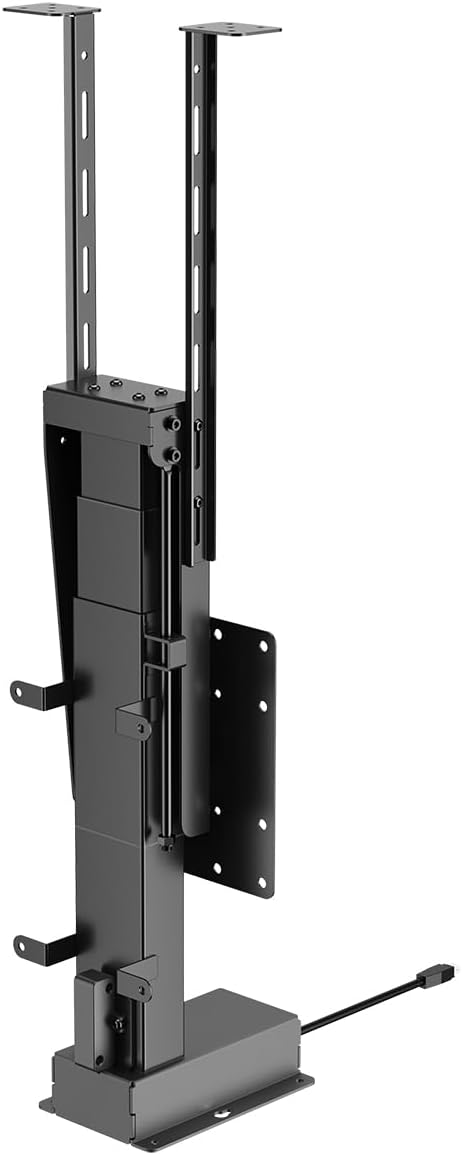
Figura 2: Fronte view of the motorized TV lift mechanism.

Figura 3: lato view of the motorized TV lift mechanism.
4. Configurazione e installazione
The My Wall HP66L TV mount is designed for both cabinet and ceiling integration. Professional installation is recommended due to the complexity of integrating the unit into furniture or ceiling structures.
4.1 Determine VESA Compatibility
Before installation, verify your TV's VESA mounting pattern. The VESA standard specifies the distance between the four mounting holes on the back of your TV in millimeters (horizontal x vertical).
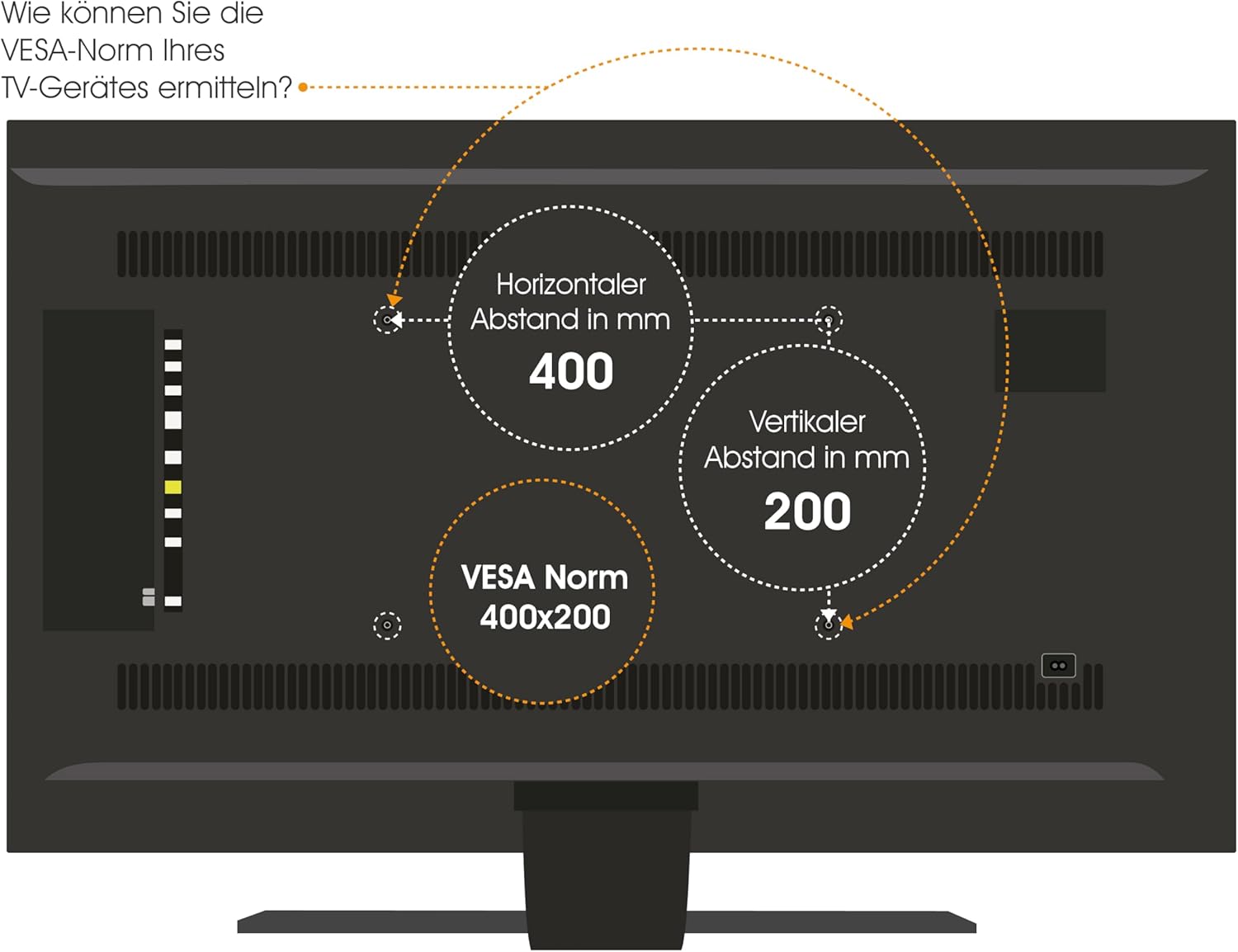
Figure 4: How to determine your TV's VESA standard.
4.2 Opzioni di montaggio
The mount supports two primary installation types:
- Cabinet/Furniture Integration: The lift mechanism is installed inside a cabinet, allowing the TV to rise vertically for viewing.
- Integrazione nel soffitto: The lift mechanism is installed in a ceiling cavity, allowing the TV to descend vertically for viewing.

Figure 5: Lid variants for cabinet integration: fixed lid and hinged lid.
4.3 Passaggi generali di installazione
- Posizionamento del piano: Carefully determine the exact location for your TV and the lift mechanism, considering viewing angles, power access, and structural support.
- Preparare la superficie di montaggio: For cabinet installation, ensure the cabinet structure is robust enough. For ceiling installation, verify ceiling joists or suitable blocking are available.
- Mount the Lift Mechanism: Securely attach the lift mechanism to the chosen surface using appropriate fasteners. Refer to the detailed technical drawing for precise measurements and mounting points.
- Attach TV to Mount: Secure your TV to the VESA plate on the lift mechanism using the correct screws and spacers.
- Connetti alimentazione: Plug the power adapter into the lift mechanism and then into a suitable power outlet.
- Operazione di prova: Before final enclosure or finishing, test the full range of motion using the remote control or app.

Figure 6: Technical drawing with dimensions (in mm) for installation planning.
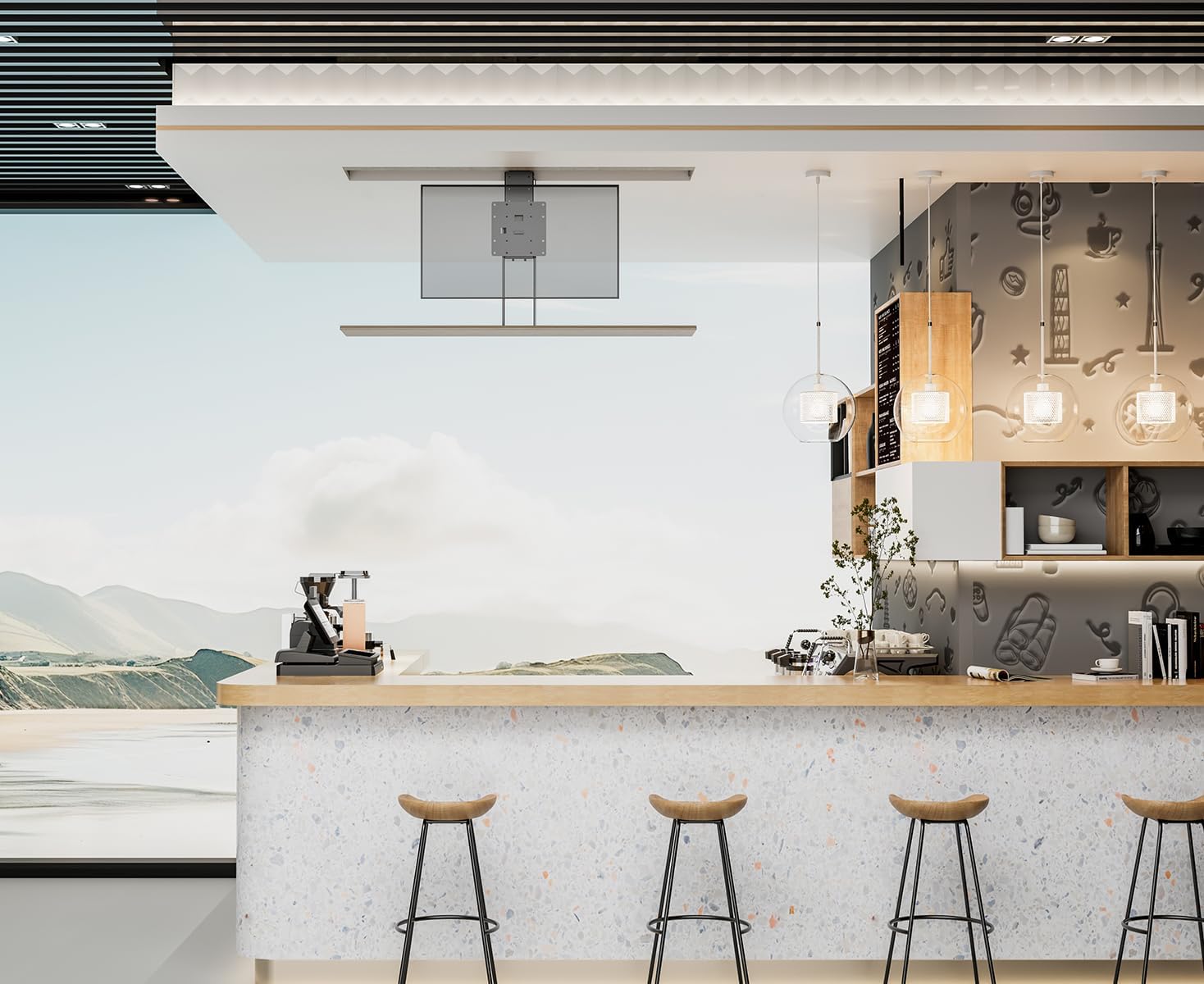
Figura 7: Esample of TV lift installed in a cabinet.

Figura 8: Esample of TV lift installed in a ceiling.
5. Istruzioni per l'uso
The My Wall HP66L offers multiple convenient ways to control your TV lift.
Metodi di controllo 5.1
- Telecomando: Use the included remote control to raise or lower the TV.
- App per smartphone: Download the dedicated app (e.g., Tuya APP) to control the lift from your smartphone. Follow the app's instructions for pairing.
- Controllo vocale: Integrate the lift with smart home systems like Alexa or Google Home for voice-activated operation. Refer to your smart home system's instructions for device integration.

Figure 9: Control options: Remote control, Tuya App, and Voice control.
5.2 Collision Avoidance System
The My Wall HP66L is equipped with a collision avoidance system to ensure safe movement. If an obstruction is detected during upward or downward motion, the lift will automatically stop to prevent damage.

Figure 10: Collision avoidance system for safe operation.
5.3 Video ufficiali del prodotto
There are no official product videos from the seller specifically for the My Wall HP66L model available at this time. Please refer to the images and written instructions for guidance.
6. Manutenzione
- Pulizia: Pulire le superfici esterne dell'ascensore e del televisore con un panno morbido e asciutto. Non utilizzare detergenti abrasivi o solventi.
- Ispezione: Periodically check all mounting screws and connections to ensure they are secure.
- Lubrificazione: I componenti motorizzati sono generalmente esenti da manutenzione. Non tentare di lubrificare le parti interne se non espressamente indicato dal produttore.
7. Risoluzione Dei Problemi
- Lift not moving:
- Ensure the power cable is securely connected to both the lift and the power outlet.
- Controllare se la presa di corrente funziona.
- Verificare che le batterie del telecomando non siano scariche.
- Controllare che non vi siano ostacoli che impediscano il movimento.
- Il telecomando non risponde:
- Sostituire le batterie del telecomando.
- Ensure there is no interference between the remote and the lift's receiver.
- Rumori insoliti durante il funzionamento:
- Interrompere immediatamente l'operazione.
- Inspect for any loose parts or obstructions.
- Se il rumore persiste, contattare l'assistenza clienti.
8. Specifiche
| Caratteristica | Dettaglio |
|---|---|
| Numero modello articolo | HP66L |
| Marca | My Wall |
| Produttore | My Wall |
| Dispositivi compatibili | Televisione |
| Dimensione minima compatibile | 17 pollici |
| Dimensione massima compatibile | 32 pollici |
| Tipo di movimento | Altezza regolabile |
| Tipo di montaggio | Cabinet/Ceiling Mount |
| Materiale | Metallo |
| Colore | Nero |
| Capacità di carico | Fino a 45 kg |
| Numero di articoli | 1 |
| Dimensioni del pacco | Dimensioni: 67 x 32.5 x 22.5 cm |
| Peso del pacco | 13.54 kg |
| Paese di origine | Cina |
| Disponibilità dei pezzi di ricambio (UE) | 1 anno |
| Aggiornamenti software garantiti fino al | Sconosciuto |
9. Garanzia e supporto
This product comes with a standard manufacturer's warranty. Please refer to the warranty card included in your package for specific terms and conditions. For technical support, troubleshooting assistance, or warranty claims, please contact My Wall customer service through their official websito o le informazioni di contatto fornite con l'acquisto.