
1. Introduzione
This manual provides detailed instructions for the LIGE Smart Watch Gift Set, which includes two distinct models: the TX1-G Slivery (round display) and the FV12-H Black (rectangular display). Please read this manual carefully before using your smartwatches to ensure proper operation and to maximize their features. Keep this manual for future reference.
2. Prodotto finitoview
The LIGE Smart Watch Gift Set offers two versatile smartwatches designed for various lifestyles. Both watches feature advanced health monitoring, fitness tracking, and smart communication capabilities. The TX1-G model presents a classic, elegant round design, while the FV12-H model offers a rugged, sporty rectangular aesthetic.

This image displays the two smartwatches included in the gift set: the LIGE TX1-G with a round, rose gold bezel and black mesh strap, and the LIGE FV12-H with a rectangular, rugged black and silver design and a metal link strap. Both watches show their respective digital interfaces.
3. Impostazione
3.1. Ricaricare lo smartwatch
Before initial use, fully charge your smartwatch. Both models typically use a magnetic charging cable.
- Collegare l'estremità USB del cavo di ricarica a un adattatore di alimentazione (consigliato 5 V/1 A) o alla porta USB di un computer.
- Align the magnetic pins of the charging cable with the charging contacts on the back of your smartwatch. The cable will snap into place.
- Il display dell'orologio indicherà lo stato di carica. Per una carica completa sono necessarie circa 2-3 ore.
3.2. Installazione e associazione dell'app
To unlock the full potential of your LIGE smartwatch, you need to install the companion application on your smartphone.
- Scarica l'App: Scan the QR code provided in the watch's packaging or search for the designated app (e.g., 'LIGE Smart' or 'Smart Health') in your smartphone's app store (App Store for iOS, Google Play Store for Android).
- Registrati/Accedi: Apri l'app e segui le istruzioni sullo schermo per creare un account o accedere.
- Abilita Bluetooth: Assicurati che il Bluetooth sia abilitato sul tuo smartphone.
- Abbina l'orologio: In the app, navigate to the 'Device' or 'My Watch' section. Tap 'Add Device' or 'Scan for Device'. Select your smartwatch from the list of available devices (e.g., 'LIGE-TX1G' or 'LIGE-FV12H').
- Conferma associazione: A pairing request may appear on your watch and/or phone. Confirm the pairing on both devices.
3.3. Configurazione iniziale
After successful pairing, configure your personal information and preferences within the app.
- Set your gender, age, height, and weight for accurate fitness tracking.
- Adjust notification settings for calls, messages, and other applications.
- Synchronize time and date with your phone.
4. Istruzioni per l'uso
4.1. Navigazione di base
Both smartwatches feature a full-touch display and physical buttons for navigation.
- Schermo tattile: Swipe up/down/left/right to navigate through menus and features. Tap to select.
- Pulsanti laterali: Typically, one button serves as a Power/Back/Menu button, while others might be dedicated to Sports modes or quick access functions. Refer to the on-screen prompts for specific button functionalities.
4.2. Chiamate Bluetooth
The smartwatches support Bluetooth calling, allowing you to make and receive calls directly from your wrist when connected to your smartphone.

This visual guide illustrates the LIGE FV12-H's communication capabilities. It shows the watch interface for Bluetooth calling with a dial pad, contact list, and call records. Below, it depicts message notifications from various social media apps and the activation of the smart voice assistant.

This image focuses on the LIGE TX1-G smartwatch, illustrating its Bluetooth call and message notification functions. It shows the watch receiving an incoming call and displaying notifications from various social media applications, along with options for dial keypad, contact lists, and call records.
- Effettuare le chiamate: Access the 'Dial' or 'Phone' icon on your watch. You can dial a number directly, select from your synced contacts, or view recent call records.
- Ricevere chiamate: Quando arriva una chiamata, l'orologio visualizza l'ID del chiamante. Puoi rispondere o rifiutare la chiamata direttamente dal tuo polso.
4.3. Notifiche dei messaggi
Receive notifications from your smartphone apps directly on your smartwatch.
- Ensure notification permissions are enabled for the companion app on your smartphone.
- In the app, select which applications you want to receive notifications from (e.g., SMS, WhatsApp, Facebook, Instagariete).
- Le notifiche appariranno sullo schermo del tuo orologio. Scorri per ignorare o view more details if available.
4.4. Modalità sportive e monitoraggio del fitness
Both watches offer extensive sports tracking capabilities to monitor your physical activity.
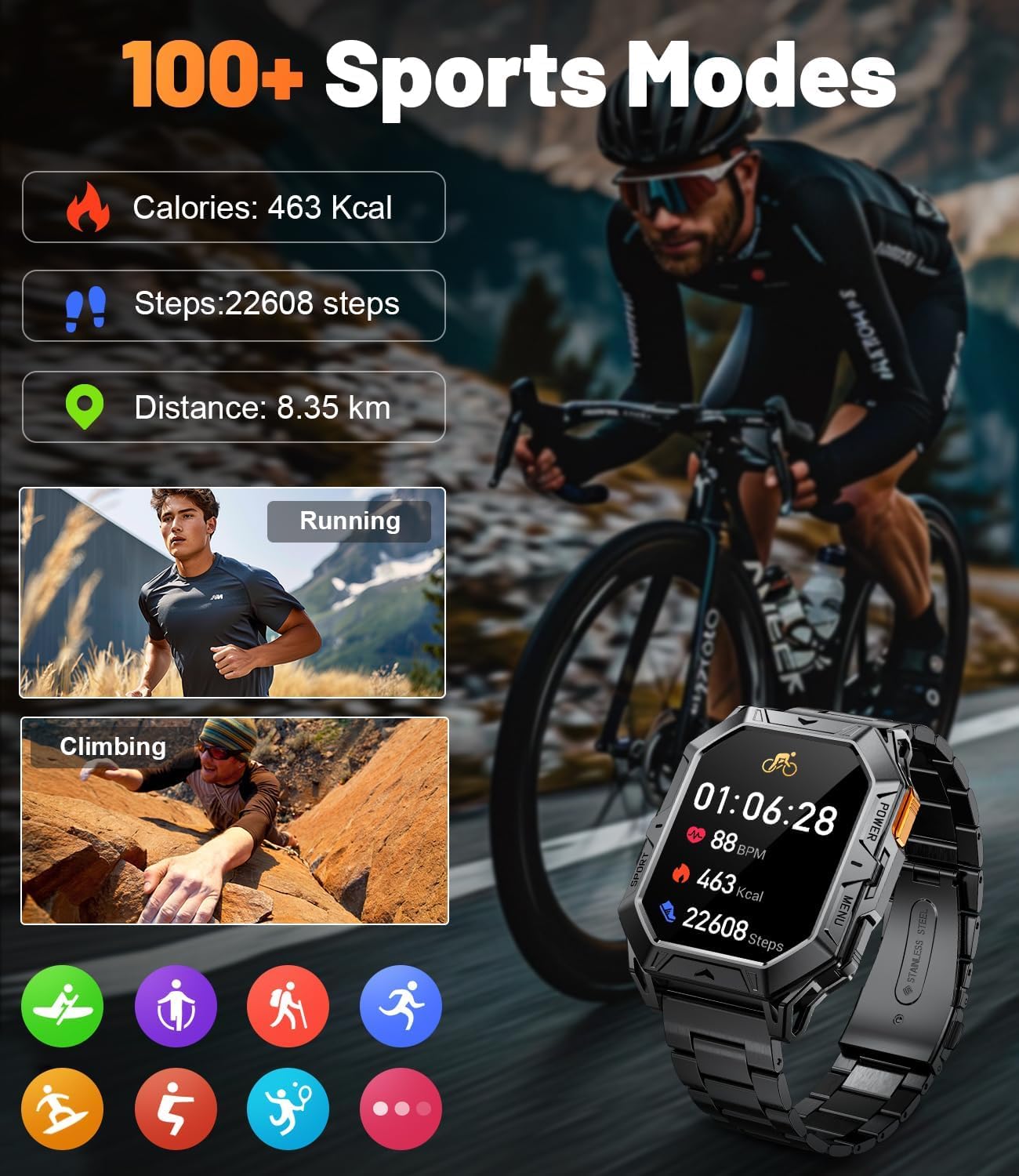
The LIGE FV12-H smartwatch is featured displaying its sports tracking interface, showing calories burned, steps taken, and distance covered. Examples of activities like running and climbing are depicted, emphasizing the watch's ability to monitor over 100 different sports modes.

This image illustrates the LIGE TX1-G smartwatch's capability to track 121 sports modes. It shows the watch interface displaying exercise duration, calories burned, and steps taken, with icons representing various activities like cycling, jump rope, running, and yoga.
- Accedi alle modalità sportive: Swipe on the watch face or press the dedicated sports button (if available) to access the list of sports modes (e.g., Running, Walking, Cycling, Climbing, Yoga).
- Inizia l'attività: Select your desired activity. The watch will begin tracking metrics such as duration, calories burned, steps, distance, and heart rate.
- Fine attività: Swipe or press the button to pause or end the activity. Data will be synced to the app.
4.5. Monitoraggio della salute
Monitora i parametri sanitari chiave direttamente dal tuo polso.
- Frequenza cardiaca: Access the heart rate monitor feature on your watch. Ensure the watch is snug on your wrist for accurate readings.
- Passi e calorie: These metrics are continuously tracked throughout the day. View daily summaries on your watch or in the app.
4.6. Watch Faces and Customization
Personalizza il tuo smartwatch con una varietà di quadranti.

The LIGE TX1-G smartwatch is highlighted, showcasing its 1.43-inch AMOLED full-screen colorful display with 466*466 high resolution. The image also demonstrates the availability of over 200 free and DIY watch dials, allowing for extensive personalization.
- Cambia quadrante: Long-press the watch face on your screen to enter the watch face selection menu. Swipe left/right to browse and tap to select.
- More Watch Faces: Access the companion app to download additional watch faces or create custom DIY watch faces using your own photos.
4.7. Assistente vocale intelligente
Utilize the integrated smart voice assistant for quick commands and information.
- Ensure your watch is connected to your smartphone and the voice assistant feature is enabled in the app.
- Activate the voice assistant on your watch (usually by a specific swipe gesture or button press).
- Speak your command or question (e.g., "What is the weather like today?", "Call Jack").
5. Manutenzione
5.1. Pulizia
- Pulisci lo schermo e il corpo dell'orologio con un panno morbido e privo di lanugine.
- Per sporco ostinato, leggermente dampLavare il panno con acqua. Evitare l'uso di prodotti chimici aggressivi o materiali abrasivi.
- Per garantire una ricarica efficiente, pulire regolarmente i contatti di ricarica.
5.2. Resistenza all'acqua
The LIGE smartwatches are designed to be splash-proof and resistant to sweat and light rain. They are generally not suitable for swimming, showering, or diving unless explicitly stated otherwise in the product specifications. Avoid exposing the watches to hot water or steam.
5.3. Cura della batteria

The LIGE FV12-H smartwatch is shown charging, highlighting its 1000mAh battery. The image indicates a standby time of over 100 days, typical usage of over 14 days, and heavy usage of 7 days.
- Evitare di scaricare completamente la batteria frequentemente.
- Caricare l'orologio utilizzando il cavo in dotazione e un adattatore di alimentazione compatibile.
- Conservare l'orologio in un luogo fresco e asciutto quando non lo si utilizza per lunghi periodi.
6. Risoluzione Dei Problemi
6.1. L'orologio non si accende
- Assicurati che l'orologio sia completamente carico. Collegalo al caricabatterie per almeno 30 minuti.
- Tieni premuto il pulsante di accensione per 10-15 secondi.
6.2. Impossibile associare allo smartphone
- Assicurati che il Bluetooth sia abilitato sullo smartphone e sull'orologio.
- Assicurati che l'orologio si trovi nel raggio di azione del Bluetooth del tuo telefono (in genere 10 metri).
- Riavvia sia lo smartphone che lo smartwatch.
- Clear the Bluetooth cache on your phone or forget the device in Bluetooth settings, then try pairing again.
- Assicurati che l'app complementare sia aggiornata.
6.3. Notifiche non funzionanti
- Check if notifications are enabled in the companion app for specific applications.
- Verify that the app has the necessary permissions on your smartphone (e.g., notification access).
- Assicurati che l'orologio sia connesso tramite Bluetooth.
6.4. Dati sanitari inesatti
- Assicurati che l'orologio sia indossato comodamente al polso, né troppo largo né troppo stretto.
- Verify that your personal information (height, weight, age) is correctly entered in the app.
- I fattori ambientali e il movimento possono influire sulla precisione.
7. Specifiche
7.1. LIGE TX1-G (Round Display)
| Caratteristica | Dettaglio |
|---|---|
| Display | 1.43 inch AMOLED Full Screen Colorful |
| Risoluzione | 466*466 High Resolution |
| Quadranti dell'orologio | 200+ Free Dials & DIY options |
| Modalità Sportive | 121 modalità sportive |
| Connettività | Bluetooth per chiamate e sincronizzazione dati |
| Caratteristiche principali | Bluetooth Calling, Message Notifications, Health Monitoring, Smart Voice Assistant |
7.2. LIGE FV12-H (Rectangular Display)
| Caratteristica | Dettaglio |
|---|---|
| Capacità della batteria | 1000mAh |
| Tempo di standby | Fino a 100+ giorni |
| Utilizzo tipico | 14+ giorni |
| Utilizzo intenso | 7 giorni |
| Modalità Sportive | 100+ modalità sportive |
| Connettività | Bluetooth per chiamate e sincronizzazione dati |
| Caratteristiche principali | Bluetooth Calling, Message Reminders, Smart Voice Assistant, Health Monitoring |
8. Garanzia e supporto
For warranty information and customer support, please refer to the documentation included with your product packaging or visit the official LIGE website. If you encounter any issues not covered in this manual, please contact LIGE customer service for assistance.