
Introduzione
This manual provides comprehensive instructions for the operation, maintenance, and troubleshooting of your LIGE Military Smart Watch (Model: FV14-A1-US). Designed for durability and versatility, this smartwatch features a 2.01-inch HD display, robust military-grade construction, and a long-lasting 700mAh battery. It supports Bluetooth calling, over 100 sports modes, and various health monitoring functions, making it suitable for both outdoor adventures and daily use.
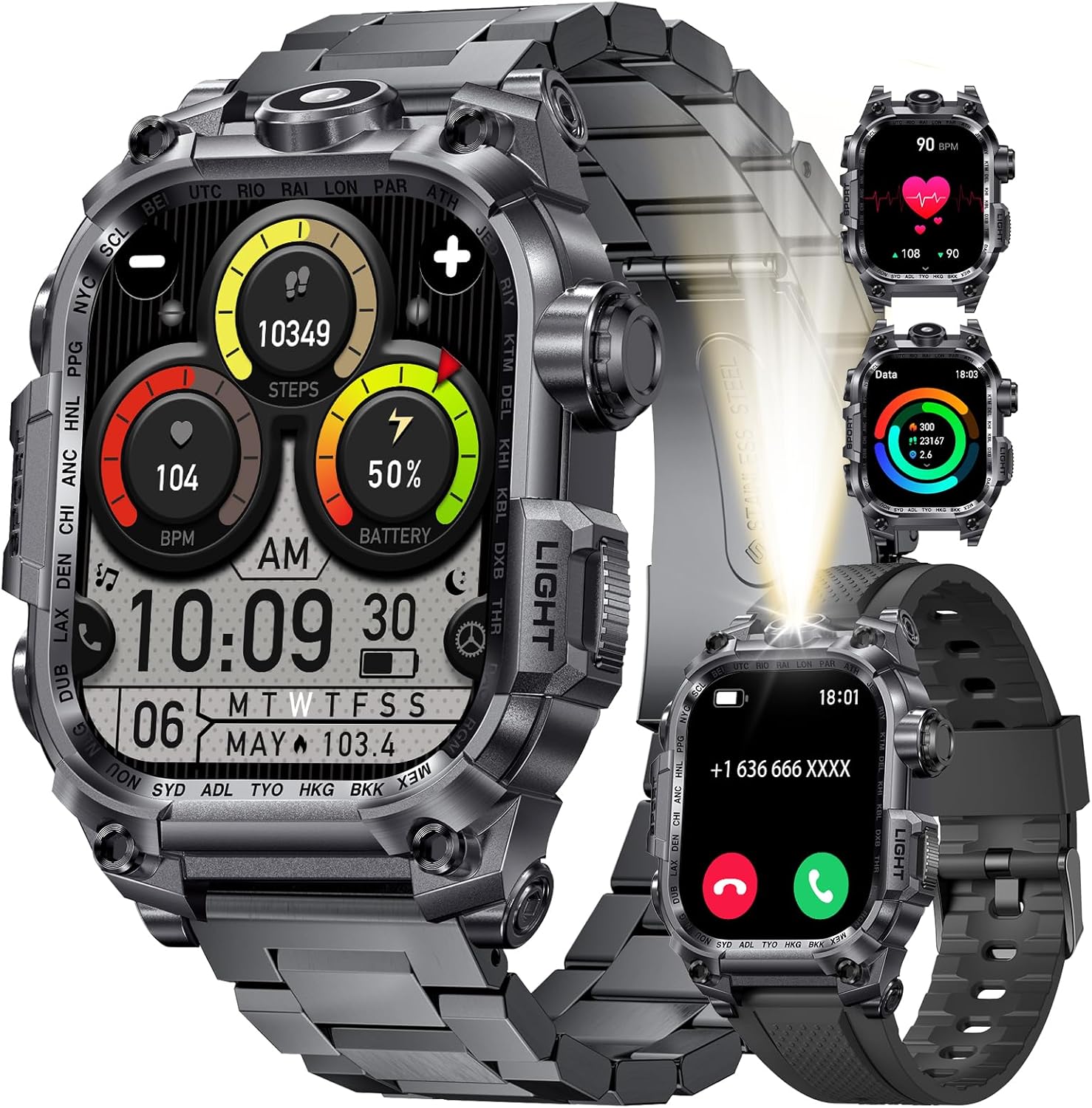
Image: The LIGE Military Smart Watch, showcasing its rugged design and digital display with various health metrics and time.
Cosa c'è nella scatola
Dopo aver aperto la confezione, verificare che siano presenti tutti i seguenti elementi:
- LIGE Military Smart Watch (FV14-A1-US)
- Two (2) Watch Straps
- Cavo di ricarica magnetico
- Strumenti per l'installazione e la rimozione delle cinghie
- User Instructions Manual (this document)
Guida all'installazione
1. Ricarica dello Smart Watch
Before initial use, fully charge your smartwatch. Connect the magnetic charging cable to the charging points on the back of the watch and plug the USB end into a compatible power adapter (not included) or a computer USB port. A full charge typically takes approximately 2.5 hours.

Immagine: Illustrazione dello smartwatch in carica tramite cavo magnetico, che evidenzia la capacità della batteria da 700 mAh e i tempi di utilizzo stimati.
2. Installazione e associazione dell'app
To unlock the full functionality of your LIGE Smart Watch, you need to install the companion application on your smartphone.
- Scarica l'App: Scan the QR code provided in the watch's on-screen instructions or search for "FitCloudPro" in your smartphone's app store (Google Play Store for Android, Apple App Store for iOS). Alternatively, you can download the app from the official link: FitCloudPro App Download.
- Abilita Bluetooth: Assicurati che il Bluetooth sia abilitato sul tuo smartphone.
- Apri FitCloudPro: Launch the FitCloudPro app and follow the on-screen prompts to create an account or log in.
- Aggiungi dispositivo: In the app, navigate to the "Device" or "Add Device" section. The app will search for nearby smartwatches. Select "I121" (or the corresponding device name) from the list to initiate pairing.
- Conferma associazione: A pairing request will appear on your smartphone. Confirm the pairing. On some devices, a pop-up may ask to allow access to contacts and call history; accept these permissions for full functionality.
- Abilita funzione di chiamata: After successful pairing, go to your phone's Bluetooth settings and locate "I121_Audio" (or similar). Connect to this profile to enable Bluetooth call functionality directly from your watch.

Image: Step-by-step visual guide for downloading the FitCloudPro app, enabling Bluetooth, pairing the watch, and connecting for call audio.
3. Strap Installation and Removal
Your LIGE Smart Watch comes with tools to assist in changing the watch straps. Align the spring bars of the strap with the lug holes on the watch body and gently push the pin to secure it. Use the provided tools for easier installation and removal.
Istruzioni per l'uso
Navigazione di base
- Schermo tattile: Scorri verso sinistra/destra, su/giù per navigare tra i menu e le funzioni. Tocca per selezionare.
- Pulsanti laterali: The watch features multiple physical buttons for quick access to functions like power on/off, back, and specific modes (e.g., Sport, Light). Refer to the watch's on-screen prompts for specific button assignments.

Image: Close-up of the smartwatch display, emphasizing its 2.01-inch HD large screen with high resolution and full-screen touch capabilities.
Funzioni chiave
Torcia LED
The smartwatch integrates a powerful LED flashlight. Activate it via the dedicated "LIGHT" button on the side of the watch or through the quick settings menu on the display. This feature is useful for illuminating your path in low-light conditions, providing a convenient hands-free light source.

Image: The smartwatch highlighting its LED flashlight function, alongside illustrations of its dust-proof, IP68 waterproof, and anti-impact capabilities.
Chiamate e notifiche Bluetooth
Once paired with your smartphone and the call audio function is enabled (as described in Setup), you can make and receive calls directly from your watch. The watch also displays incoming call alerts, SMS messages, and notifications from various social media applications (e.g., WhatsApp, Facebook, Instagariete, Twitter).

Image: Visual representation of the smartwatch's ability to answer/make calls, interact with a smart voice assistant, and display instant message reminders from various apps.
Modalità Sportive
The watch supports over 100 sports modes, including running, swimming, cycling, hiking, and more. Select your desired activity from the "Sport" menu to begin tracking. The watch will automatically record data such as exercise duration, calories burned, step count, and distance in real-time. Swipe through the display to view different metrics during your workout.
Nota: The data provided by the fitness tracker is for reference only and should not be used for professional medical diagnosis.

Image: A person climbing while wearing the smartwatch, with an overlay showing various sports modes and tracked metrics like distance, steps, calories, and heart rate.
Monitoraggio della salute
The LIGE Smart Watch can monitor various health metrics. Access these functions through the health monitoring section on the watch or within the FitCloudPro app:
- Frequenza cardiaca: Monitoraggio della frequenza cardiaca in tempo reale.
- Ossigeno nel sangue (SpO2): Misura i livelli di saturazione dell'ossigeno nel sangue.
- Pressione sanguigna: Fornisce letture stimate della pressione sanguigna.
- Monitoraggio del sonno: Monitora i modelli e la qualità del sonno.
Importante: The health data provided by this device is for general fitness and wellness purposes only. It is not intended for medical use, diagnosis, treatment, or prevention of any disease. Consult a medical professional for any health concerns.

Image: Visuals demonstrating the smartwatch's capability to monitor heart rate, blood oxygen, and blood pressure, with a user wearing the watch during physical activity.
Other Multifunctional Features
Your LIGE Smart Watch offers a range of additional features to enhance your daily life:
- Controllo della musica: Controlla la riproduzione musicale sul tuo smartphone (riproduci, metti in pausa, salta le tracce).
- Controllo remoto della telecamera: Utilizza il tuo orologio come otturatore remoto per la fotocamera del tuo smartphone.
- Sveglia: Imposta le sveglie direttamente dall'orologio o dall'app.
- Previsioni del tempo: Ricevi aggiornamenti meteo in tempo reale.
- Promemoria sedentario: Ti avvisa di muoverti dopo periodi di inattività.
- Promemoria sull'idratazione: Ti ricorda di bere acqua.
- Trova telefono/orologio: Aiuta a localizzare il dispositivo associato.
- Calcolatrice: Funzione di base della calcolatrice.
- Assistente vocale: Interagisci con l'assistente vocale del tuo smartphone.
- Quadranti personalizzabili: Personalize your watch face through the FitCloudPro app.

Image: A collage showing the smartwatch's camera control, music control, drinking reminders, alarm, and weather display features.
Manutenzione
Resistenza all'acqua (IP68)
The LIGE Smart Watch is IP68 waterproof, meaning it is resistant to dust and can withstand immersion in water up to 1.5 meters for up to 30 minutes. This makes it suitable for daily activities like hand washing, rain, and shallow swimming. However, it is not suitable for hot water, saunas, diving, or sea use, as steam and saltwater can damage the device. Avoid pressing buttons underwater.

Image: The smartwatch submerged in water, illustrating its IP68 waterproof rating and suitability for activities like swimming, rain, showering, and hand washing.
Pulizia e cura
- Pulire regolarmente l'orologio e il cinturino con un panno morbido eamp stoffa.
- Evitare l'uso di prodotti chimici aggressivi, detergenti abrasivi o solventi.
- Prima di procedere alla ricarica, assicurarsi che i contatti di ricarica siano puliti e asciutti.
Cura della batteria
- Per prolungare la durata della batteria, evitare temperature estreme.
- Charge the watch regularly, do not let the battery completely drain for extended periods.
- The 700mAh high-performance battery provides extended usage, reducing the need for frequent recharging.
Risoluzione dei problemi
| Problema | Possibile causa | Soluzione |
|---|---|---|
| L'orologio non si accende. | Batteria scarica. | Charge the watch for at least 30 minutes before attempting to turn it on. |
| Impossibile effettuare l'associazione con lo smartphone. | Bluetooth is off; app not running; watch not discoverable; incorrect device selected. | Ensure Bluetooth is on. Restart the FitCloudPro app. Restart both watch and phone. Make sure you select "I121" in the app. |
| La funzione di chiamata Bluetooth non funziona. | "I121_Audio" not connected in phone's Bluetooth settings. | Go to your phone's Bluetooth settings and manually connect to "I121_Audio" after pairing the main device. |
| Notifiche non ricevute. | Autorizzazioni app non concesse; impostazioni di notifica disattivate nell'app/telefono. | Check app permissions for notifications. Ensure notification alerts are enabled in the FitCloudPro app settings for specific applications. |
| Dati sanitari imprecisi. | Orologio non indossato correttamente; movimento durante la misurazione. | Assicurati che l'orologio sia ben aderente al polso. Rimani fermo durante la misurazione. Ricorda che i dati sono solo di riferimento. |
Specifiche
| Caratteristica | Dettaglio |
|---|---|
| Numero di modello | FV14-A1-US |
| Dimensioni dello schermo | 2.01 pollici |
| Risoluzione dello schermo | 320*390 pixel |
| Capacità della batteria | 700 mAh (Nonstandard Battery, included) |
| Tempo di ricarica | Circa 2.5 ore |
| Connettività | Bluetooth 5.2 |
| Sistema operativo | AsteroidOS |
| Capacità di archiviazione della memoria | 256 MB |
| Valutazione della resistenza all'acqua | Grado di protezione IP68 |
| Peso dell'articolo | 9.9 once |
| Dimensioni del pacco | 8.07 x 3.78 x 0.94 pollici |
| Compatibilità | Android 4.4 or iOS 9.0 and above (Smartphones only) |
| Caratteristiche speciali | LED Flashlight, Weather Forecast, Stopwatch, Timer, Music Control, Pedometer, Find Phone, Alarm Clock, Camera Control, Calculator, Drinking Water Reminder, Sedentary Reminder, Do Not Disturb Mode, Activity Tracker, 100+ Sports Modes, Fitness Tracker, Stress Tracker, Sleep, Calorie Counter, Answer/Dial Calls, Messaging Notification, Voice Assistant, Multi-Language. |
Garanzia e supporto
LIGE is committed to providing excellent products and customer service. Your LIGE Military Smart Watch comes with the following support:
- Servizio online 24 ore su 24: Customer support is available 24 hours a day to assist with any inquiries or issues.
- 6 Months Returns Service: Refer to your purchase platform's return policy for details on eligibility and process.
- Garanzia di 2 anni: The product is covered by a 2-year guarantee from the date of purchase.
If you experience any damage issues, usage problems, or are not 100% satisfied, please contact the LIGE Customer Service Team directly for assistance.

Image: Graphic detailing LIGE's 24-hour online service, 6 months returns service, and 2 years guarantee, with a prompt to contact customer service.
Video del prodotto finitoview
Video: Un video ufficiale del prodotto mostraasing the LIGE Military Smart Watch's features, including its rugged design, display, and various functionalities.

