
1. Introduzione
Thank you for choosing the VCHICS 3D Holographic Fan PD42-P65. This device is designed to create stunning 3D visual effects for advertising, displays, and events. This manual provides essential information for the safe and efficient use of your holographic fan, including setup, operation, maintenance, and troubleshooting.
2. Informazioni sulla sicurezza
Please read all safety warnings and instructions carefully before installation and operation.
- Installazione: Ensure the device is securely mounted in a location where it cannot be easily accessed or struck by people or objects.
- Alimentazione elettrica: Utilizzare solo l'adattatore di alimentazione fornito. Assicurarsi che la fonte di alimentazione corrisponda al volumetage requisiti del dispositivo.
- Parti mobili: Le pale del ventilatore ruotano ad alta velocità. NON FARE touch the blades while the device is operating or connected to power. Keep hands, hair, and loose clothing away from the fan.
- Ventilazione: Assicurare un'adeguata ventilazione attorno al dispositivo per evitare il surriscaldamento. Non ostruire le aperture di ventilazione.
- Ambiente: Avoid exposing the device to water, moisture, extreme temperatures, or direct sunlight.
- Manutenzione: Scollegare l'alimentazione prima di effettuare operazioni di pulizia o manutenzione.
- Bambini: Tenere fuori dalla portata dei bambini. Questo non è un giocattolo.
3. Contenuto della confezione
Verificare che tutti i componenti siano presenti nella confezione:
- VCHICS 3D Holographic Fan Unit
- Adattatore di alimentazione
- Telecomando
- Hardware di montaggio
- Manuale d'uso

Image 3.1: The VCHICS 3D Holographic Fan unit, its remote control, and the product packaging box.
4. Istruzioni per l'installazione
4.1 Assemblaggio e montaggio
The VCHICS 3D Holographic Fan requires assembly before use. Follow these steps for proper installation:
- Disimballare: Rimuovere con attenzione tutti i componenti dalla confezione.
- Montare le lame: Attach the fan blades to the central motor unit. Ensure they are securely fastened according to the included assembly diagram.
- Scegli la posizione: Select a suitable mounting location. The fan should be installed at a height where the rotating blades are out of reach.
- Montaggio: Use the provided mounting hardware to securely fix the fan unit to a wall or ceiling. Ensure the mounting surface can support the weight of the device.
- Collegamento elettrico: Connect the power adapter to the fan unit and then plug it into a power outlet.
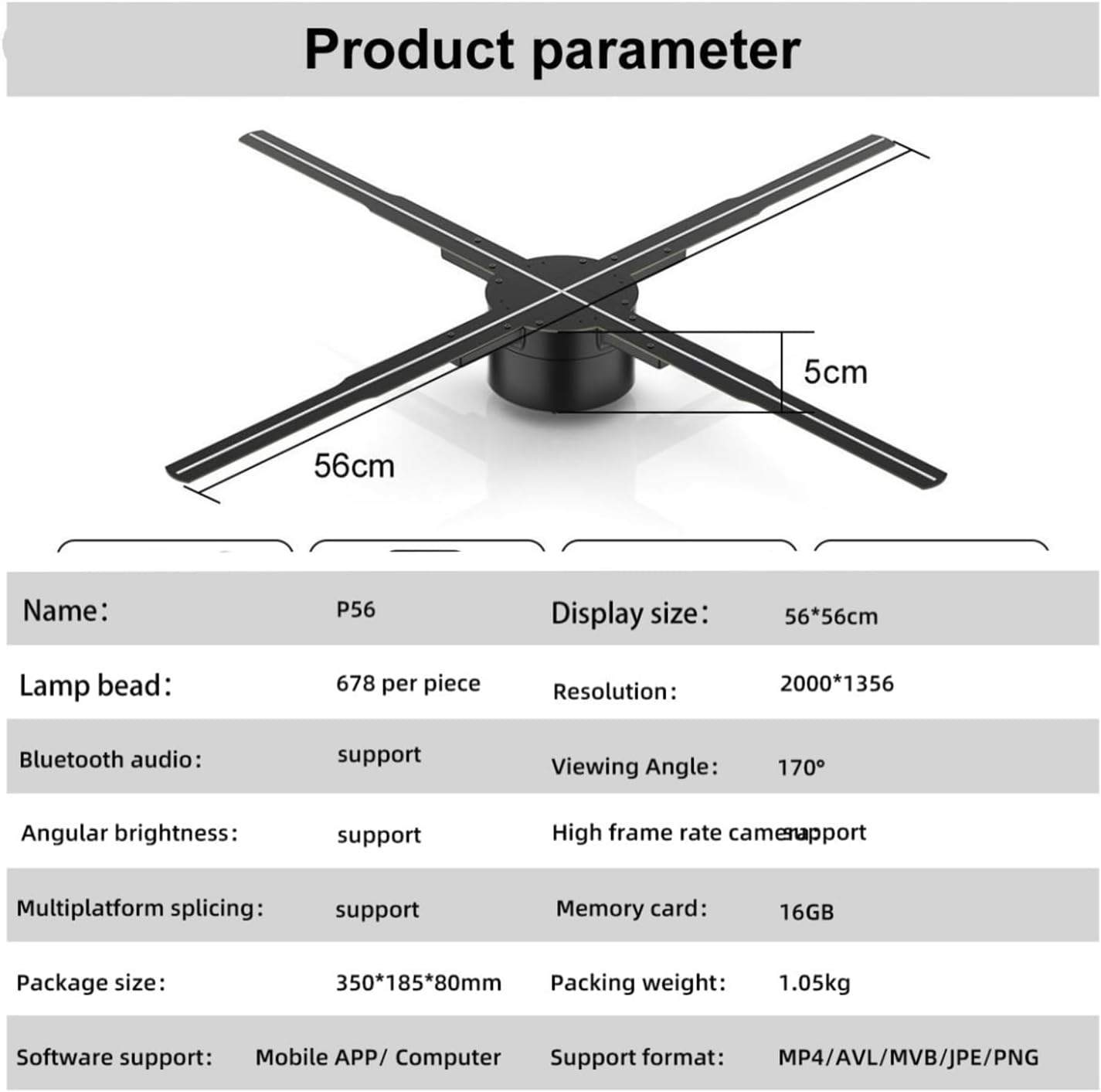
Image 4.1: The VCHICS 3D Holographic Fan unit, illustrating its approximate dimensions of 56cm in width and 5cm in height.
4.2 Content Preparation and Upload
The holographic fan supports various media formats for display. You can upload images, videos, or logos. For creating 3D images, contact customer service for assistance.
- Formati supportati: MP4, AVL, MVB, JPE, PNG.
- Supporto software: Content can be managed via a Mobile APP or Computer software.
- Scheda di memoria: The device includes a 16GB memory card for storing content.
Refer to the specific Mobile APP or Computer software instructions for detailed steps on uploading and managing your display content.
5. Istruzioni per l'uso
The VCHICS 3D Holographic Fan can be controlled via a remote control or a dedicated mobile application/computer software.
5.1 Accensione/Spegnimento
- Accensione: Once connected to power, the fan will typically enter a shutdown state. Use the remote control or app to initiate startup.
- Sequenza di avvio: The fan blades will begin to rotate, and after a brief initialization period, the holographic effect will appear.
- Spegni: Use the remote control or app to shut down the device. The blades will slow down and stop.
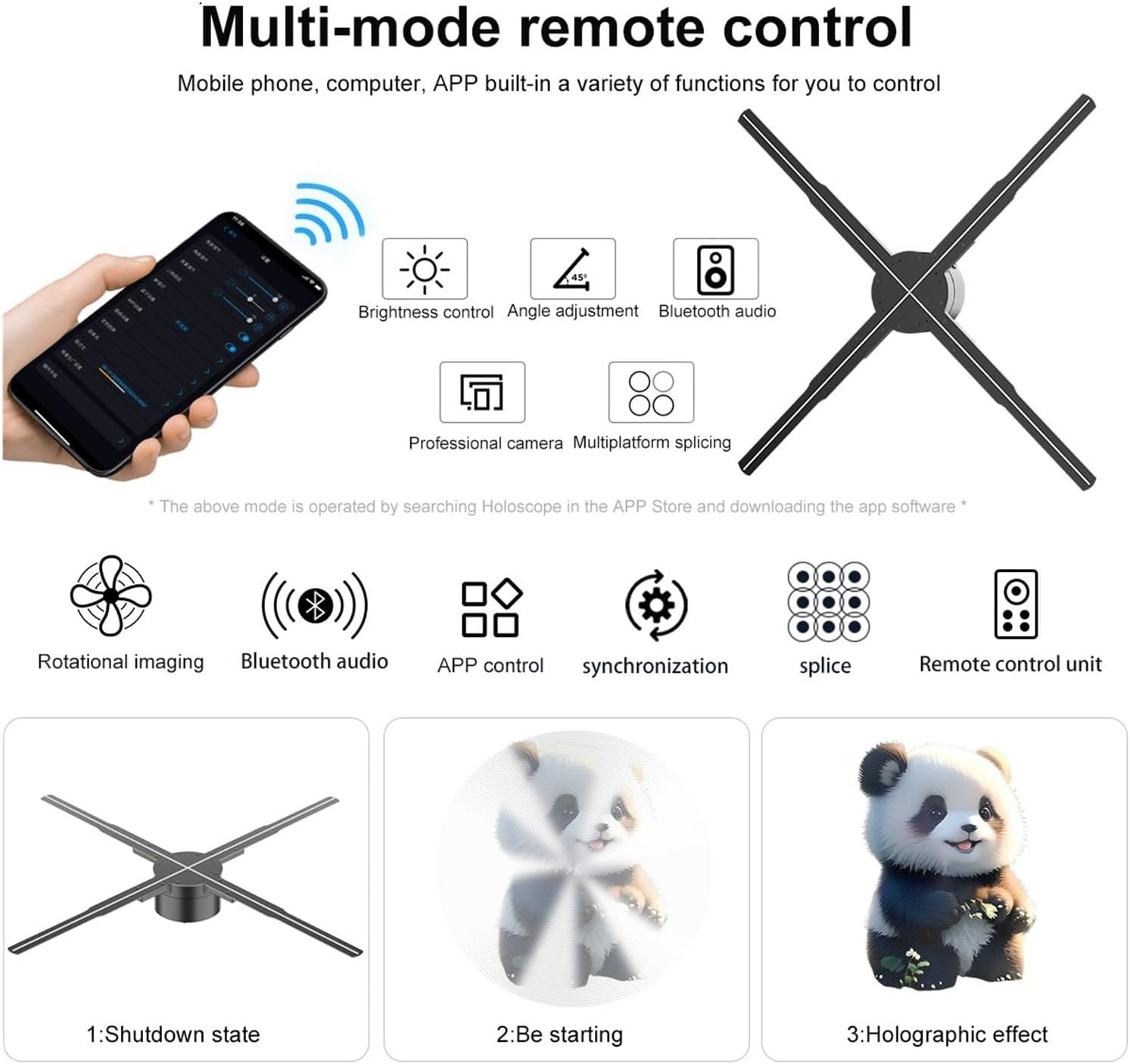
Image 5.1: Illustration of multi-mode control options via mobile phone app and remote, depicting the shutdown state, starting sequence, and the final holographic effect.
5.2 Remote Control and App Functions
The remote control and mobile application offer various functions for managing the display:
- Controllo della luminosità: Adjust the intensity of the LED display.
- Regolazione dell'angolo: Modify the display angle for optimal viewing.
- Audio Bluetooth: Connect to external Bluetooth speakers for synchronized audio.
- Selezione dei contenuti: Choose from uploaded videos, animations, or images.
- Multiplatform Splicing: If using multiple units, control their synchronization for a larger display.

Image 5.2: The VCHICS 3D Holographic Fan demonstrating its Bluetooth audio capability by connecting to an external Bluetooth speaker, enhancing the 3D visual experience with sound.
5.3 Multi-Unit Splicing
For larger display areas, multiple VCHICS 3D Holographic Fan units can be synchronized to create a seamless, expansive holographic image. This feature is supported by the device and can be configured through the control software.

Immagine 5.3: Un example of multiple VCHICS 3D Holographic Fans being spliced together to create a larger, continuous holographic display, showcasing a shark image.
6. Manutenzione
Regular maintenance ensures the longevity and optimal performance of your VCHICS 3D Holographic Fan.
- Pulizia: Disconnect the power before cleaning. Use a soft, dry cloth to wipe the fan blades and housing. Do not use liquid cleaners or abrasive materials.
- Rimozione della polvere: Periodically check for dust accumulation on the blades and motor unit. Use compressed air or a soft brush to gently remove dust.
- Magazzinaggio: If storing the device for an extended period, ensure it is clean, dry, and stored in its original packaging or a protective case in a cool, dry place.
7. Risoluzione Dei Problemi
If you encounter issues with your VCHICS 3D Holographic Fan, refer to the following common problems and solutions:
| Problema | Possibile causa | Soluzione |
|---|---|---|
| La ventola non si accende | Nessuna alimentazione; collegamento allentato | Check power adapter connection; Ensure power outlet is functional. |
| No holographic image | Incorrect content format; Fan not fully started | Verify content format (MP4, AVL, MVB, JPE, PNG); Allow fan to complete startup sequence. |
| Immagine tremolante o distorta | Damaged content file; Loose blade connection | Re-upload content; Check if blades are securely attached. |
| Il telecomando non funziona | Batterie scariche; Ostruzione | Sostituire le batterie del telecomando; assicurarsi che nessun oggetto blocchi il percorso del segnale. |
| Bluetooth audio not connecting | Speaker not in pairing mode; Distance too far | Ensure Bluetooth speaker is in pairing mode; Reduce distance between fan and speaker. |
Se il problema persiste dopo aver provato queste soluzioni, contattare l'assistenza clienti.
8. Specifiche
The following table details the technical specifications of the VCHICS 3D Holographic Fan PD42-P65:
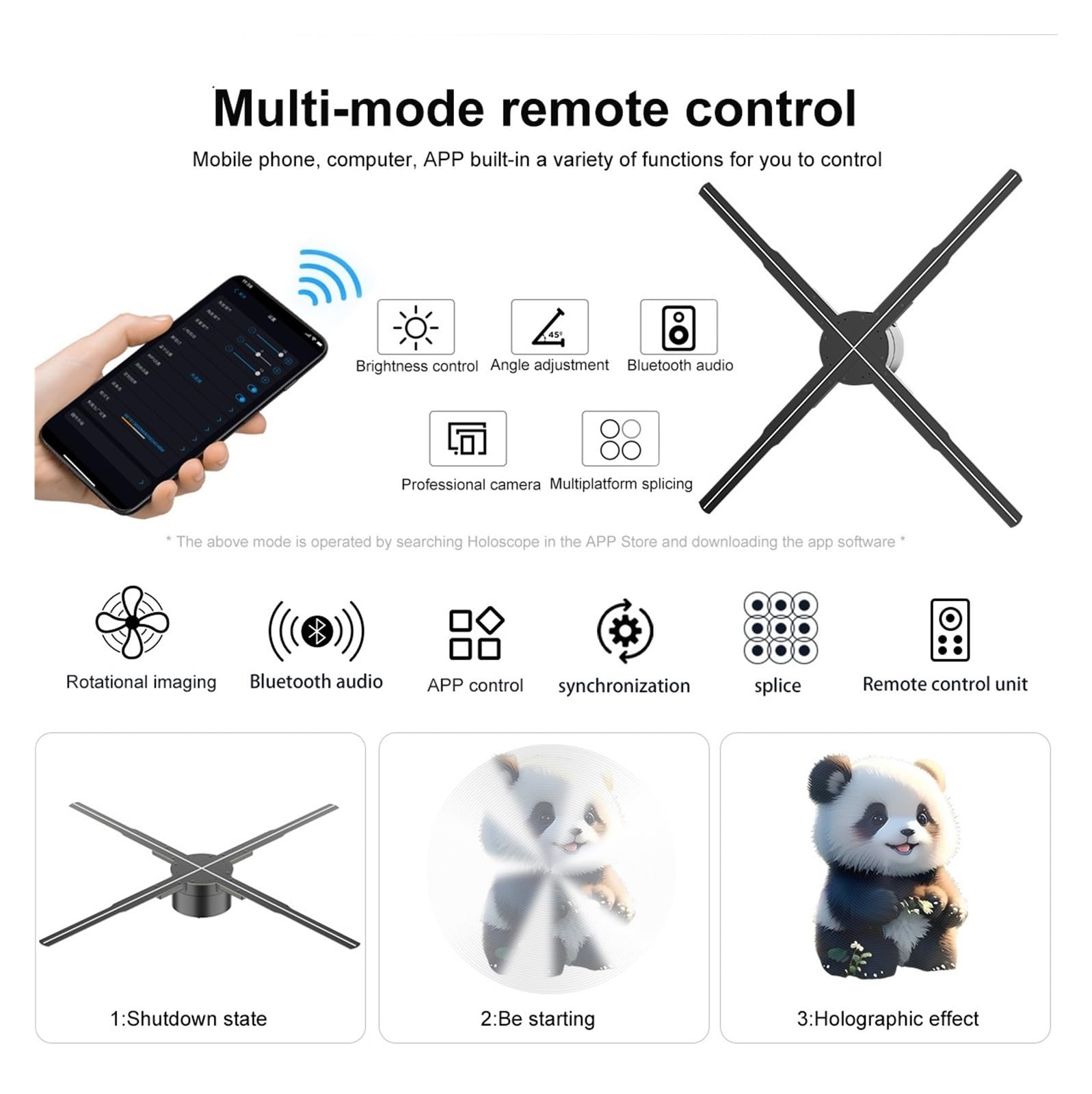
Image 8.1: Detailed product parameters for the VCHICS 3D Holographic Fan PD42-P65.
| Caratteristica | Specificazione |
|---|---|
| Marca | VCHICS |
| Modello | PD42-P65 |
| Dimensioni dello schermo | Dimensioni: 56 x 56 cm |
| Lamp Perline | 678 per piece |
| Risoluzione | 2000x1356 |
| Viewangolo di ing | 170° |
| Audio Bluetooth | Supportato |
| Angular Brightness | Supportato |
| High Frame Rate Camera | Supportato |
| Multiplatform Splicing | Supportato |
| Scheda di memoria | 16 GB |
| Supporto software | APP mobile / Computer |
| Formati supportati | MP4, AVL, MVB, JPE, PNG |
| Dimensioni del pacco | Dimensioni: 48.01 x 8 x 7.01 cm |
| Peso dell'articolo | 4.5 kg |
9. Garanzia e supporto
For warranty information and technical support, please refer to the documentation provided with your purchase or contact VCHICS customer service directly. Keep your purchase receipt as proof of purchase for warranty claims.
Contatto del servizio clienti: Please refer to the contact details provided on the product packaging or the official VCHICS websito.