
1. Introduzione
This manual provides essential information for the installation, operation, and maintenance of your PNY NVIDIA GeForce RTX 5060 Epic-X ARGB OC Triple Fan Graphics Card. This graphics card is designed to deliver high-performance visuals and computing power, leveraging NVIDIA Blackwell architecture, DLSS 4, and advanced cooling technologies.

Figure 1: PNY NVIDIA GeForce RTX 5060 Epic-X ARGB OC Triple Fan Graphics Card
2. Cosa c'è nella scatola
Verificare che tutti i componenti siano presenti prima di procedere con l'installazione:
- PNY NVIDIA GeForce RTX 5060 Graphics Card
- NVIDIA App (Software download required)
- Guida rapida (questo documento)

Figure 2: Retail packaging for the PNY NVIDIA GeForce RTX 5060 Graphics Card
3. Specifiche
| Caratteristica | Dettaglio |
|---|---|
| Coprocessore grafico | Scheda grafica NVIDIA GeForce RTX 5060 |
| Marca | PNY |
| Dimensione RAM grafica | 8 GB |
| Velocità di clock della GPU | 2280 MHz |
| Interfaccia di uscita video | Porta Display, HDMI |
| Tipo di RAM grafica | Memoria GDDR7 |
| Dispositivi compatibili | Scrivania |
| Risoluzione massima dello schermo | 7680x4320 |
| Interfaccia della scheda grafica | PCI-Express x8 |
| Velocità di clock della memoria | 2280 MHz |
| Numero di fan | 3 |
| Processore video | NVIDIA |
| Nome del modello | RTX 5060 8GB |
| Peso dell'articolo | 1.01 chilogrammi |
4. Configurazione e installazione
Before installing your new graphics card, ensure your system's power supply meets the recommended wattage and that your motherboard has a compatible PCI-Express x8 slot. Power off your computer and disconnect all cables before opening the case.
- Prepara il tuo sistema: Power down your computer, unplug it from the wall, and open the side panel of your PC case.
- Rimuovere la vecchia scheda grafica (se applicabile): If you are replacing an existing graphics card, carefully unmount it from the PCIe slot and disconnect any power cables.
- Install the RTX 5060: Align the graphics card with an available PCI-Express x8 slot on your motherboard. Press down firmly until it clicks into place. Secure the card to the case with screws.
- Connetti alimentazione: Connect the necessary PCIe power cables from your power supply to the graphics card. Refer to your power supply and graphics card documentation for specific power connector requirements.
- Chiudi la custodia e collega il display: Close your PC case, reconnect all cables, and connect your display to one of the graphics card's DisplayPort or HDMI outputs.
- Installa i driver: Power on your computer. Once Windows loads, download and install the latest NVIDIA drivers from the official NVIDIA webposto (www.nvidia.com/drivers).

Figura 3: Fronte view of the PNY NVIDIA GeForce RTX 5060 Graphics Card with triple fans.

Figure 4: DisplayPort and HDMI outputs on the graphics card.

Figure 5: Dimensions of the PNY RTX 5060, highlighting its compact 2-slot design suitable for SFF PCs.
5. Utilizzo della scheda grafica
Your PNY NVIDIA GeForce RTX 5060 graphics card is equipped with advanced features to enhance your gaming and creative workflows.
5.1. NVIDIA Technologies
- DLSS 4: Apprendimento profondo Super Sampling uses AI to boost frame rates and generate high-quality images. Enable DLSS in supported games for improved performance.
- NVIDIA Reflex: Optimizes the graphics pipeline to reduce system latency, providing faster reaction times in competitive games.
- Studio NVIDIA: Accelerates creative applications with world-class drivers and exclusive tools for AI-assisted workflows.
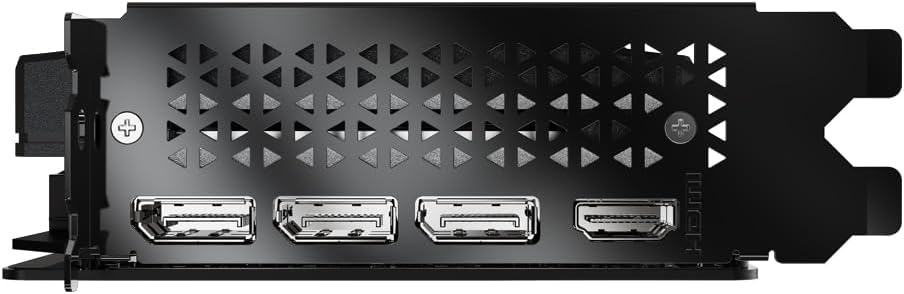
Figura 6: Oltreview of NVIDIA Blackwell Architecture features, including Tensor Cores, Ray Tracing Cores, DLSS 4, and Reflex.
5.2. PNY VelocityX Software
The PNY VelocityX software allows you to fine-tune your graphics card's performance, monitor its status, and customize its ARGB lighting. Download it from the official PNY websito.
- Overclocking: Adjust core clock, memory clock, power target, and thermal target to maximize performance.
- Controllo della ventola: Customize fan speeds with automatic or manual settings to balance cooling and noise levels.
- Illuminazione ARGB: Personalize the Epic-X ARGB lighting with various effects, colors, and brightness levels.

Figure 7: Screenshot of the PNY VelocityX software interface, displaying performance metrics and overclocking controls.

Figure 8: Visual representation of the Epic-X ARGB Lighting 2.0 features, showing customizable LED lighting zones.
Video 1: PNY GeForce RTX 50 Series GPU with VelocityX. This video demonstrates the features and customization options available through the PNY VelocityX software for your graphics card.
6. Manutenzione
Una corretta manutenzione garantisce la longevità e le prestazioni ottimali della scheda grafica.
6.1. Sistema di raffreddamento
The PNY RTX 5060 features advanced cooling technology:
- Open Aluminum Backplate: Improves ventilation for better performance and stability.
- Modalità invisibile: Fans stop when GPU temperature falls below 50°C for silent operation during light loads.
- Ultra-dense Heat Fins: Massimizza la dissipazione del calore.
- Improved Axial-Fans: Dual-ball bearings and redesigned blades push up to 15% more airflow.

Figure 9: Diagram illustrating the Advanced Cooling Technology, including the open aluminum backplate, stealth mode, ultra-dense heat fins, and improved axial fans.
6.2. Pulizia
Pulire regolarmente la polvere dalle ventole della scheda grafica e dal dissipatore di calore utilizzando aria compressa. Assicurarsi che il computer sia spento e scollegato prima di procedere alla pulizia.
7. Risoluzione Dei Problemi
If you encounter issues with your graphics card, try the following steps:
- Nessuna uscita di visualizzazione: Ensure the display cable is securely connected to the graphics card and monitor. Verify the graphics card is properly seated in the PCIe slot and all power cables are connected.
- Problemi con i driver: Uninstall existing graphics drivers using Display Driver Uninstaller (DDU) in Safe Mode, then perform a clean installation of the latest drivers from NVIDIA's websito.
- Problemi di prestazioni: Check GPU temperatures using monitoring software (e.g., PNY VelocityX) to ensure it's not overheating. Verify your power supply unit (PSU) meets the minimum wattage requirements for your system, especially if you have other power-hungry components.
- Instabilità/arresti anomali del sistema: Ensure your system's BIOS/UEFI is up to date. Test the graphics card in another compatible system if possible to rule out other component issues.
8. Garanzia e supporto
Your PNY NVIDIA GeForce RTX 5060 Graphics Card comes with a Garanzia di 3 anno. For technical support, driver downloads, and further product information, please visit the official PNY websito o contattare il loro servizio clienti.
PNY Ufficiale Websito: www.pny.com
PNY Store on Amazon: PNY Store