
1. Introduzione
This manual provides detailed instructions for the assembly, operation, and maintenance of your DEVAISE AMGZ 60 Inch L-Shaped Gaming Desk. Please read this manual thoroughly before assembly and use to ensure proper function and safety. Keep this manual for future reference.

Figure 1.1: The DEVAISE AMGZ 60 Inch L-Shaped Gaming Desk in a typical setup, showcasing its monitor stand, LED lighting, and integrated storage.
2. Informazioni sulla sicurezza
Osservare le seguenti precauzioni di sicurezza per evitare lesioni o danni al prodotto:
- Leggere attentamente tutte le istruzioni prima del montaggio.
- Prima di iniziare il montaggio, assicurarsi che tutti i componenti siano presenti e integri.
- Montare la scrivania su una superficie morbida e pulita per evitare graffi.
- Non stringere eccessivamente le viti durante il montaggio, poiché ciò potrebbe danneggiare il materiale.
- Tenere le parti piccole lontano dalla portata dei bambini per evitare rischi di soffocamento.
- Do not exceed the maximum weight capacity of the desk (100 lbs).
- Ensure the power cord for the integrated outlets is properly routed and not pinched.
- Avoid spilling liquids directly onto the power outlets or LED light strip.
- Controllare periodicamente tutti i collegamenti e gli elementi di fissaggio per assicurarsi che siano sempre saldi.
3. Installazione e montaggio
Assembly typically requires two people and takes approximately 1-2 hours. All necessary tools are usually included. Follow the numbered steps provided in your packaging for detailed assembly instructions.
3.1 Disimballaggio e identificazione delle parti
Carefully unpack all components and lay them out on a protected surface. Refer to the parts list in your package to identify each piece. Ensure all hardware (screws, bolts, etc.) is accounted for.
3.2 Assemblaggio del telaio
Begin by assembling the metal frame components. Attach the main support beams to the leg frames using the provided screws. Do not fully tighten screws until all frame pieces are loosely connected.
3.3 Desktop Panel Installation
Once the frame is stable, carefully place the desktop panels onto the frame. Secure them using the designated screws. Ensure the L-shape orientation is correct for your desired setup.

Figure 3.1: The assembled DEVAISE L-Shaped Desk, ready for use in a home office environment.
3.4 Monitor Stand and Storage Shelf Attachment
Attach the monitor stand to the main desktop panel. Install the open storage shelves on the side frame. The headphone hook can be attached to the side of the desk as desired.

Figure 3.2: Detail of the iron hook for headphones and the open storage shelf for CPU or other items.
3.5 Drawer Unit Assembly
Assemble the fabric drawers according to the instructions. Insert the drawers into the designated cabinet space. The bottom drawer is designed to hold A4/legal files.
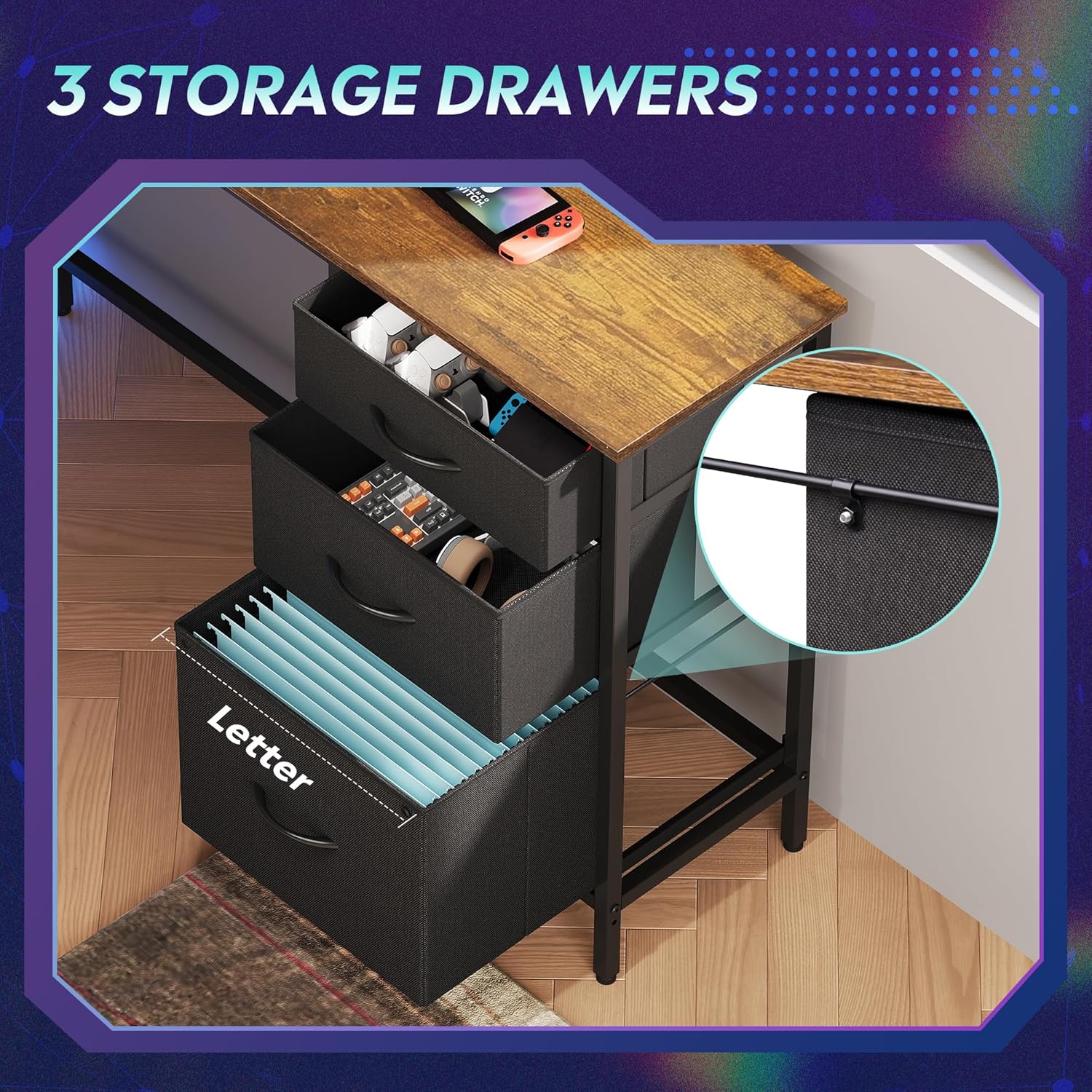
Figure 3.3: The three fabric storage drawers, illustrating their capacity for various items, including file cartelle nel cassetto inferiore.
3.6 Power Outlet and LED Light Installation
Integrate the recessed power strip into its designated slot on the desktop. Connect the LED light strip to its power source and route the cables neatly. Ensure all electrical connections are secure before plugging into a wall outlet.

Figure 3.4: The recessed power strip, featuring two AC outlets and two USB ports for convenient device charging.
3.7 regolazioni finali
Once fully assembled, tighten all screws. Adjust the non-slip footpads at the bottom of the desk legs to ensure stability on uneven floors.

Figure 3.5: Detail showing the desk's durable board material and the adjustable footpads for stability.
4. Istruzioni per l'uso
4.1 Sistema di illuminazione a LED
The integrated LED lighting system offers various modes and colors. It can be controlled via a smart controller or a dedicated app (if applicable, refer to specific instructions in your package for app details).
- Accensione/spegnimento: Single short press the controller button to turn on. Long press for 3 seconds to turn off.
- Cambia colore/modalità luce: Single short press (again) to cycle through 31 light modes and colors.
- Sincronizzazione musicale: Some models support music rhythm synchronization. Refer to the specific LED controller instructions for activation.
- Funzioni del timer: Some models include timer functions for automatic shut-off. Refer to the specific LED controller instructions.

Figure 4.1: The smart controller for the LED lighting system, indicating features like 31 light modes, color palette switch, music rhythm, and timer.

Figure 4.2: Instructions for operating the smart controller for the LED lights.
4.2 Prese di corrente
The desk includes a recessed power strip with 2 AC outlets (125V/12A) and 2 USB ports (5V/2.1A). Plug the desk's main power cord into a wall outlet. You can then plug your devices directly into the desk's integrated outlets for convenient power access.
- Do not overload the power strip. Ensure the total wattage of connected devices does not exceed the strip's capacity.
- Use the USB ports for charging compatible devices.
4.3 Cassetti e ripiani portaoggetti
Utilize the three fabric drawers for organizing office supplies, gaming accessories, or personal items. The bottom drawer is designed with rails for hanging A4/legal size file folders. The open storage shelves provide space for a CPU tower, books, or decorative items. The headphone hook keeps your headset easily accessible.
5. Manutenzione
- Pulizia: Pulisci le superfici della scrivania con un panno morbido eamp panno. Evitare prodotti chimici aggressivi o detergenti abrasivi che potrebbero danneggiare la finitura.
- Spolverare: Regularly dust the desk and LED light strip to maintain optimal appearance and function.
- Elementi di fissaggio: Periodically check all screws and bolts to ensure they are tight. Retighten if necessary to maintain desk stability.
- Componenti elettrici: Keep the power outlets and LED light strip dry. If any electrical component appears damaged, discontinue use and contact support.
6. Risoluzione Dei Problemi
6.1 La scrivania è traballante
- Assicurarsi che tutte le viti di montaggio siano ben serrate.
- Adjust the non-slip footpads on the bottom of the legs to compensate for uneven flooring.
6.2 Le luci LED non funzionano
- Verificare che il cavo di alimentazione principale della scrivania sia collegato saldamente a una presa a muro funzionante.
- Ensure the LED light strip's connector is properly attached to its power source.
- Verify the smart controller is functioning correctly and not damaged.
- Try pressing the power button on the controller.
6.3 Power Outlets Not Providing Power
- Verificare che il cavo di alimentazione principale della scrivania sia collegato saldamente a una presa a muro funzionante.
- Verificare che la presa a muro funzioni collegandovi un altro dispositivo.
- Ensure the power strip is properly seated in its desktop slot and its internal connections are secure.
- Evitare di sovraccaricare la ciabatta con troppi high-wattage dispositivi.
6.4 I cassetti non scorrono fluidamente
- Ensure the fabric drawers are correctly assembled and inserted into their slots.
- Check for any obstructions within the drawer cabinet.
7. Specifiche
| Marca | DEVASTARE |
| Numero di modello | AMGZ |
| Dimensioni del prodotto (P x L x A) | 46.5" x 59" x 29.4" |
| Colore | Marrone rustico |
| Materiale | Legno ingegnerizzato, metallo |
| Peso dell'articolo | 55.8 libbre |
| Caratteristiche speciali | LED Lights, Power Outlets (2 AC, 2 USB), Monitor Stand, Storage Drawers, Headphone Hook, Open Storage Shelf, Adjustable Footpads |
| Capacità massima di peso | 100 libbre |
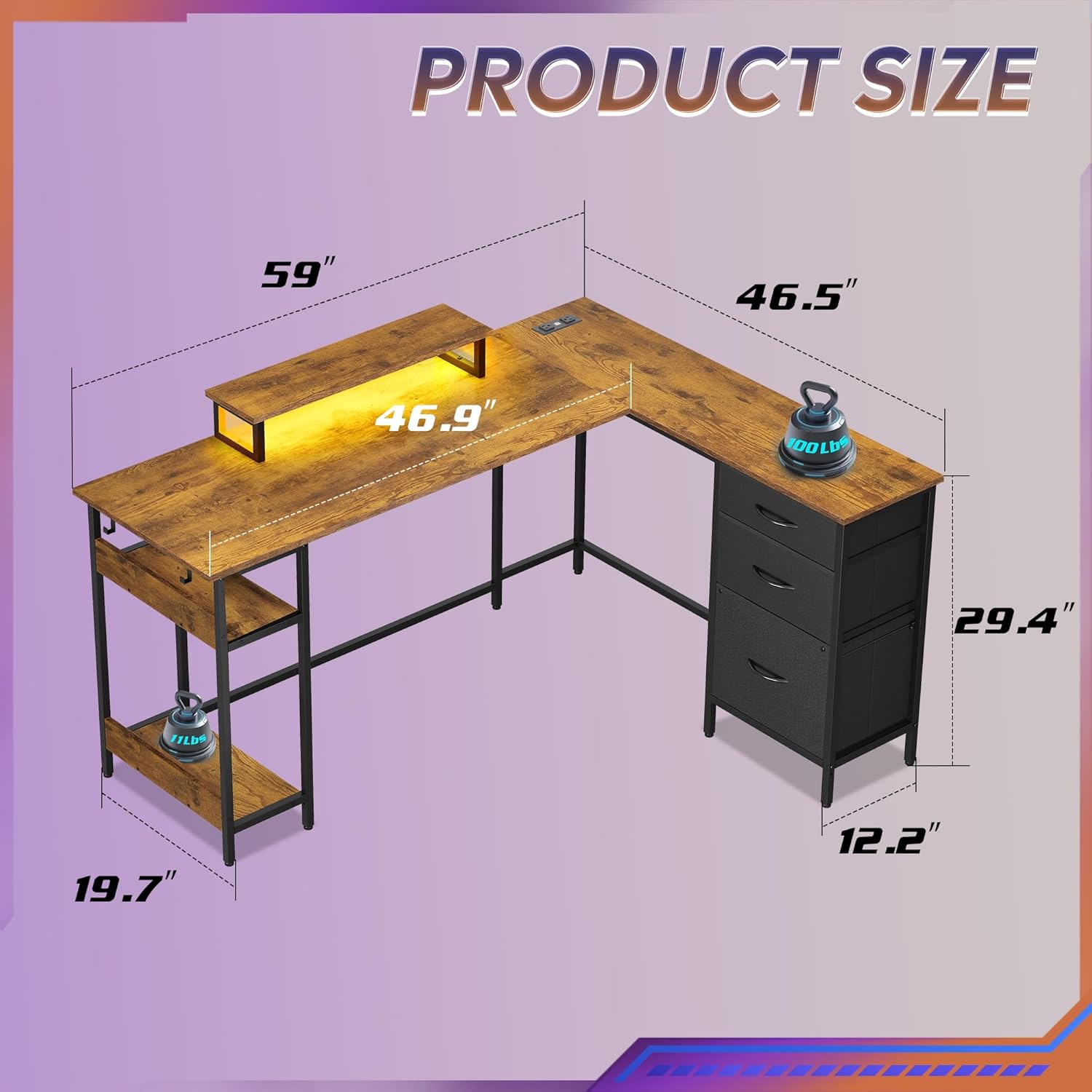
Figure 7.1: Detailed product dimensions of the DEVAISE AMGZ 60 Inch L-Shaped Gaming Desk.
8. Informazioni sulla garanzia
For detailed warranty information, please refer to the warranty card included with your product packaging or visit the official DEVAISE websito. Conservare la ricevuta d'acquisto come prova d'acquisto per eventuali reclami in garanzia.
9. Assistenza clienti
If you encounter any issues or have questions regarding your DEVAISE AMGZ 60 Inch L-Shaped Gaming Desk, please contact DEVAISE customer support through the following channels:
- E-mail: Refer to your product packaging or the official DEVAISE websito per email di contatto.
- Websito: Visit the official DEVAISE websito per FAQ, risorse di supporto e moduli di contatto.
- Telefono: Check your product documentation for a customer service phone number.
When contacting support, please have your model number (AMGZ) and purchase information ready.