
1. Introduzione
This manual provides essential information for the safe and efficient operation of your Hisense M2 Pro 4K Mini Laser Projector. Please read it thoroughly before using the device and retain it for future reference.
2. Informazioni sulla sicurezza
- Sicurezza laser: Non guardare direttamente l'obiettivo del proiettore quando il dispositivo è in funzione. La luce laser può causare danni agli occhi.
- Ventilazione: Assicurare un'adeguata ventilazione attorno al proiettore. Non ostruire le aperture di ventilazione.
- Alimentazione elettrica: Utilizzare solo l'adattatore di alimentazione fornito. Assicurarsi che il volumetage corrisponde all'alimentazione elettrica locale.
- Posizionamento: Place the projector on a stable, level surface. Avoid placing it in direct sunlight, near heat sources, or in humid environments.
- Pulizia: Scollegare l'alimentazione prima della pulizia. Utilizzare un panno morbido e asciutto. Non utilizzare detergenti liquidi o spray.
- Bambini: Tenere il proiettore fuori dalla portata dei bambini.
3. Contenuto della confezione
Verificare che tutti gli articoli siano presenti nel pacco:
- Hisense M2 Pro Projector
- Cavo di alimentazione
- Telecomando
- Manuale dell'utente (questo documento)
4. Prodotto finitoview
The Hisense M2 Pro is a compact 4K mini laser projector designed for versatile use. It features a flexible stand for multi-angle projection and various connectivity options.
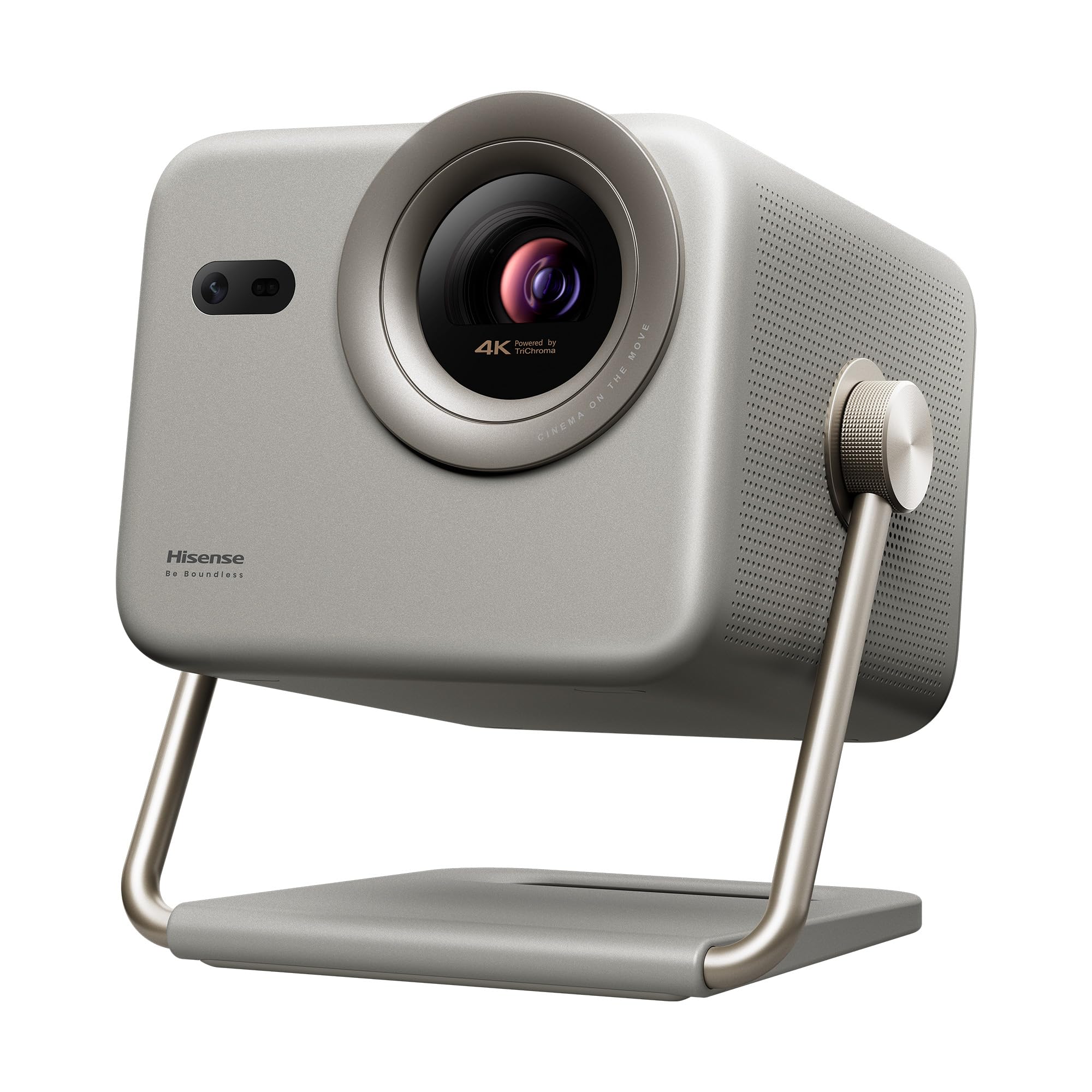
Figure 1: Hisense M2 Pro Projector with remote control and key dimensions (193mm width, 218mm depth, 230mm height).
4.1 Front View
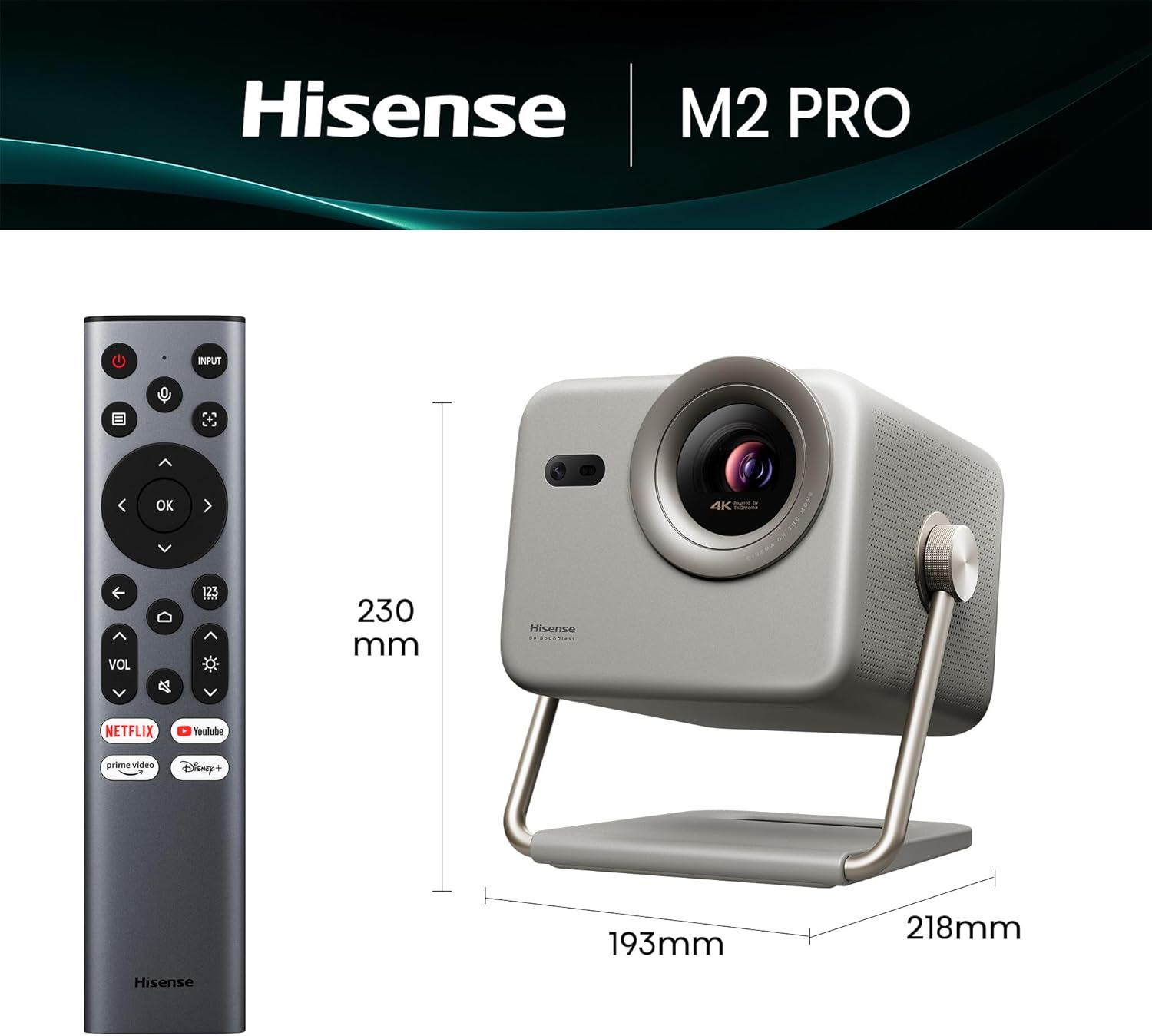
Figura 2: Fronte view of the projector, highlighting the main projection lens and integrated sensors for autofocus and keystone correction.
4.2 Posteriore View e porti
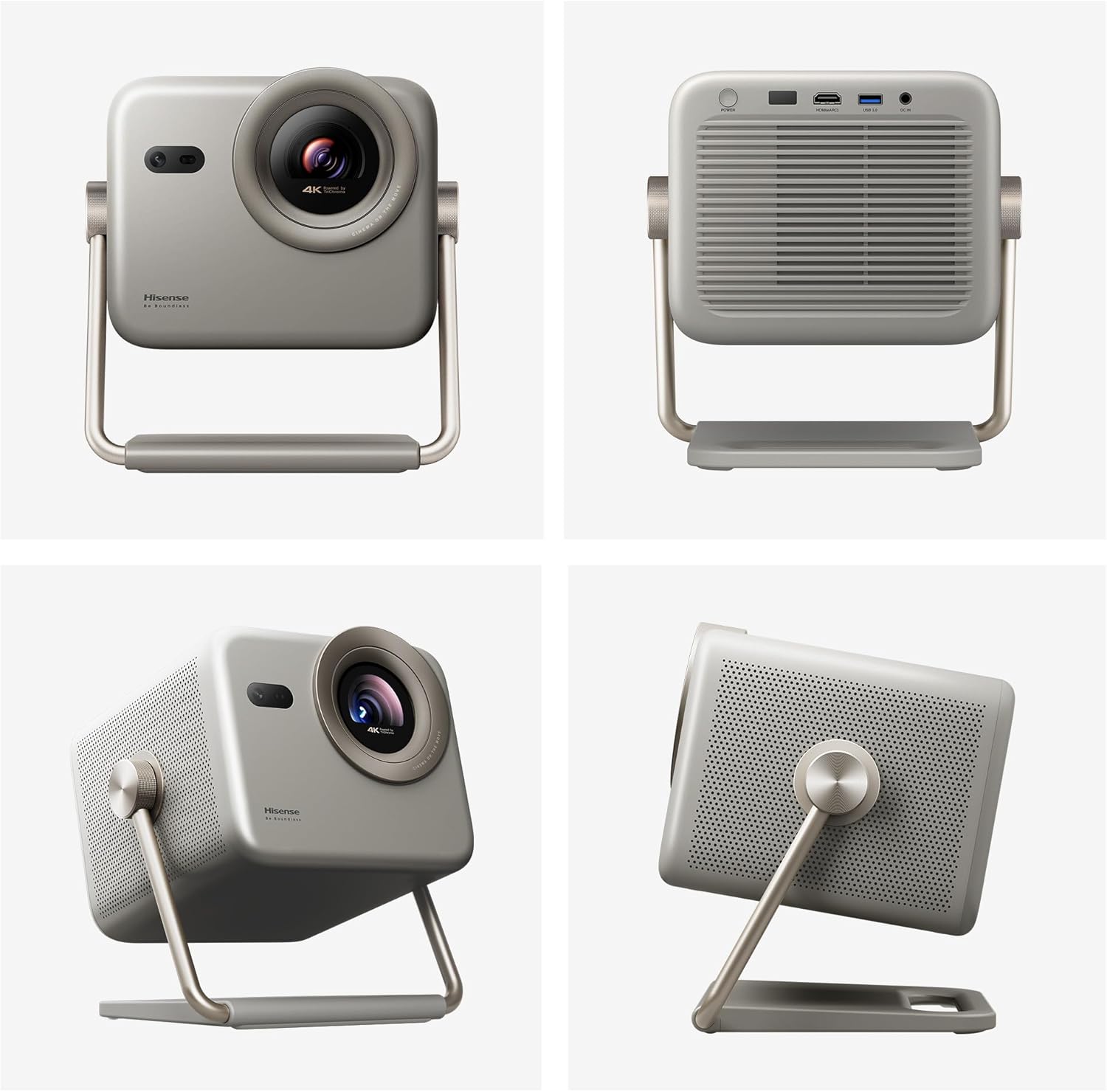
Figura 3: Posteriore view of the projector, displaying the power input, HDMI (eARC), USB 3.0, and DC IN ports.
5. Impostazione
5.1 Posizionamento
The Hisense M2 Pro offers flexible placement options due to its portable design and 360-degree projection capability. It can be placed on a table, mounted on the ceiling, or positioned on the floor.

Figure 4: Illustrates different ways to position the projector, including on a table, ceiling, or floor, adapting to various room layouts.
5.2 Collegamento di alimentazione
- Connect the power cable to the projector's DC IN port.
- Collegare l'altra estremità del cavo di alimentazione a una presa elettrica adatta.
- Premere il pulsante di accensione sul proiettore o sul telecomando per accendere il dispositivo.
5.3 Configurazione iniziale e regolazione dell'immagine
The projector features automatic image correction functions for ease of use:
- Correzione trapezoidale automatica: Automatically adjusts the image to be rectangular, even if the projector is not perfectly aligned with the screen.
- Messa a fuoco automatica: Ensures a sharp and clear image without manual adjustment.
- Evitare gli ostacoli: Detects and adjusts the projection area to avoid objects in the path.
- Protezione intelligente degli occhi: Reduces laser output when an object is detected close to the lens.
- Adattamento del colore della parete: Adjusts colors based on the wall surface for optimal viewing.

Figure 5: Visual representation of the projector's automatic adjustment features, including keystone correction, autofocus, and obstacle avoidance.
6. Istruzioni per l'uso
6.1 telecomando
Use the provided remote control to navigate the projector's interface and control playback. Key functions include power, input selection, volume, navigation, and quick access to streaming services.

Figure 6: The remote control for the Hisense M2 Pro, showing dedicated buttons for various functions and popular streaming applications.
6.2 Collegamento di dispositivi esterni
The projector supports various external devices for content playback:
- HDMI: Connect gaming consoles, Blu-ray players, or other HDMI-enabled devices. The HDMI (eARC) port supports enhanced audio return channel.
- Porta USB 3.0: Collegare dispositivi di archiviazione USB per la riproduzione di contenuti multimediali.
- Bluetooth 5: Pair with smartphones, tablets, or Bluetooth speakers for audio streaming.
- LAN: Per la connessione di rete cablata.

Figure 7: Illustrates how to connect various devices like laptops, gaming consoles, soundbars, and mobile devices to the projector.
6.3 Funzionalità Smart TV (sistema operativo VIDAA)
The projector runs on the VIDAA Smart TV operating system, providing access to popular streaming applications and smart features.

Figure 8: The projector's smart interface, displaying icons for popular streaming services and other entertainment applications.
6.4 Projection Modes and Features
- Trichroma Laser Technology: Experience vibrant and accurate colors with 110% BT.2020 super wide color space.
- Dolby Vision: Enjoy enhanced detail in shadows and brighter highlights for a more immersive viewesperienza di acquisizione.
- Optical Zoom (1.0 to 1.3): Adjust the image size without compromising 4K clarity.
- 240Hz Gaming: Provides smooth, blur-free gaming with high refresh rates.
- Supporto 3D: Supporta il 3D immersivo viewing. DLP-Link Active Shutter 3D glasses are required (sold separately).

Figure 9: Explains the advanced Trichroma laser technology, offering superior color accuracy and a wide color gamut.

Figure 10: Demonstrates the visual impact of Dolby Vision, providing enhanced detail and contrast in projected images.

Figure 11: Shows the effect of optical zoom, allowing adjustment of screen size from 65 to 200 inches while maintaining 4K resolution.

Figure 12: Depicts the projector's 240Hz gaming feature, ensuring ultra-clear and smooth action for an enhanced gaming experience.

Figure 13: Highlights the immersive audio capabilities with DTS and Dolby Audio, complementing the 3D visual experience.
7. Manutenzione
7.1 Pulizia del proiettore
- Prima di pulire il proiettore, assicurarsi che sia spento e scollegato.
- Per pulire le superfici esterne, utilizzare un panno morbido e privo di lanugine.
- Per la pulizia delle lenti, utilizzare un panno e una soluzione specifici per la pulizia delle lenti. Evitare di toccare la lente direttamente con le dita.
- Non utilizzare detergenti abrasivi, cere o solventi poiché potrebbero danneggiare la finitura.
7.2 Conservazione
When not in use for extended periods, store the projector in a cool, dry place, away from direct sunlight and extreme temperatures. It is recommended to use the original packaging for storage to protect it from dust and physical damage.
8. Risoluzione Dei Problemi
If you encounter issues with your Hisense M2 Pro projector, refer to the following common problems and solutions:
| Problema | Possibile causa | Soluzione |
|---|---|---|
| Nessuna immagine proiettata | Power cable disconnected, input source not selected, device not powered on. | Check power connections, ensure input source is correctly selected (HDMI, USB), power on connected devices. |
| L'immagine è sfocata | Autofocus issue, projector too close/far from screen. | Allow autofocus to complete. If manual adjustment is needed, refer to the on-screen menu. Ensure projector is within optimal projection distance (1.44m to 5.75m for 65-200 inches). |
| Nessun suono | Volume troppo basso, dispositivo audio esterno non collegato, uscita audio selezionata non corretta. | Increase volume, check Bluetooth connection to external speakers, verify audio output settings in the projector menu. |
| Il telecomando non funziona | Batteries depleted, obstruction between remote and projector. | Sostituire le batterie e assicurarsi che il ricevitore IR del proiettore sia ben visibile. |
9. Specifiche
| Caratteristica | Specificazione |
|---|---|
| Numero di modello | M2 Pro |
| Dimensioni (L x P x A) | Dimensioni: 19.3 x 21.8 x 23 cm |
| Peso | 4.1 kg |
| Tecnologia di visualizzazione | Laser (Trichroma) |
| Risoluzione nativa | Risoluzione 3840 x 2160 (4K UHD) |
| Luminosità | 1300 ANSI Lumen |
| Rapporto di contrasto | 1000:1 |
| Dimensione massima dell'immagine | 200 pollici |
| Min Image Size | 65 pollici |
| Distanza massima di proiezione | 5.75 metri |
| Min Projection Distance | 1.44 metri |
| Connettività | Bluetooth 5, HDMI, USB 3.0, Wi-Fi |
| Caratteristiche speciali | Integrated Speaker, Wi-Fi Compatible, Autofocus, Portable, Dolby Vision, 240Hz Gaming, 3D |
| Consumo energetico | 20 watt |
| Voltage | 220 Volt |
10. Garanzia e supporto
10.1 Informazioni sulla garanzia
The Hisense M2 Pro projector comes with a Garanzia del produttore di 3 anniLa presente garanzia copre i difetti di materiali e fabbricazione in condizioni di normale utilizzo. Si prega di conservare la prova d'acquisto per eventuali reclami in garanzia.
10.2 Assistenza clienti
For technical assistance, troubleshooting, or warranty inquiries, please contact Hisense customer support through their official website or the contact information provided in your product registration materials.
You can also visit the official Hisense support page for FAQs and additional resources: Supporto Hisense