
1. Finitaview
The Roku Select Series HD TV provides a streamlined entertainment experience. This 32-inch 720p HD television integrates the Roku operating system for easy access to streaming content, live TV, and various applications. It features a voice remote for convenient control and includes technologies like Bluetooth Headphone Mode and Dolby Audio for enhanced sound.
Caratteristiche principali
- Streaming senza interruzioni: Fast Wi-Fi and quick app launches for immediate entertainment access.
- Extensive Content: Access to thousands of streaming apps, free movies, shows, and live TV channels.
- Schermata iniziale personalizzabile: Organize apps and content for personalized viewing.
- Aggiornamenti software automatici: Ensures access to the latest features and applications.
- Integrazione della casa intelligente: Compatible with Roku Voice, Siri, Alexa, and Google Assistant for voice control. Supports Apple AirPlay for content sharing.
- Clear HD Picture: 720p HD resolution with Roku Smart Picture technology for optimized visuals.
- Telecomando vocale: Search, play, and control streaming with voice commands.
- Audio migliorato: Designed for clear speech and louder sound with Dolby Audio technology.
- Bluetooth Headphone Mode: Private listening with wireless headphones.
Image: Roku 32-inch Select Series HD Smart TV with included remote control.
2. Cosa c'è nella scatola
Verificare che tutti i componenti siano presenti prima di procedere con la configurazione.
- Roku Select Series 32" HD TV
- Stands and screws
- Roku Voice Remote with batteries (2 AAA)
- Cavo di alimentazione
- Manuale dell'utente (questo documento)

Image: Contents of the Roku Select Series TV packaging.
3. Impostazione
3.1 Disimballaggio
Estrarre con cautela il televisore e tutti gli accessori dall'imballaggio. Conservare l'imballaggio per eventuali trasporti o interventi di assistenza futuri.
3.2 Fissaggio del supporto
- Posizionare lo schermo del televisore su una superficie morbida e pulita per evitare graffi.
- Allineare i supporti della TV con i fori delle viti sulla parte inferiore della TV.
- Fissare i supporti utilizzando le viti fornite. Assicurarsi che siano ben serrate.
3.3 Collegamento delle periferiche
Collega i tuoi dispositivi alle porte appropriate sul retro del televisore.
- HDMI: Connect up to three HDMI devices (e.g., cable box, gaming console, Blu-ray player) to the HDMI ports.
- USB: Use the USB port for media playback or connecting compatible accessories.
- Ottico (S/PDIF): Per il collegamento a un sistema audio esterno.
- Cavo di alimentazione: Collegare il cavo di alimentazione al televisore e poi a una presa a muro.
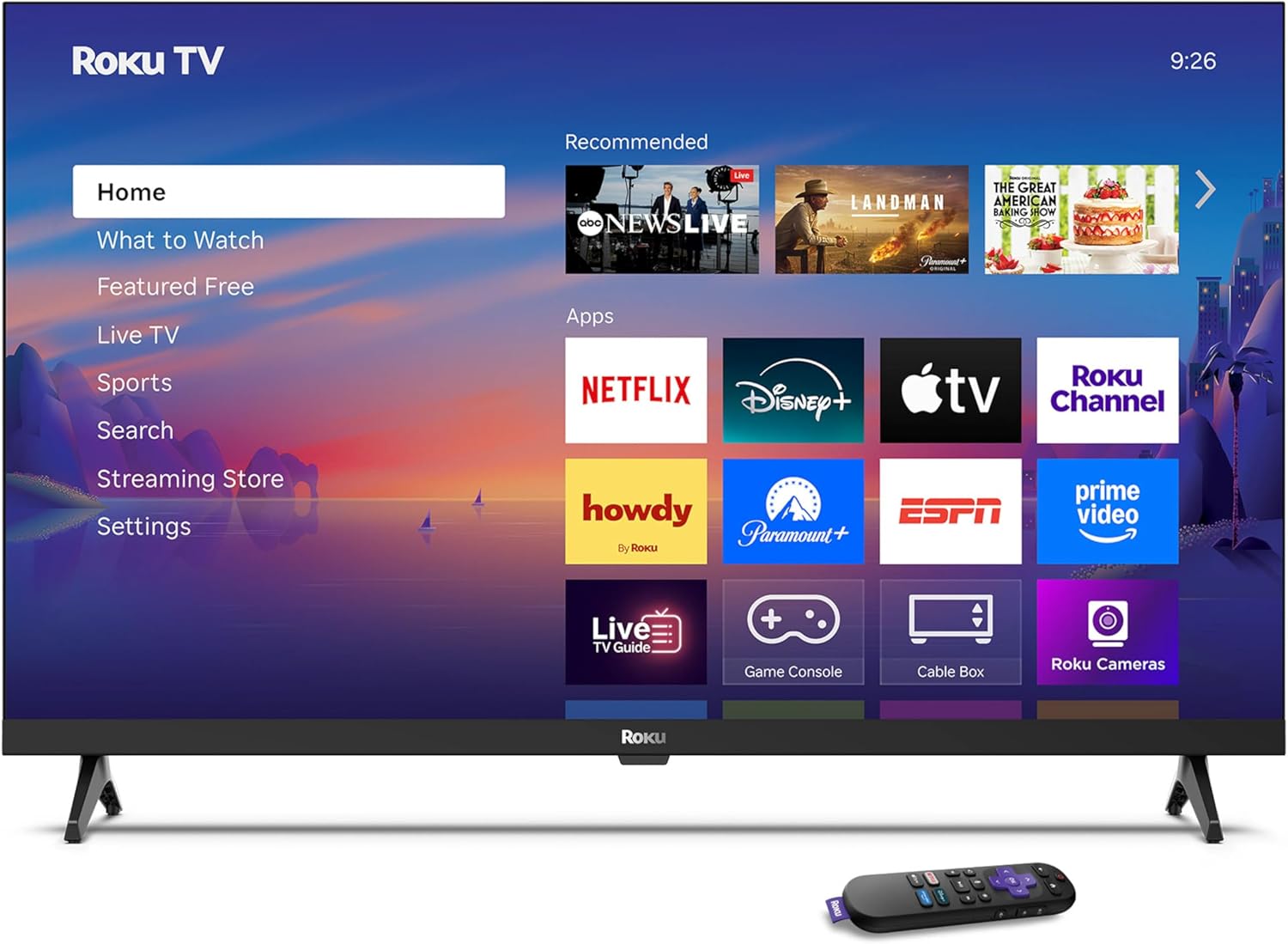
Image: Rear panel connections including HDMI, USB, and optical ports.
3.4 Accensione iniziale e connessione di rete
- Plug in the TV and press the power button on the remote or TV.
- Segui le istruzioni sullo schermo per selezionare la lingua e connetterti alla rete Wi-Fi.
- Activate your Roku account or create a new one.
Video: Un oltreview of the Roku TV operating system, demonstrating its user interface and features. This video is provided by Roku, Inc.
4. Istruzioni per l'uso
4.1 Utilizzo del telecomando vocale
The Roku Voice Remote allows for intuitive control of your TV and streaming content.
- Ricerca vocale: Press and hold the voice button and speak your command to search for content, launch apps, or control playback.
- Navigazione: Utilizzare il tastierino direzionale per spostarsi nei menu e selezionare le voci.
- Scorciatoie dell'app: Pulsanti dedicati consentono un rapido accesso ai servizi di streaming più diffusi.

Image: Features of the Roku Voice Remote, highlighting voice control and shortcut buttons.
4.2 Navigazione nella schermata iniziale
The Roku Home Screen provides access to all your installed apps, inputs, and settings.
- Casa: Ti riporta alla schermata principale.
- Cosa guardare: Discover recommended content.
- TV in diretta: Access free live television channels.
- Negozio di streaming: Browse and add new streaming channels.
- Impostazioni: Adjust TV and system preferences.

Image: The Roku TV home screen interface.
4.3 Regolazione delle impostazioni di immagine e audio
Personalizza il tuo viewesperienza di ascolto e di ascolto tramite il menu delle impostazioni.
- Modalità Immagine: Select from predefined modes like Standard, Vivid, Sports, or Movie. Roku Smart Picture automatically optimizes settings.
- Modalità audio: Scegli il professionista del suonofiles or enable features like Night Mode for reduced volume fluctuations.
- Bluetooth Headphone Mode: Pair your wireless headphones for private audio.

Image: Picture mode settings on the Roku TV.

Image: Bluetooth Headphone Mode in use.

Image: Dolby Audio technology for clear sound.
5. Manutenzione
5.1 Pulizia dello schermo
Per pulire lo schermo del televisore, strofinarlo delicatamente con un panno morbido, asciutto e privo di lanugine. Per macchie ostinate, strofinare leggermenteampPulisci il panno con acqua o una soluzione detergente adatta allo schermo. Evita di utilizzare prodotti chimici aggressivi o materiali abrasivi.
5.2 Aggiornamenti software
Your Roku TV automatically receives software updates when connected to the internet. These updates provide new features, performance improvements, and bug fixes. Ensure your TV remains connected to the internet for optimal performance.
6. Risoluzione Dei Problemi
If you encounter issues with your Roku TV, refer to the following common solutions:
- Nessun potere: Assicurati che il cavo di alimentazione sia collegato saldamente sia al televisore che a una presa elettrica funzionante. Prova una presa diversa.
- Nessuna immagine/suono: Verify that the correct input source is selected. Check all cable connections (HDMI, audio). Restart the TV by unplugging it for 30 seconds and plugging it back in.
- Il telecomando non funziona: Replace the AAA batteries in the remote. Ensure there are no obstructions between the remote and the TV. For voice remote issues, re-pair the remote if necessary (refer to Roku support for specific steps).
- Problemi di connessione di rete: Restart your Wi-Fi router and modem. Go to the TV's settings menu, then Network, and try reconnecting to your Wi-Fi network.
- App Not Loading/Crashing: Try restarting the app. If the issue persists, remove the app from the home screen, restart the TV, and then re-add the app from the Streaming Store.
7. Specifiche
| Caratteristica | Dettaglio |
|---|---|
| Dimensioni dello schermo | 32 pollici |
| Tecnologia di visualizzazione | GUIDATO |
| Risoluzione | Formato: 720p |
| Frequenza di aggiornamento | Frequenza 60 Hz |
| Caratteristiche speciali | Bluetooth Headphone Mode, Dolby Audio, Voice Remote |
| Tecnologia di connettività | Wifi bluetooth |
| Porte HDMI totali | 3 |
| Porte USB totali | 1 |
| Ingresso audio | Cavo HDMI |
| Sistema operativo | Sistema operativo Roku |
| Tipo di montaggio | Montaggio da tavolo, montaggio a parete |
| Standard di montaggio VESA | 200 x 200 millimetri |
| Dimensioni del prodotto (P x L x A) | 7"P x 28.3"L x 18.3"A |
| Peso dell'articolo | 7.5 libbre |
| Numero di modello | 32R2D5 |
| Codice UPC | 829610008974 |
8. Informazioni sulla garanzia
8.1 Garanzia limitata
Roku warrants the hardware against defects in materials and workmanship under normal use for a period of one (1) year from the date of purchase ("Warranty Period"). If Roku determines that the device’s hardware is defective during the Warranty Period, Roku’s sole obligation, and your exclusive remedy, will be to either repair or replace the unit with either a new or rebuilt device, at its option. This warranty applies if the product is used in accordance with the provided documentation.
8.2 Politica di reso
You may return a device for any reason:
- Within thirty (30) days from the date of purchase from Roku.
- Within the applicable return period if purchased from an authorized reseller or distributor.
Additional details regarding product returns can be found on the Roku support site.
9. Supporto
For further assistance, troubleshooting guides, and frequently asked questions, please visit the official Roku support websito: