
Introduzione
This manual provides essential instructions for the safe and efficient use of your G-TiDE Smartwatch S6 PRO. Please read this manual thoroughly before using the device to ensure proper operation and to understand its features and functions. Keep this manual for future reference.
Prodotto finitoview
The G-TiDE Smartwatch S6 PRO is designed to integrate seamlessly into your daily life, offering advanced features for communication, health monitoring, and personal assistance. It features a vibrant AMOLED display and a durable design.
Contenuto della confezione
- G-TiDE Smartwatch S6 PRO
- Cavo di ricarica magnetico
- Interchangeable Silicone Strap (22mm)
- Additional Interchangeable Straps (Total of three straps included)
- Manuale dell'utente (questo documento)
Componenti del dispositivo
Familiarize yourself with the main components of your smartwatch:

Immagine: Frontale view of the G-TiDE Smartwatch S6 PRO, displaying the AMOLED screen with a digital watch face showing time, date, weather, heart rate, and other metrics. The watch has a silver-colored casing and a green strap.
- Schermo touchscreen AMOLED: 1.95-inch, 466 x 466 pixel resolution for clear visuals and interactive control.
- Pulsanti funzionali: Two physical buttons on the side for navigation and quick access to features.
- Sensore di frequenza cardiaca: Posizionato sul retro per il monitoraggio continuo della frequenza cardiaca.
- Contatti di ricarica: Contatti magnetici sul retro per la ricarica.
- Altoparlante e microfono: For calls and voice functions.
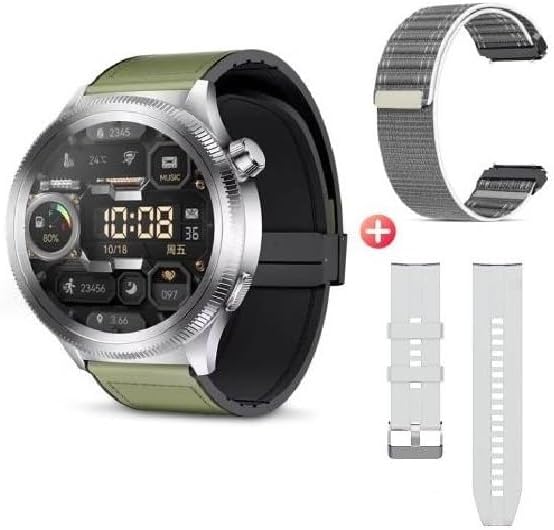
Image: The G-TiDE Smartwatch S6 PRO shown alongside two additional interchangeable straps. The watch itself has a green strap, and a grey fabric strap and a white silicone strap are displayed separately, highlighting the customization options.
Impostare
1. Ricarica dello smartwatch
Prima del primo utilizzo, carica completamente lo smartwatch. Collega il cavo di ricarica magnetico ai contatti di ricarica sul retro dell'orologio e collega l'estremità USB a un adattatore di alimentazione (non incluso) o alla porta USB di un computer.
- Una carica completa richiede in genere circa 2 ore.
- Il display dell'orologio indicherà lo stato di carica.
- Importante: Do not charge the watch if it is wet. Ensure the charging contacts are dry before connecting the charger.
2. App Installation (Wearfit Pro)
To unlock the full functionality of your G-TiDE Smartwatch S6 PRO, you need to install the Wearfit Pro application on your smartphone.
- Scan the QR code provided in the watch's packaging or search for "Wearfit Pro" in your smartphone's app store (Google Play Store for Android, Apple App Store for iOS).
- Scarica e installa l'applicazione.
- Ensure your smartphone meets the compatibility requirements: iOS 9.0 or higher, or Android 4.4 or higher.
3. Associazione con lo smartphone
After installing the Wearfit Pro app, follow these steps to pair your smartwatch:
- Abilita il Bluetooth sul tuo smartphone.
- Open the Wearfit Pro app and create an account or log in.
- Segui le istruzioni nell'app per aggiungere un nuovo dispositivo. L'app cercherà gli smartwatch disponibili.
- Select "S6 PRO" or the corresponding device name from the list.
- Conferma la richiesta di associazione sia sullo smartphone che sullo smartwatch.
- Una volta effettuata l'associazione, l'app sincronizzerà i dati con l'orologio.
Istruzioni per l'uso
Navigazione di base
- Schermo tattile: Scorri verso sinistra, destra, in alto o in basso per navigare tra i menu e le funzionalità. Tocca per selezionare un elemento.
- Pulsanti funzionali: Use the physical buttons for specific actions, such as returning to the home screen or accessing the app menu.
- Schermata di riattivazione: Lift your hand to automatically turn on the screen (motion sensor feature).
- Stili del menu: The watch supports 6 fluid menu styles; customize this in settings.
Chiamate e notifiche
- Effettuare/risposta alle chiamate: Once paired, you can make and answer calls directly from your smartwatch. Ensure Bluetooth calling is enabled in the Wearfit Pro app.
- Sincronizzazione dei contatti: Synchronize contacts from your smartphone to the watch via the Wearfit Pro app.
- Notifiche sui social media: Receive notifications from apps like Facebook, WhatsApp, and Instagram directly on your watch. Enable specific app notifications in the Wearfit Pro app settings.
Monitoraggio della salute
The G-TiDE Smartwatch S6 PRO offers comprehensive health tracking features:
- Heart Rate (HR) Monitoring: Continuous 24/7 tracking of your heart rate. View real-time data on the watch or detailed history in the Wearfit Pro app.
- Monitoraggio dell'ossigeno nel sangue (SpO2): Misura i livelli di ossigeno nel sangue.
- Esercizi di respirazione: Guided breathing exercises to help manage stress and improve relaxation.
- Monitoraggio del sonno: Monitora i tuoi schemi di sonno, inclusi sonno profondo, sonno leggero e orari di veglia.
Modalità sport
Select from various sport modes to track your workouts accurately:
- Available modes include Walking, Running, Cycling, Mountaineering, Basketball, Football, and more.
- During a workout, the watch tracks metrics such as distance, steps, heart rate, and calories burned.
AI Features (Wearfit Pro App Dependent)
- Traduttore in tempo reale: Translate words and sentences directly from your watch.
- AI Chat (Wearfit GPT): Interact with an advanced AI assistant.
- AI Watch Face Generation: Describe your desired watch face, and the AI can generate it.
Altre caratteristiche
- Archiviazione e controllo della musica: Store your favorite songs on the watch and control music playback from your smartphone.
- E-book Storage: Carry electronic books on your smartwatch for convenient access.
- Registratore vocale: Record audio directly from your watch.
- Telecamera remota: Controlla la fotocamera del tuo smartphone da remoto.
- Timer & Chronograph: Funzioni di temporizzazione integrate.
- Calcolatrice: Eseguire calcoli di base.
- Allarme: Imposta le sveglie direttamente sull'orologio.
- Trova telefono: Locate your smartphone by triggering an alarm from your watch.
- Giochi: Includes two pre-installed games.
Manutenzione
Pulizia
- Pulisci lo schermo e il corpo dell'orologio con un panno morbido e privo di lanugine.
- Per macchie ostinate, leggermente dampLavare il panno con acqua. Evitare prodotti chimici aggressivi o materiali abrasivi.
- Clean the charging contacts regularly to ensure proper connection.
Resistenza all'acqua (IP67)
The G-TiDE Smartwatch S6 PRO has an IP67 water resistance rating. This means it is protected against dust ingress and can withstand immersion in water up to 1 meter for 30 minutes.
- It is suitable for daily use and can withstand splashes, rain, and brief immersion.
- Importante: It is not recommended for swimming, showering with hot water, or prolonged immersion. Do not expose to salt water or chlorinated water.
- Ensure the watch is completely dry before charging.
Cura della batteria
- Evitare di scaricare completamente la batteria frequentemente.
- Charge the watch using the provided magnetic cable.
- Conservare l'orologio in un luogo fresco e asciutto quando non lo si utilizza per lunghi periodi.
Risoluzione dei problemi
L'orologio non si accende
- Assicurati che l'orologio sia completamente carico. Collegalo al caricabatterie per almeno 30 minuti.
- Tenere premuto il pulsante di accensione per diversi secondi.
Impossibile associare allo smartphone
- Assicurati che il Bluetooth sia abilitato sul tuo smartphone.
- Make sure the Wearfit Pro app is open and searching for devices.
- Bring the watch and smartphone closer together.
- Riavvia sia l'orologio che lo smartphone.
- Controlla se l'orologio è già associato a un altro dispositivo. Disconnettilo se necessario.
Notifiche non visualizzate
- Verifica che l'orologio sia correttamente associato allo smartphone.
- Check notification settings within the Wearfit Pro app and your smartphone's system settings to ensure permissions are granted.
- Ensure the Wearfit Pro app is running in the background.
Dati sanitari imprecisi
- Assicurati che l'orologio sia indossato comodamente al polso, né troppo stretto né troppo largo.
- Pulisci il sensore sul retro dell'orologio.
- I fattori ambientali e la fisiologia individuale possono influenzare la precisione del sensore.
Specifiche
| Modello | S6 PRO |
| Display | Touchscreen AMOLED da 1.95 pollici |
| Risoluzione | 466 x 466 pixel |
| Capacità di archiviazione | 128 MB |
| Capacità della batteria | 300 mAh |
| Durata media della batteria | Fino a 4.5 giorni (utilizzo tipico) |
| Connettività | Bluetooth |
| Resistenza all'acqua | Grado di protezione IP67 |
| Compatibilità | Android 4.4+ / iOS 9.0+ |
Garanzia e supporto
For warranty information and customer support, please refer to the warranty card included with your product or visit the official G-TiDE website. You can also contact G-TiDE customer service through the Wearfit Pro app or the contact details provided on the brand's official channels.
Supporto online: Visit the G-TiDE Store on Amazon