
1. Introduzione
Thank you for choosing the ULTIMEA Skywave F40 Boom 5.1.2 Dolby Atmos Soundbar System. This manual provides essential information for setting up, operating, and maintaining your new sound system. Please read it thoroughly before use to ensure optimal performance and safety.
2. Contenuto della confezione
Si prega di selezionare la casella per i seguenti elementi:
- 1x Soundbar
- 1x subwoofer
- 2 altoparlanti surround
- 1x Power cable for soundbar + surround speakers
- 1x cavo HDMI
- 1x Optical cable
- 1x RCA to RCA stereo cable (6m)
- 1 adattatori HDMI
- 1x Telecomando
- 1x Manuale utente
- 1x Wall mounting kit
- 1x staffa da parete
- Viti esagonali
3. Prodotto finitoview
The ULTIMEA Skywave F40 Boom is a 5.1.2 channel Dolby Atmos soundbar system designed to deliver an immersive audio experience for your home cinema. It features a main soundbar unit, a wireless subwoofer, and two wireless surround speakers.
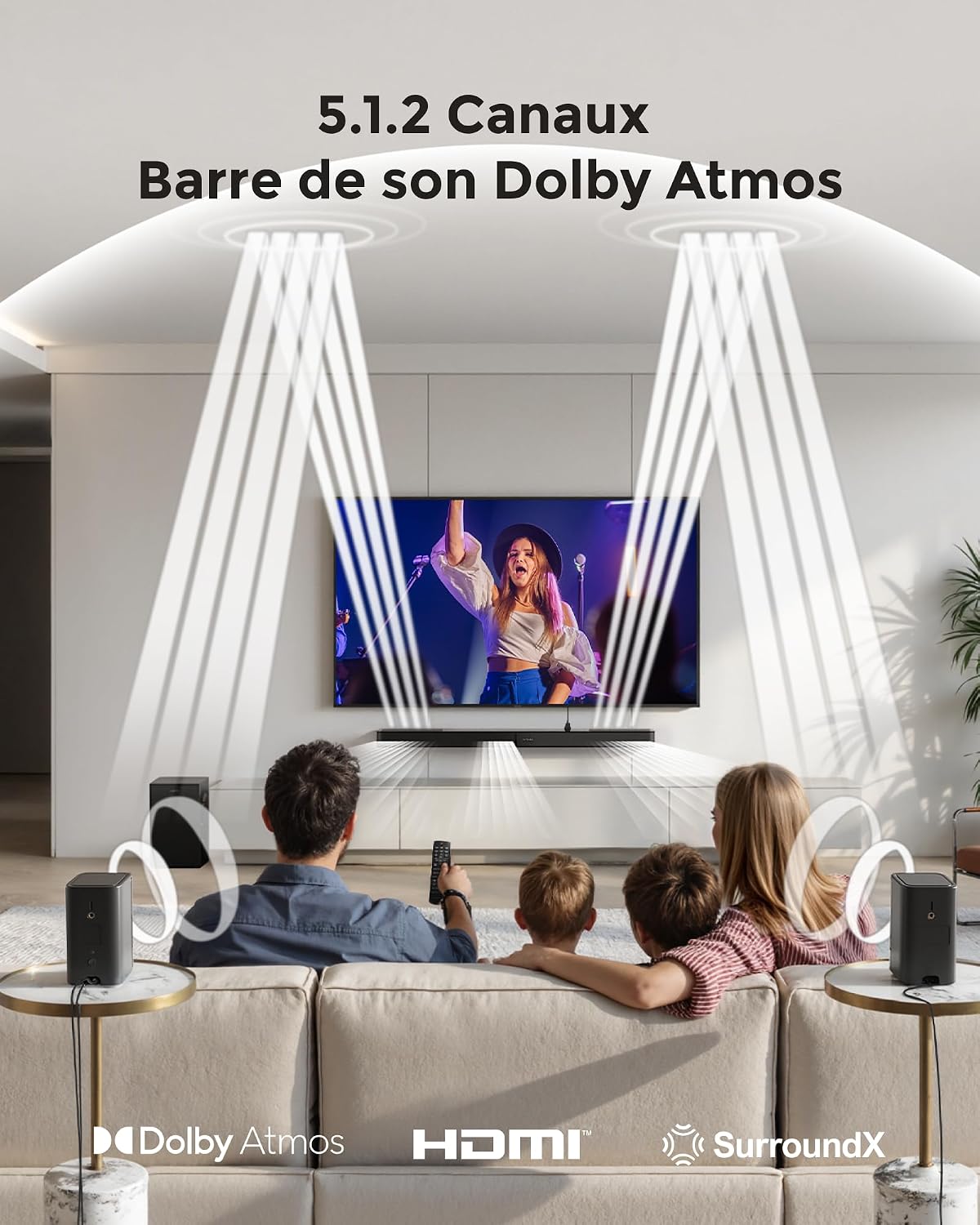
This image depicts the immersive 5.1.2 channel Dolby Atmos sound experience provided by the ULTIMEA Skywave F40 Boom, with sound directed from the soundbar and two rear speakers to create a 360-degree audio field for viewERS.

This diagram illustrates the 8 high-performance speakers within the ULTIMEA Skywave F40 Boom system, detailing the soundbar's left, center, right, and up-firing channels, along with the separate subwoofer and two rear surround speakers.

The soundbar features a unique two-unit design, allowing for flexible placement and configuration.
4. Configurazione e installazione
4.1 Posizionamento
Position the soundbar centrally below your TV. Place the subwoofer in a suitable location, ideally near the soundbar. The two surround speakers should be placed behind your listening position for optimal surround sound effects.

This image provides technical diagrams for different installation options, including wall mounting and tabletop placement, ensuring flexibility for your home setup.

This diagram details the available connection ports on the soundbar: HDMI to TV (eARC) for high-quality audio, Optical for digital audio, USB for MP3 files (up to 128GB), SUB OUT for the subwoofer, and DC IN for power.
4.2 Collegamento del sistema
- Collegamento elettrico: Connect the power cable to the soundbar and a power outlet. Connect the power cable for the surround speakers to their respective power outlets.
- Subwoofer and Surround Speakers: The subwoofer and surround speakers will automatically pair wirelessly with the soundbar when powered on. Ensure they are within range and have a clear line of sight to the soundbar for stable connection.
- Audio Connection to TV (Recommended HDMI eARC):
- eARC HDMI: Connect one end of the provided HDMI cable to the soundbar's HDMI to TV (eARC) port and the other end to your TV's HDMI eARC port. This connection supports lossless audio formats like Dolby Atmos.
- Ottico: If your TV does not have an HDMI eARC port, connect the optical cable from the soundbar's OTTICO port to your TV's optical audio output.

This illustration guides you through connecting the soundbar to your TV using the HDMI eARC port for optimal audio transmission.

This diagram demonstrates connecting the soundbar to your TV using an optical cable for digital audio.
- Riproduzione USB: Insert a USB drive (up to 128GB, MP3 files supported) into the soundbar's USB port for direct audio playback.

This image shows the wireless connectivity of the soundbar system, where the subwoofer and rear speakers automatically pair with the main soundbar unit.
5. Istruzioni per l'uso
5.1 Operazioni di base
- Accensione/spegnimento: Premere il pulsante di accensione sulla soundbar o sul telecomando.
- Selezione input: Use the 'Source' button on the remote or the soundbar to cycle through available inputs: HDMI eARC, Optical, Bluetooth, and USB.
- Controllo del volume: Adjust the volume using the '+' and '-' buttons on the remote or soundbar.

The included remote control provides convenient access to all essential functions, including power, input selection, volume, and sound mode adjustments.
5.2 Associazione Bluetooth
- Select the Bluetooth input on the soundbar. The soundbar will enter pairing mode.
- On your mobile device, search for "ULTIMEA Skywave F40 Boom" in the Bluetooth settings and connect.

This image demonstrates connecting a mobile device to the soundbar via Bluetooth for wireless audio streaming.
5.3 Controllo dell'app
Enhance your control and customization options by downloading the official Ultimea app.
- Download the "Ultimea" app from your device's app store.
- Open the app and follow the on-screen instructions to connect to your Skywave F40 Boom soundbar.

The Ultimea app allows for comprehensive control over your soundbar, including adjusting sound levels (Bass, Midrange, Treble), surround effects, up-firing speaker levels, and accessing firmware updates.

The app offers multiple sound modes and a 10-band graphic equalizer to customize your audio experience.
5.4 Regolazioni audio
- Modalità audio: Select from preset sound modes (Movie, Music, Voice, Sport, Game, Night) via the remote or app to optimize audio for different content.
- Regolazione dei bassi: Adjust the subwoofer's bass level from -6 to +6 using the remote control or the Ultimea app.
- Tecnologia VoiceMX: This feature enhances dialogue clarity, ensuring voices are crisp and easy to understand.

The BassMX subwoofer provides powerful and deep bass, which can be adjusted from -6 to +6 using the remote control or app to suit your preference.

VoiceMX technology enhances dialogue clarity, ensuring voices are crisp and easy to understand, even during action-packed scenes.
6. Manutenzione
Per garantire la longevità e le prestazioni ottimali del tuo sistema soundbar, segui queste linee guida per la manutenzione:
- Pulizia: Use a soft, dry, lint-free cloth to clean the surfaces of the soundbar, subwoofer, and surround speakers. Do not use liquid cleaners, abrasive cleaning agents, or solvents, as these can damage the finish.
- Ventilazione: Ensure that all components have adequate ventilation. Do not block any ventilation openings.
- Ambiente: Evitare di posizionare il sistema alla luce diretta del sole, vicino a fonti di calore o in aree con elevata umidità o polvere.
- cavi: Periodically check all cables for any signs of damage. Replace damaged cables immediately.
7. Risoluzione Dei Problemi
If you encounter any issues with your ULTIMEA Skywave F40 Boom system, refer to the following troubleshooting steps:
- Nessun potere:
- Ensure all power cables are securely connected to the soundbar, subwoofer, surround speakers, and a working power outlet.
- Verificare che la presa di corrente funzioni collegandovi un altro dispositivo.
- Nessun suono:
- Verify that the correct input source (HDMI eARC, Optical, Bluetooth, USB) is selected on the soundbar.
- Ensure all audio cables (HDMI, Optical) are securely connected between the soundbar and your TV/source device.
- Check that the soundbar and TV volumes are not muted or set too low.
- Confirm that the subwoofer and surround speakers are powered on and successfully paired with the soundbar.
- Suono distorto:
- Riduci il livello del volume.
- Controlla la qualità della tua sorgente audio.
- Adjust the equalizer settings in the Ultimea app or via the remote control.
- Problemi di connessione Bluetooth:
- Assicurarsi che la soundbar sia in modalità di associazione Bluetooth.
- Avvicina il tuo dispositivo Bluetooth alla soundbar.
- Clear previous Bluetooth connections on your device and attempt to pair again.
- Il telecomando non funziona:
- Sostituire le batterie del telecomando.
- Assicurarsi che non vi siano ostacoli tra il telecomando e il sensore della soundbar.
8. Specifiche
| Marca | ULTIMA |
| Nome del modello | Braccio Skywave F40 |
| Numero di modello | Minore 4123 |
| Speaker Output Power (Max) | 460 Watt |
| Risposta in frequenza | Frequenza 38 Hz |
| Tecnologia di connettività | Bluetooth (BT 5.4), HDMI eARC, Optical, USB |
| Modalità di uscita audio | Surround (5.1.2 Channels) |
| Tipo di montaggio | Montaggio a parete |
| Caratteristiche speciali | 2 Adjustable Surround Speakers, Ultimea SurroundX Technology, Dolby Atmos, Adjustable Bass & BassMX Technology, Ultimea Smart App Control, VoiceMX Technology |
| Usi consigliati | Gaming console, Computer, Smartphone/Tablet, Ambient sound system, Television |
| Colore | Nero |
| Metodo di controllo | App, Controllo remoto |
| Dimensioni del subwoofer | 6.5 pollici (16.51 cm) |
| Fonte di alimentazione | Cavo elettrico |
| Dimensioni della soundbar (L x P x A) | 80 x 9 x 4.6 cm (800 x 90 x 46 mm) |
| Peso totale del sistema | 8.5 chilogrammi |
This diagram provides detailed dimensions for the soundbar (800mm length, 90mm width, 46mm height), subwoofer (234mm width, 315mm height, 192mm depth), and surround speakers (69mm width, 120mm height, 69mm depth).
9. Garanzia e supporto
9.1 Informazioni sulla garanzia
The ULTIMEA Skywave F40 Boom soundbar system comes with a Garanzia limitata di 2 anno dalla data di acquisto. La presente garanzia copre difetti di fabbricazione e malfunzionamenti in condizioni di normale utilizzo. Si prega di conservare la prova d'acquisto per eventuali reclami in garanzia.
9.2 Supporto al prodotto
For any questions, technical assistance, or support regarding your product, ULTIMEA offers various free support options:
- Live assistance via phone or chat.
- Dati di contatto del produttore.
- Repair services.
- Step-by-step troubleshooting guides.
- Free replacement of missing or broken parts.
The availability of these support options may vary by product and country. Please visit the official ULTIMEA website or contact your retailer for specific support details in your region.
9.3 Politica di reso
A Politica di reso di 30 giorni is typically offered for this product. Please refer to your purchase agreement or retailer's return policy for detailed terms and conditions.