
1. Introduzione
This manual provides detailed instructions for the installation, operation, and maintenance of the TOMZN TOVPD3-63VA Din Rail 3 Phase Adjustable Over and Under Voltage Protector Relay with Current Protection. This device is designed to safeguard electrical equipment from voltage fluctuations and overcurrent conditions in three-phase systems.
Please read this manual thoroughly before installation and operation to ensure proper use and to prevent damage to the device or connected equipment.

Figura 1: Fronte view of the TOMZN TOVPD3-63VA Din Rail 3 Phase Voltage Protector Relay.
2. Informazioni sulla sicurezza
ATTENZIONE: Pericolo di scossa elettrica. L'installazione e la manutenzione devono essere eseguite solo da personale qualificato.
- Scollegare sempre l'alimentazione prima di installare o effettuare la manutenzione del dispositivo.
- Assicurarsi che tutti i collegamenti elettrici siano sicuri e conformi alle normative elettriche locali.
- Non utilizzare il dispositivo in ambienti bagnati o damp condizioni.
- Verificare il volumetage and current ratings of your system match the device specifications.
- Never attempt to open or repair the device yourself. Refer to qualified service personnel.
3. Caratteristiche principali
The TOMZN TOVPD3-63VA offers robust protection and monitoring capabilities:
- Instant Fault Response: Detects and reacts to electrical abnormalities within milliseconds to prevent equipment damage.
- Sistema multiprotezione: Comprehensive coverage against overcurrent, under-voltage, phase loss, and short circuits.
- Durata di livello industriale: Heavy-duty construction with flame-retardant materials for demanding environments.
- Compatibilità universale: Works with AC/DC systems, motors, transformers, and power distribution panels.
- Clear Visual Indicators: LED status lights and fault alarms for quick system diagnostics.
- Sovra-volume regolabiletage, sotto-volumetage, and over-current protection thresholds.
- Asymmetry and phase sequence protection.
- Adjustable active time and reconnect time.
- Volume manualetage and current calibration capability.
4. Varianti del prodotto
The TOVPD3 series is available in several configurations to suit different electrical systems. The primary differences lie in the current rating and the presence of a neutral (N) connection, which affects the voltage display and wiring:
- 63A With N (3X120V/3X220V/3X230V): Designed for 3-phase systems with a neutral line. Each phase voltage (L1, L2, L3) is displayed relative to the neutral. For example, in a 3*220V+N system, each phase will display 220V.
- 63A without N (380V): Designed for 3-phase systems without a neutral line. The device displays the line-to-line voltage for each phase (e.g., L1-L2, L2-L3, L3-L1), typically showing 380V across all phases.
- 100A With N (3X220V): Similar to the 63A With N variant but with a higher current capacity.
- 100A without N (380V): Similar to the 63A without N variant but with a higher current capacity.
Ensure you select the correct variant for your specific electrical installation.
5. Componenti e display
The device features a clear digital display and intuitive control buttons for monitoring and configuration.
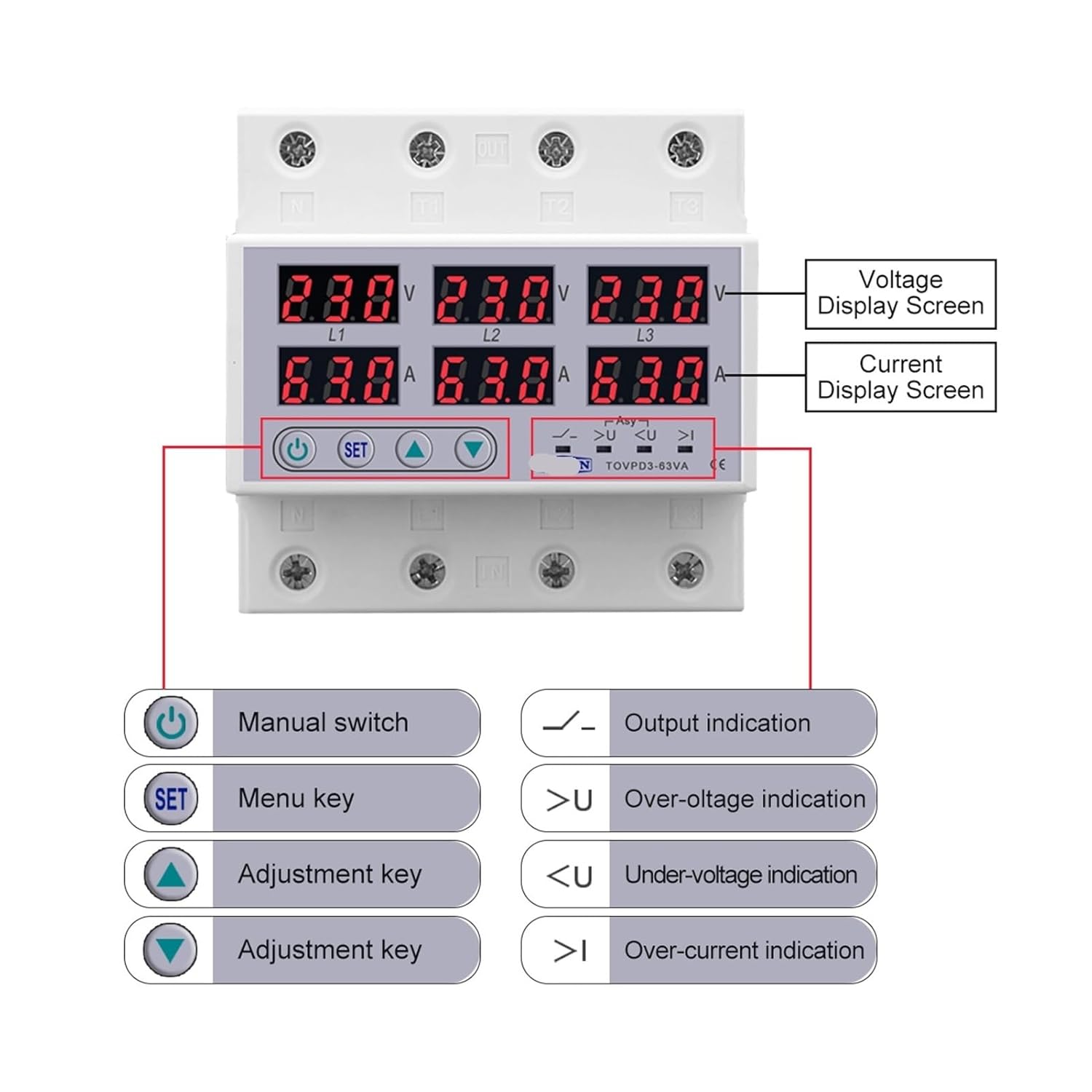
Figure 2: Labeled components and display of the TOMZN TOVPD3-63VA.
5.1 Schermate di visualizzazione
- Voltage Display Screen (V): Mostra il volumetage per ogni fase (L1, L2, L3).
- Current Display Screen (A): Shows the current for each phase (L1, L2, L3).
5.2 Pulsanti di controllo e indicatori
- Interruttore manuale (pulsante di accensione): Used to manually turn the output on or off.
- SET (Menu Key): Enters the setting menu and confirms selections.
- Tasti di regolazione (frecce su/giù): Used to navigate menu options and adjust parameter values.
- Indicazione di uscita: LED indicator for output status.
- Over-volumetage Indicazione (>U): LED indicator illuminates when an over-voltagLa condizione viene rilevata.
- sotto-volumetage Indicazione ( LED indicator illuminates when an under-voltagLa condizione viene rilevata.
- Over-current Indication (>I): LED indicator illuminates when an over-current condition is detected.
- Asymmetry Indication (Asy): LED indicator illuminates when phase asymmetry is detected.
6. Installazione
6.1 Montaggio
The TOMZN TOVPD3-63VA is designed for Din Rail mounting. Ensure the Din Rail is securely installed in an appropriate electrical enclosure, away from moisture and excessive heat.
6.2 Cablaggio
IMPORTANT: Disconnect all power before proceeding with wiring.
- Identify the input (IN) and output (OUT) terminals on the device. The terminals are typically labeled L1, L2, L3, and N (if applicable).
- Connect the incoming three-phase power supply to the 'IN' terminals (L1, L2, L3). If your model includes a neutral connection, connect the neutral line to the 'N' terminal.
- Connect the load (equipment to be protected) to the 'OUT' terminals (L1, L2, L3). If your model includes a neutral connection, connect the load's neutral line to the 'N' output terminal.
- Ensure all connections are tight and secure to prevent loose contacts, which can cause overheating or malfunction.
- Double-check all wiring against your system's electrical diagram and local codes before restoring power.
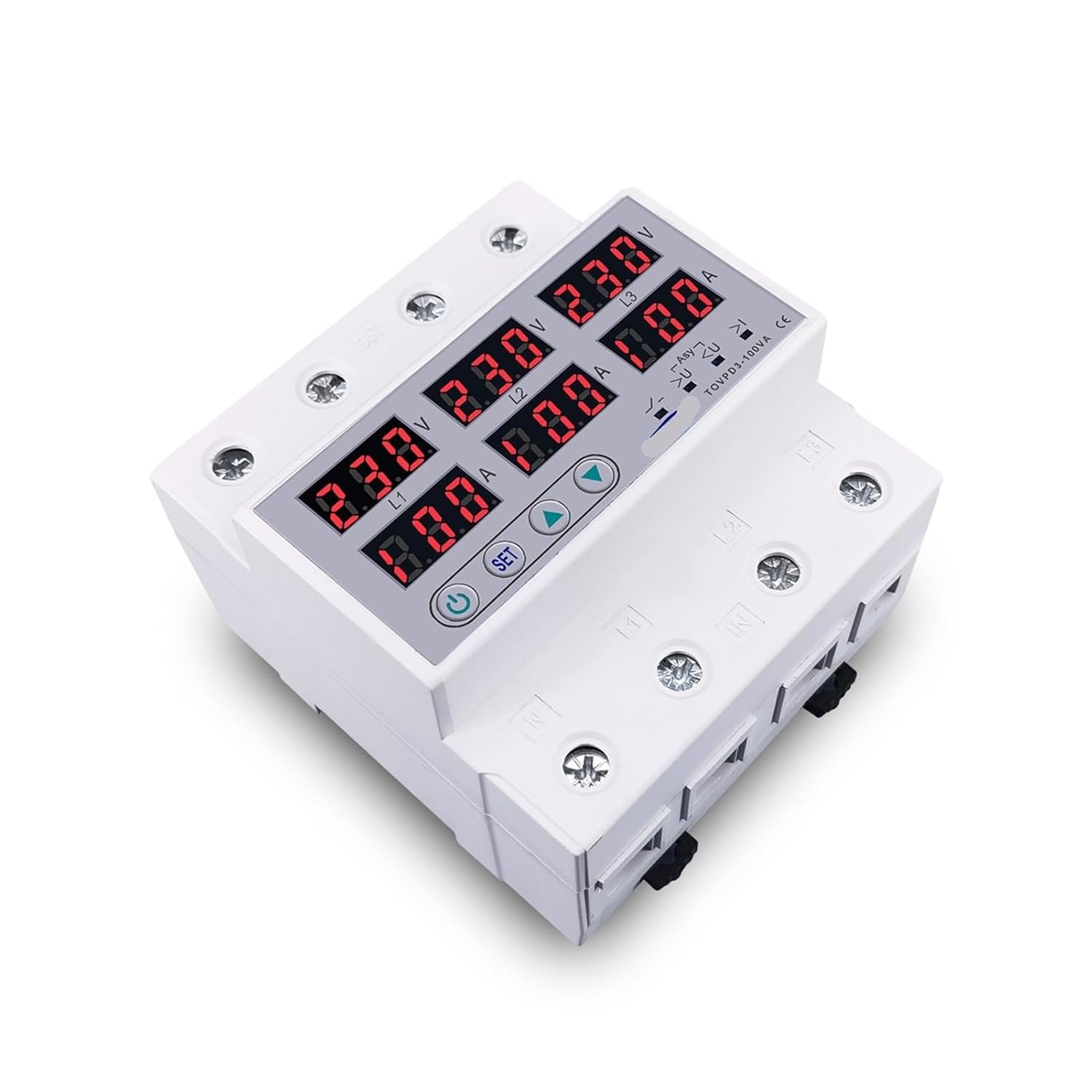
Figura 3: Dall'alto verso il basso view illustrating the input and output terminals for wiring.
7. Funzionamento
7.1 Accensione iniziale
- After completing the wiring, restore power to the circuit.
- The device display will illuminate, showing the current voltage letture attuali per ciascuna fase.
- The device will perform a self-check and, if no faults are detected, will connect the output after the configured reconnect time.
7.2 Impostazioni dei parametri
Per regolare i parametri di protezione:
- Premere e tenere premuto il tasto IMPOSTATO button for a few seconds to enter the setting menu.
- Utilizzare il Up E Giù adjustment keys to navigate through the parameters (e.g., Over-voltage threshold, Under-voltage threshold, Over-current threshold, Active time, Reconnect time, Asymmetry threshold, Phase sequence protection enable/disable).
- Premere IMPOSTATO again to select a parameter for adjustment.
- Utilizzare il Up E Giù tasti per modificare il valore.
- Premere IMPOSTATO to confirm the new value and move to the next parameter or exit the menu.
- If no buttons are pressed for a certain period, the device will automatically exit the setting menu and save changes.
7.3 Calibrazione manuale
The device supports manual calibration of voltage and current readings for enhanced accuracy. Refer to the device's on-screen menu for specific calibration steps, typically involving comparing readings with a known accurate meter and adjusting the device's internal values.
8. Manutenzione
The TOMZN TOVPD3-63VA is designed for minimal maintenance. However, periodic checks are recommended:
- Ispezione visiva: Ispezionare regolarmente il dispositivo per verificare la presenza di eventuali segni di danni fisici, scolorimento o collegamenti allentati.
- Pulizia: Mantenere il dispositivo pulito e privo di polvere e detriti. Utilizzare un panno asciutto e morbido per la pulizia. Non utilizzare solventi o detergenti abrasivi.
- Controllo della funzionalità: Periodically verify the device's protection functions by simulating fault conditions (if safely possible and recommended by a qualified electrician) or by observing its normal operation.
9. Risoluzione Dei Problemi
If you encounter issues with your TOMZN TOVPD3-63VA, refer to the following common problems and solutions:
| Problema | Possibile causa | Soluzione |
|---|---|---|
| Il dispositivo non si accende. | Nessuna alimentazione in ingresso; cablaggio errato. | Check power supply and wiring connections. Ensure input voltage rientra nelle specifiche. |
| Output is off, and a protection indicator is lit. | Over-volumetage, sotto-volumetage, over-current, or phase fault detected. | Identify the fault indicated by the LED. Rectify the electrical issue in the system. The device will automatically reconnect after the set reconnect time once the fault clears. |
| Il display mostra un volume erratotage/corrente. | Calibration required; sensor issue. | Perform manual calibration as described in Section 7.3. If the issue persists, contact support. |
| Il dispositivo scatta frequentemente. | Protection thresholds set too low/high; unstable power supply. | Review and adjust protection parameters (Section 7.2) to match system requirements. Investigate power supply stability. |
If the problem persists after attempting these solutions, please contact a qualified electrician or the product manufacturer for assistance.
10. Specifiche
| Caratteristica | Descrizione/Valore |
|---|---|
| Numero di modello | TOVPD3-63VA (Base Model) |
| Corrente nominale | 63A, 100A (a seconda della variante) |
| Volume nominaletage | 3*220V+N, 3*380V (depending on variant) |
| Funzioni di protezione | Over-volumetage, Sotto-voltage, Over-current, Asymmetry, Phase Sequence |
| Parametri regolabili | Over-volumetage, Sotto-voltage, Over-current thresholds, Active time, Reconnect time |
| Display | Vol. digitaletage (V) and Current (A) for each phase |
| Tipo di montaggio | Guida DIN da 35 mm |
| Certificazione | CE |
| Dimensioni del pacco | Circa 0.39 x 0.39 x 0.39 pollici |
| Peso dell'articolo | Circa 3.53 once |
11. Garanzia e supporto
This product is manufactured to high-quality standards. For specific warranty information, please refer to the documentation provided at the time of purchase or contact your retailer. In case of technical issues or questions not covered in this manual, please reach out to the product manufacturer or your supplier for support.