
1. Importanti istruzioni di sicurezza
- Leggere attentamente queste istruzioni prima di utilizzare il dispositivo.
- Conservare queste istruzioni per riferimento futuro.
- Rispettare tutte le avvertenze sul prodotto e nelle istruzioni per l'uso.
- Seguire tutte le istruzioni.
- Non utilizzare questo apparecchio vicino all'acqua.
- Pulire solo con un panno asciutto.
- Non ostruire le aperture di ventilazione. Installare secondo le istruzioni del produttore.
- Non installare vicino a fonti di calore come radiatori, bocchette di riscaldamento, stufe o altri apparecchi (inclusi amplificatori) che producono calore.
- Proteggere il cavo di alimentazione per evitare che venga calpestato o schiacciato, in particolare in corrispondenza delle spine, delle prese di corrente e del punto in cui esce dall'apparecchio.
- Utilizzare solo accessori/componenti specificati dal produttore.
- Scollegare l'apparecchio durante i temporali o quando non viene utilizzato per lunghi periodi di tempo.
- Affidare tutti gli interventi di assistenza a personale di assistenza qualificato. L'assistenza è richiesta quando l'apparecchio è stato danneggiato in qualsiasi modo, ad esempio se il cavo di alimentazione o la spina sono danneggiati, se è stato versato del liquido o sono caduti degli oggetti nell'apparecchio, se l'apparecchio è stato esposto a pioggia o umidità, se non funziona normalmente o se è caduto.
2. Contenuto della confezione
Verifica che tutti gli articoli elencati di seguito siano inclusi nel tuo pacchetto:
- GOBOULT X400 Soundbar
- BoomX Subwoofer
- Telecomando
- Manuale dell'utente (questo documento)
- Scheda di garanzia
- Adattatore/cavo di alimentazione
- Cavo ausiliario

Immagine: Oltreview of the GOBOULT X400 system components and key features.
3. Guida all'installazione
3.1 Posizionamento
For optimal audio performance, place the soundbar centrally below your television. Position the BoomX subwoofer on the floor near the soundbar, ensuring it has adequate space for bass dispersion. The two satellite speakers should be placed to the left and right of your listening area for a true 5.1 surround sound experience.

Image: Recommended placement of the soundbar and subwoofer in a home environment.
3.2 Collegamento del subwoofer
Connect the wired BoomX subwoofer to the 'SUBWOOFER OUT' port on the soundbar using the provided cable.
3.3 Collegamento di alimentazione
Connect the power cable to the soundbar's power input and then plug it into a wall outlet. Ensure the power switch on the soundbar (if present) is in the 'ON' position.
3.4 Connessioni di ingresso audio
The GOBOULT X400 offers multiple connectivity options:
- HDMI ARCO: For the best audio quality and control, connect an HDMI cable from your TV's HDMI ARC port to the soundbar's HDMI ARC port. This allows your TV remote to control the soundbar's volume.
- Ottico: Connect an optical cable from your TV's optical output to the soundbar's OPTICAL input.
- AUSILIARI: Use a 3.5mm auxiliary cable to connect devices with an AUX output to the soundbar's AUX input.
- USB: Inserire un'unità USB nella porta USB per riprodurre l'audio filedirettamente.
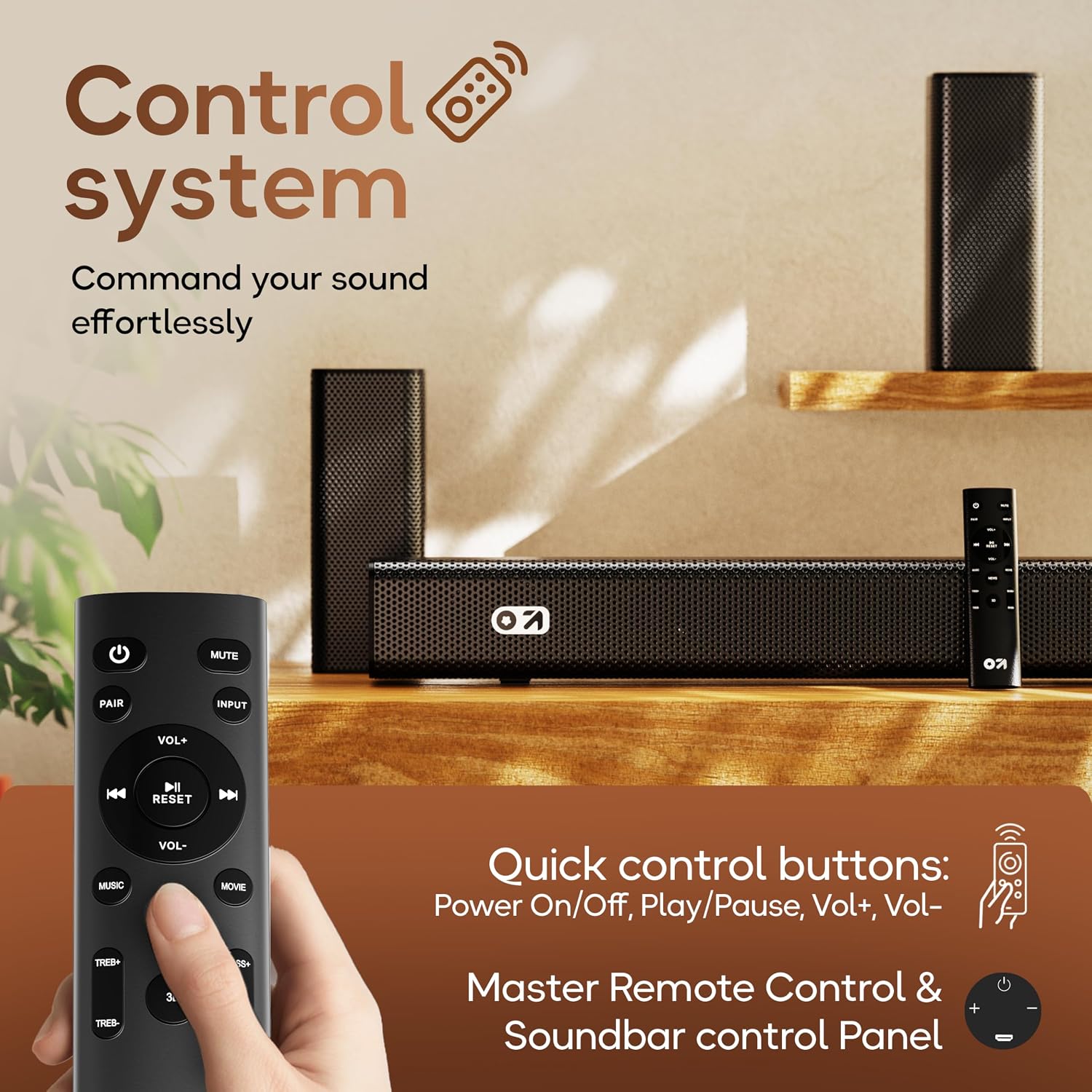
Immagine: dettagliata view of the soundbar's input ports for various audio sources.
3.5 5.1 Channel Surround Sound Configuration
The X400 system includes a soundbar, a subwoofer, and two satellite speakers to deliver a 5.1 channel surround sound experience. Ensure the satellite speakers are connected to the soundbar and positioned appropriately to create an immersive audio field around the listener.

Image: Visual guide for setting up the 5.1 channel surround sound system.
4. Istruzioni per l'uso
4.1 Accensione/spegnimento
Premere il tasto Energia pulsante sul telecomando o sulla soundbar per accendere o spegnere l'unità.
4.2 Selezione della sorgente di input
Premere il tasto Ingresso button on the remote control to cycle through available input sources: Bluetooth, HDMI ARC, Optical, AUX, USB. The selected input will be displayed on the soundbar's LED panel.
4.3 Controllo del volume
Utilizzare il Volume+ E vol- buttons on the remote control or the soundbar to adjust the volume level.
4.4 Associazione Bluetooth
- Select Bluetooth input mode on the soundbar. The LED display will show "BT" and flash, indicating it's in pairing mode.
- Sul tuo dispositivo mobile, attiva il Bluetooth e cerca i dispositivi disponibili.
- Select "GOBOULT X400" from the list. Once connected, the LED display will show a steady "BT".
4.5 modalità EQ
The GOBOULT X400 features multiple equalizer (EQ) modes to optimize your listening experience. Press the dedicated Film, Musica, O Notizia buttons on the remote control to switch between modes.
4.6 Funzioni del telecomando

Image: Layout and functions of the GOBOULT X400 remote control.
- Energia: Attiva o disattiva la soundbar.
- Disattiva audio: Disattiva o riattiva l'audio.
- Ingresso: Seleziona la sorgente di ingresso audio.
- VOL+/VOL-: Regola il volume principale.
- Riproduci/Pausa: Controls media playback (Bluetooth/USB modes).
- Precedente Successivo: Skips tracks (Bluetooth/USB modes).
- EQ Modes (Movie, Music, News): Seleziona il suono preimpostato profiles.
- PAIO: Avvia l'associazione Bluetooth.
- RIPRISTINA: Ripristina le impostazioni audio predefinite.
- TREB+/TREB-: Regola i livelli degli acuti.
- BASSI+/BASSI-: Regola i livelli dei bassi.
5. Manutenzione
To ensure the longevity and optimal performance of your GOBOULT X400 soundbar system, follow these maintenance guidelines:
- Pulizia: Use a soft, dry cloth to clean the surfaces of the soundbar and subwoofer. Do not use liquid cleaners, aerosols, or abrasive materials, as they may damage the finish or internal components.
- Ventilazione: Assicurarsi che le aperture di ventilazione della soundbar e del subwoofer non siano ostruite. Un flusso d'aria adeguato previene il surriscaldamento.
- Magazzinaggio: Se si conserva l'unità per un periodo prolungato, scollegarla dalla presa di corrente e conservarla in un luogo fresco e asciutto, lontano dalla luce solare diretta e da temperature estreme.
- Esposizione all'acqua: While the product is water-resistant, avoid direct exposure to water or high humidity to prevent damage.
6. Risoluzione Dei Problemi
If you encounter issues with your GOBOULT X400, refer to the following common problems and solutions:
| Problema | Possibile causa | Soluzione |
|---|---|---|
| Nessun potere | Cavo di alimentazione non collegato; presa di corrente non attiva | Assicurarsi che il cavo di alimentazione sia collegato saldamente alla soundbar e a una presa di corrente funzionante. |
| Nessun suono | Sorgente di ingresso errata; Volume troppo basso; Disattivazione audio attivata; Collegamento del cavo errato | Selezionare la sorgente di ingresso corretta. Aumentare il volume. Disattivare l'audio. Controllare i collegamenti dei cavi audio. |
| L'associazione Bluetooth non riesce | Soundbar non in modalità di associazione; Dispositivo troppo lontano; Interferenza | Ensure soundbar is in Bluetooth pairing mode. Move device closer. Clear previous pairings on your device. |
| Il telecomando non funziona | Batterie scariche; Ostruzione; Telecomando fuori portata | Replace remote control batteries. Remove any obstructions between remote and soundbar. Ensure remote is within operating range. |
| Il subwoofer non produce bassi | Subwoofer cable loose; Bass level set too low | Check the connection of the subwoofer cable to the soundbar. Increase bass level using the remote control. |
7. Specifiche
Detailed technical specifications for the GOBOULT X400 Soundbar System:

Immagine: Interna view of the BoomX Dual Driver, highlighting its design for enhanced bass response.
| Caratteristica | Specificazione |
|---|---|
| Marca | GOBOULT |
| Nome del modello | Cassa per bassi X400 |
| Potenza massima in uscita dell'altoparlante | 400 Watt |
| Numero di canali audio | 5.1 |
| Tecnologia di connettività | Auxiliary, Bluetooth, USB, HDMI ARC, Optical |
| Versione Bluetooth | 5.3 |
| Portata Bluetooth | 10 metri |
| Modalità di uscita audio | Circondare |
| Tipo di altoparlante | Soundbar con subwoofer cablato |
| Metodo di controllo | Remoto |
| Caratteristiche del prodotto | Bass Boost, LED Light, USB Port, Water Resistant |
| Fonte di alimentazione | Elettrico con cavo |
| Dimensioni dell'articolo (P x L x A) | 8P x 9L x 7.5A centimetri (Soundbar) |
| Peso dell'articolo | 7.6 chilogrammi |
8. Garanzia e supporto
8.1 Informazioni sulla garanzia
The GOBOULT X400 Soundbar System comes with a Garanzia del produttore di 1 anni from the date of purchase. This warranty covers manufacturing defects and ensures reliable operation under normal use. Please retain your purchase receipt and the warranty card for any warranty claims.
8.2 Assistenza clienti
For technical assistance, troubleshooting, or warranty inquiries, please contact GOBOULT customer support. Refer to the contact information provided on your warranty card or visit the official GOBOULT websito per i dettagli del supporto.