
EMEET PIXY JP
EMEET PIXY 4K AI Auto-Tracking PTZ WebManuale dell'utente della camma
Model: PIXY JP
Introduzione
The EMEET PIXY is a state-of-the-art 4K AI auto-tracking PTZ webcam designed to enhance your live streaming, online classes, video conferences, and content creation. Featuring a dual-camera system with PDAF high-speed autofocus, a 1/2.55-inch ultra-sensitive Sony sensor, and three integrated AI chips for superior image processing, AI analysis, and PTZ control, the PIXY delivers unparalleled video quality and intelligent tracking capabilities. Its versatile design and dedicated EMEET STUDIO software provide intuitive control and customization for a professional-grade experience.
Cosa c'è nella scatola
Please check the package contents to ensure all items are included:
- EMEET PIXY Camera
- Webcam Clip
- Adattatore da USB-C ad A
- Cavo USB-C da 1.5 m
- Guida rapida
- Scheda di garanzia
- Manuale d'uso

Prodotto finitoview
The EMEET PIXY features an innovative dual-camera design and advanced AI processing to deliver superior video and audio performance.
Sistema Dual Camera
The PIXY integrates a main imaging camera with a 1/2.55-inch Sony sensor for stunning 4K resolution at 30 frames per second (FPS) and 1080P at 60FPS. An auxiliary AI camera assists in precise facial recognition and environmental light adaptation, ensuring optimal focus and exposure.

AI Chips for Enhanced Performance
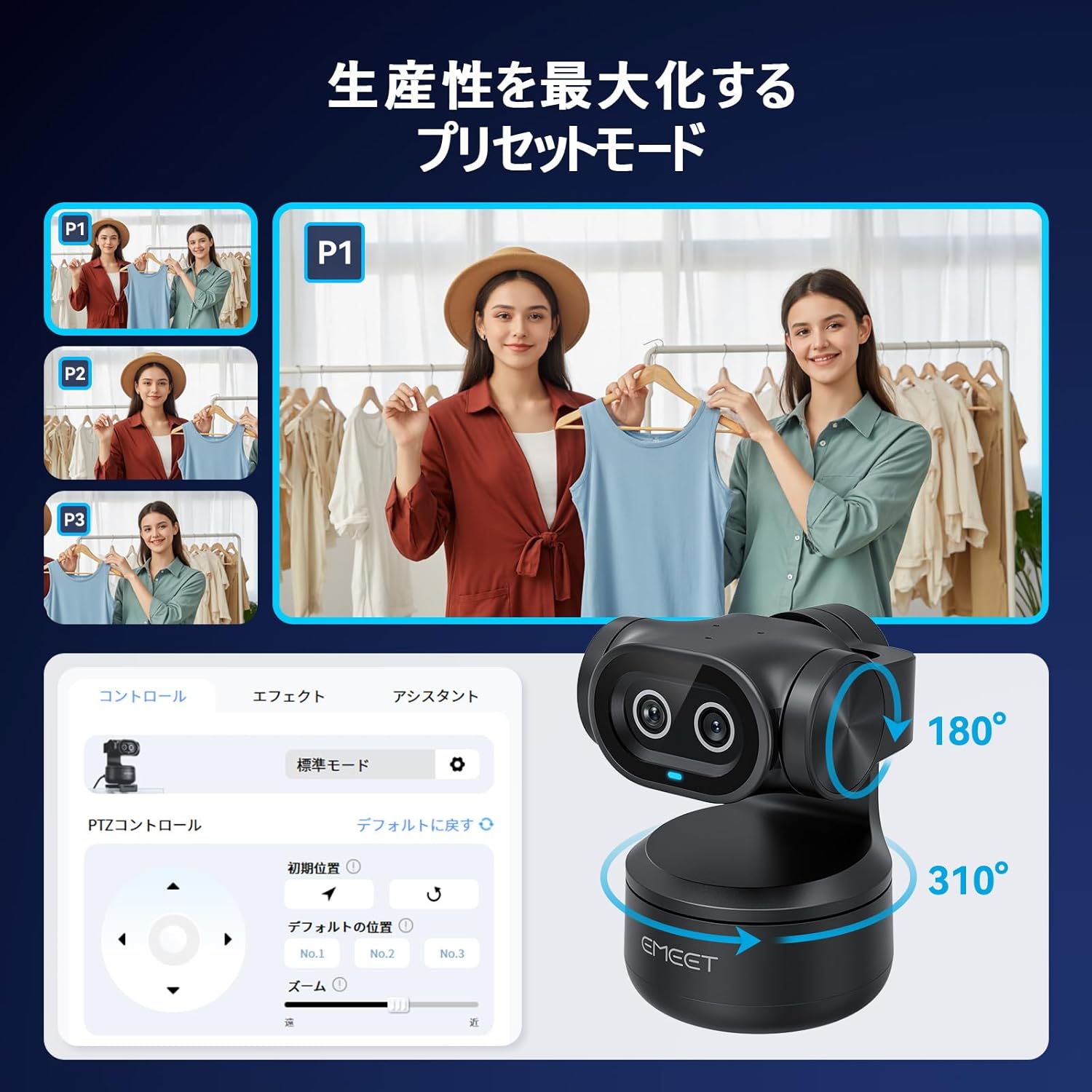
Three dedicated AI chips manage image processing, AI analysis, and PTZ (Pan-Tilt-Zoom) control. This multi-chip architecture enables rapid autofocus (0.2 seconds), smooth 310° pan and 180° tilt movements, and real-time optimization of video quality based on movement and lighting.

Triple Microphone Array
The PIXY is equipped with three built-in microphones that deliver clear and immersive audio. It offers three distinct audio modes: Live Mode for suppressing constant background noise, Noise Cancelling Mode for reducing sudden sounds, and Original Sound Mode for faithful recording of environmental and musical nuances.

Impostare
Installazione fisica
- Allega il webcam clip to the bottom of the EMEET PIXY.
- Securely mount the PIXY on your monitor, laptop, or a tripod using the clip.
- Connect the PIXY to your computer using the provided USB-C cable. Use the USB-C to A adapter if your computer only has USB-A ports.
Software Installation (EMEET STUDIO)
For full functionality and customization, download and install the EMEET STUDIO software from the official EMEET webposto (www.emeet.com). EMEET STUDIO is compatible with Windows 10 (64-bit) or later and macOS 10.14 or later.

Istruzioni per l'uso
AI Auto-Tracking and Autofocus
The EMEET PIXY utilizes advanced AI to automatically track your movements and maintain sharp focus. The PDAF high-speed autofocus ensures that you remain clear and in focus even with rapid movements.

EMEET STUDIO Software Features
- Modalità preimpostate: Use EMEET STUDIO to save and switch between different camera angles and zoom levels instantly. This is ideal for presentations or multi-angle streaming.
- Controllo gestuale: Control certain camera functions, such as starting/stopping tracking, using simple hand gestures.
- Modalità lavagna: Automatically recognizes and corrects whiteboard content, making it clear and legible for viewers without the need for special stickers.
- Modalità ritratto: Rotate the camera to a vertical orientation for optimized smartphone-style video content.
- AIGC Function: EMEET's unique AI Generated Content feature can automatically create shot plans tailored to your scene, simplifying complex setups.


Caratteristiche audio
The EMEET PIXY's triple microphone array offers specialized audio modes to suit various environments:
- Modalità dal vivo: Suppresses constant background noise (e.g., air conditioners, PC fans) for a stable, noise-free streaming environment.
- Modalità di cancellazione del rumore: Reduces sudden sounds (e.g., keyboard clicks, door opening/closing) for clear online classes and web conferenze.
- Modalità audio originale: Faithfully records environmental sounds and subtle musical nuances, providing studio-quality audio without additional microphones.
Funzionalità sulla privacy
The EMEET PIXY offers a dedicated Privacy Mode to ensure your privacy when the camera is not in use. This mode can be activated by:
- Tilting the camera unit downwards.
- Manually switching via the EMEET STUDIO application.
- Setting an automatic timer for privacy activation within the software.

Connettività e compatibilità
The EMEET PIXY connects via USB and is compatible with a wide range of operating systems and streaming platforms:
- Sistemi operativi: Windows 10 (64-bit) or later, macOS 10.14 or later, Switch 2.
- Software di streaming: OBS, Twitch, YouTube, Facebook, XSplit, ManyCam, and more.
Dimostrazione video
Manutenzione
To ensure the longevity and optimal performance of your EMEET PIXY, follow these maintenance guidelines:
- Mantenere pulita la lente della fotocamera utilizzando un panno morbido e privo di lanugine. Evitare materiali abrasivi o sostanze chimiche aggressive.
- Conservare la fotocamera in un luogo asciutto e fresco, lontano dalla luce solare diretta e da temperature estreme.
- Evitare di far cadere la fotocamera o di sottoporla a forti urti.
- Regularly check for firmware updates via the EMEET STUDIO software to ensure you have the latest features and improvements.
Risoluzione dei problemi
If you encounter any issues with your EMEET PIXY, please refer to the following common troubleshooting steps:
- Nessuna immagine/video: Ensure the USB cable is securely connected to both the camera and your computer. Try a different USB port or cable. Verify that the camera is selected as the video input device in your application settings.
- Problemi di messa a fuoco automatica: Ensure there is adequate lighting. Check for obstructions in front of the lens. Update EMEET STUDIO software and camera firmware.
- Problemi audio: Confirm the PIXY's microphones are selected as the audio input device in your application. Check microphone levels. Ensure no physical obstructions are blocking the microphones.
- Monitoraggio non funzionante: Ensure you are within the recommended tracking range. Check lighting conditions. Verify that AI tracking is enabled in EMEET STUDIO.
- Il software non riconosce la fotocamera: Restart your computer and the EMEET STUDIO software. Reinstall the EMEET STUDIO software.
For further assistance, please contact EMEET customer support.
Specifiche
| Caratteristica | Dettaglio |
|---|---|
| Marca | EMETTARE |
| Numero di modello | PIXY JP |
| Risoluzione di acquisizione video | 4K |
| Tecnologia del sensore fotografico | CMOS (1/2.55" Sony Sensor) |
| Lunghezza focale massima | 3000 millimetri |
| Lunghezza focale minima | 100 millimetri |
| Formato di acquisizione video | MP4 |
| Formati audio supportati | AAC, MP3, PCM |
| Tecnologia di connettività | USB |
| Caratteristiche speciali | Scene Mode, Microphone Input, Face Detection, AI Auto-Tracking, PTZ Control |
| Stabilizzazione dell'immagine | Ottico |
| Fattore di forma | Palmheld |
| Sistema operativo supportato | Windows 10 (64bit) or later, macOS 10.14 or later, Switch 2 Camera |
| Proporzioni | 16:9 |
Garanzia e supporto
The EMEET PIXY comes with a warranty card included in the package. Please refer to the warranty card for specific terms and conditions. For technical support, product inquiries, or warranty claims, please visit the official EMEET websito o contattare il loro servizio clienti.
Ask a question about this manual
Ask about setup, troubleshooting, compatibility, parts, safety, or missing instructions. Manuals+ will review the question and use this page’s manual context to help answer it.