
1. Introduzione
Thank you for choosing the XBJ Smart Projector LXPT001. This portable projector is designed to provide a versatile entertainment experience with its advanced features, including 4K decoding support, Android 11 operating system, dual-band 5G WiFi, and Bluetooth 5.2 connectivity. Its 180° rotatable design and automatic keystone correction allow for flexible projection in various indoor and outdoor settings.
This manual provides essential information for setting up, operating, and maintaining your projector to ensure optimal performance and longevity.
2. Cosa c'è nella scatola
- XBJ Portable Projector
- Cavo di alimentazione
- Telecomando
- Manuale d'uso
3. Prodotto finitoview
The XBJ Smart Projector LXPT001 is a compact and lightweight device, measuring approximately 4.06 x 3.62 x 6.89 inches and weighing 14.1 ounces. Its design allows for 180° rotation, enabling projection onto walls, ceilings, or screens with ease.

Figure 1: XBJ Smart Projector LXPT001 and included remote control.
3.1 Porte e controlli
The projector features multiple connectivity options for versatile use:
- Porta HDMI: For connecting laptops, TV sticks, gaming consoles (PS5/XBOX), and other HDMI-enabled devices.
- Porta USB: Per collegare unità USB per riprodurre contenuti multimediali files.
- Jack audio da 3.5 mm: Per collegare cuffie o altoparlanti esterni.
- Potenza in ingresso: Per collegare il cavo di alimentazione.

Figura 2: Posteriore view of the projector highlighting its various input/output ports.
3.2 Portabilità e design
The projector's compact size and lightweight design make it ideal for easy transport and use in various locations, from bedrooms to outdoor campviaggi.
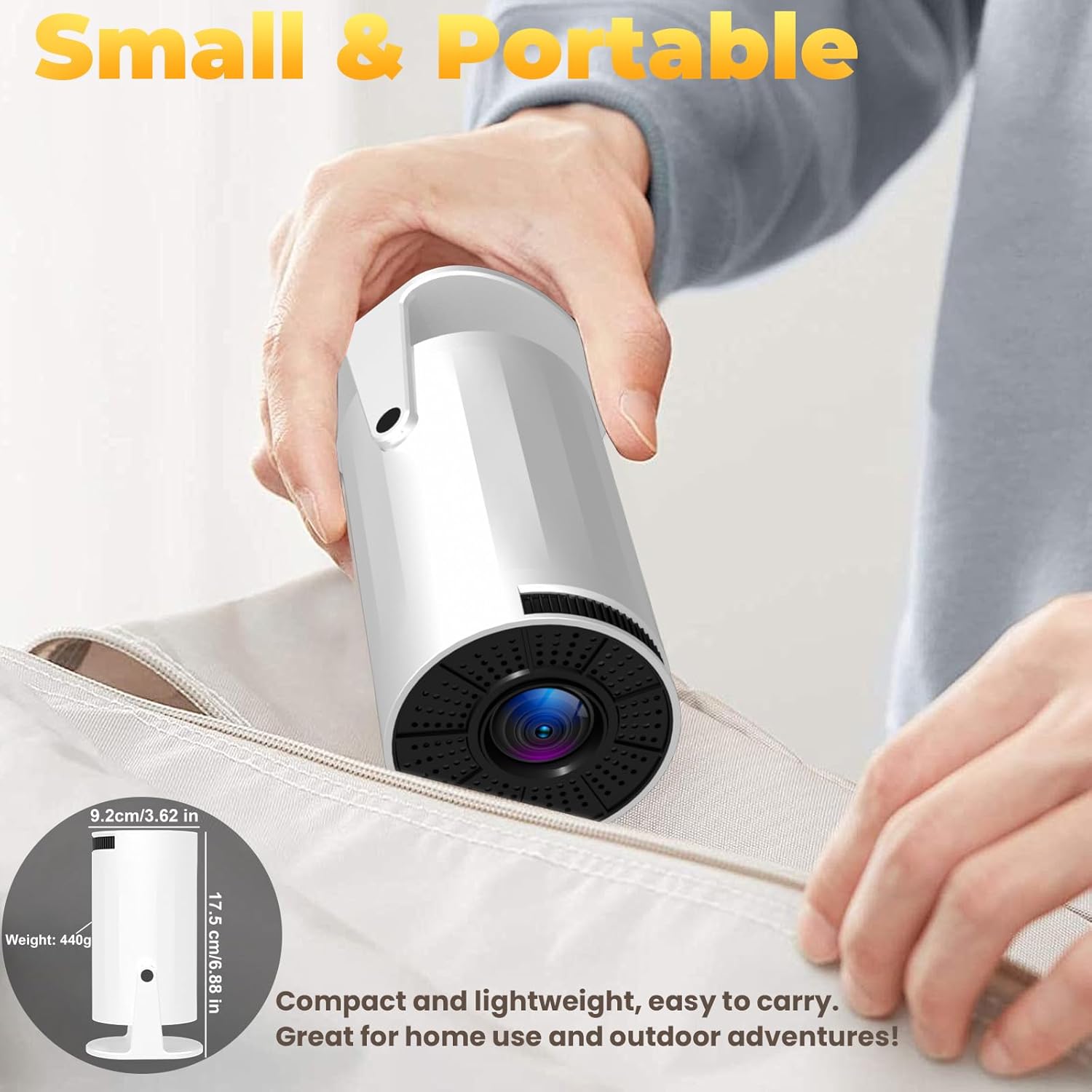
Figure 3: The projector's compact design allows for easy portability.
Video 1: Un overview of the XBJ Mini Portable Movie Projector, showcasinil suo design e le sue caratteristiche.
4. Istruzioni per l'installazione
4.1 Accensione iniziale
- Collegare il cavo di alimentazione all'ingresso di alimentazione del proiettore e quindi a una presa di corrente.
- Premere il pulsante di accensione sul proiettore o sul telecomando per accendere il dispositivo.
4.2 Network Setup (5G WiFi)
For optimal performance and smooth screen mirroring, connect your projector to a 5G WiFi network:
- Navigate to the 'Settings' menu on the projector's home screen using the remote control.
- Select 'Network Settings' or 'WiFi'.
- Choose your desired 5G WiFi network from the list and enter the password.

Figure 4: Projector interface displaying WiFi settings and other display adjustments.
Video 2: A guide demonstrating how to connect the projector to WiFi and perform screen casting.
4.3 Keystone Correction and Focus
The projector features 180° rotation and auto keystone correction for optimal image alignment. Manual focus is also available for fine-tuning clarity.
- Rotazione 180°: Physically adjust the projector's angle to project onto desired surfaces (walls, ceilings).
- Correzione trapezoidale automatica: Il proiettore regolerà automaticamente la forma dell'immagine in modo che sia rettangolare.
- Messa a fuoco manuale: Use the focus ring on the projector or remote control to sharpen the image.
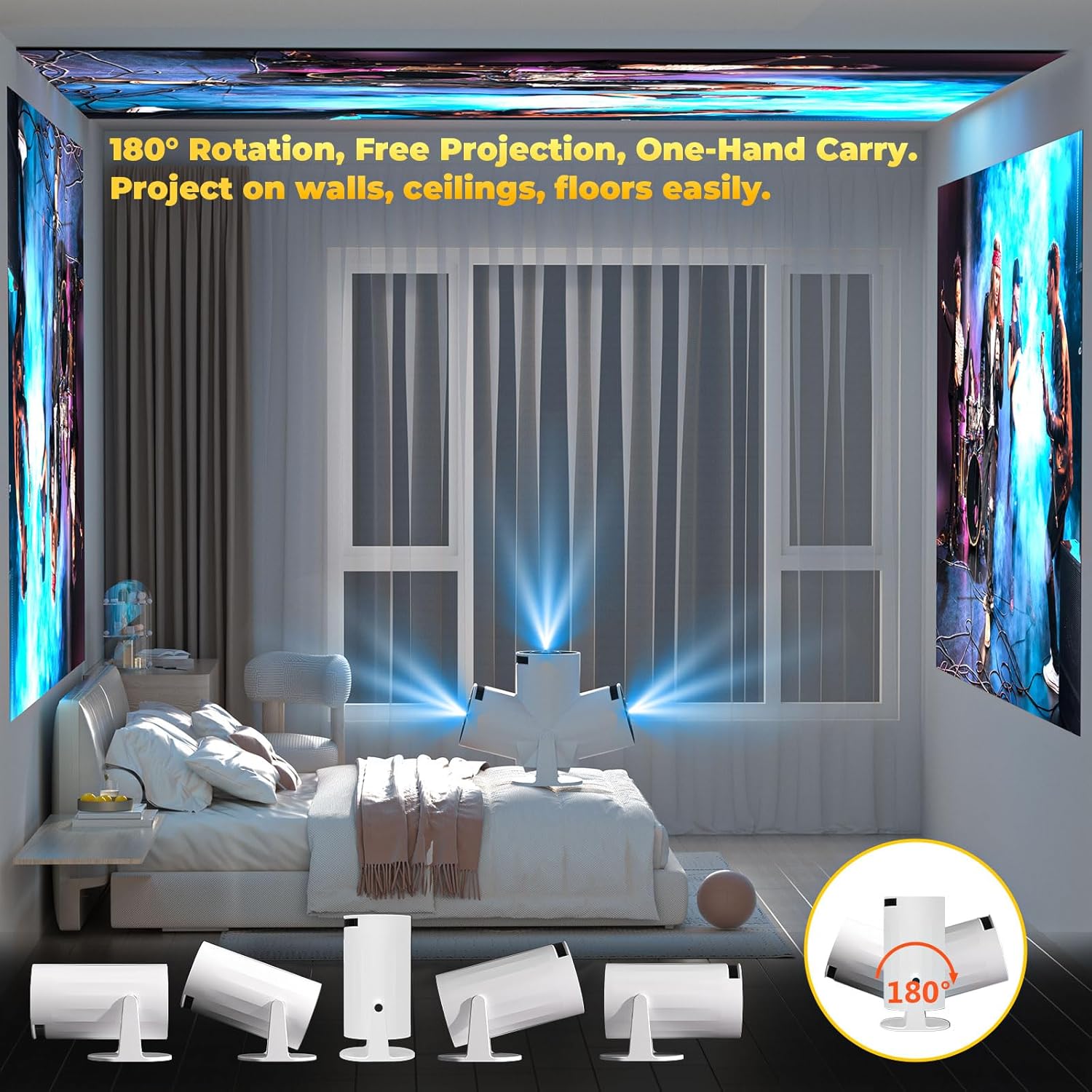
Figure 5: The projector's 180° rotatable design allows for flexible projection angles.
5. Istruzioni per l'uso
5.1 Using Built-in Apps (Android 11)
Il proiettore funziona con Android 11, consentendo l'accesso a un'ampia gamma di applicazioni:
- From the home screen, navigate to 'My Apps' or 'App Store' to browse and install applications.
- Use the remote control to select and launch your desired streaming services (e.g., Netflix, YouTube, Disney+).
Video 3: Instructions on how to update applications on the XBJ Smart Projector.
5.2 Mirroring dello schermo
Mirror your smartphone, tablet, or laptop screen wirelessly to the projector:
- Ensure both your device and the projector are connected to the same 5G WiFi network.
- On the projector, select the 'Screen Mirroring' option (often found in 'My Apps' or as a dedicated button).
- On your mobile device, activate screen mirroring (e.g., AirPlay for iOS, Cast for Android) and select the projector from the list of available devices.
Video 4: A demonstration on how to connect to AirPlay for screen mirroring with the XBJ Portable Projector.
5.3 Connettività Bluetooth
Connect Bluetooth 5.2 compatible HIFI speakers or headphones for an enhanced audio experience:
- Vai su "Impostazioni" e seleziona "Bluetooth".
- Enable Bluetooth on the projector and your audio device.
- Seleziona il tuo dispositivo audio dall'elenco dei dispositivi disponibili per l'associazione.
Video 5: Instructions on how to connect a Bluetooth device to the XBJ movie projector.
5.4 Collegamento di dispositivi esterni
Use the HDMI and USB ports to connect various external devices:
- HDMI: Connect your laptop, TV stick, PS5/XBOX, or other HDMI-enabled devices. Select the HDMI input from the projector's source menu.
- USB: Inserisci un'unità USB contenente un supporto files. Il lettore multimediale del proiettore consente di sfogliare e riprodurre i contenuti.

Figure 6: Versatile connectivity options for various devices.
5.5 Impostazioni di proiezione
Adjust projection size and aspect ratio for your viewambiente di ing:
- Rapporto di proiezione: 1.25:1, allowing for larger screens at shorter distances.
- Suggested Projection Distance: 1.2 - 4 meters (3.9 - 13.2 feet).
- Dimensioni di proiezione: Da 40 a 150 pollici.
- Proporzioni: Supports 16:9 and 4:3.

Figure 7: Projection distance and screen size guidelines.
6. Specifiche
| Caratteristica | Specificazione |
|---|---|
| Marca | XBJ |
| Numero di modello | LXPT001 |
| Peso dell'articolo | 14.1 once |
| Dimensioni del prodotto | 4.06 x 3.62 x 6.89 pollici |
| Risoluzione dello schermo | 1280 x 720 (supports 4K decoding) |
| Tecnologia di connettività | 3.5mm Jack, Bluetooth 5.2, HDMI, USB, Wi-Fi 6 (5G + 2.4G) |
| Caratteristiche speciali | Built-In Cooling System, Built-In Speaker, Built-In Wi-Fi, Digital Keystone Correction, Portable, 180° Rotatable |
| Usi consigliati | Istruzione, Giochi, Home Cinema |
7. Risoluzione Dei Problemi
If you encounter common problems, please refer to the following solutions:
- Signal, Sound, Bluetooth, or WiFi Connection Issues: Check the user manual for detailed instructions. Ensure all cables are securely connected and devices are within range. For WiFi, ensure you are connected to the correct network (5G recommended for mirroring).
- Item Damaged During Shipping: If the item received is broken or damaged, please contact the seller's official store for assistance.
Video 6: Instructions on how to restore the XBJ portable movie projector to factory settings.
8. Manutenzione
Per garantire la longevità e le prestazioni ottimali del proiettore, seguire queste linee guida per la manutenzione:
- Pulizia: Use a soft, dry cloth to clean the exterior of the projector. For the lens, use a specialized lens cleaning cloth and solution.
- Sistema di raffreddamento: The projector has a built-in cooling system. Ensure that the ventilation vents are not blocked during operation to prevent overheating.
- Magazzinaggio: Quando non in uso, conservare il proiettore in un luogo fresco e asciutto, lontano dalla luce solare diretta e da temperature estreme.
9. Garanzia e supporto
For technical support, warranty inquiries, or any issues you encounter with your product, please contact our customer support team. We are fully responsible for products sold via our official store.
Email dell'assistenza clienti: ESzxkj@outlook.com
Sono disponibili per l'acquisto ulteriori piani di protezione:
- Piano di protezione biennale
- Piano di protezione biennale
- Complete Protect (piano mensile che copre gli acquisti passati e futuri idonei)