
1. Introduzione
This manual provides essential information for the safe and effective use of your Mibro GS Pro2 Multisport Smartwatch. Please read this manual thoroughly before using the device and retain it for future reference.
Prodotto finitoview
The Mibro GS Pro2 is a versatile multisport smartwatch designed for various activities, featuring a 1.43-inch AMOLED display, Bi-Band GNSS for precise positioning, and extensive health and fitness tracking capabilities.

Image 1.1: Mibro GS Pro2 Smartwatch. This image displays the Mibro GS Pro2 smartwatch from an angled perspective, showcasing its round dark gray casing, black silicone strap, and the digital watch face with various data points like time, date, and weather.
2. Impostazione
2.1 Carica iniziale
Before first use, fully charge your Mibro GS Pro2 smartwatch. Connect the magnetic charging cable to the charging contacts on the back of the watch and plug the USB end into a standard USB power adapter (not included).
- Una carica completa richiede in genere circa 2.5 ore.
- The watch will display a charging indicator on the screen.
2.2 Associazione con lo smartphone
To unlock the full functionality of your Mibro GS Pro2, pair it with your smartphone via the dedicated Mibro Fit application.
- Scarica l'App: Cercare "Mibro Fit" in your smartphone's app store (iOS or Android) and install it.
- Creare un account: Apri l'app Mibro Fit e segui le istruzioni sullo schermo per creare un account o effettuare l'accesso.
- Abilita Bluetooth: Assicurati che il Bluetooth sia abilitato sul tuo smartphone.
- Aggiungi dispositivo: In the Mibro Fit app, navigate to the "Device" or "Add Device" section.
- Select Watch: Select "Mibro GS Pro2" from the list of available devices.
- Conferma associazione: A pairing request will appear on both your watch and smartphone. Confirm the pairing on both devices.
Una volta associato, l'orologio sincronizzerà i dati con l'app e potrai personalizzare le impostazioni, ricevere notifiche e view detailed activity reports.
3. Utilizzo del dispositivo
3.1 Navigazione di base
The Mibro GS Pro2 features a responsive touchscreen and physical buttons for navigation.
- Schermo tattile: Scorri verso l'alto, verso il basso, verso sinistra o verso destra per navigare tra menu e widget. Tocca per selezionare gli elementi.
- Pulsanti laterali: Use the physical buttons on the side of the watch to access specific functions (e.g., power on/off, return to home screen, quick access to sports modes). Refer to the watch's on-screen prompts for specific button assignments.
3.2 Accensione/spegnimento
- Accensione: Press and hold the power button (usually the top right button) until the Mibro logo appears.
- Spegni: Tenere premuto il pulsante di accensione, quindi selezionare "Spegni" tra le opzioni visualizzate sullo schermo.
3.3 Effettuare e ricevere chiamate
When connected to your smartphone, the Mibro GS Pro2 allows you to manage calls directly from your wrist.
- Ricevere chiamate: When a call comes in, the watch will display the caller ID. You can tap the green icon to answer or the red icon to reject the call.
- Effettuare le chiamate: Access the call function on your watch (usually through the phone icon or a dedicated widget) to dial numbers or select contacts from your synced phonebook.
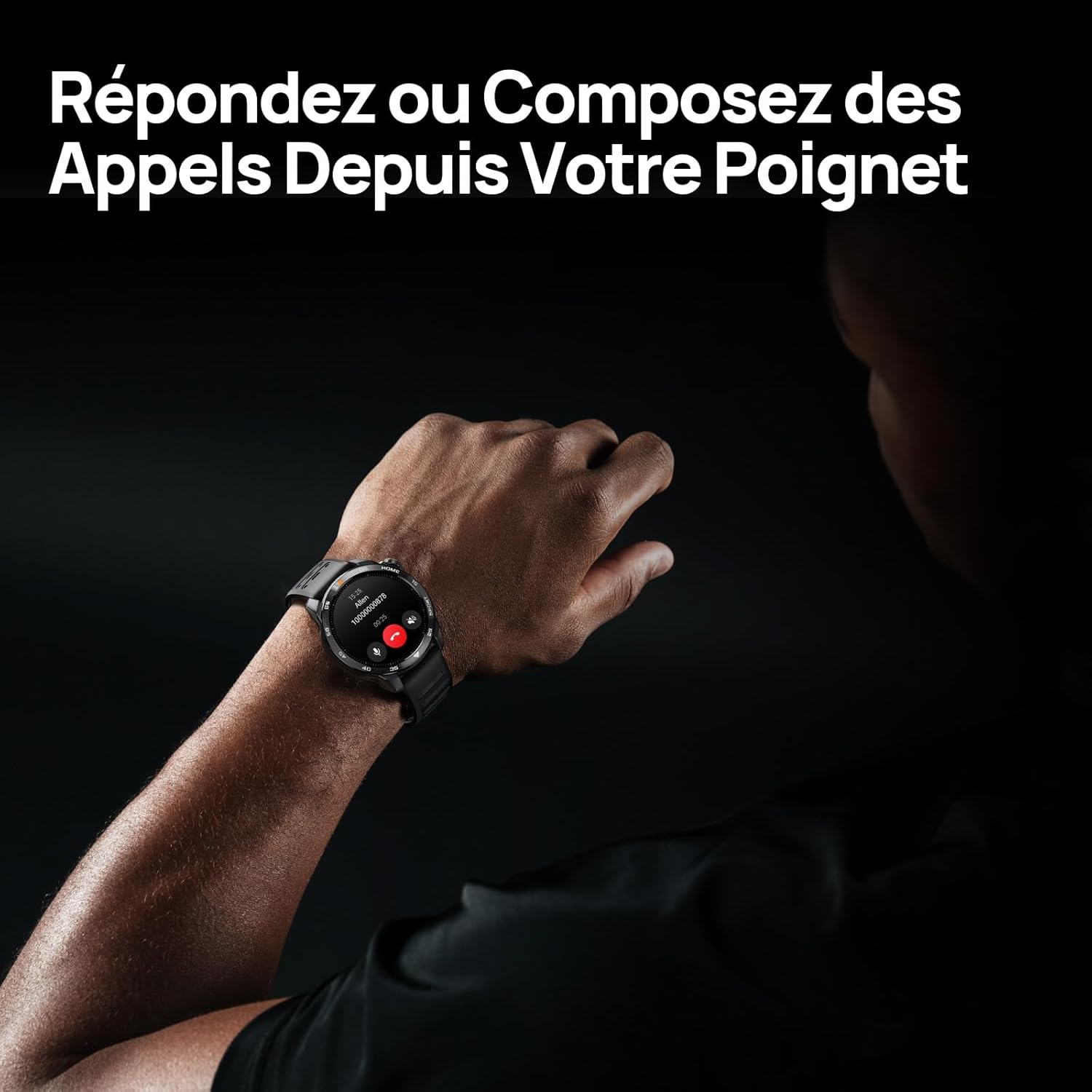
Image 3.1: Responding to calls on the Mibro GS Pro2. This image shows a person's wrist with the Mibro GS Pro2 smartwatch displaying an incoming call notification, illustrating the ability to answer or decline calls directly from the watch.
4 Caratteristiche
4.1 Visualizzazione
The Mibro GS Pro2 features a vibrant 1.43-inch AMOLED display, offering clear visibility even in bright outdoor conditions.
- Misurare: 1.43 pollici
- Tipo: AMOLED
- Risoluzione: 466x466 pixel
- Luminosità: Up to 1200 nits peak brightness
- Caratteristiche: Touchscreen, Anti-fingerprint coating.

Image 4.1: Mibro GS Pro2 1.43" AMOLED High Brightness Screen. This image highlights the smartwatch's display specifications, including 1200 nits peak brightness, 466x466 resolution, and 60 fps refresh rate, demonstrating its clarity and responsiveness.
4.2 Multisport Modes
The watch supports over 150 sports modes, providing tailored data analysis for each activity. This includes intelligent transitions for multi-discipline events like triathlons.
- Aquatic Sports: Suitable for open water swimming and pool swimming, calculating parameters such as distance, pace, and trajectory. The watch is 5ATM water resistant.
- Ciclismo: Tracks various cycling metrics, including outdoor cycling, indoor cycling, mountain biking, and short-distance modes.
- Corsa: Offers professional running algorithms, including running dynamics, performance index, and physical analysis based on real-time data. It records trajectories and provides long-term training plans.
- Other Sports: Includes modes for hiking, skiing, padel, and many more.

Image 4.2: Mibro GS Pro2 with 150+ Sports Modes. This image shows the smartwatch displaying various sports icons, indicating its extensive support for over 150 different physical activities, including swimming, cycling, and running.

Image 4.3: Mibro GS Pro2 5ATM Water Resistant. This image depicts a swimmer wearing the Mibro GS Pro2 smartwatch, with on-screen data showing swimming metrics like distance, stroke count, and calories burned, highlighting its water resistance and aquatic sport tracking capabilities.
4.3 GPS and Outdoor Navigation
The smartwatch features precise dual-frequency geolocation (Bi-Band GNSS) with real-time deviation alerts. It provides accurate route data and altitude variation measurements for outdoor activities like cycling tours or hiking.
- Dynamically adjust start/end points directly on the watch.
- Store up to 10 backup routes for navigation in areas without signal.
- Includes Barometer and Altimeter functions for environmental data.

Image 4.4: Mibro GS Pro2 Dual-Frequency GPS for Precise Outdoor Navigation. This image shows the smartwatch displaying a map and route tracking, alongside a smartphone app showing a detailed outdoor run trajectory, emphasizing its accurate GPS capabilities for outdoor activities.

Image 4.5: Mibro GS Pro2 Barometer and Altimeter. This image displays the watch showing barometric pressure, a compass, and altitude readings, with a person climbing in the background, illustrating its environmental sensing capabilities.
4.4 Monitoraggio sanitario
The Mibro GS Pro2 provides comprehensive health tracking features to help you monitor your well-being.
- Monitoraggio della frequenza cardiaca: Monitoraggio continuo della frequenza cardiaca.
- Monitoraggio dell'ossigeno nel sangue (SpO2): Misura i livelli di saturazione dell'ossigeno nel sangue.
- Monitoraggio del sonno: Monitora il sonnotag(leggero, profondo, REM) e fornisce un punteggio del sonno.
- Monitoraggio dello stress: Tiene traccia dei livelli di stress durante il giorno.
- VO2 Max e tempo di recupero: Professional metrics for training optimization.
- Monitoraggio delle attività: Records calories burned, total distance, and steps taken.

Image 4.6: Mibro GS Pro2 VO2 Max & Recovery Time. This image shows the smartwatch displaying VO2 Max percentage and recovery time recommendations, along with training effect metrics, aiding in professional workout analysis.

Image 4.7: Mibro GS Pro2 Blood Oxygen (SpO2) Monitoring. This image illustrates the watch's ability to track blood oxygen saturation levels over a 24-hour period, displayed as a graph on the watch face.

Image 4.8: Mibro GS Pro2 Sleep Tracking. This image shows the smartwatch displaying sleep quality metrics (Good, BPM, Stress) and a breakdown of sleep stages (Awake, Light Sleep, Deep Sleep), with a person sleeping in the background.
4.5 Durata della batteria
The Mibro GS Pro2 offers extended battery life to support prolonged use.
- Modalità giornaliera: Circa 20 giorni.
- Modalità GPS: Circa 20 ore.
- Modalità di risparmio energetico: Up to 50+ days.

Image 4.9: Mibro GS Pro2 Ultra-Long Battery Life and Fast Charging. This image illustrates the watch's battery performance, showing 2.5 hours for a full charge and estimated usage times for daily mode (20+ days), power-saving mode (50+ days), and GPS mode (20 hours).
4.6 Funzioni intelligenti
Beyond fitness tracking, the Mibro GS Pro2 integrates seamlessly with your digital life.
- Notifiche dei messaggi: Receive alerts for calls, SMS, and app notifications (e.g., TikTok, WhatsApp, Telegram, Instagram, Facebook, Snapchat).
- Controllo della musica: Controlla la riproduzione musicale sul tuo smartphone direttamente dall'orologio.
- Trova il mio telefono: Individua il tuo smartphone associato tramite l'orologio.
- Quadranti personalizzabili: Personalize your watch with various watch face designs.

Image 4.10: Mibro GS Pro2 New Daily Health & Well-being Features. This image shows icons representing sleep tracking, wake-up reminders, music control, and 'find my phone' functionality, indicating the watch's smart features for daily use.

Image 4.11: Mibro GS Pro2 Message Push Notifications. This image shows the smartwatch displaying a message notification, surrounded by logos of popular social media and messaging apps, illustrating its capability to receive alerts from various platforms.

Image 4.12: Mibro GS Pro2 Personalized Watch Faces. This image displays a variety of digital watch faces, showcasing the customization options available to users for personalizing their smartwatch display.
5. Manutenzione
5.1 Pulizia dello smartwatch
- Regularly clean the watch casing e cinturino con un morbido, damp stoffa.
- In caso di sporco ostinato, utilizzare una soluzione di sapone delicato e risciacquare abbondantemente con acqua pulita.
- Prima di procedere alla ricarica, assicurarsi che i contatti di ricarica siano puliti e asciutti per evitare la corrosione.
- Evitare l'uso di prodotti chimici aggressivi, detergenti abrasivi o solventi, poiché potrebbero danneggiare la finitura e le guarnizioni dell'orologio.
5.2 Resistenza all'acqua
The Mibro GS Pro2 is 5ATM water resistant, meaning it can withstand pressures equivalent to a depth of 50 meters. This makes it suitable for swimming and showering. However, it is not recommended for diving or high-pressure water activities.
- Non azionare i pulsanti sott'acqua.
- Dopo l'esposizione all'acqua salata, sciacquare l'orologio con acqua dolce e asciugarlo accuratamente.
5.3 Cura della batteria
- Evitare di scaricare completamente la batteria frequentemente.
- Conservare l'orologio in un luogo fresco e asciutto quando non lo si utilizza per lunghi periodi.
- Utilizzare solo il cavo di ricarica fornito.
6. Risoluzione Dei Problemi
6.1 L'orologio non si accende
- Assicurati che l'orologio sia completamente carico. Collegalo al caricabatterie per almeno 30 minuti.
- Tenere premuto il pulsante di accensione per 10-15 secondi per tentare un riavvio forzato.
6.2 Impossibile associare allo smartphone
- Assicurati che il Bluetooth sia abilitato sullo smartphone e sull'orologio.
- Assicurati che l'orologio si trovi nel raggio di azione del Bluetooth del tuo telefono.
- Riavvia sia lo smartphone che l'orologio.
- Cancella la cache Bluetooth sul telefono (se applicabile) e prova a eseguire nuovamente l'associazione.
- Assicurati che l'app Mibro Fit sia aggiornata all'ultima versione.
6.3 Letture GPS imprecise
- Assicurati di trovarti in un'area esterna aperta e con una vista libera view del cielo.
- Wait for the watch to acquire a stable GPS signal before starting your activity.
- Ensure the watch's firmware is up to date via the Mibro Fit app.
6.4 Notifiche non visualizzate
- Controlla le impostazioni di notifica nell'app Mibro Fit per assicurarti che siano abilitate per le applicazioni desiderate.
- Verify that your phone's notification permissions are granted to the Mibro Fit app.
- Assicurati che l'orologio sia connesso al telefono tramite Bluetooth.
7. Specifiche
| Caratteristica | Dettaglio |
|---|---|
| Marca | Micro |
| Numero di modello | GS Pro2 |
| Dimensioni dello schermo | 1.43 pollici |
| Tipo di visualizzazione | AMOLED |
| Sistema operativo | Sistemi operativi in tempo reale |
| Connettività | Bluetooth |
| Caratteristiche speciali | Touchscreen, Water Resistant (5ATM), Bi-Band GNSS, Health Monitoring |
| Dispositivi compatibili | Smartphone |
| Composizione della batteria | Agli ioni di litio |
| Durata della batteria (modalità giornaliera) | Circa 20 giorni |
| Durata della batteria (modalità GPS) | Circa 20 ore |
| Resistenza all'acqua | 5 ATM |
| Dimensioni (corpo dell'orologio) | 48 mm (diametro) x 12 mm (spessore) |
| Lunghezza del cinturino | 265mm |
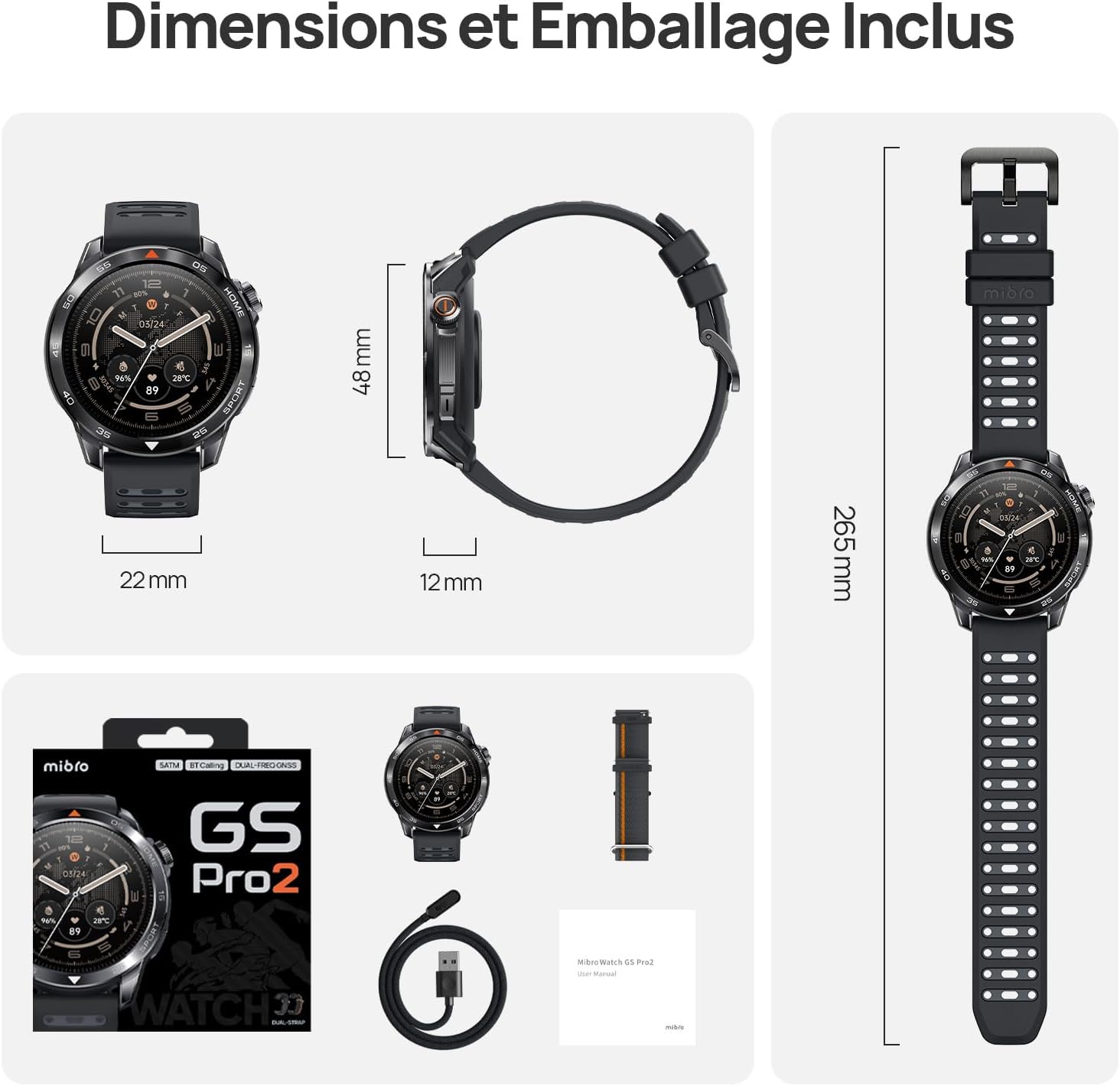
Image 7.1: Mibro GS Pro2 Dimensions and Included Packaging. This image provides a visual representation of the watch's dimensions (48mm diameter, 12mm thickness, 265mm strap length) and shows the contents of the product packaging, including the watch, charging cable, and user manual.
8. Garanzia e supporto
8.1 Garanzia del produttore
The Mibro GS Pro2 comes with a Garanzia del produttore di 1 anniLa presente garanzia copre i difetti di materiali e fabbricazione in condizioni di normale utilizzo. Si prega di conservare la prova d'acquisto per eventuali reclami in garanzia.
La garanzia non copre i danni causati da uso improprio, incidenti, modifiche non autorizzate o normale usura.
8.2 Assistenza clienti
For technical assistance, troubleshooting, or warranty inquiries, please refer to the official Mibro website or contact their customer support channels. Specific contact details may be found on the product packaging or the official Mibro websito.