
Introduzione
This manual provides detailed instructions for the VINABTY Voice Remote Control, designed as a direct replacement for various OK. QLED TV models. This remote control features voice search capabilities, an ergonomic design, and durable construction for reliable performance. Please read this manual carefully to ensure proper setup and operation.
Impostare
1. Installazione della batteria
Il telecomando richiede due batterie AAA (non incluse). Per installarle, segui questi passaggi:
- Aprire il coperchio del vano batterie situato sul retro del telecomando.
- Inserire due batterie AAA, assicurandosi che i terminali positivo (+) e negativo (-) corrispondano agli schemi all'interno del vano.
- Chiudere saldamente il coperchio del vano batterie.

Immagine: Posteriore view del telecomando con il coperchio della batteria rimosso, che illustra il posizionamento corretto di due batterie AAA.
2. Abbinamento con la TV
This remote control is designed for easy use and typically requires no programming. However, for voice search functionality, it must be paired with your TV. Refer to your TV's user manual for specific pairing instructions for a new remote control. Generally, this involves:
- Assicurati che la TV sia accesa.
- Navigate to the TV's settings menu, usually under 'Remotes & Accessories' or 'Bluetooth Settings'.
- Select 'Add new device' or 'Pair remote control'.
- Follow the on-screen prompts to complete the pairing process. This may involve holding down specific buttons on the remote.

Image: The VINABTY remote control positioned beside a television, highlighting its ready-to-use nature and material quality.
Istruzioni per l'uso
The VINABTY Voice Remote Control offers intuitive control over your OK. QLED TV. Below are the primary functions:
- Pulsante di accensione (⏻): Accende o spegne la TV.
- Tasti numerici (0-9): Seleziona direttamente i canali TV.
- Tastierino di navigazione (su, giù, sinistra, destra, OK): Navigare nei menu e confermare le selezioni.
- Volume su/giù (+/-): Regola il volume della TV.
- Canale Su/Giù (P^/P˅): Cambia canale TV.
- Pulsante muto (🔇): Disattiva o riattiva l'audio della TV.
- Tasto indietro (←): Torna alla schermata o al menu precedente.
- Pulsante Home (🏠): Access the TV's home screen or smart hub.
- Pulsante di controllo vocale (🎤): Press and hold to activate voice search or commands (requires successful pairing).
- Pulsanti di accesso rapido: Dedicated buttons for popular streaming services like Netflix, YouTube, Prime Video, and Google Play for direct access. A USB button is also included for media playback.
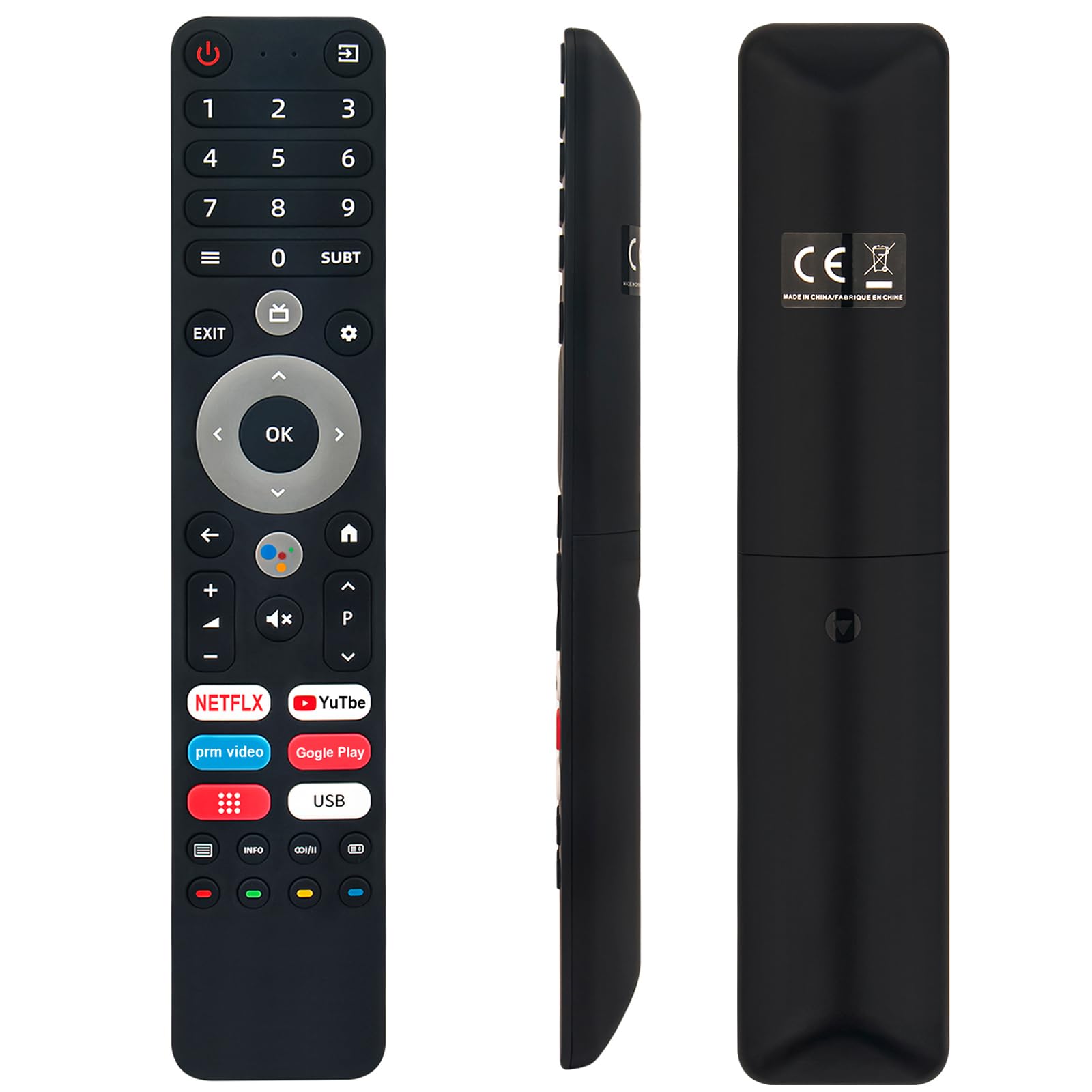
Image: The remote control with a visual emphasis on the voice command button, indicating its functionality.
Manutenzione
To ensure the longevity and optimal performance of your VINABTY Voice Remote Control, follow these maintenance guidelines:
- Pulizia: Use a soft, dry cloth to clean the remote control. Avoid using liquid cleaners, aerosols, or harsh chemicals, as these can damage the surface or internal components.
- Sostituzione della batteria: Sostituisci le batterie quando la risposta del telecomando diventa lenta o smette di funzionare. Sostituisci sempre entrambe le batterie contemporaneamente con batterie nuove dello stesso tipo (AAA).
- Magazzinaggio: Conservare il telecomando in un luogo fresco e asciutto, lontano dalla luce solare diretta, da temperature estreme e da elevata umidità. Se il telecomando non viene utilizzato per un periodo prolungato, rimuovere le batterie per evitare perdite.
- Gestione: Evitare di far cadere il telecomando o di sottoporlo a forti urti, poiché ciò potrebbe danneggiare i circuiti interni.
Risoluzione dei problemi
If you encounter issues with your VINABTY Voice Remote Control, try the following solutions:
- Il telecomando non risponde:
- Check if the batteries are correctly installed and not depleted. Replace them if necessary.
- Assicurarsi che non vi siano ostacoli tra il telecomando e il ricevitore a infrarossi del televisore.
- Verificare che il telecomando sia puntato direttamente verso la TV.
- Controllo vocale non funzionante:
- Verify that the remote control is successfully paired with your TV. Refer to the 'Pairing with Your TV' section or your TV's manual.
- Ensure your TV's internet connection is stable, as voice commands often rely on online services.
- Pulsanti non funzionanti:
- Pulisci il telecomando, in particolare attorno ai pulsanti, per rimuovere sporco o detriti che potrebbero causare inceppamenti.
Se questi passaggi non risolvono il problema, contattare l'assistenza clienti per ulteriore assistenza.
Specifiche
| Caratteristica | Dettaglio |
|---|---|
| Marca | VINABITÀ |
| Modelli compatibili | OK. QLED TV OTV 55AU-5023C, OTV43AU-5023C, OTV50AU-5023C, OTV 43AU-5023C, OTV 50AU-5023C |
| Tecnologia di connettività | Infrarossi |
| Portata massima | 10 metri |
| Tipo di batteria | 2 x AAA (non incluso) |
| Materiale | ABS (body), Soft Rubber (buttons) |
| Colore | Nero |
| Dimensioni (L x P x A) | 18 cm x 3 cm x 1.5 cm (circa 7.09 x 1.18 x 0.59 pollici) |
| Peso | 60 grammi |
| Caratteristiche speciali | Voice Control, No Programming Required, Ergonomic Design |

Image: The remote control displayed with its precise length and width measurements.
Supporto
For any questions regarding the VINABTY Voice Remote Control, or if you are unsure about its compatibility with your specific TV model, please contact our customer support team. We are committed to providing assistance and ensuring your satisfaction.
If you received a remote control that does not function as expected, or if you require further technical support, please reach out to us via email. We will respond promptly to address your concerns.