
Introduzione
This manual provides essential instructions for the assembly, operation, and maintenance of your Pinmoco 42" L-Shaped Gaming Desk. Please read this manual thoroughly before assembly and use to ensure proper function and longevity of your product.

Image: The Pinmoco L-Shaped Gaming Desk in a modern gaming environment, showcasing its monitor stand, LED lighting, and storage features.
Informazioni sulla sicurezza
Per evitare lesioni o danni al prodotto, attenersi alle seguenti norme di sicurezza:
- Montare sempre la scrivania seguendo le istruzioni fornite.
- Keep the desk away from heat sources and avoid placing heavy objects on the monitor stand.
- Do not operate the desk while the RGB lighting is in motion mode if you have any sensitivity to light or seizures.
- Always unplug the desk from the power source before making any adjustments or cleaning.
Contenuto della confezione
Verificare che tutti i componenti siano presenti prima di iniziare il montaggio. Se qualche componente risulta mancante o danneggiato, contattare l'assistenza clienti.
- Desk panels (L-shaped desktop, monitor stand, under-desk storage shelf)
- Componenti del telaio metallico (gambe, travi di supporto)
- RGB LED lighting strip and controller
- Gancio per cuffie
- Portabicchieri pieghevole
- Pattini di livellamento regolabili
- Ferramenta di montaggio (viti, bulloni, ecc.)
- Istruzioni di montaggio
Installazione e assemblaggio
Assembly is required for this product. Please follow the detailed instructions provided in the separate assembly guide included with your package. Ensure you have adequate space and the necessary tools before starting.
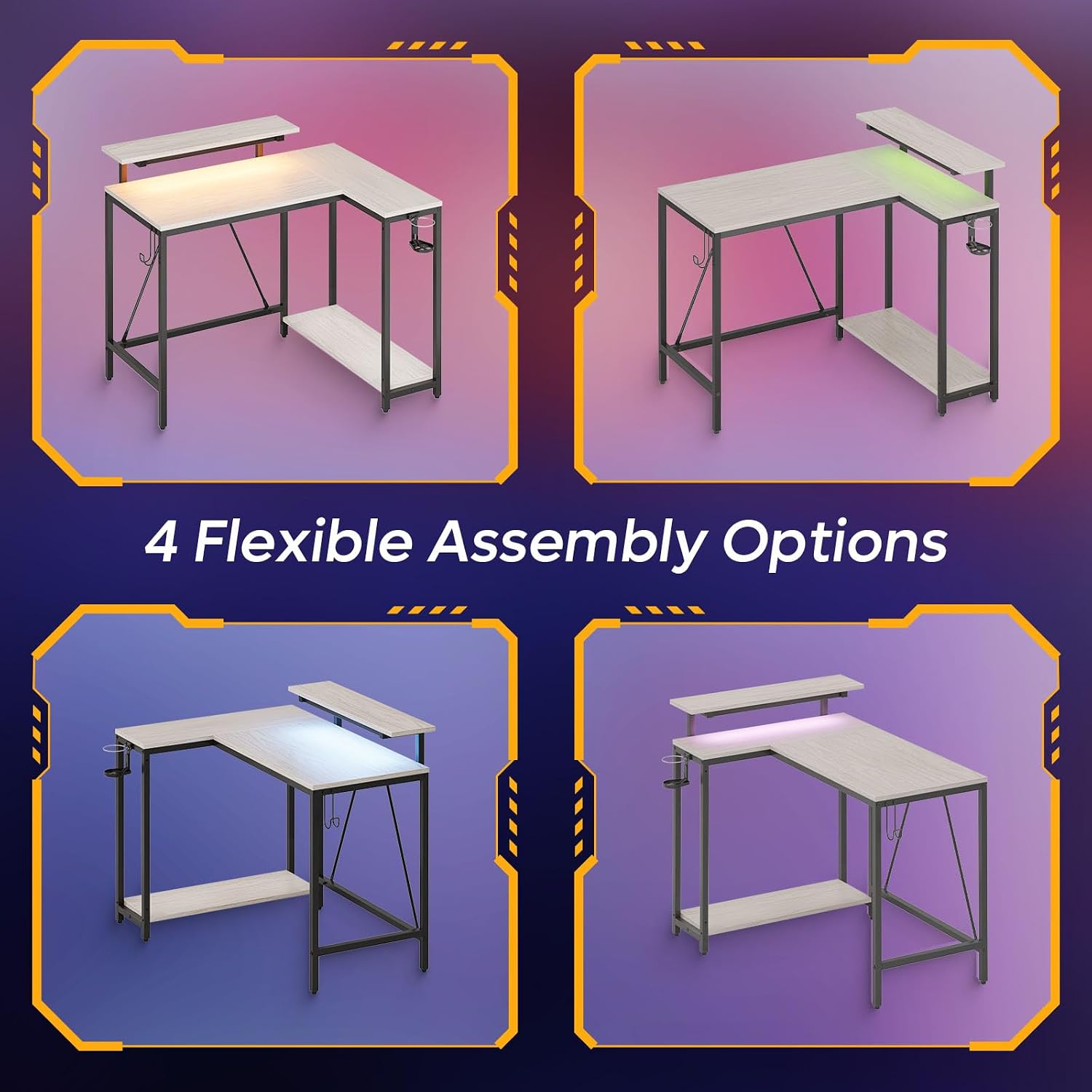
Image: This illustration demonstrates the four flexible assembly options for the L-shaped desk, allowing users to configure it to suit their space.
Considerazioni chiave sull'assemblaggio:
- Layout reversibile: The L-shaped design allows for a reversible configuration to fit various room layouts. Refer to the assembly guide for specific steps on how to achieve your desired orientation.
- Reinforced Legs and Leveling Pads: Ensure all legs are securely fastened. The adjustable leveling pads should be used to stabilize the desk on uneven surfaces, preventing wobbling.
- Posizionamento del supporto del monitor: The monitor stand is designed to be placed on the main desktop. Secure it according to the assembly instructions.
Istruzioni per l'uso
Illuminazione a LED RGB
The desk features integrated RGB LED lighting. Connect the LED strip to a power source and use the included controller to select from 7 primary colors and 20 dynamic modes. Refer to the LED controller's specific instructions for detailed operation.

Image: This graphic highlights the LED monitor stand's features, including 7 main colors, RGB, and 22 dynamic modes, alongside a comparison of ergonomic posture benefits.
Supporto ergonomico per monitor
The adjustable monitor stand is designed to elevate your screen to eye level, promoting better posture and reducing strain on your neck and spine during extended use.
Gestione degli accessori
- Gancio per auricolare: Utilize the integrated hook on the side of the desk to keep your headphones organized and easily accessible.
- Foldable Cup Holder: The foldable cup holder provides a convenient and secure place for beverages, helping to prevent spills on your workspace.
- Under-Desk Storage Shelf: The spacious shelf beneath the desk is suitable for storing files, books, or a PC tower, contributing to a clutter-free environment.

Image: This image details the versatile storage options, including the under-desk shelf dimensions, the cup holder, and the headphone hook.
Manutenzione
Per mantenere l'aspetto e la funzionalità della tua scrivania:
- Pulire le superfici con un panno morbido, damp stoffa. Evitare detergenti abrasivi.
- Assicurarsi che tutte le viti e i collegamenti siano ben serrati. Controllare periodicamente e serrare se necessario.
- Keep the desk dry and away from direct sunlight or extreme temperatures.
- For the LED lights, ensure the power cable is not pinched or damaged.
Risoluzione dei problemi
La scrivania ondeggia
- Assicurarsi che tutta la ferramenta di montaggio sia ben serrata.
- Adjust the leveling pads on the bottom of the desk legs to compensate for uneven flooring.
Luci LED non funzionanti
- Check that the LED strip is properly connected to the power source and the controller.
- Verificare che la presa di corrente funzioni.
- Ensure the controller's battery (if applicable) is working or that it is properly connected.
Parti mancanti o componenti danneggiati
- Refer to the package contents list. If any items are missing or damaged upon arrival, contact Pinmoco customer support immediately for assistance.
Specifiche
| Marca | Pinmoco |
| Dimensioni del prodotto (P x L x A) | 41.93"P x 32.36"L x 36.02"A |
| Colore | Walnut Wash |
| Stile | Moderno |
| Materiale di base | Metallo |
| Tipo di materiale superiore | Wood (P2 particleboard) |
| Caratteristica speciale | LED Light, Ergonomic Monitor Stand, Headset Hook, Cup Holder, Under-desk Storage Shelf, Adjustable Leveling Pads |
| Usi consigliati | Giochi, ufficio a casa |
| Assemblaggio richiesto | SÌ |
| Numero di ripiani | 1 (under-desk) |

Image: Detailed dimensions and weight capacities for various sections of the desk, including the main desktop, monitor stand, and lower shelf.
Garanzia e supporto
This Pinmoco product comes with a limited warranty. Please refer to the warranty card included in your package for specific terms and conditions. For technical support, missing parts, or warranty claims, please contact Pinmoco customer service through the retailer where the product was purchased or visit the official Pinmoco websito.
Per ulteriori informazioni o assistenza, visitare il sito Pinmoco Store on Amazon.