
1. Introduzione
The MCHOSE Jet 75 is a 75% rapid trigger gaming keyboard featuring Hall Effect magnetic switches. Designed for precision and speed, it offers advanced customization options for competitive gaming and everyday use. This manual provides instructions for setting up, operating, and maintaining your keyboard.

Image 1.1: The MCHOSE Jet 75 Rapid Trigger Keyboard in a typical desktop setup.
2. Cosa c'è nella scatola
Verificare che tutti gli articoli siano presenti nel pacco:
- 1 x MCHOSE Jet 75 Keyboard
- 1 cavo USB-C
- 1 x estrattore per tasti e interruttori
- 2 x Replace Switches
- 1 x parapolvere
- 1 x Manuale utente (questo documento)
3. Guida all'installazione
- Disimballare la tastiera: Carefully remove the MCHOSE Jet 75 keyboard and all accessories from its packaging.
- Collegare il cavo USB-C: Insert the USB-C end of the provided cable into the port on the keyboard. Connect the other end (USB-A) to an available USB port on your computer.
- Riconoscimento iniziale: Your computer should automatically detect and install the necessary drivers for basic functionality.
- Installazione software facoltativa: For advanced customization, including key remapping, macros, and performance settings, download and install the MCHOSE desktop driver or use the web driver. Refer to Section 5 for details.

Immagine 3.1: Passoview of MCHOSE Jet 75 key features.
4. Istruzioni per l'uso
4.1 Utilizzo di base della tastiera
The MCHOSE Jet 75 functions as a standard QWERTY keyboard for typing and general computer use. Its 75% layout provides a compact form factor while retaining essential keys.
4.2 Rapid Trigger Technology
Rapid Trigger dynamically adjusts the actuation and deactivation points of keys. This feature allows keys to activate when pressed and deactivate immediately upon release, eliminating input latency for faster, more responsive actions in gaming.

Image 4.1: Rapid Trigger sensitivity comparison.
4.3 Attuazione regolabile
The Hall Effect magnetic switches allow for adjustable actuation points, ranging from 0.1mm to 4.0mm. This enables users to customize the sensitivity of each key to their preference, from ultra-light touches to deeper presses.

Image 4.2: Adjustable Actuation mechanism of the Kailh Magnetic God Switch.
4.4 Rappy Snappy
This feature monitors at least two selected keys and activates the key pressed the furthest. If both are active at the same depth, it defaults to your configured SOCD resolution. This can enhance movement and action timing in various games.
4.5 SOCD (Simultaneous Opposite Cardinal Directions)
SOCD resolution manages conflicting directional inputs, ensuring consistent and predictable movement, particularly useful in fighting games and other competitive titles.

Image 4.3: Explanation of SOCD functionality.
4.6 Dynamic Keystroke (DKS), MT, TGL
The keyboard supports advanced features like Dynamic Keystroke (DKS), Mod-Tap (MT), and Toggle (TGL) for enhanced key functionality and macros. These can be configured via the MCHOSE software.
4.7 Illuminazione RGB
The MCHOSE Jet 75 features customizable RGB backlighting. Lighting effects and colors can be adjusted directly on the keyboard using key combinations (refer to the included quick guide) or through the MCHOSE software for more detailed control.

Image 4.4: MCHOSE Jet 75 keyboard with RGB lighting.
5. Software e driver
The MCHOSE Jet 75 keyboard offers comprehensive customization through its dedicated software. You can access this via a web-based driver or a downloadable desktop application.
- Web Autista: Access the MCHOSE web driver directly through your browser for real-time adjustments without installing local software.
- Desktop Driver: A downloadable desktop application is available for offline access and potentially more robust features.
Il software consente di:
- Regolare i punti di attivazione per i singoli tasti.
- Configurare la sensibilità del trigger rapido.
- Riassegna i tasti e crea macro personalizzate.
- Personalizza gli effetti di illuminazione RGB e i colori.
- Manage advanced features like SOCD, Rappy Snappy, DKS, MT, and TGL.

Image 5.1: MCHOSE software interface for customization.
5.1 Connecting to the MCHOSE Web Autista
Video 5.1: This video demonstrates how to connect your MCHOSE keyboard to the web driver for configuration.
6. Manutenzione
6.1 Pulizia
The floating keycap design of the MCHOSE Jet 75 facilitates easier cleaning. Use a soft brush or compressed air to remove dust and debris from between the keycaps. For stubborn dirt, gently wipe the keycaps with a damp stoffa. Evitare l'uso di prodotti chimici aggressivi.
Utilize the included dust cover when the keyboard is not in use to prevent dust accumulation.
6.2 Sostituzione dell'interruttore
The MCHOSE Jet 75 features hot-swappable switches, allowing you to easily replace individual switches without soldering. Use the provided keycap and switch puller to carefully remove keycaps and switches. Insert new compatible Kailh Magnetic God Switches, ensuring they are properly aligned before pressing them into place.
7. Risoluzione Dei Problemi
- La tastiera non risponde:
- Assicurati che il cavo USB-C sia collegato saldamente sia alla tastiera che al computer.
- Prova a collegare la tastiera a una porta USB diversa del computer.
- Riavvia il computer.
- Chiavi non registrate o bloccate:
- Check for any debris under the keycap that might be obstructing the switch.
- If a specific switch is consistently problematic, consider replacing it with one of the included spare switches.
- Verify actuation point settings in the MCHOSE software; an extremely low actuation point might cause unintended activations.
- Problemi di illuminazione RGB:
- Ensure the lighting is enabled via keyboard shortcuts or the MCHOSE software.
- Check lighting settings in the MCHOSE software for desired effects and brightness.
- Il software non rileva la tastiera:
- Ensure the keyboard is connected via USB.
- Close and reopen the MCHOSE software or refresh the web driver page.
- Prova un'altra porta USB.
8. Specifiche
| Caratteristica | Dettaglio |
|---|---|
| Marca | MSCEGLI |
| Nome del modello | Getto 75 |
| Tecnologia di connettività | USB-C (cablato) |
| Descrizione della tastiera | Hall Effect Magnetic |
| Tipo di interruttore | Kailh Magnetic God Switch (Linear) |
| Numero di chiavi | 80 |
| Disposizione della tastiera | Tastiera QWERTY |
| Tasso di sondaggio | 8000 Hz |
| Frequenza di scansione | 128K |
| Latenza | 0.1 millisecondo |
| Gamma di attuazione | Da 0.1 mm a 4.0 mm (regolabile) |
| Rapid Trigger Sensitivity | 0.005mm |
| Caratteristiche speciali | Tasti retroilluminati, personalizzabili, ergonomici, sostituibili a caldo, programmabili |
| Retroilluminazione della tastiera | Colore RGB |
| Dispositivi compatibili | Gaming Console, Laptop, PC, PS5, XBOX |
| Dimensioni del prodotto (L x P x A) | 12.68" x 5.39" x 1.89" (322 x 136.9 x 40.7 mm) |
| Peso dell'articolo | 2.4 libbre (1030 g) |
| Materiale di recinzione | Plastic, Polycarbonate, Silicone |
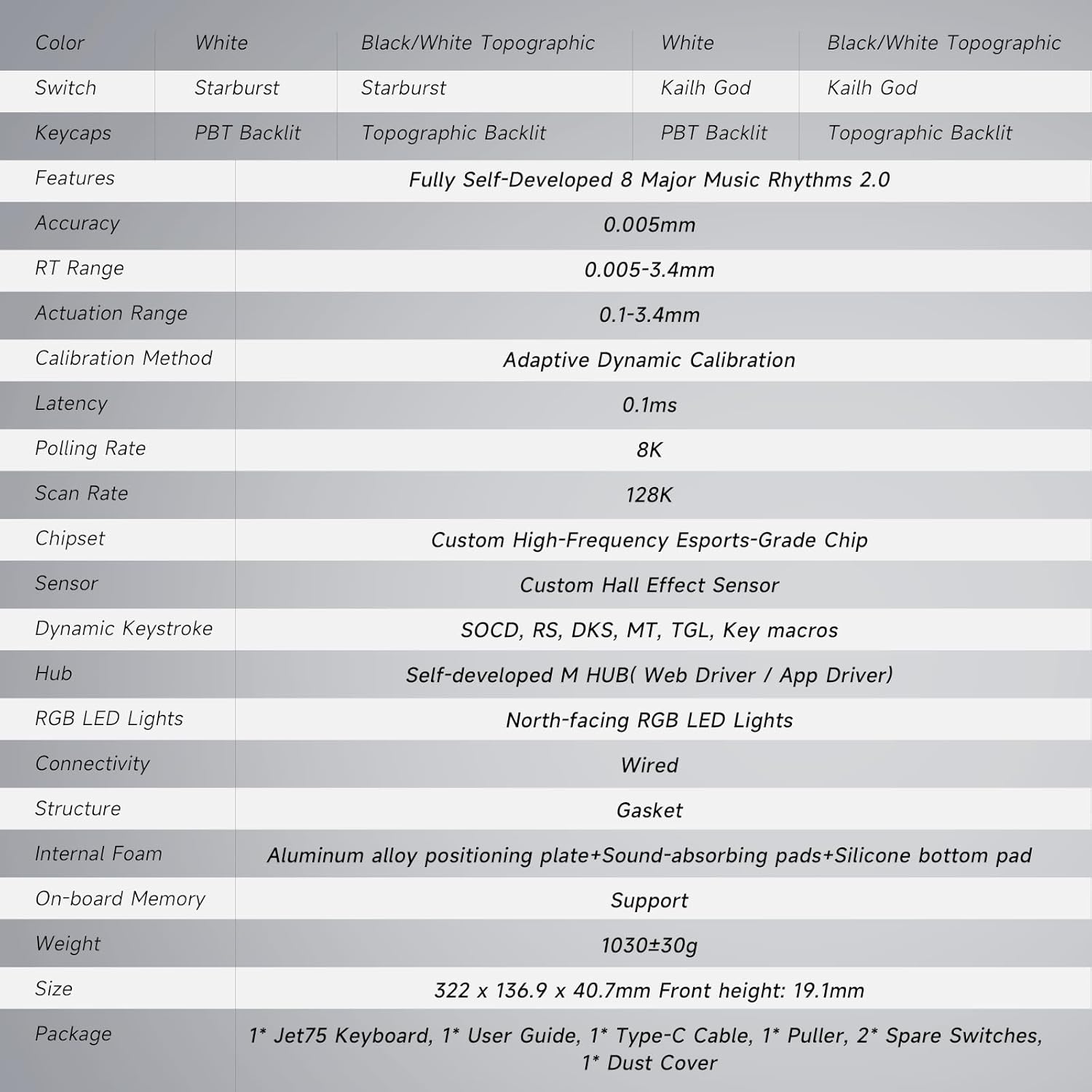
Image 8.1: Detailed specifications of the MCHOSE Jet 75 keyboard.
9. Garanzia e supporto
9.1 Garanzia del produttore
The MCHOSE Jet 75 Rapid Trigger Keyboard comes with a 1-Year Manufacturer Warranty. This warranty covers defects in materials and workmanship under normal use. Please retain your proof of purchase for warranty claims.
9.2 Assistenza clienti
For technical assistance, warranty claims, or product inquiries, please contact MCHOSE Official customer support. Refer to the official MCHOSE websito per le informazioni di contatto e le risorse di supporto più aggiornate.
Video 9.1: Un overview of the MCHOSE Jet 75 Hall Effect Gaming Keyboard, highlighting its features and design.