
1. Introduzione
This manual provides detailed instructions for the installation, setup, and operation of your RODOT Ewelink 30A High Power WiFi Smart Switch. This device is designed to integrate high-power electrical loads into your smart home system, offering remote control, timing functions, and voice control capabilities.
Caratteristiche principali:
- Supporto ad alta potenza: Equipped with a 30A relay, capable of handling up to 3000W resistive load and 800W inductive load, suitable for water heaters, pumps, and other high-power appliances (110-240V).
- Timing Automation: Supports fixed time, countdown, and cycle timing modes for automated control of connected devices.
- Collegamento intelligente delle scene: Create custom smart scenes and group devices for integrated control.
- Telecomando: Manage your devices from anywhere using the eWeLink app on iOS and Android.
- Controllo vocale: Compatibile con Amazon Alexa e Google Assistant per l'utilizzo a mani libere.
2. Informazioni importanti sulla sicurezza
WARNING: Risk of electric shock. Installation should only be performed by qualified personnel. Always disconnect power before installation or maintenance.
- Ensure the main power supply is turned off at the circuit breaker before wiring.
- Verify all wire connections are secure and correct to prevent short circuits or damage.
- Non superare il carico massimo nominale di 30A.
- This device requires a 2.4GHz Wi-Fi network. 5GHz Wi-Fi is not supported.
- Tenere il dispositivo lontano dall'acqua e da ambienti ad alta umidità.
3. Contenuto della confezione
- 1 x RODOT Ewelink 30A High Power WiFi Smart Switch Receiver
- 1 x Manuale utente
4. Prodotto finitoview
The RODOT Ewelink 30A Smart Switch is a compact device designed for high-power applications. It features clear input and output terminals, a Wi-Fi indicator, and a pairing button.

Immagine 4.1: anteriore view of the RODOT Ewelink 30A High Power WiFi Smart Switch, showing the Wi-Fi indicator, 'SMART SWITCH' label, Wi-Fi specifications, input/output terminals (L and N), and max load of 30A.
Parametri del prodotto:
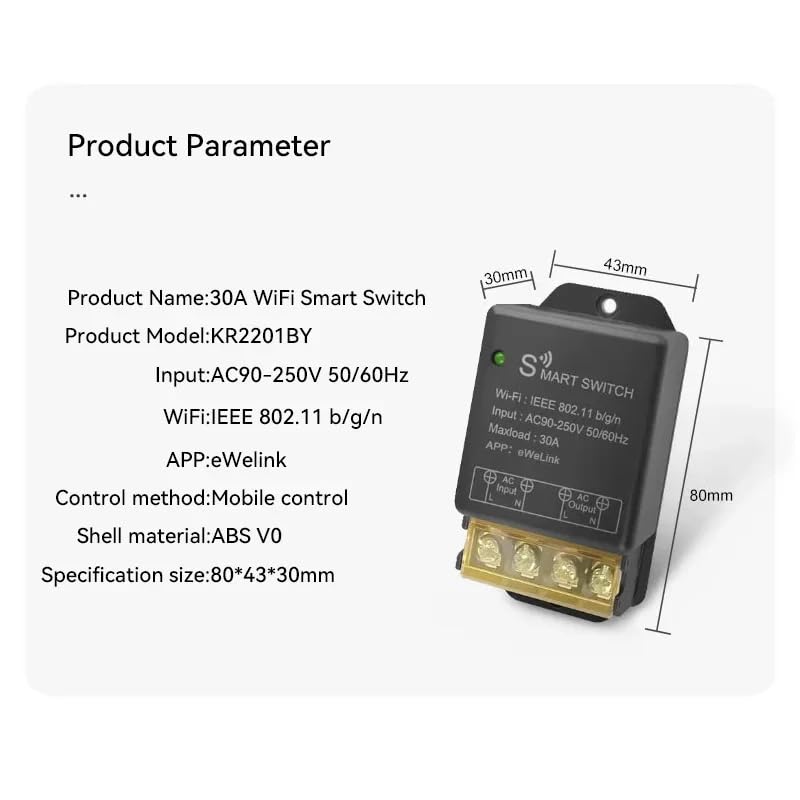
Image 4.2: Diagram illustrating the dimensions and key parameters of the smart switch.
- Nome del prodotto: Interruttore intelligente WiFi 30A
- Modello del prodotto: KR2201BY
- Ingresso: AC90-250V 50 / 60Hz
- Wifi: Standard di trasmissione dati IEEE 802.11b/g/n
- Carico massimo: 30A
- APPLICAZIONE: Collegamento eWeLink
- Metodo di controllo: Controllo mobile
- Materiale della calotta: ABS V0
- Dimensione specifica: 80*43*30mm
5. Installazione e configurazione
5.1 Prima dell'installazione
- Assicurati che il tuo telefono sia connesso a una rete Wi-Fi a 2.4 GHz.
- La versione del tuo sistema telefonico deve essere Android 5.0/iOS 10 o successiva.
- Your router needs to support the 2.4GHz band (5GHz Wi-Fi is not supported).
- Disable MAC address filtering on your router if enabled.
- Always turn off the main power supply before proceeding with wiring.
5.2 Istruzioni per il cablaggio
Carefully follow the wiring diagrams below. Incorrect wiring can cause damage to the device or connected appliances, and poses a safety risk.

Image 5.1: Basic wiring diagram showing AC input (L and N) connected to the smart switch, and AC output (L and N) connected to a light bulb. Ensure Live (L) and Neutral (N) connections are correct.
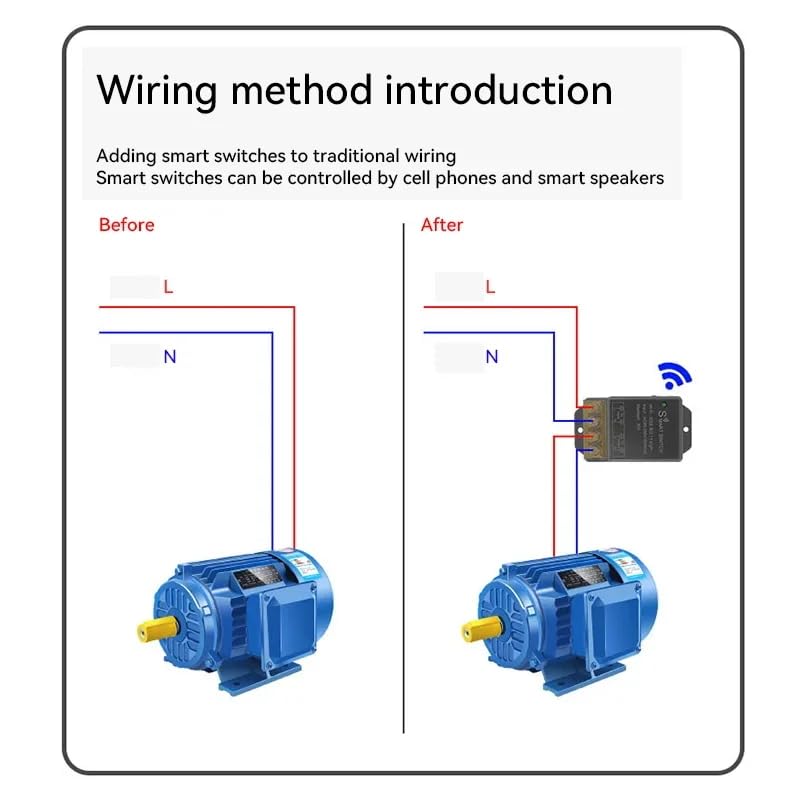
Image 5.2: Illustration of adding the smart switch to a traditional wiring setup for a motor. The smart switch is inserted between the power source and the motor, controlling the Live (L) and Neutral (N) lines.
- Identify the Live (L) and Neutral (N) wires from your AC power source.
- Connect the Live (L) wire from the power source to the 'AC Input L' terminal on the smart switch.
- Connect the Neutral (N) wire from the power source to the 'AC Input N' terminal on the smart switch.
- Connect the Live (L) wire of your appliance (e.g., light, motor) to the 'AC Output L' terminal on the smart switch.
- Connect the Neutral (N) wire of your appliance to the 'AC Output N' terminal on the smart switch.
- Ensure all screw terminals are tightened securely.
5.3 Installazione dell'app eWeLink
The eWeLink app is required for controlling your smart switch. You can download it from your device's app store.

Image 5.3: Section of the manual showing eWeLink app download options and initial pairing screen.
- Download the eWeLink app from the App Store (iOS) or Google Play Store (Android). Alternatively, scan the QR code provided in the manual or visit http://app.coolkit.cc/dl.html.
- Register an account and log in to the eWeLink app.
5.4 Associazione del dispositivo
After installing the app and wiring the device, you need to pair the smart switch with your eWeLink account.

Image 5.4: Section of the manual detailing compatible pairing mode and RM2.4G remote control pairing.
- Ensure the smart switch is powered on. The Wi-Fi LED indicator should be blinking.
- Open the eWeLink app, tap the '+' icon at the bottom of the screen, and select 'Bluetooth Pairing'.
- The app will automatically scan for nearby devices. Select your device (e.g., 'ck_10015d6292') from the discovered list and tap 'Connect'.
- Confirm the relevant Wi-Fi information, enter your 2.4GHz Wi-Fi password, and tap 'Next'.
- Wait for the device to connect. Once successfully added, you can rename the device and tap 'Complete'.
Compatible Pairing Mode (if Bluetooth Pairing fails):
- Long press the pairing button on the smart switch for 5 seconds until the Wi-Fi LED indicator changes to a cycle of two short flashes and one long flash, then release.
- In the eWeLink app, tap '+' and select 'Compatible Pairing Mode'.
- Select your 2.4GHz Wi-Fi SSID and enter the password.
- Seguire le istruzioni sullo schermo per completare il processo di associazione.
6. Operating Your Smart Switch
6.1 Controllo remoto tramite l'app eWeLink
Once paired, you can control your smart switch from anywhere using the eWeLink app.

Image 6.1: Screenshot of the eWeLink app interface showing a device (living room lamp) with an on/off toggle and options for Schedule, Timer, and Loop Timer.
- Open the eWeLink app and select your smart switch from the device list.
- Tocca l'icona di accensione per accendere o spegnere l'apparecchio collegato.
- Monitor the real-time status of your device within the app.
6.2 Funzioni di temporizzazione
The eWeLink app offers various timing options to automate your devices.

Image 6.2: Screenshots of the eWeLink app showing interfaces for Loop Timer, Schedule, and Countdown Timer settings.
- Timer di ciclo: Set a device to turn on/off repeatedly at specified intervals.
- Programma: Create fixed schedules for your device to turn on or off at specific times on chosen days.
- Conto alla rovescia: Set a countdown for the device to turn on or off after a set duration.
6.3 Controllo vocale
Integrate your smart switch with Amazon Alexa or Google Assistant for convenient voice control.

Image 6.3: Illustration of a user controlling a light with voice commands via a smart speaker, compatible with Amazon Alexa and Google Home.
- Ensure your smart switch is successfully paired with the eWeLink app.
- Apri l'app Amazon Alexa o Google Home.
- Enable the 'eWeLink Smart Home' skill/service.
- Link your eWeLink account with Alexa/Google Home.
- Discover devices. Your smart switch should appear.
- Ora puoi usare comandi vocali come:
- "Alexa, accendi [Nome dispositivo]"
- "Ehi Google, disattiva [Nome dispositivo]"
7. Manutenzione
The RODOT Ewelink Smart Switch requires minimal maintenance.
- Assicurarsi che il dispositivo sia conservato in un ambiente asciutto, lontano dalla luce solare diretta e da temperature estreme.
- Controllare periodicamente i collegamenti elettrici per accertarsi che siano sempre saldi.
- Clean the exterior of the device with a soft, dry cloth. Do not use liquid cleaners or solvents.
8. Risoluzione Dei Problemi
If you encounter issues with your smart switch, refer to the following table for common problems and solutions.
| Problema | Possibile causa | Soluzione |
|---|---|---|
| Il dispositivo non si connette al Wi-Fi. | Incorrect Wi-Fi band (5GHz), weak signal, incorrect password, MAC filtering. | Ensure your router is broadcasting a 2.4GHz Wi-Fi signal. Check Wi-Fi signal strength near the device. Verify Wi-Fi password. Disable MAC filtering on your router. Try 'Compatible Pairing Mode'. |
| Il dispositivo non risponde ai comandi dell'app. | No power, device offline, app issue. | Check if the device has power. Verify your phone has internet access. Restart the eWeLink app. Re-pair the device if necessary. |
| Il controllo vocale non funziona. | Abilità non abilitata, account non collegato, nome dispositivo errato. | Ensure 'eWeLink Smart Home' skill is enabled and linked in your Alexa/Google Home app. Try rediscovering devices. Use the exact device name configured in eWeLink. |
| Device remains partially powered off (e.g., lights flicker). | Wiring issue, residual current. | Double-check all wiring connections, especially Live and Neutral. Consult a qualified electrician if the issue persists. |
| eWeLink app trial expired / cloud cost. | Subscription required for certain advanced features. | Contact eWeLink support or check their website for information regarding app features and potential subscription requirements for cloud services. |
9. Specifiche del prodotto
| Specificazione | Valore |
|---|---|
| Numero modello articolo | KR2201BY |
| Modalità di funzionamento | Automatico |
| Valutazione attuale | 30000 milioneamps (30A) |
| Volume di eserciziotage | 90-250 Volt CA |
| Tipo di contatto | Normalmente aperto |
| Tipo di connettore | Vite |
| Marca | RODOTTO |
| terminale | Vite |
| Tipo di circuito | 1 vie |
| Tipo di attuatore | Premere il pulsante |
| Materiale di contatto | Rame |
| Dimensioni del pacco | 4.41 x 3.27 x 1.46 pollici |
| Peso | 3.21 once |
10. Garanzia e assistenza clienti
For warranty information, technical support, or any inquiries regarding your RODOT Ewelink 30A High Power WiFi Smart Switch, please contact the manufacturer or your retailer. Refer to the product packaging or purchase documentation for specific contact details.